
已儲存
選擇要顯示在你的已儲存選單中的名稱。
完成!
描述

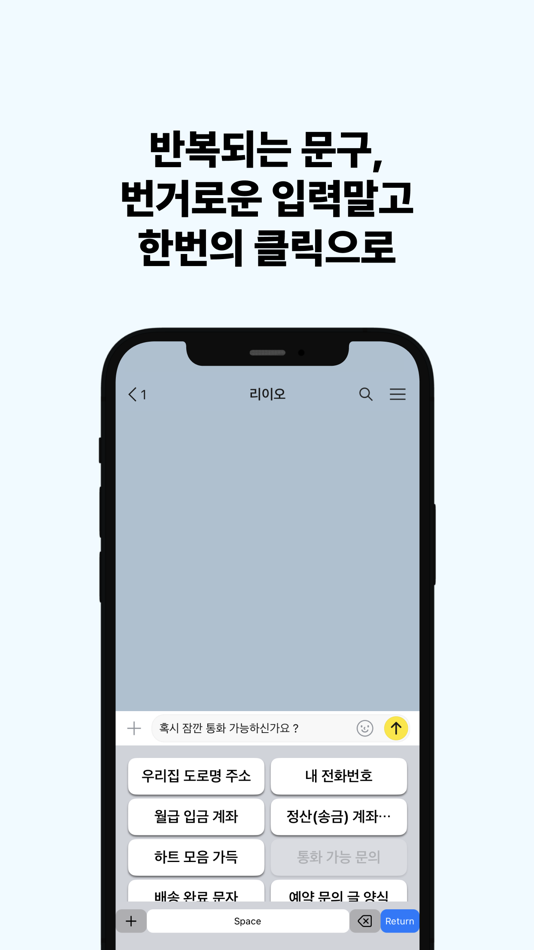
Save your frequent texts as keyboard buttons.
No abbreviations to memorize — just tap and send.
螢幕擷取畫面




Ad
價格歷史
-
* 應用內購買 - 目前價格: 免費
- 最小值: 免費
- 最大值: $3.99
追蹤票價
AppAgg 評價
10,020
AppAgg 預估評價:
Clip Keyboard - Quick Phrases
10,020 黃金
評價越高,通常代表在 AppAgg 上的信號越強。
基於: 人氣 · 使用者評分 · 新鮮度 · 優惠 · 商店資料 · 社群活躍度
根據最新 AppAgg 資料每日重新計算。
縮短網址: 已複製!
新功能
- 版本: 4.1.0
- 最後更新:
- ClipKeyboard v4.1.0
- The memo creation screen has been thoroughly reworked to reduce the "blank page" friction and guide you through a natural writing flow
- Picking a category now auto-fills both a sample value and a name for that category — e.g. picking Phone gives you 010-0000-0000 and the name "Phone" ready to edit
- When a sample is still in place, a yellow "Sample — please edit before using" notice appears, and disappears the moment you change a single character
- If you haven't added any memos yet, we now show 3 random examples from a pool of 20+ persona-tailored suggestions — nomad gets visa runs, international invoicing, and async-first replies; office workers get meeting minutes and email signatures; students get office hours and assignment submission. Fresh inspiration on every entry
- Added a "Get inspired by usage examples" button — browse real-world English business templates with a category filter and pull one into your memo
- In imported templates, dummy placeholders like [Your Name] are highlighted in bold red right inside the input field, so you instantly see what needs editing
- When you save a scenario as a memo, the corresponding toggle (Template / Combo) is now pre-enabled if the scenario calls for it — no need to decide again
- The "Content to paste" field starts compact and grows automatically as you type, with internal scrolling after ~240pt
- A "Next" button appears on the keyboard toolbar to jump from Content to Name in one tap
- Screen order rearranged: Category → Usage Examples → Content → Name → Options
- Labels are now meaningful: "Title" → "Name shown on keyboard", "Content" → "Content to paste"
- Memo card badges are visually distinct: regular TEMPLATE badge in accent color, attached-template memo gets a purple +TEMPLATE badge
- Settings → Keyboard → "Persona" lets you change the persona you picked during onboarding at any time, unified under the single "Persona" label to avoid confusion with the "Use case" entry
- The Usage Examples screen is fully translated into Korean and Indonesian — English business template bodies stay in English so you can send them to clients as-is
- Improved clipboard auto-classification priority — fixed bank account numbers being misclassified as phone numbers, with better detection accuracy for IBAN, SWIFT, VAT, credit card, and bank account
- Filled in missing translations across the board — no more Korean strings leaking into the English or Indonesian UI
其他資訊
 https://m1zz.github.io/ClipKeyboard/
開發人員
- hyunho lee
- 平台: iOS 應用程式 (22) macOS 應用程式 (2)
- 清單: 1 + 0
- 點數: 9 + 3 ¡
- 排名: 0
- 註釋: 0
- 折扣: 0
- 影片: 0
- RSS: 訂閱
清單 (1)
- Clip Keyboard - Quick Phrases


排名 (0)
0
註釋 (0)
成為第一個發表評論的人
簡要
Clip Keyboard - Quick Phrases 縮短網址: 已複製!- 分享
- App Store
«Clip Keyboard - Quick Phrases». 平台: iOS. 類別: 生產應用. 開發商: «hyunho lee». 首次發布: . 最後更新: . 目前價格: 免費. 此項目尚未在 AppAgg 上獲得評分或評論。 列表: 公開: 1, 私人: 0. 追蹤點: 已確認: 3, 間接: 2. 商店: App Store. 店家評價: 5.0. 投票數: 2. 可用語言: English, Indonesian, Korean. AppAgg 會追蹤 «Clip Keyboard - Quick Phrases»的價格歷史、評分和用戶回饋。 AppAgg 不託管應用程式或分發軟體。 所有商標、標誌和螢幕截圖均屬於其各自所有者。 關注未來折扣和更新: RSS
類似
-
- Phrases: Daily Reminders
- iOS 應用程式: 生產應用 由: Courtne J Marland
- $29.99
- 清單: 0 0 0
- 點數: 1 + 0 670 · 青銅 版本: 1.0 Phrases helps you collect your favorite quotes and keeps them front and center on your home and lock screen. The idea is simple: you need to be reminded more than you need to be ...
-
- Quick Todo - Widget Lab
- iOS 應用程式: 生產應用 由: Nardi Haxhija
- * 免費
- 清單: 0 0 0
- 點數: 1 + 0 780 · 白銀 版本: 1.0.1 Quick Todo keeps your next tasks visible, tidy, and easy to clear. Capture a task in seconds, plan it by day, add device reminders, and review what you completed today. Tap a task to ...
-
- Quick.Notes
- iOS 應用程式: 生產應用 由: Cristian Radu
- $1.99
- 清單: 0 0 0
- 點數: 0 + 0 580 · 青銅 版本: 1.0 Quick.Notes is a retro-style, minimalist note-taking app that keeps things fast, focused, and entirely local. No cloud, no clutter just your thoughts, stored securely on your ...
- 全新
- Quick Docs Keyboard
- iOS 應用程式: 生產應用 由: Raghav Jhawar
- * 免費
- 清單: 0 0 0
- 點數: 0 + 0 1K · 白銀 版本: 1.0.3 Access your most important documents in two taps directly from your keyboard. Quick Docs Keyboard transforms your frequently sent files into a fluid, horizontal library available ...
-
- Quick Message - Click To Chat
- iOS 應用程式: 生產應用 由: Shahar Barsheshet
- 免費
- 清單: 0 0 0
- 點數: 3 + 3,311 34K · 傳奇 版本: 2.5.4 Send Quick Messages to anyone using WhatsApp or SMS Without Adding Contacts! - Use our Quick Message templates across various categories to send messages faster. - More templates are ...
-
- Quick Notes (easy voice notes)
- iOS 應用程式: 生產應用 由: Matt Birchler
- 免費
- 清單: 0 0 0
- 點數: 0 + 22 10K · 黃金 版本: 2.0.3 Capture your thoughts with your voice. Tap to record, get instant transcriptions, then save or share. Perfect for quick ideas, voice memos, or anything you'd rather say than type. ...
-
- Quick Note for Notion
- iOS 應用程式: 生產應用 由: Michael Gubik
- 免費
- 清單: 1 + 1 0 0
- 點數: 2 + 9 5K · 黃金 版本: 1.2.10 Quickly jot down notes into your Notion without delay or distraction. Taking a quick note should be super fast. Now it is. Quick Note launches instantaneously is always ready for you ...
-
- Keyboard AI
- iOS 應用程式: 生產應用 由: Irina Scelcunova
- 免費
- 清單: 0 0 0
- 點數: 0 + 345 23K · 白金 版本: 2.3 Introducing Keyboard AI - Your Ultimate Texting Companion! Transform your texting experience with Keyboard AI, the ultimate AI writing assistant that has your back whenever you need to
-
- Quick Scan And Share
- iOS 應用程式: 生產應用 由: Aleksander Lurie
- 免費
- 清單: 0 0 0
- 點數: 7 + 2 8K · 黃金 版本: 1.2.3 Quick Scan and Share makes organizing paperwork fast and effortless, and 1.2.3 supercharges the editor. Capture invoices, receipts, and notes - or import existing documents and photos ...
-
- Clip Flow: Snippet Manager
- iOS 應用程式: 生產應用 由: Ivan Petrov
- * 免費
- 清單: 0 0 0
- 點數: 2 + 3 8K · 黃金 版本: 2.7 Clip Flow is a snippet-first clipboard manager for iPhone. Save text, links, images, screenshots, and files, then find them fast and paste them anywhere with the Clip Flow keyboard. ...
-
- Quick Replies Pro
- iOS 應用程式: 生產應用 由: Muradiye Kayaduman
- $2.99
- 清單: 0 0 0
- 點數: 0 + 0 590 · 青銅 版本: 1.0 Quick Replies Pro helps you send better messages faster. Choose from ready-to-use templates for sales, customer support, appointments, payments, delivery updates, follow-ups, and more.
-
- Quick keyboard - Auto Reply
- iOS 應用程式: 生產應用 由: ErxiangHeyi Information
- $1.99
- 清單: 0 0 0
- 點數: 1 + 0 600 · 青銅 版本: 2.2.0 Quick keyboard, an intelligent artifact that allows you to send one-click in many communication occasions, eliminating the need for brains and repeated input Function: 1: Support ...
-
- Quick AI: Speak & Translate
- iOS 應用程式: 生產應用 由: Krishna Bhayani
- 免費
- 清單: 0 0 0
- 點數: 1 + 1 6K · 黃金 版本: 2.1 Quick AI: Speak & Translate is to facilitate easy, effortless, and natural communication in any language. With the app, you can quickly understand and be understood whether you're ...