
| Nhà phát triển: | Wise Tech Labs Private Limited (30) | ||
| Giá bán: | $9.99 | ||
| Xếp hạng: | 0 | ||
| Đánh giá: | 0 Viết đánh giá | ||
| Danh sách: | 1 + 1 | ||
| Điểm: | 14 + 0 ¡ | ||
| Mac App Store | |||
Mô tả

Get powerful screen capture and recording with RICH Shot. Swiftly capture Mac’s screen without desktop icons, annotate captured screenshot, record and trim videos,save screenshots, record GIFs, record calls and more!
Below are the features of RICH Shot:
CAPTURE SCREENSHOT
Capture full screen, area or window and create pixel perfect screenshots using hotkeys or RICH Shot menu options.
>> Capture Full Screen
>> Capture an Area of Screen
>> Capture a specific Window
>> Capture after a specified delay
>> Automatically Hide Desktop icons while capturing
SCREEN RECORDING
Recording a video on Mac with RICH Shot is really straightforward. Simply open screen recorder and hit the red record button. You can make a video recording of the entire screen or just a selected portion of it.
>>Record Screen with Audio
> Record Full Screen
> Record a Selected Region
> Record specific Window area
RECORD CAMERA
Record your webcam video with RICH Shot by using the built-in camera in your Mac or connecting an external one. It’s lightning fast, completely private and saved on your local disk for usage.
RECORD AUDIO
Make Sound recordings with high quality using your Mac's microphone or any other attached device. Save your audio recording as playable audio files.
RECORD GIFs
Make your screen casts in the animated GIF format, the file format supported on all devices. Using the GIF screen recorder you can record actions on your Mac's desktop.
>> Full Screen GIF recording
>> Record selected area on screen as GIF
ANNOTATE SCREENSHOTS
Mark up your screenshots, add helpful information to your screenshots that help guide your audience, using our built in annotation tool.
EDIT VIDEO RECORDING
The inbuilt video editor allows you to easily trim the video recording you have created with RICH Shot. Use the Yellow handles to adjust the video size and save the trimmed video.
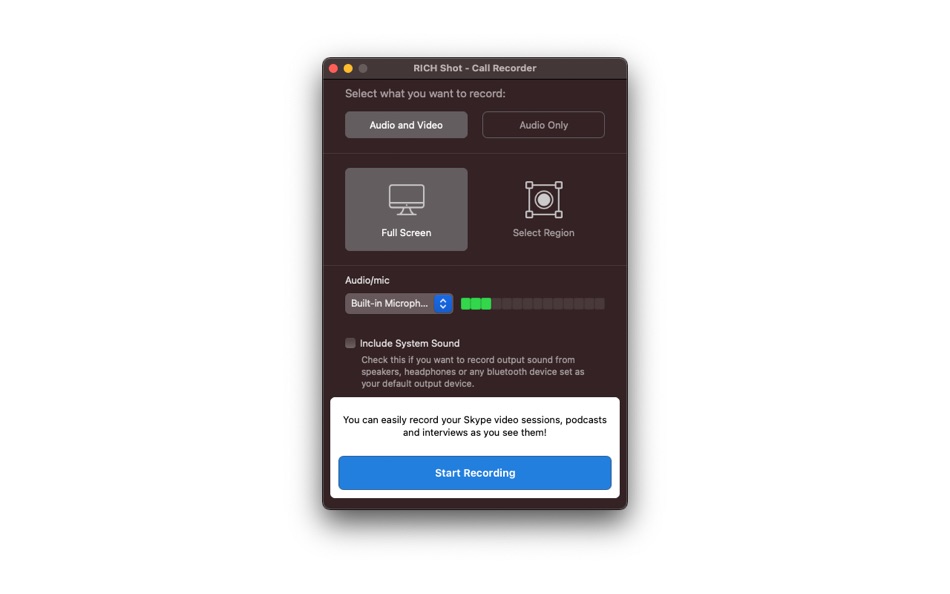
CALL RECORDER
Whether you want to record a Skype call to ensure you don’t forget anything or you want to release a conversation as a podcast or learning materials, the built in Call Recorder would easily do the job for you.
>>Record Audio and Video
> Record Full Screen
> Record Selected Region
>> Record Audio Only
>> Record Output Sound
QUICK ACCESS OVERLAY
Rich shot's Quick Access overlay makes access to the taken screenshots a breeze. It appears on lower corner of your Mac's screen and allows you to copy, drag & drop screenshot to other apps for easy sharing.
>> Copy file to clipboard
>> Share screenshot with anyone
>> Copy file path to clipboard
>> Drag & drop image to any other app
>> Delete Screenshot
Enjoy powerful and clean screen capture and recording with RICH Shot.
RICH Shot is a lightweight that it sits on your top Menu bar and give you all the options from the menu. It also allows you to record custom shortcuts for each action so that you can quickly perform the desired task of taking shots or creating a recording.
It supports the beautiful Dark Mode.
You may visit our blog at http://blogs.wisetechlabs.com to remain updated about latest technology updates and learn daily how to articles for various tasks.
You may always ask for new features or the features you need in any of our apps and we will try to accommodate as soon as possible! Cheers!
Ảnh chụp màn hình


Tính năng mới
- Phiên bản: 2.0
- Cập nhật:
- - Updated for macOS Tahoe
- Fixes for Annotation functionality
- Enhancements of tooltips
- GIF recording improvised
- Video editing after recording improvised for less memory consumption
Giá bán
- Hôm nay: $9.99
- Tối thiểu: Miễn phí
- Tối đa: $9.99
Theo dõi giá
Nhà phát triển
- Wise Tech Labs Private Limited
- Nền tảng: iOS Ứng dụng (1) macOS Ứng dụng (29)
- Danh sách: 6 + 5
- Điểm: 201 + 24 ¡
- Xếp hạng: 0
- Đánh giá: 0
- Giảm giá: 0
- Video: 1
- RSS: Đăng ký
Điểm


Xếp hạng
0 ☹️
Danh sách
Đánh giá
Hãy là người đầu tiên đánh giá 🌟
Thông tin bổ sung
- Phiên bản: 2.0
- Danh mục:
macOS Ứng dụng›Năng suất - HĐH:
macOS,macOS 10.13 trở lên - Kích thước:
7 Mb - Ngôn ngữ được hỗ trợ:
English - Xếp hạng nội dung:
4+ - Mac App Store Xêp hạng:
0 - Cập nhật:
- Ngày phát hành:
Danh bạ
- Trang web:
 http://wisetechlabs.com
RICH Shot URL ngắn: Đã sao chép!- 🌟 Chia sẻ
- Mac App Store
Bạn cũng có thể thích
-
- Shot Assistant SE
- macOS Ứng dụng: Năng suất Bởi: Sunset Magicwerks, LLC
- Miễn phí
- Danh sách: 0 + 0 Xếp hạng: 0 Đánh giá: 0
- Điểm: 4 + 0 Phiên bản: 1.0.1 Shot Assistant provides functionality needed by Media and Entertainment professionals that is not provided elsewhere. -Create and remove multiple Projects as desired. -Import ALEs into ⥯
-
- Mindful Mynah
- macOS Ứng dụng: Năng suất Bởi: Rich Henderson
- $1.99
- Danh sách: 2 + 0 Xếp hạng: 0 Đánh giá: 0
- Điểm: 0 + 0 Phiên bản: 3.8 Mindfulness at the Sound of a Bell A mindfulness bell is a simple yet powerful tool used to bring your attention back to the present moment. Traditionally, it emits a gentle sound at ... ⥯
-
- Goodnotes: AI Notes, Docs, PDF
- macOS Ứng dụng: Năng suất Bởi: Goodnotes Limited
- Miễn phí
- Danh sách: 42 + 32 Xếp hạng: 0 Đánh giá: 0
- Điểm: 33 + 391,880 (4.7) Phiên bản: 7.0.30 Goodnotes has always been the place to capture your ideas from quick notes to big plans. Now, it goes further. With powerful AI and new ways to capture information, Goodnotes helps you ⥯
-
- PDF Max Pro
- macOS Ứng dụng: Năng suất Bởi: Mobeera
- $4.99
- Danh sách: 6 + 5 Xếp hạng: 3 (1) Đánh giá: 0
- Điểm: 37 + 1,448 (4.5) Phiên bản: 8.1.0 PDF Max is a desktop class PDF app for reading, annotating or signing PDF documents on your iPhone/iPad. Mark up documents with highlights and handwriting, insert texts and stamps, ... ⥯
-
- Scrivener 3
- macOS Ứng dụng: Năng suất Bởi: Literature & Latte
- $59.99
- Danh sách: 3 + 11 Xếp hạng: 0 Đánh giá: 0
- Điểm: 2 + 0 Phiên bản: 3.5.2 Typewriter. Corkboard. Scrapbook. Scrivener combines all the writing tools you need to craft your first draft, from nascent notion to final full stop. The biggest software advance for ... ⥯
-
- Airmail - Lightning Fast Email
- macOS Ứng dụng: Năng suất Bởi: Bloop S.R.L.
- * Miễn phí
- Danh sách: 4 + 5 Xếp hạng: 0 Đánh giá: 0
- Điểm: 5 + 0 Phiên bản: 26.0.1 Apple Design Award 2017 Winner Airmail is a mail client designed with performance and intuitive interaction in mind optimized for macOS and iOS! Support for iCloud™, MS Exchange, ... ⥯
-
- Microsoft Word
- macOS Ứng dụng: Năng suất Bởi: Microsoft Corporation
- * Miễn phí
- Danh sách: 4 + 2 Xếp hạng: 0 Đánh giá: 0
- Điểm: 8 + 0 Phiên bản: 16.105.1 This application requires a qualifying Microsoft 365 subscription. Microsoft 365 includes premium Word, Excel, and PowerPoint apps, 1 TB cloud storage in OneDrive, advanced security, ... ⥯
-
- iCliper - Clipboard Manager
- macOS Ứng dụng: Năng suất Bởi: Oran Levi
- * Miễn phí
- Danh sách: 0 + 1 Xếp hạng: 0 Đánh giá: 0
- Điểm: 17 + 32 (3.8) Phiên bản: 3.5 iCliper - Powerful Clipboard Manager to Save, Organize, and Access Everything You Copy iCliper is your all-in-one clipboard manager designed to elevate your clipboard experience. It ... ⥯
-
- MindAtom
- macOS Ứng dụng: Năng suất Bởi: Tingting Zhang
- Miễn phí
- Danh sách: 2 + 1 Xếp hạng: 0 Đánh giá: 0
- Điểm: 12 + 0 Phiên bản: 1.15.7 As a mind-mapping tool, MindAtom helps you capture your ideas in a fluent experience. With MindAtom, your ideas can be visualized as nodes linking to each other, being extended to ... ⥯
-
- Bridges Link Formatting
- macOS Ứng dụng: Năng suất Bởi: Jonathan Ruiz
- Miễn phí
- Danh sách: 1 + 1 Xếp hạng: 0 Đánh giá: 0
- Điểm: 14 + 0 Phiên bản: 2.1 Bridges is the best way to collect custom formatted links. Saving a link for your podcast, newsletter, or blog post has never been easier. If you ve ever had the task to collect links ... ⥯
-
- Prodrafts - Infinite Notes
- macOS Ứng dụng: Năng suất Bởi: EMMO Corp.
- * Miễn phí
- Danh sách: 1 + 0 Xếp hạng: 0 Đánh giá: 0
- Điểm: 7 + 3,540 (4.8) Phiên bản: 4.3.9 Prodrafts is a globally popular infinite note-taking app that supports almost all file formats and attachments. It is the perfect tool for achieving paperless learning on your iPad. ... ⥯
-
- Awesome Copy Clipboard History
- macOS Ứng dụng: Năng suất Bởi: Evan Jones
- * Miễn phí
- Danh sách: 0 + 1 Xếp hạng: 0 Đánh giá: 0
- Điểm: 14 + 0 Phiên bản: 5.10 AwesomeCopy is a full-featured clipboard history manager built for Apple users who value speed, design, and privacy. It keeps track of everything you copy - text, images, links, files, ⥯
-
- WinkNotes - Easy Flashcards
- macOS Ứng dụng: Năng suất Bởi: Detailsoft Co., Ltd.
- Miễn phí
- Danh sách: 1 + 1 Xếp hạng: 0 Đánh giá: 0
- Điểm: 7 + 123 (4.8) Phiên bản: 2.17.4 WinkNotes are an ideal combination of note taking, knowledge organization, and memory learning. Taking detailed notes, but can't always find the key points? You take serious notes, but ⥯
-
- Plain Text Editor
- macOS Ứng dụng: Năng suất Bởi: Sindre Sorhus
- $5.00
- Danh sách: 0 + 2 Xếp hạng: 0 Đánh giá: 0
- Điểm: 10 + 7 (4.3) Phiên bản: 1.8.3 Simple distraction-free text editor without any rich text nonsense. The simplicity is a feature. Highlights - No formatting. Just text. - Edit any plain text file like .txt, .csv, .md, ⥯