
已儲存
選擇要顯示在你的已儲存選單中的名稱。
完成!
描述

** YouTube Video: http://www.youtube.com/watch?v=A69c4HHok3U
** IMPORTANT ** Please turn off Bluetooth on the device (Settings->General->Bluetooth) before using PocketCam. Otherwise, you may experience frame drops/freeze.
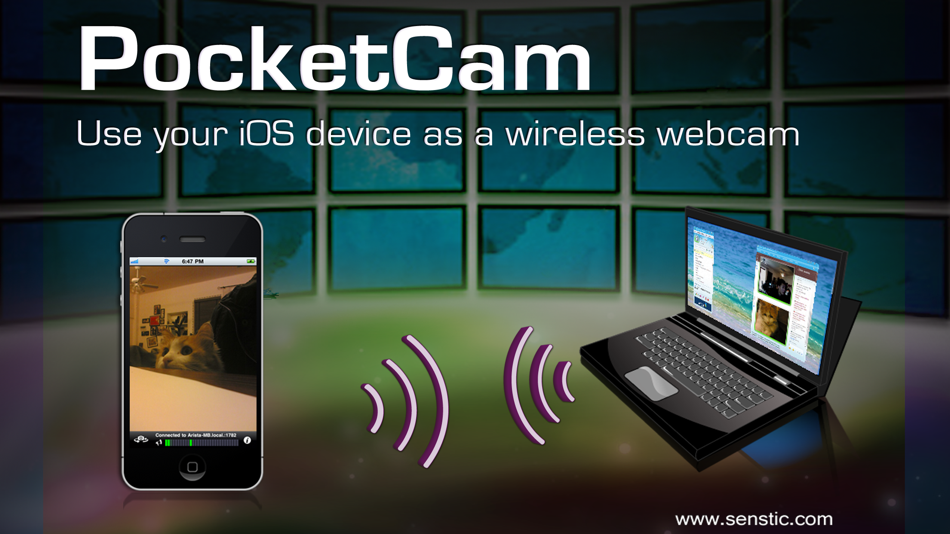
Why paying for an expensive webcam when you can use your awesome iOS device for video conference? Better yet, your iOS webcam is wireless! Now you can use your iOS device to show around your house/apartment on your favorite webcam applications such as FaceTime, iChat/Messages, Windows Live or Skype.
PocketCam lets you use your iPhone/iPod Touch/iPad as a wireless webcam for your Windows-based computer or Mac (OS X 10.7 or above). PocketCam automatically forwards video captured by your iOS camera, which can then be used as if they come from a virtual webcam.
PocketCam works with any Windows-based webcam or video conferencing applications, including instant message applications such as MSN Live Messenger, Skype, AIM, etc. For Mac users, PocketCam works with any Mac applications such as FaceTime, iChat/Messages, GTalk, Skype and aMSN.
You can even record the live video from your iOS cam using a webcam recorder such as QuickTime Pro.
INSTRUCTIONS:
1. If you have not already done so, download and install the PocketControl for Windows or Mac software from our website: http://www.senstic.com/iPhone/PocketCam/PocketCam.aspx
2. On Windows, run PocketControl for Windows and make sure the PocketCam service is running on your computer. On Mac, run PocketControl, and run any application that uses webcam and select PocketCam as your preferred webcam.
3. Start PocketCam on iOS device, and the app will automatically connect to your computer. The bottom of your iOS screen should display "Connected to your_computer_name:port."
4. Start any program on your computer that uses webcam, and select "PocketCam" as your virtual webcam.
Enjoy live feed from your iOS camera as your webcam source!
Step-by-step instructions can be found at http://www.senstic.com/iphone/pocketcam/Support.aspx
LIMITATIONS:
1. Currently, PocketCam supports Windows XP/Vista/7/8, Mac OS X 10.7 (Lion) or above.
2. There is a half second delay before the images are shown up on the computer.
3. PocketCam Lite (free version) is limited to monochrome feed. Audio is not supported.
螢幕擷取畫面



視頻
Ad
價格歷史
- 目前價格: 免費
- 最小值: 免費
- 最大值: 免費
追蹤票價
AppAgg 評價
3,940
AppAgg 預估評價:
PocketCam Lite
3,940 白銀
評價越高,通常代表在 AppAgg 上的信號越強。
基於: 人氣 · 使用者評分 · 新鮮度 · 優惠 · 商店資料 · 社群活躍度
根據最新 AppAgg 資料每日重新計算。
縮短網址: 已複製!
新功能
- 版本: 3.0
- 最後更新:
- This app has been updated by Apple to display the Apple Watch app icon.
Support newer devices.
其他資訊
- 發行日期:
- 類別 :
iOS 應用程式›攝影 - OS:
Apple Watch,iPad,iPhone,iOS 9.1 以上版本 - 大小:
2 Mb - 支援的語言 :
English - 內容分級:
4+ - App Store 評分:
2.6(5)
 http://www.senstic.com/iphone/PocketCam/PocketCam.aspx
開發人員
- Senstic
- 平台: iOS 應用程式 (8) macOS 應用程式 (5) Windows 應用程式 (3)
- 清單: 1 + 1
- 點數: 1 + 125 ¡
- 排名: 0
- 註釋: 0
- 折扣: 0
- 影片: 1
- RSS: 訂閱
清單 (1)
- PocketCam Lite

點數 (0)
0
排名 (0)
0
註釋 (0)
成為第一個發表評論的人
簡要
PocketCam Lite 縮短網址: 已複製!- 分享
- App Store
«PocketCam Lite». 平台: iOS. 類別: 攝影. 開發商: «Senstic». 首次發布: . 最後更新: . 目前價格: 免費. 此項目尚未在 AppAgg 上獲得評分或評論。 列表: 公開: 1, 私人: 0. 商店: App Store. 店家評價: 2.6. 投票數: 5. 可用語言: English. AppAgg 會追蹤 «PocketCam Lite»的價格歷史、評分和用戶回饋。 AppAgg 不託管應用程式或分發軟體。 所有商標、標誌和螢幕截圖均屬於其各自所有者。 關注未來折扣和更新: RSS
類似
-
- CAM VIEW
- iOS 應用程式: 攝影 由: AKIYO HAYASHI
- 免費
- 清單: 0 0 0
- 點數: 2 + 0 1K · 白銀 版本: 4.6.3 CAM VIEW - Smart Surveillance, Peace of Mind CAM VIEW delivers HD live streaming, motion detection alerts, and more, allowing you to check your camera feeds on the go. With ...
-
- Cam Viewer
- iOS 應用程式: 攝影 由: NEXTBASE UK
- 免費
- 清單: 0 0 0
- 點數: 0 + 14 3K · 白銀 版本: 2023.3 Cam Viewer is designed to work with WiFi enabled Nextbase Dash Cams. Currently compatible with Nextbase NBDVR312GW, NBDVR380GW, NBDVR412GW, NBDVR512GW, NBDVR612GW, MIRROR and DUO-HD. ...
-
- CAM-IT
- iOS 應用程式: 攝影 由: Information Concepts, LLC
- $1.99
- 清單: 0 0 0
- 點數: 0 + 2 590 · 青銅 版本: 2.0 CAM-IT allows you to capture special events without creating huge files in your Photos directory. Stream your video through a window and save only what is within the window. Use as a ...
-
- Cam AI - Photography Coach
- iOS 應用程式: 攝影 由: Tomas Mistrik
- 免費
- 清單: 0 0 0
- 點數: 3 + 5 6K · 黃金 版本: 1.0.6 Turn every shot into your best shot with Cam AI. Now with AI Pose Ideas, you can instantly generate a personalised, professional pose based on your own photo. Upload an image and Cam ...
-
- Cam-ful
- iOS 應用程式: 攝影 由: Elliot Williams
- 免費
- 清單: 0 0 0
- 點數: 0 + 1 4K · 白銀 版本: 1.0 All Controls just a swipe away from the bottom of your screen Take full control of your mobile photography with Cam-ful. Designed for enthusiasts and creators who need more than just ...
-
- Cam Filter FX
- iOS 應用程式: 攝影 由: marcio bastos filho
- * 免費
- 清單: 0 0 0
- 點數: 0 + 0 820 · 白銀 版本: 1.0.6 Imagine turning every photo and video from your iPhone into a cinematic scene in just seconds. With Cam Filter FX, you don t need to be a photographer or professional editor: with one ...
-
- Cam-Shot
- iOS 應用程式: 攝影 由: Cambiante Technologies
- 免費
- 清單: 0 0 0
- 點數: 0 + 0 910 · 白銀 版本: 1.0.21 cam-shot is your go-to app for managing, storing, and sharing event photos with ease. Whether you're organizing a personal celebration, a professional event, or any special occasion, ...
-
- Cam Light Painting
- iOS 應用程式: 攝影 由: 庆宇 孟
- 免費
- 清單: 0 0 0
- 點數: 0 + 0 600 · 青銅 版本: 2.2 Cam Light Painting is an application that allows you to freely change camera parameters, enabling you to adjust various options to obtain photos in Raw, TIFF formats, as well as light ...
-
- Cam Interval
- iOS 應用程式: 攝影 由: Jeff Bocala
- 免費
- 清單: 0 0 0
- 點數: 0 + 1 570 · 青銅 版本: 1.6 Cam Interval makes photography hands-free and hassle-free. Perfect for taking photos of yourself, time-lapse photography, or simply ensuring you never miss a moment.
- 全新
- Pocket Polaroid
- iOS 應用程式: 攝影 由: Sebastian Corcino
- 免費
- 清單: 0 0 0
- 點數: 0 + 0 600 · 青銅 版本: 1.0 Pocket Polaroid is a small, slow journal for the pictures you actually want to keep one frame, one moment, no infinite feed. Take one picture when you mean it. Caption it, date it, ...
-
- Dazz Cam
- iOS 應用程式: 攝影 由: Dazz Cam
- * 免費
- 清單: 0 0 0
- 點數: 3 + 93 18K · 白金 版本: 2.1.1 Dazz Cam is your go-to solution for the most realistic retro photography on smartphones. It s inspired by the vintage film cameras from the 80s. Whether you are into old-school ...
- 全新
- Pocket 4 Cam
- iOS 應用程式: 攝影 由: 洋 景
- 免費
- 清單: 0 0 0
- 點數: 0 + 1 590 · 青銅 版本: 1.9 The phone camera that shoots straight out in Pocket 4 colors is here complete with beautiful built-in watermarks. No editing needed: just tap and shoot! Swipe casually to switch ...
-
- Cam Reader - Teleprompter
- iOS 應用程式: 攝影 由: Francois Devatine
- 免費
- 清單: 0 0 0
- 點數: 2 + 0 690 · 青銅 版本: 1.27 Speak Confidently. Look Natural. 100% Free. Stop worrying about your lines and start connecting with your audience. Are you tired of recording the same video 50 times because you keep ...