
書籤
為此書籤設定標題。
書籤已儲存
螢幕擷取畫面 10


廣告
摘要
PythonIDE Python 3 Code Editor(iOS):免費,含內購。AppAgg 評分:20,100(白金)。AppAgg 清單收藏:1 次。 開發者:文禄 张。分類:開發者工具。 應用程式點數:5。 AppAgg 使用者尚未對此應用程式評分。 點數顯示有多少已登入的 AppAgg 使用者前往了商店。 此應用程式首次發布於。 此應用程式最近更新於。 此應用程式目前在App Store的評分為4.8,投票數為44。 此應用程式支援以下語言:中文, 俄文, 德文, 日文, 法文, 英文, 葡萄牙文, 西班牙文, 韓文。 查看價格紀錄、將應用程式加入清單,或追蹤開發者。 透過RSS 訂閱來源追蹤此應用程式日後的優惠和更新。 AppAgg 不代管或散布此應用程式。 與此應用程式相關的所有商標、標誌和螢幕截圖均屬於其各自的所有者。
首頁專屬動態
為「最新與更新」選擇平台,首頁就只會顯示你需要的 App 和遊戲。
描述

PythonIDE brings local Python, notebooks, web projects, native MiniApps and remote development into one workspace. Learn a language, explore data, build a useful tool or work on an existing project wherever you are.
PYTHON, FROM EDITING TO DEBUGGING
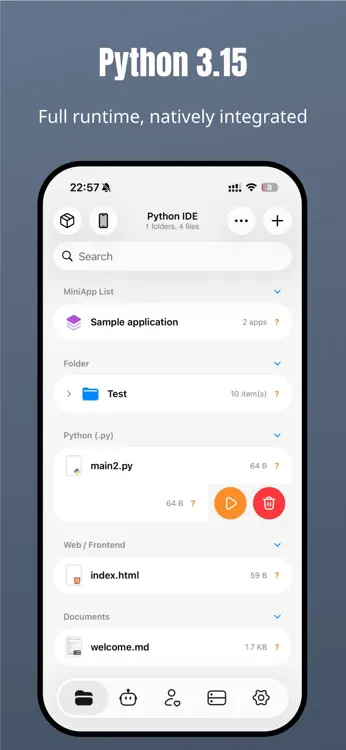
• Run Python 3.15.2 locally without a remote server.
• Work with syntax highlighting, completion, multiple files and project folders.
• Use interactive input, script arguments, ANSI/Rich terminal output, images and charts.
• Investigate problems with breakpoints, stepping, call stacks and a variable viewer.
NOTEBOOKS THAT KEEP YOUR THINKING WITH YOUR CODE
Open and edit .ipynb files, run Python cells, and combine Markdown notes with results. View rich output including HTML, images and plots.
HTML / CSS / JAVASCRIPT
Build multi-file web projects with live page and style previews. HTML/CSS includes offline completion, formatting and relative resource path suggestions. Load local images and scripts, then use the built-in console to inspect console messages, resource loading, Promise and fetch errors.
50 BUNDLED NATIVE EXTENSION PACKAGES
Start with 50 third-party distributions containing C/C++/Rust native extensions for scientific computing, data analysis, imaging, machine learning, media and cryptography.
Libraries include NumPy, pandas, Matplotlib, SciPy, scikit-learn, OpenCV, Pillow, pygame, h5py, PyAV, MLX, tokenizers, safetensors, SentencePiece, cryptography and lxml. Install compatible pure Python packages through the package manager.
EXPLORE ON-DEVICE COMPUTING WITH MLX
Use MLX for arrays, automatic differentiation and training. With compatible higher-level packages and model weights obtained separately, explore local model inference from Python scripts. MLX.md in the examples folder includes array, training, tokenization and model-file examples. MLX requires iOS 17 or later; model weights are not preinstalled.
BUILD NATIVE MINIAPPS WITH PYTHON
Use AppUI to combine native lists, forms, charts and navigation with Python logic. Organize projects with file tools, import/export and native capability interfaces, subject to system permissions.
AN AI AGENT THAT WORKS WITH YOUR PROJECT
Get help writing and editing files, running code, analyzing errors and working through multi-step tasks with project context. Extend workflows with Skills and MCP. Tool access follows the app's permission and confirmation settings.
SSH / SFTP / GIT AND YOUR FILES
Connect to SSH with passwords or keys and host fingerprint verification. Browse, edit and transfer SFTP files. Work with Git status, diffs, staging, commits, branches, remote synchronization and conflicts. Access WebDAV, Files and iCloud Drive.
WIDGETS, AUTOMATION AND DEVELOPER TOOLS
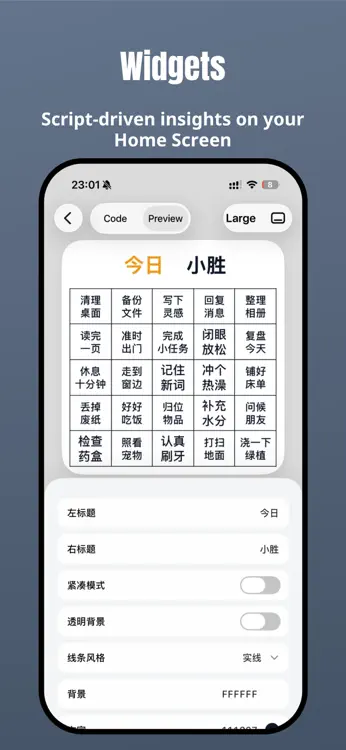
Create Python widgets and connect scripts to Shortcuts and automation. Discover and share community scripts, publish web projects, and use JSON, regex, encoding, HTTP, QR and download tools, plus SQLite/CSV previews.
Some features require Pro. AI, community, remote connections and online publishing need internet access. AI services may require separate credits or your own API key. Packages, models and system capabilities depend on compatibility, device support and permissions.
Terms of Use:
https://www.apple.com/legal/internet-services/itunes/dev/stdeula/
Privacy Policy:
https://pythonide.xin/privacy/
來自開發者
你是開發者嗎?
你的動態顯示在頁面頂部,並透過電子郵件寄給追蹤者
其他平台 0
| PythonIDE Python 3 Code EditorApp Store20K 白金iPhoneiPad應用程式內購買 $0.99 – $24.99 | 免費 |
目前僅在此商店提供。
價格紀錄 0
- 目前價格: 免費
- 最小值: 免費
- 最大值: 免費
清單 0
-
 PythonIDE Python 3 Code Editor
點數 5
-

- +1 點
-
- 831 Charles Star
- +1
-
- 242 Lance Eliakim Sotto
- +1
-
- 6 Hany Alem
- +1
-
- 1,321 Aglinea
- +1
-
- 248 SALAH TV
- +1





排名 0
-
- 您的評分
留言 0 ¡
搶先留下第一則留言
新功能
- 版本: 1.8.1
- 最後更新:
- • Reduced the app’s installation size to save storage space.
• Fixed a crash when a window closes and made both tapping Done and swiping down mark What’s New as read.
版本紀錄15
- • Redesigned the default app icon and refreshed the alternate icons in Settings.
• Upgraded the built-in Python runtime to 3.15.2, updated libraries including NumPy, and added storage details for installed packages.
• Publish HTML projects from the editor, share them with short links, and check your sites and traffic usage in My Websites.
• Free accounts can publish one site, while Pro includes up to five sites and 2 GiB of shared monthly traffic.
• Add 5 GiB of shared traffic and 100,000 resource requests to your account with a traffic pack in My Websites.
• Move the exit button in full-screen HTML previews, play web games with improved audio, and submit HTML creations up to 2 MiB to the Community.
• The Community has a simpler Apple sign-in flow and a single screen for setting up your profile.
• Fixed preview and download issues, and made the Terminal open directly when you run Python from Shortcuts on iOS 26 or later. - • Editor and console improvements: Faster editor entry, clear hints, guides, tabs, completion, brackets and libraries, lighter consoles and reading recovery, background options and protection, Live Activities and keep-awake fixes.
• Updated Python libraries: Updated selected bundled libraries and coroutine support, clarified model download progress and errors in the bundled MLX example, and preserved installed packages, scripts and settings.
• Refreshed Pro page: A unified Pro page with a flowing background, native close, adaptive light/dark layouts and membership status, with cards for available offers after returning and inline offer countdowns in Settings.
• Smoother startup: Removed the brand launch screen and setting, improved in-app Shortcuts and external-folder opening/deletion, and fixed external-folder ZIP creation/extraction and crashes when leaving previews. - Version 1.7.8 brings more on-device computing to your everyday workflow.
• Added MLX, tokenizers, safetensors and SentencePiece for arrays, automatic differentiation, training and compatible local model workflows. MLX requires iOS 17 or later; obtain model weights separately.
• Bundled h5py and PyAV for HDF5 data and audio/video processing.
• Added MLX.md in the examples folder with array, training, tokenizer and model-file examples. Existing installations receive it once, preserving same-name files and your edits.
• Improved swipe switching between Python/JavaScript code and the terminal, with switching vibration removed.
• Fixed Agent file reads incorrectly rejecting empty unused parameters and improved invalid-request recovery.
• Improved compatibility when running ordinary scripts after importing model-related libraries.
• Fixed task interruptions caused by OAuth credentials becoming unreadable after locking the device.
• Added in-app release notes, update history and version checks.
• Improved AI send-button and download-button contrast in dark themes.
• Refined interface copy in ten languages for Git, MiniApps, file sharing, data previews, web publishing and settings. - Fixed known issues.
- 修复已知问题
- 修复已知问题,提升性能
- Fixed known issues and improved performance.
Upgraded the built-in runtime to Python 3.14.7. - Fixed known issues and improved performance.
- What's New in 1.7.2
• Added offline code completion for HTML, CSS, and JSON, along with better Python path completion and syntax diagnostics. Python, HTML, CSS, and JSON now support one-tap formatting.
• Added Insert Resources for project files, imported files, photos, colors, contacts, and your current location. MiniApp projects can also insert SF Symbols.
• Added Python performance profiling to reveal the most time-consuming project functions and important library calls after a run.
• Improved HTML Preview, Markdown, Notebook, and source/preview switching, with better layout, scrolling, and gestures.
• Rebuilt the local terminal and run output experience, improving keyboard, cursor, and scrolling behavior and adding support for running modules with python -m.
• Improved AI Agent task progress, queued messages, attachments, and conversation scrolling, plus more reliable SSH/SFTP remote editing, text detection, and file transfers.
• Added a Community work catalog with category browsing, and improved recommendations, search, sharing, comments, Py仔 assistant replies, and privacy controls.
• Improved file management, MiniApp, widgets, package management, navigation, localization, and overall stability. - Completely revamped the Community with Recommended, Latest, and Following feeds, plus categories, search, profiles, follows, and notifications.
Expanded community creation with Markdown, multiple images, Live Photos, workspace code, MiniApps, and project packages.
Added phone number and Apple sign-in, with improved profiles, avatar selection, and account switching.
Major AI Agent upgrade with message navigation, background execution, task recovery, context management, automatic fallback models, and improved streaming and long-conversation stability.
Added Agent personalities, memory, and iCloud sync for conversations, attachments, Skills, and related settings.
Expanded Shortcuts, sharing, MiniApp, and AppUI capabilities, with faster file browsing, image previews, Python startup and execution, plus fixes for Notebook, SSH, smart indentation, and overall stability. - Fully upgraded AI Agent capabilities, significantly improving complex task execution, background continuation, and interruption recovery.
Added agent memory, personalization settings, and iCloud sync so conversations, skills, and configurations are preserved across devices.
Expanded model services and login options, with improved model selection, long conversation handling, and streaming response experience.
Fully upgraded MiniApp and AppUI with enhanced native interfaces, system sharing, background operation, and Live Activities support.
Added Python breakpoint debugging, including variable inspection, call stack viewing, and runtime input debugging.
Improved file sorting and preview support for CSVs, images, archives, and documents, and made searching for Python files faster.
Enhanced package installation, SSH access, WebDAV, and community app import workflows.
Fixed issues with auto-indentation, Notebook editing, and Agent timeline behavior, and improved overall stability and smoothness. - • Upgraded the project terminal with improved Python, Git, SSH, pipeline, and redirection workflows.
• Added a desktop-style pip experience for installing, removing, inspecting, and managing packages with requirements files.
• Added and upgraded multiple bundled C extensions, with improved native support for NumPy, SciPy, OpenCV, scikit-learn, Pillow, cryptography, and more.
• Improved compatibility for scientific computing, image processing, machine learning, and cryptography projects.
• Upgraded the AI Agent with Skill management, MCP integrations, and more native tools.
• Improved AI response streaming, execution steps, keyboard interaction, and task recovery.
• Improved editor interactions, swipe-to-delete actions, HTML previews, and Python runtime stability. - • Built-in Python runtime upgraded to 3.14.6, with improved language support, runtime stability, and execution performance
• Widget Studio rebuilt with streamlined preview, build, and publish workflows, plus refined multi-size preview switching
• Package Manager enhanced for more reliable installation, environment detection, and dependency management
• Git module improved with optimized remote operations and synchronization for more dependable version control
• Fixed state synchronization when switching between code and HTML preview views
• Fixed interaction issues in the feedback list on the Settings screen
• Optimized interpreter scheduling to reduce resource conflicts during concurrent execution across multiple entry points - Added iCloud Workspace for copying, moving, and managing projects between local storage and iCloud.
Improved previews for HTML, Markdown, SVG, and CSV files, with smoother source and preview switching.
Enhanced Shortcuts support with arguments, run status, and output retrieval.
Added native music playback for MiniApps and improved Pygame runtime support with new samples.
Refined MiniApp import, packaging, launch, and community workflows.
Fixed issues across editor completion, runtime stability, package management, and the MiniApp console, with expanded localization. - • Added Notebook support for opening, editing, and running .ipynb files.
• Added Desktop Development mode for easier MiniApp development, debugging, and previewing from your computer.
• Improved the MiniApp creation workflow, making sync and preview smoother.
• Improved overall performance across editing, running, and navigation.
• Fixed known issues and improved overall stability.
其他資訊
 https://github.com/jinwandalaohu66/PythonIDE-Landing
AppAgg 評分
20,100
AppAgg 預估評分:
PythonIDE Python 3 Code Editor
開發者: 文禄 张
20,100 白金
評分越高,通常代表其在 AppAgg 上的各項指標表現越好。
基於: 人氣 · 使用者評分 · 新鮮度 · 優惠 · 商店資料 · 社群活躍度
根據最新 AppAgg 資料每日重新計算。
網站徽章:  已複製!
分享
PythonIDE Python 3 Code Editor 短網址: 已複製!- App Store

