
| デベロッパー: | Sand Castle Designs, Inc (11) | ||
| 価格: | * フリー | ||
| ランキング: | 0 | ||
| レビュー: | 0 レビューを書く | ||
| リスト: | 0 + 0 | ||
| ポイント: | 1 + 0 ¡ | ||
| App Store | |||
説明

Comes with 4 sample cross stitch patterns. Download is free. To activate is $2.99.
Create your own cross stitch patterns using Cross Stitch Pattern Creator
Highly recommended to use a tablet because of cross stitch pattern size.
To create cross stitch patterns, select Create a Cross Stitch Pattern button.
The Cross Stitch Pattern Editor will appear. Fill in the squares with DMS floss colors.
You can even add your own colors if you want.
To get started - Use the pencil to fill in squares to your cross stitch pattern. Use the Eraser to clear filled squares from your cross stitch pattern.
You also can select from over 80 stamps and borders to apply to your cross stitch pattern.
Buttons from left to right in the button bar are:
DMC Floss Color button - use to select the floss color you want to use
Save - button to save your pattern
Pencil - button to fill in squares on your cross stitch pattern
Eraser - use to erase filled squares and backstitch lines from your pattern
Backstitch - First select the color button to select the color for the backstitch. Now select Backstitch button to add backstitch lines on your cross stitch pattern
Backstitch move - Select a backstitch and drag it to a new location
Backstitch move stitch end - Select a backstitch. Blue boxes will appear over each end of the backstitch. Now move either end to new location.
Stamps - selectable little stamps (little cross stitch designs) to add to your cross stitch pattern
Borders - selectable borders to add to your pattern. Borders automatically wrap around your cross stitch pattern.
Dropper - lets you extract a color from your pattern and add more of that color to your cross stitch pattern
Bucket - use to fill selected area with the current selected color
Bucket+ - used to replace a color with the currently selected color
Undo - undo each last change you made to the pattern
Redo - redo each changes you undid
Selection box - select the area of the pattern to cut/copy/rotate/flip
Cut- First select the "Selection box" button to select an area of the pattern. Now select the cut button to remove select area of your cross stitch pattern
Copy - First select the "Selection box" button to select an area of the pattern. Now select the copy button to copy the selected area of your cross stitch pattern to the clipboard.
Paste - Paste copied area to your cross stitch pattern. Now drag the pasted box to the location you want.
Rotate - rotated selected area of the pattern or whole pattern
Flip right/left - flip selected area of the pattern or whole pattern
Flip top/bottom - flip selected area of your cross stitch pattern or whole pattern
Zoom in - magnify the pattern
Zoom out - minify the pattern
Symbols - displays a unique symbol on each color to indicate it's color value
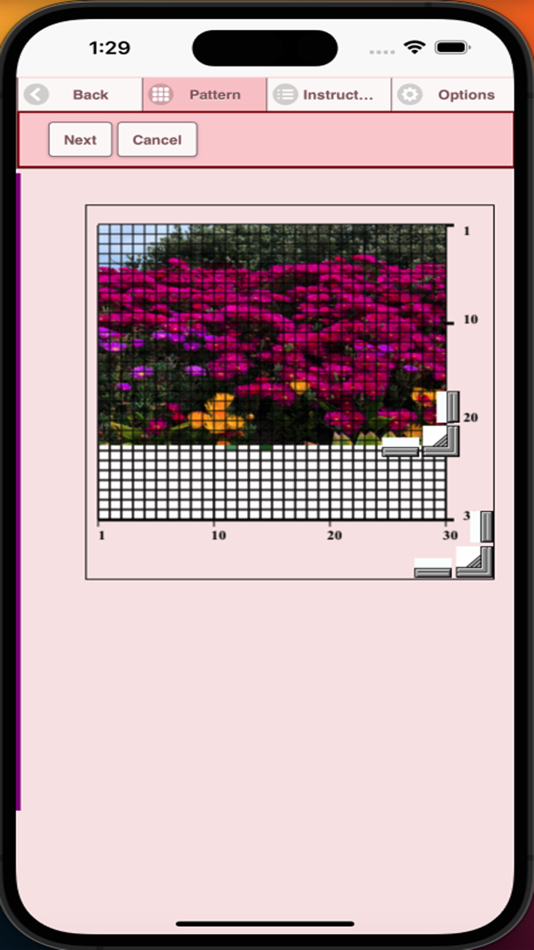
Picture - select a picture from your device and convert to a pattern
Print pattern - select to print your pattern
Social media - use social media to share your pattern (email, text etc.)
Resize bars - resize bars are display at the bottom right corner of your pattern. Drag them to resize your cross stitch pattern
Option settings - change the grid color, change fill style from Solid to X's,
select not to display the row/column counter.
Instruction page - displays the DMC colors used and finished sizes for
different Aida Cloth sizes
Finished Product page - displays what your pattern looks like after cross
stitched. You can also change the fabric color.
スクリーンショット


価格
-
* アプリ内購入あり - 今日: フリー
- 最小値: フリー
- 最大: フリー
料金のチェック
デベロッパー
- Sand Castle Designs, Inc
- プラットフォーム: iOS アプリ (11)
- リスト: 0 + 0
- ポイント: 1 + 5 ¡
- ランキング: 0
- レビュー: 0
- 割引: 0
- 動画: 0
- RSS: 購読する
ポイント
-

- 134 Anh Nguyên
- +1

ランキング
0 ☹️
リスト
0 ☹️
レビュー
最初のクチコミを書こう 🌟
情報
- バージョン: 8
- カテゴリ:
iOS アプリ›グラフィック&デザイン - オペレーティング システム:
iPad,iPhone,iOS 11.0 以上 - サイズ:
12 Mb - サポートされる言語:
English - コンテンツのレーティング:
4+ - App Store 評価:
0 - アップデート:
- リリース日:
Cross Stitch Pattern Creator 短縮 URL: コピーしました!- 🌟 シェア
- App Store
あなたも好きかも
-
- Filet Crochet Pattern Creator
- iOS アプリ: グラフィック&デザイン 作者: Sand Castle Designs, Inc
- フリー
- リスト: 0 + 0 ランキング: 0 レビュー: 0
- ポイント: 0 + 1 (1.0) バージョン: 7 Create your own Filet Crochet Patterns using File Crochet Creator. Over 400 Stamps, Inserts and Borders you can add to your pattern. Four free patterns included. To activate creation ... ⥯
-
- StitchIt: Cross Stitch Creator
- iOS アプリ: グラフィック&デザイン 作者: MANUEL ANTONIO VALENTE COUTO
- フリー
- リスト: 0 + 0 ランキング: 0 レビュー: 0
- ポイント: 1 + 1 (1.0) バージョン: 2.0.0 Create beautiful, custom cross stitch patterns from any photo with StichIt! Whether you re a beginner or expert stitcher, StichIt makes designing and stitching easier and more fun than ⥯
-
- Pattern Wallpaper Mobile
- iOS アプリ: グラフィック&デザイン 作者: 磊 刘
- * フリー
- リスト: 0 + 0 ランキング: 0 レビュー: 0
- ポイント: 2 + 2 (3.5) バージョン: 1.11 Pattern Wallpaper is an application that generates wallpaper using 2D tiled patterns. It contains hundreds of classic or trendy patterns, and the number is still growing. Each ... ⥯
-
- Stitch Photos
- iOS アプリ: グラフィック&デザイン 作者: Le Giang Nam
- フリー
- リスト: 1 + 3 ランキング: 0 レビュー: 0
- ポイント: 13 + 526 (4.6) バージョン: 1.3.9 Automatically stitch multiple screenshots into one long image. Stitch Photos allows you to create a full conversation screenshot, scrolling app screenshot or full webpage screenshot. ... ⥯
- 新着
- Pattern Weave Art
- iOS アプリ: グラフィック&デザイン 作者: Erez Segal
- フリー
- リスト: 0 + 0 ランキング: 0 レビュー: 0
- ポイント: 0 + 0 バージョン: 1.0 PatternWeave Art turns your screen into an endless collection of abstract wallpapers. The app generates patterns from shapes, gradients, and color combinations so you can find a ... ⥯
-
- Dot Lab - Perler beads pattern
- iOS アプリ: グラフィック&デザイン 作者: 桂华 冉
- * フリー
- リスト: 0 + 0 ランキング: 0 レビュー: 0
- ポイント: 0 + 4 (4.5) バージョン: 2.1.8 Welcome to "Dot Lab"! "Dot Lab" is a simple and user-friendly pixel art creation app, designed for both beginners and experienced artists. With our app, you can effortlessly create ... ⥯
-
- Logo Maker Shop - Creator ۬
- iOS アプリ: グラフィック&デザイン 作者: ZerOnes
- フリー
- リスト: 0 + 0 ランキング: 0 レビュー: 0
- ポイント: 2 + 237 (4.8) バージョン: 1.0.9 Logo Maker is a app, where you can design a crystal clear logo for your business or company or organisation as easy as a few taps on your iPhone, or iPad no design expertise ... ⥯
-
- Sketchbook - Animation Creator
- iOS アプリ: グラフィック&デザイン 作者: AdzSpec Technologies
- フリー
- リスト: 0 + 0 ランキング: 0 レビュー: 0
- ポイント: 0 + 0 バージョン: 1.0 Sketch & Cartoon Animation Creator app; A creative tool to bring your ideas to life. This sketch animation maker app offers powerful features to create layer-by-layer GIFs with ease. ... ⥯
-
- Sprite Creator
- iOS アプリ: グラフィック&デザイン 作者: Skyler Lauren
- $3.99
- リスト: 0 + 0 ランキング: 0 レビュー: 0
- ポイント: 0 + 327 (4.6) バージョン: 2.1.0 Sprite Creator is a very powerful and easy to use pixel art drawing app. Create and import sprite sheets, tile maps, or even animated gifs. This app has been designed to be a simple ... ⥯
-
- Flip Draw 2D Animation Creator
- iOS アプリ: グラフィック&デザイン 作者: Muhammad Talha
- * フリー
- リスト: 0 + 0 ランキング: 0 レビュー: 0
- ポイント: 0 + 2 (1.5) バージョン: 1.0 Explore the world of 2D animations and become a real animator with the Flip Draw: 2D Animation Creator app. Flip Draw is a simple and perfect 2D animation app designed for creators of ... ⥯
-
- AI Image Creator - AI Painting
- iOS アプリ: グラフィック&デザイン 作者: Surraia Parveen
- * フリー
- リスト: 0 + 0 ランキング: 0 レビュー: 0
- ポイント: 0 + 1 (5.0) バージョン: 1.3 Unleash the power of artificial intelligence to create, enhance, and transform images like never before. Whether you're a designer, content creator, or just someone who loves ... ⥯
-
- NFT Creator: Digital Art Maker
- iOS アプリ: グラフィック&デザイン 作者: Ehsan Tahzeeb
- フリー
- リスト: 0 + 0 ランキング: 0 レビュー: 0
- ポイント: 0 + 0 バージョン: 1.0 NFT (non-fungible token) is a unique set of data stored in digital ledger. You can convert your photos, videos, art into a digital NFT and sell on different NFT market places. Some ... ⥯
-
- Logo Maker and Logo Creator
- iOS アプリ: グラフィック&デザイン 作者: Dharmesh Hirpara
- フリー
- リスト: 0 + 0 ランキング: 0 レビュー: 0
- ポイント: 0 + 0 バージョン: 1.2 Crafting the perfect logo has never been easier! Our Logo Maker & Creator offers endless design possibilities to help your brand stand out. Try it now! ⥯
-
- Logo AI - Custom Logo Creator
- iOS アプリ: グラフィック&デザイン 作者: 军 刘
- * フリー
- リスト: 0 + 0 ランキング: 0 レビュー: 0
- ポイント: 0 + 17 (4.4) バージョン: 1.1.0 Logo AI - Custom Logo Creator AI Logo Generator & Maker Bring your logo ideas to life in seconds with AI Logo Generator, the AI-powered design tool made for creators, entrepreneurs, ... ⥯