
| Nhà phát triển: | Sand Castle Designs, Inc (11) | ||
| Giá bán: | Miễn phí | ||
| Xếp hạng: | 0 | ||
| Đánh giá: | 0 Viết đánh giá | ||
| Danh sách: | 0 + 0 | ||
| Điểm: | 0 + 1 (1.0) ¡ | ||
| App Store | |||
Mô tả

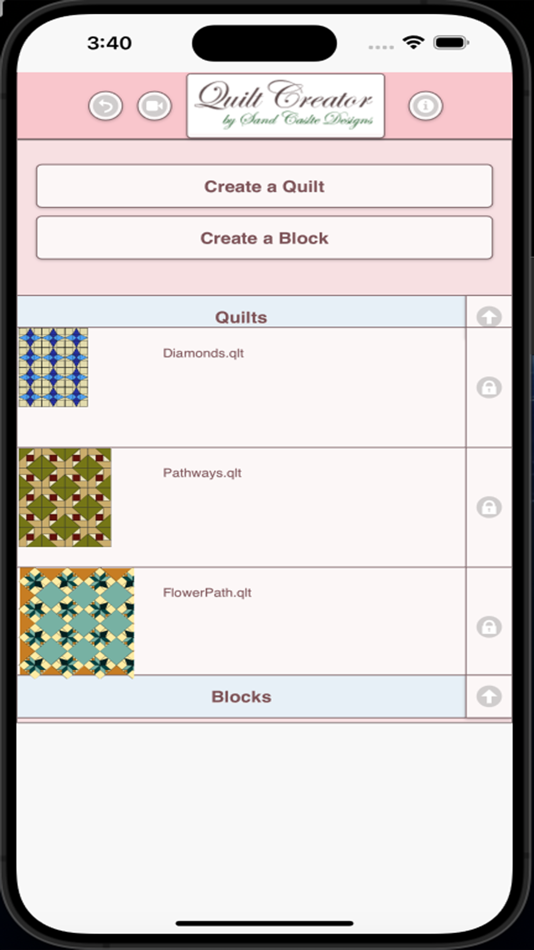
Now you can create your own blocks to use in your quilts.
Comes with 3 free quilt patterns. Download is free. To activate creation is $2.99
Once activated, get started by doing the following:
To Create a Quilt
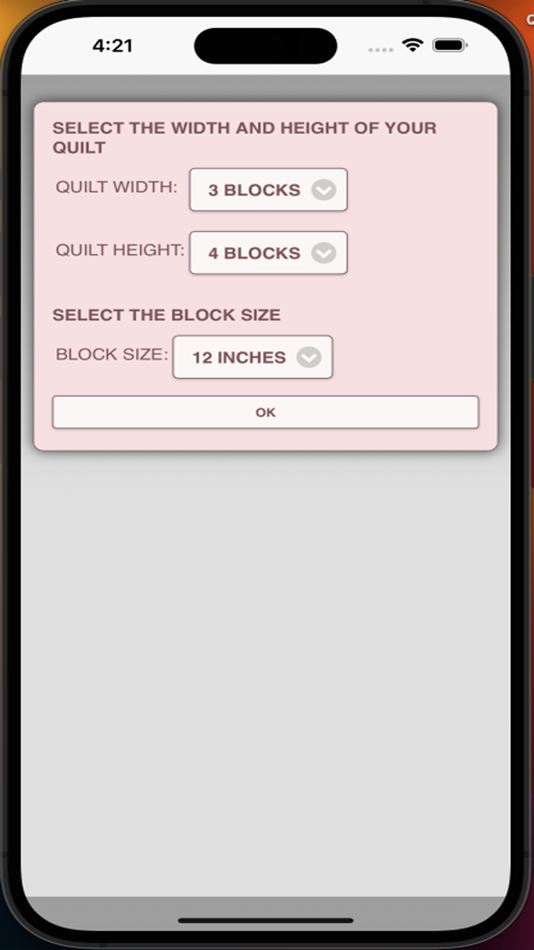
1. Select "Create a Quilt" button.
2. Enter the type of quilt (square or on point), and the quilt width and quilt height in blocks.
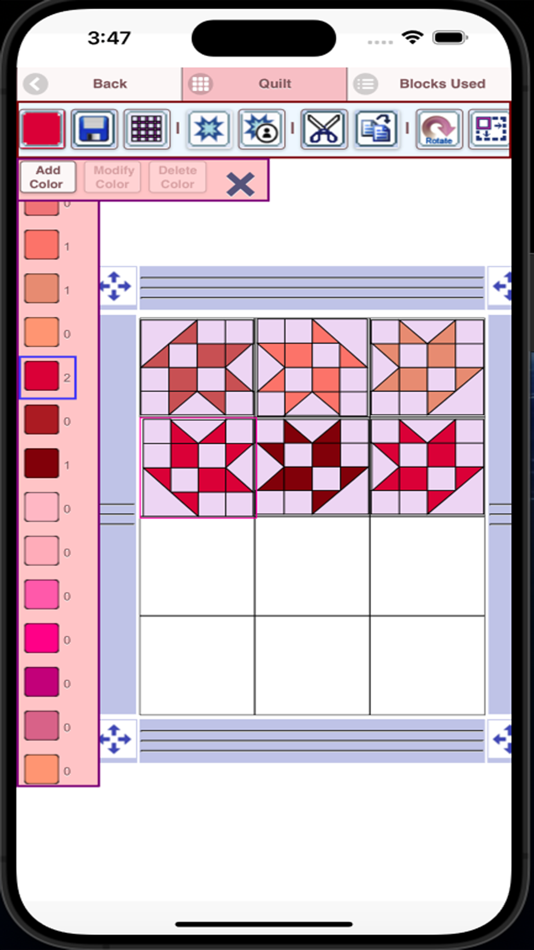
3. Select the Block Icon (forth icon in the tool bar)
4. A huge selection of quilt blocks will appear.
5. Select the quilt blocks you want to place on your quilt.
6. Select the Color Icon (first icon in the tool bar)
7. A huge selection of colors will appear
8. Select a color and select the Fill-All bucket icon with a double plus sign (11th icon in the tool bar)
9. Select on the quilt, all the blocks of the same kind will change color to the color you selected.
Buttons from left to right in the button bar:
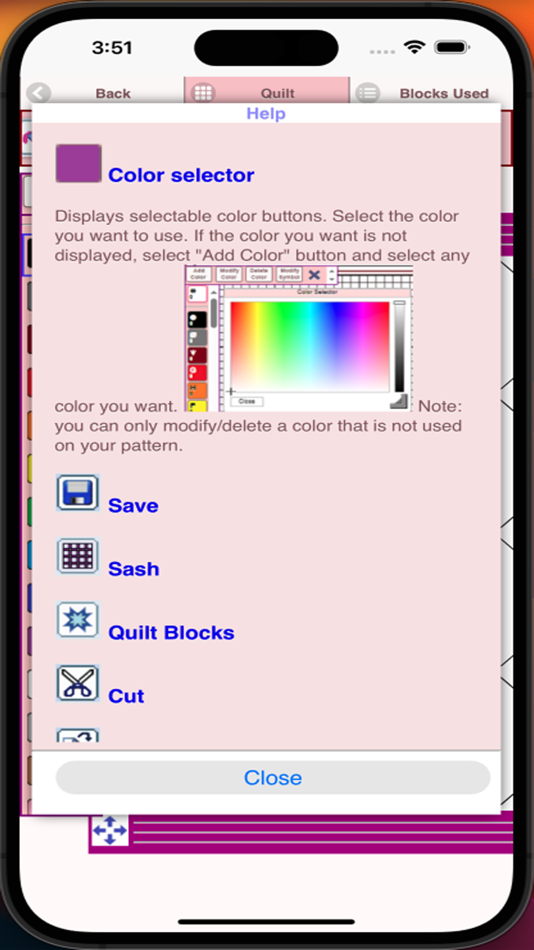
Color button - use to select any color
Save button - use to save your quilt pattern
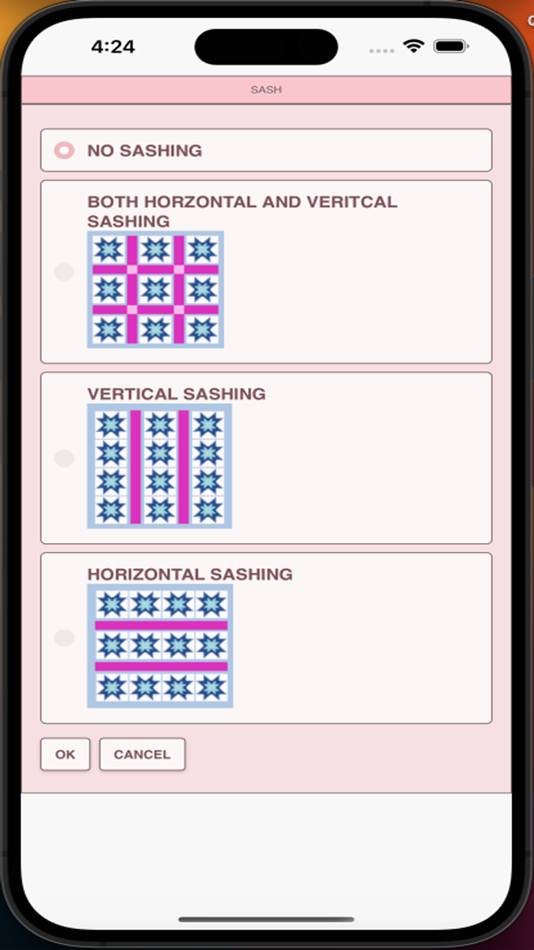
Sashing button - use it to add sashing around each quilt block (vertical, horizontal or both)
Quilt blocks button - use it to select different quilt blocks to your quilt
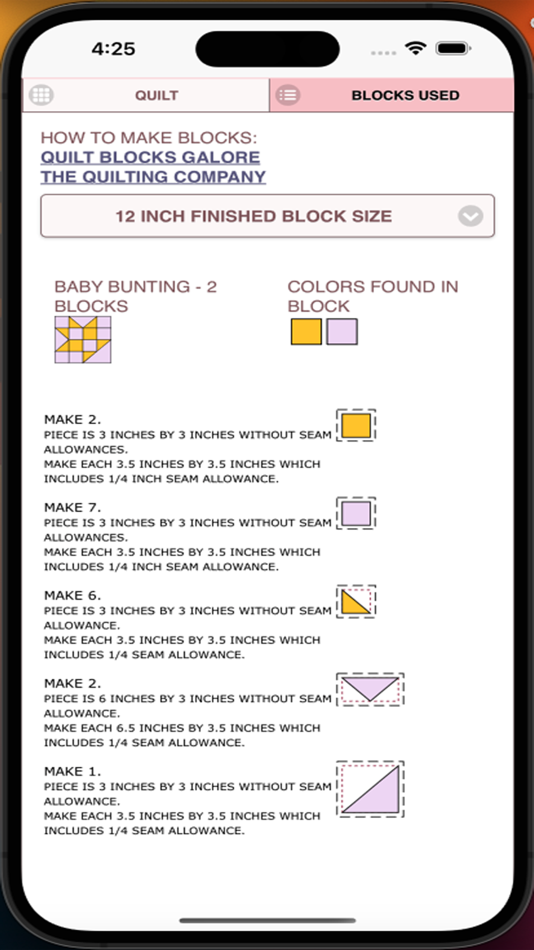
My Quilt Blocks button - displays all the blocks you have created
Cut button - select a block on your quilt and the cut icon to remove it
Copy button - select a block on your quilt and the copy icon to copy it and place it in another location on your quilt
Rotate button - select a quilt block and rotate icon to rotate that block
Resize quilt button - select to change the number of block rows and columns for your quilt
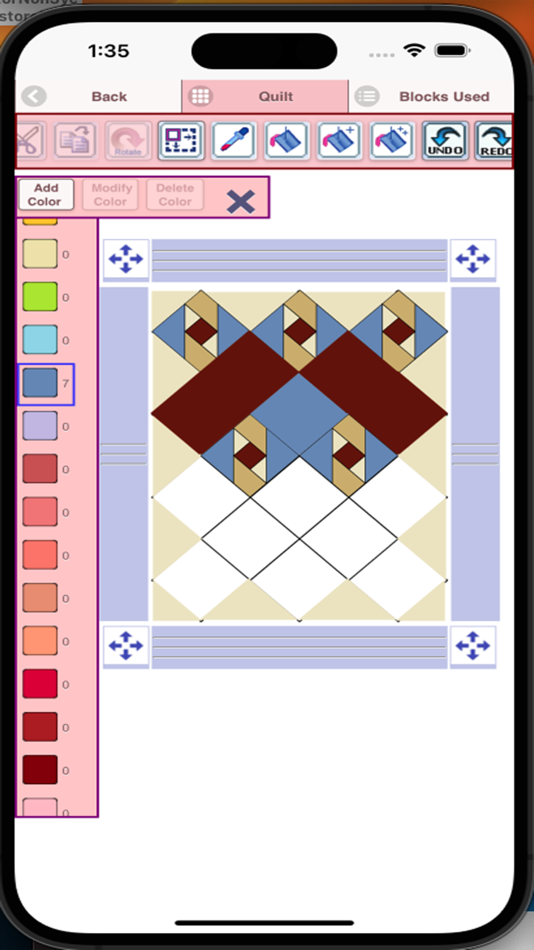
Dropper button - select a color from your quilt to use
Paint bucket button - use this when you want to change the color of one fabric in a single block
Paint bucket + button - use this when you want to change the fabric color in a single block
Paint bucket ++ button - use this when you want to change the fabric color in all blocks
Undo button - undo last things you did
Redo button - redo the things you undid
Zoom in button - zoom in on your quilt pattern
Zoom out button - zoom out on your quilt pattern
Print button
Share button - share a picture of your pattern using email, text etc.
Help button - help on how to use features of the app
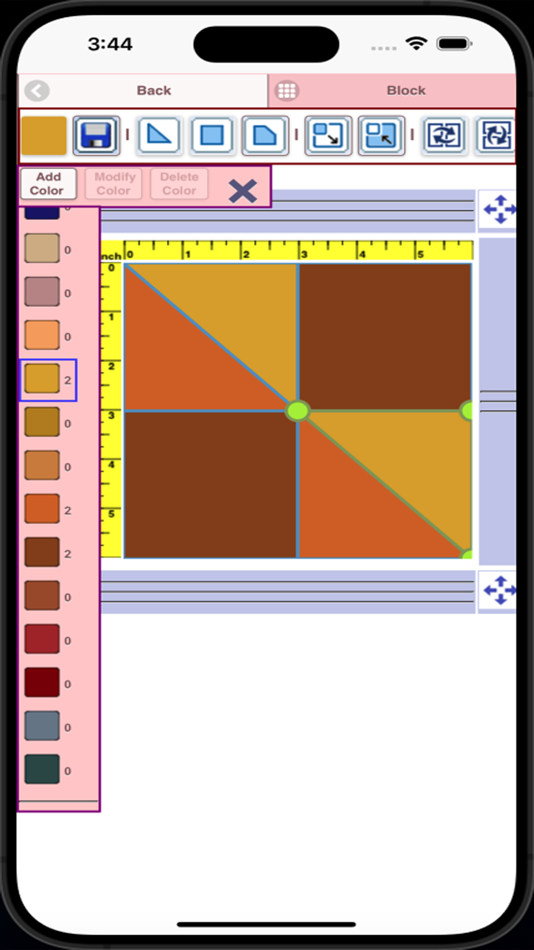
To Create a Block
1. Select "Create a Block" button.
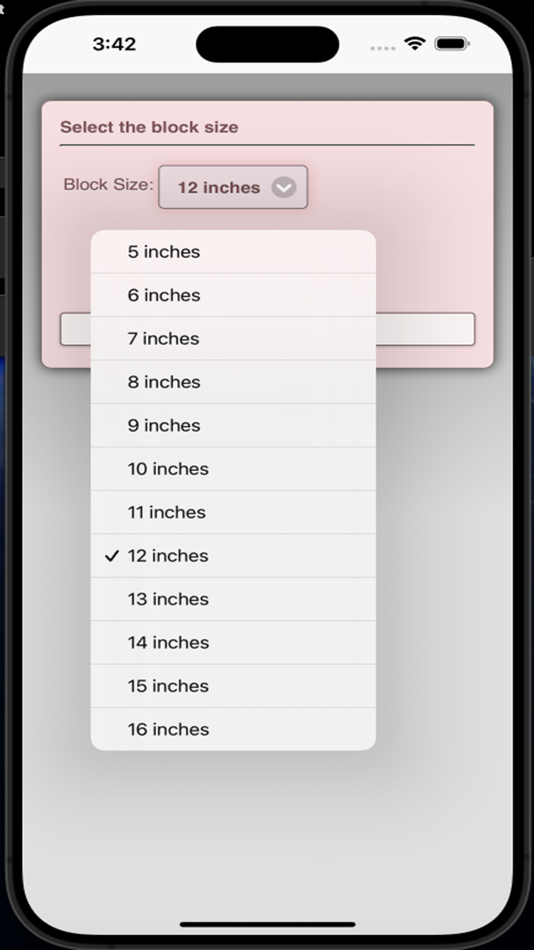
2. Select the size of the block you want to create (5-16 inches)
3. Now add shapes to your block. Shapes come in three sizes (3 sides, 4 sides and 5 sides)
4. Select the triangle to add a triangle shape to your block.
5. To change the shape just drag any of the green corner circles to where you want.
6. You can also flip, rotate and resize the shape using button in the button bar.
7. You can drag the shape to any location. Shapes snap into place.
8. Select the Color button (first button in the button bar to change the colors of your shapes)
Buttons from left to right in the button bar:
Color button - use to select a color for your fabric shapes in your block
Save button - use to save your block
Triangle shape button - add triangle fabric shapes to your block
Square shape button - add 4 sided shapes to your block
Pentagon shape button - add 5 sided shapes to your block
Resize shape larger button - select a shape and the resize larger button to make the shape a size larger
Resize shape smaller button - select a shape and the resize smaller button to make a shape a size smaller
Flip shape horizontal button - select a shape and the Flip horizontal button to flip the shape horizontally
Flip shape vertical button - select a shape and the Flip horizontal button to flip the shape vertically
Rotate shape button - select a shape and the Rotate button to rotate a shape
Dropper button - select a color from your block to use
Paint bucket button - use this when you want to change the color of fabrics in your block
Cut button - use to remove a shape from your block
Copy button - use to copy
Print button
Ảnh chụp màn hình

Giá bán
- Hôm nay: Miễn phí
- Tối thiểu: Miễn phí
- Tối đa: Miễn phí
Theo dõi giá
Nhà phát triển
- Sand Castle Designs, Inc
- Nền tảng: iOS Ứng dụng (11)
- Danh sách: 0 + 0
- Điểm: 1 + 5 ¡
- Xếp hạng: 0
- Đánh giá: 0
- Giảm giá: 0
- Video: 0
- RSS: Đăng ký
Điểm
0 ☹️
Xếp hạng
0 ☹️
Danh sách
0 ☹️
Đánh giá
Hãy là người đầu tiên đánh giá 🌟
Thông tin bổ sung
- Phiên bản: 10
- Danh mục:
iOS Ứng dụng›Thiết kế đồ họa - HĐH:
iPad,iPhone,iOS 11.0 trở lên - Kích thước:
13 Mb - Ngôn ngữ được hỗ trợ:
English - Xếp hạng nội dung:
4+ - App Store Xêp hạng:
1.0(1) - Cập nhật:
- Ngày phát hành:
Quilt Pattern Creator URL ngắn: Đã sao chép!- 🌟 Chia sẻ
- App Store
Bạn cũng có thể thích
-
- Graphghan Pattern Creator
- iOS Ứng dụng: Thiết kế đồ họa Bởi: Sand Castle Designs, Inc
- Miễn phí
- Danh sách: 0 + 0 Xếp hạng: 0 Đánh giá: 0
- Điểm: 0 + 1 (1.0) Phiên bản: 11 Crochet Graphghan Pattern Creator for your mobile device. Comes with 4 free Crochet Graphghan patterns. Download is free. A one time create activation is $2.99 Create Crochet Graphghan ⥯
-
- Pattern Wallpaper Mobile
- iOS Ứng dụng: Thiết kế đồ họa Bởi: 磊 刘
- * Miễn phí
- Danh sách: 0 + 0 Xếp hạng: 0 Đánh giá: 0
- Điểm: 2 + 2 (3.5) Phiên bản: 1.11 Pattern Wallpaper is an application that generates wallpaper using 2D tiled patterns. It contains hundreds of classic or trendy patterns, and the number is still growing. Each ... ⥯
- mới
- Pattern Weave Art
- iOS Ứng dụng: Thiết kế đồ họa Bởi: Erez Segal
- Miễn phí
- Danh sách: 0 + 0 Xếp hạng: 0 Đánh giá: 0
- Điểm: 0 + 0 Phiên bản: 1.0 PatternWeave Art turns your screen into an endless collection of abstract wallpapers. The app generates patterns from shapes, gradients, and color combinations so you can find a ... ⥯
-
- Logo Maker Shop - Creator ۬
- iOS Ứng dụng: Thiết kế đồ họa Bởi: ZerOnes
- Miễn phí
- Danh sách: 0 + 0 Xếp hạng: 0 Đánh giá: 0
- Điểm: 2 + 238 (4.8) Phiên bản: 1.0.9 Logo Maker is a app, where you can design a crystal clear logo for your business or company or organisation as easy as a few taps on your iPhone, or iPad no design expertise ... ⥯
-
- Sketchbook - Animation Creator
- iOS Ứng dụng: Thiết kế đồ họa Bởi: AdzSpec Technologies
- Miễn phí
- Danh sách: 0 + 0 Xếp hạng: 0 Đánh giá: 0
- Điểm: 0 + 0 Phiên bản: 1.0 Sketch & Cartoon Animation Creator app; A creative tool to bring your ideas to life. This sketch animation maker app offers powerful features to create layer-by-layer GIFs with ease. ... ⥯
-
- Flip Draw 2D Animation Creator
- iOS Ứng dụng: Thiết kế đồ họa Bởi: Muhammad Talha
- * Miễn phí
- Danh sách: 0 + 0 Xếp hạng: 0 Đánh giá: 0
- Điểm: 0 + 2 (1.5) Phiên bản: 1.0 Explore the world of 2D animations and become a real animator with the Flip Draw: 2D Animation Creator app. Flip Draw is a simple and perfect 2D animation app designed for creators of ... ⥯
-
- Sprite Creator
- iOS Ứng dụng: Thiết kế đồ họa Bởi: Skyler Lauren
- $3.99
- Danh sách: 0 + 0 Xếp hạng: 0 Đánh giá: 0
- Điểm: 0 + 327 (4.6) Phiên bản: 2.1.0 Sprite Creator is a very powerful and easy to use pixel art drawing app. Create and import sprite sheets, tile maps, or even animated gifs. This app has been designed to be a simple ... ⥯
-
- AI Image Creator - AI Painting
- iOS Ứng dụng: Thiết kế đồ họa Bởi: Surraia Parveen
- * Miễn phí
- Danh sách: 0 + 0 Xếp hạng: 0 Đánh giá: 0
- Điểm: 0 + 1 (5.0) Phiên bản: 1.3 Unleash the power of artificial intelligence to create, enhance, and transform images like never before. Whether you're a designer, content creator, or just someone who loves ... ⥯
-
- NFT Creator: Digital Art Maker
- iOS Ứng dụng: Thiết kế đồ họa Bởi: Ehsan Tahzeeb
- Miễn phí
- Danh sách: 0 + 0 Xếp hạng: 0 Đánh giá: 0
- Điểm: 0 + 0 Phiên bản: 1.0 NFT (non-fungible token) is a unique set of data stored in digital ledger. You can convert your photos, videos, art into a digital NFT and sell on different NFT market places. Some ... ⥯
-
- Logo Maker and Logo Creator
- iOS Ứng dụng: Thiết kế đồ họa Bởi: Dharmesh Hirpara
- Miễn phí
- Danh sách: 0 + 0 Xếp hạng: 0 Đánh giá: 0
- Điểm: 0 + 0 Phiên bản: 1.2 Crafting the perfect logo has never been easier! Our Logo Maker & Creator offers endless design possibilities to help your brand stand out. Try it now! ⥯
-
- Logo AI - Custom Logo Creator
- iOS Ứng dụng: Thiết kế đồ họa Bởi: 军 刘
- Miễn phí
- Danh sách: 0 + 0 Xếp hạng: 0 Đánh giá: 0
- Điểm: 0 + 18 (4.4) Phiên bản: 1.1.0 Logo AI - Custom Logo Creator AI Logo Generator & Maker Bring your logo ideas to life in seconds with AI Logo Generator, the AI-powered design tool made for creators, entrepreneurs, ... ⥯
-
- Customuse: 3D Skin Creator
- iOS Ứng dụng: Thiết kế đồ họa Bởi: Customuse
- Miễn phí
- Danh sách: 1 + 0 Xếp hạng: 0 Đánh giá: 0
- Điểm: 3 + 61,225 (4.7) Phiên bản: 1.72.2 Customuse is a powerful 3D design studio built for creators. With over 2 million users worldwide, it s the go-to tool for designing custom skins, outfits, and digital fashion for ... ⥯
-
- Poster Maker + Flyer Creator
- iOS Ứng dụng: Thiết kế đồ họa Bởi: Whistle Studios LLC
- Miễn phí
- Danh sách: 0 + 0 Xếp hạng: 0 Đánh giá: 0
- Điểm: 1 + 37,368 (4.7) Phiên bản: 4.0.12 Create stunning posters, flyers, logos, Instagram posts, ads and invitations effortlessly in minutes with our user-friendly poster maker and flyer maker app. Say goodbye to expensive ... ⥯
-
- Creati: Gen AI Content Creator
- iOS Ứng dụng: Thiết kế đồ họa Bởi: IMGCreator Limited
- Miễn phí
- Danh sách: 0 + 0 Xếp hạng: 0 Đánh giá: 0
- Điểm: 2 + 13,990 (4.6) Phiên bản: 2.76.0 If you're under the impression that this is merely another application that generates AI video or ordinary creator tool, then think again. "Creati" stands out from the rest, by ... ⥯