
| Nhà phát triển: | Studio Pixanoh (2) | ||
| Giá bán: | $3.99 | ||
| Xếp hạng: | 0 | ||
| Đánh giá: | 0 Viết đánh giá | ||
| Danh sách: | 1 + 3 | ||
| Điểm: | 2 + 295 (4.1) ¡ | ||
| App Store | |||
Mô tả

HIGHLIGHTS
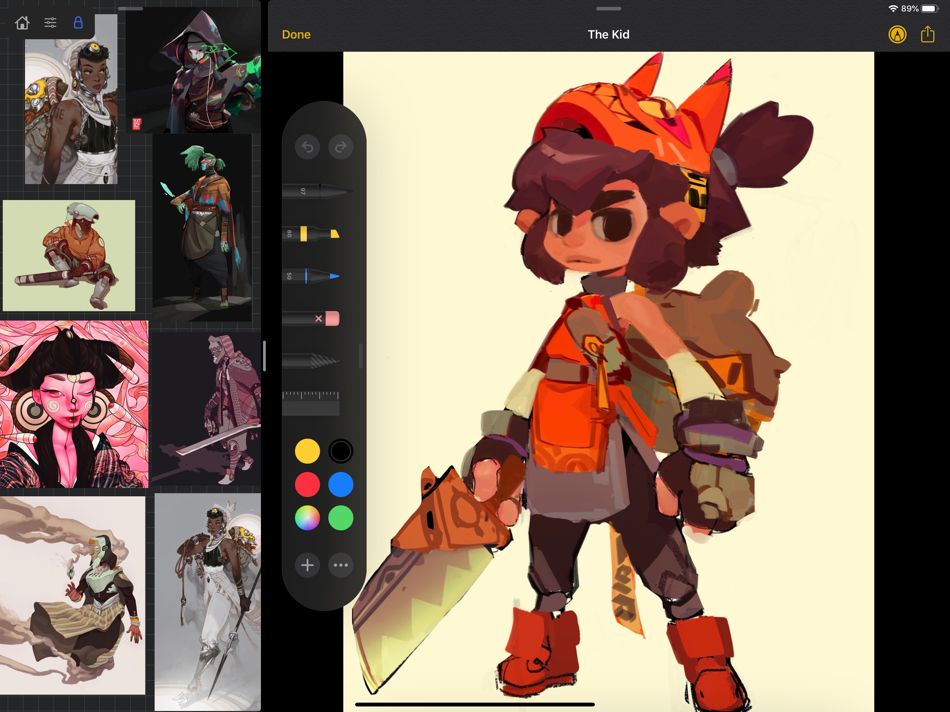
-Perfect companion app paired with Procreate® Adobe Fresco ® Clip Studio Paint® Infinite Painter® etc. by utilizing iPad IOS multitasking features
-Supports many image types including GIF
-Drag and drop from web
-Batch Import from Photos app
-Batch Export images from boards to cloud storage using Files app
- *Multi-Select and auto pack images for a quicker workflow *
-Import High-Resolution images with HD toggle
_*Focus on whats importing with Focus mode. ( rotate imageboard )
-Batch Import from iCloud, Dropbox, Google Drive with split-screen
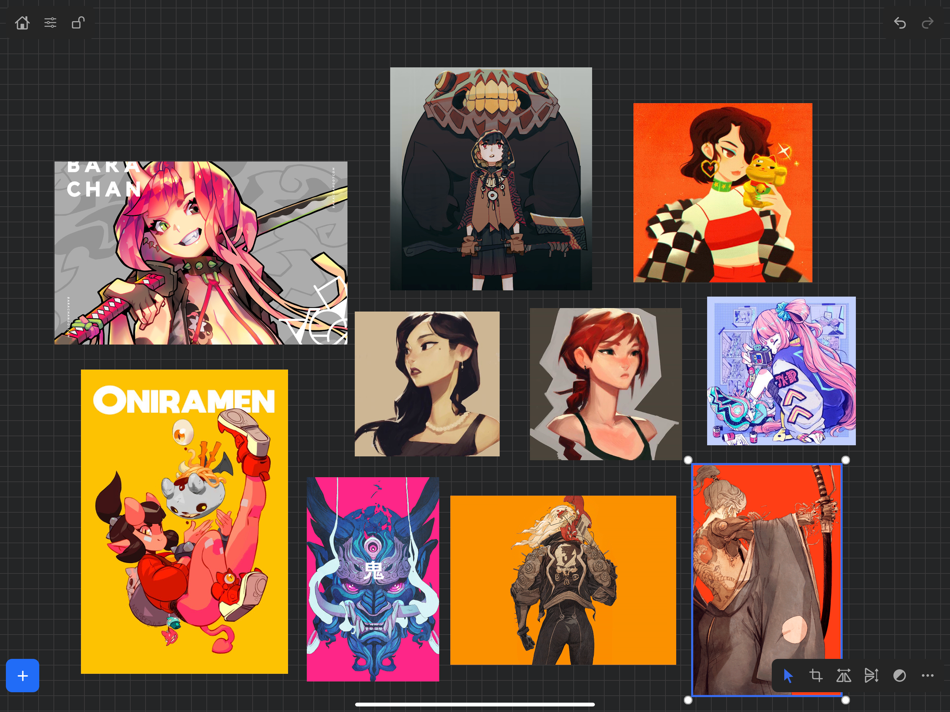
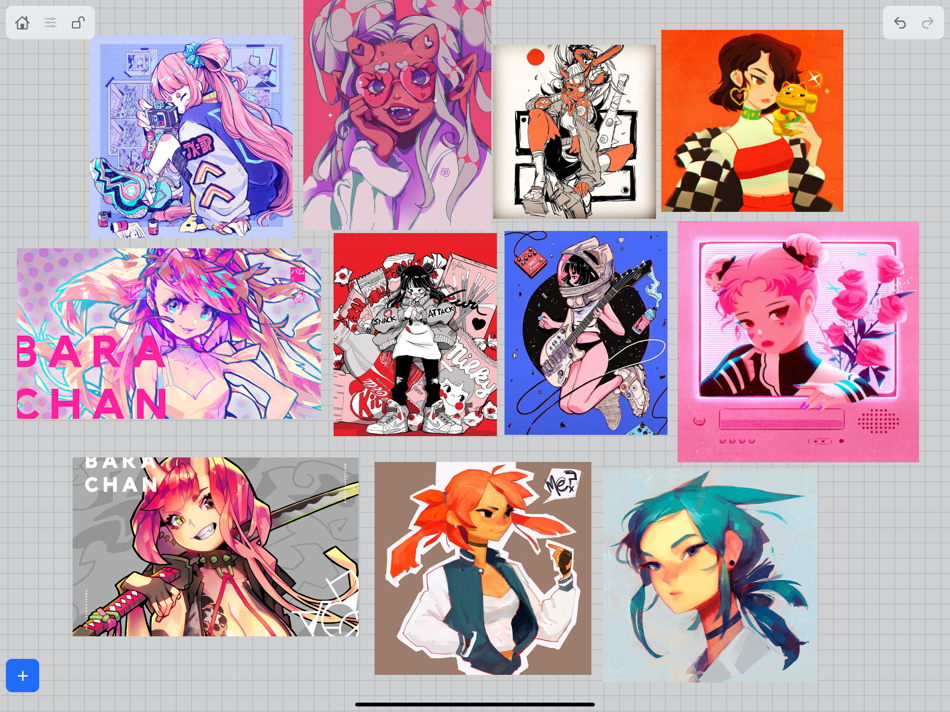
-Quick and responsive visual reference board experience
-Easy to use/ minimal UI
-Light mode and Dark mode
-Set thumbnails for reference boards to visually organize your inspiration
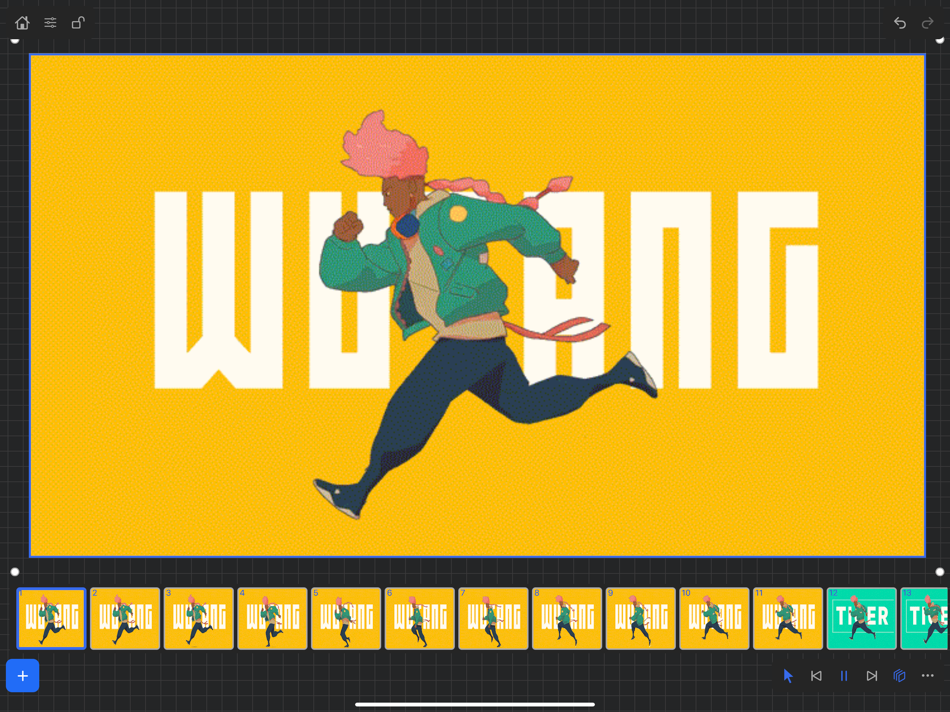
ANIMATED GIF SUPPORT
-Reference your favorite animated gifs
-Pause animation and play frame by frame to better understand referenced animations
-Advanced animation timeline gives you an interactive visual breakdown of all frames
EASY TO USE REFERENCE TOOLS
-Crop images to optimize screen space and view more references
-Greyscale toggle for images for value reference
-Flip horizontally and vertically
-Rotate Images
-Copy-paste images into other apps
Artwork and animation credits
@_Artazi
@_baomii
@_Deadslug_
@amnesiapancake
@barachan
@belgeist
@criisalys
@ergo.josh
@evan_monteiro
@gloomwastaken
@mrbeezul
@onemegawatt
@rocketboiART
@samuelyounart
@cobalt_requin
VizRef was created by Max Gonzalez and RoboWorld Entertainment with supporting development from Valere Labs
Ảnh chụp màn hình
Tính năng mới
- Phiên bản: 1.1.7
- Cập nhật:
- NEW FEATURES in 1.1.7
Exporting- Fixed some bugs related to exporting. Some of the UI was unresponsive when hitting export within the app. This was most likely due to some newer IOS versions that were later released. *** Please keep in mind that exporting/ importing directly into other apps such as Dropbox or even using Airdrop and Discord all work completely differently because of how those apps are created. We, unfortunately, can not improve much on batch exporting/ importing into these apps unless those developers improve how their apps deal with multiple images being imported or passing through them. For batch exporting images, I still recommend hooking up Dropbox/ Google Drive to the files app on your iPad and just batch exporting through the files app from Vizref.
Please also keep in mind that batch exporting hundreds of images at once will most likely crash Vizref. This is also out of our control. I recommend batch exporting about 50 images at once for the most stable and consistent experience. Vizref and other apps can't export hundreds of images at once because every app on the iPad is limited to how much Memory it can use during all operations. The app is crashing because of the hard limit set by Apple for each app.
Feature
- Revert Button- Revert will undo any cropping or rotating you've done to the image. The main reason for adding the revert button was that some users were finding their images were oddly scaled/ stretched to the wrong ratio. Revert is a backup for returning your image to the correct ratio/ scaling - the revert button is located in the toolbox icon at the bottom right after selecting an image.
- Exporting gif files. Should work now give it a try!
*Bug Fixes*
-Fixed a bug that caused images from your board to not display if your board crashed on exporting. This bug should be completely gone. If it persists after updating your app please contact us at vizrefpro@gmail.com
**If your images have disappeared from your board, please note that those images are still on you iPad and stored locally. You can retrieve them by going to the Files app then searching for your Vizref folder in " On My iPhone " or " On My iPad" file
Open "Private Documents" then you will see each .VRB file. These are your reference boards and store your images locally. You can then retrieve your images here.
Fixed some crash bugs.
Fixed several UI inconsistencies and bugs.
Giá bán
- Hôm nay: $3.99
- Tối thiểu: $3.99
- Tối đa: $3.99
Theo dõi giá
Nhà phát triển
- Studio Pixanoh
- Nền tảng: iOS Ứng dụng (2)
- Danh sách: 2 + 3
- Điểm: 3 + 331 ¡
- Xếp hạng: 0
- Đánh giá: 0
- Giảm giá: 0
- Video: 0
- RSS: Đăng ký


Xếp hạng
0 ☹️
Danh sách

Đánh giá
Hãy là người đầu tiên đánh giá 🌟
Thông tin bổ sung
- Phiên bản: 1.1.7
- Danh mục:
iOS Ứng dụng›Thiết kế đồ họa - HĐH:
iPad,iOS 13.2 trở lên - Kích thước:
4 Mb - Ngôn ngữ được hỗ trợ:
English - Xếp hạng nội dung:
4+ - App Store Xêp hạng:
4.1(295) - Cập nhật:
- Ngày phát hành:
Danh bạ
- Trang web:
 https://vizref.com/
VizRef URL ngắn: Đã sao chép!- 🌟 Chia sẻ
- App Store
Bạn cũng có thể thích
-
- POLYCAM
- iOS Ứng dụng: Thiết kế đồ họa Bởi: Narumi Inada
- $4.99
- Danh sách: 1 + 1 Xếp hạng: 0 Đánh giá: 0
- Điểm: 1 + 6 (4.0) Phiên bản: 1.0.1 To create a custom filter, use the built-in basic image filters and combine them. You can also load previously recorded images/videos and record/export. Filter Custom filters are ... ⥯
-
- Prompt Video - Make AI Videos
- iOS Ứng dụng: Thiết kế đồ họa Bởi: Yalin Kaan Senol
- * Miễn phí
- Danh sách: 0 + 0 Xếp hạng: 0 Đánh giá: 0
- Điểm: 0 + 0 Phiên bản: 1.1 Turn ideas into high-quality AI videos without the complexity. Please note that video generation requires additional monthly subscription Prompt Video gives you precise control, clean ... ⥯
-
- CapCam - 3D Scanner, LiDAR, AI
- iOS Ứng dụng: Thiết kế đồ họa Bởi: Tuyou Computing
- Miễn phí
- Danh sách: 0 + 0 Xếp hạng: 0 Đánh giá: 0
- Điểm: 1 + 8 (5.0) Phiên bản: 20251125 CapCam: Professional-grade LiDAR scanning on iOS for precise 3D models. Capture, edit, and export real-world spaces into sharable, immersive 3D experiences. CapCam is your go-to LiDAR ... ⥯
-
- Logo Design Revo
- iOS Ứng dụng: Thiết kế đồ họa Bởi: Son Phi
- Miễn phí
- Danh sách: 0 + 0 Xếp hạng: 0 Đánh giá: 0
- Điểm: 0 + 58 (4.7) Phiên bản: 1.5 Logo design studio is the easiest app to design logo and create your own custom logo, graphic,illustration with just few minutes. After create your own custom logo, you can save and ... ⥯