
| Nhà phát triển: | David Gath (1) | ||
| Giá bán: | Miễn phí | ||
| Xếp hạng: | 0 | ||
| Đánh giá: | 0 Viết đánh giá | ||
| Danh sách: | 0 + 0 | ||
| Điểm: | 0 + 0 ¡ | ||
| App Store | |||
Mô tả

Adjust the power setting on your Keis Apparel heated garment, using this mobile app to control your Keis Apparel BLUETOOTH Power Controller.
Connecting Your Keis BLUETOOTH Power Controller
The Keis BLUETOOTH Power Controller is suitable for all Keis Heated Jackets, Bodywarmers, and Vests, and other Keis heated garments that do not feature a built-in power controller.
Do not connect this Power Controller in series to a Keis garment that already has a built-in power controller (like the Keis heated motorcycle gloves), as they will cancel each other.
Always connect this BLUETOOTH Power Controller to the provided connectors in the Controller Pocket of the Keis garment you wish to control, and not in between a Keis heated garment and a power source (a portable battery or vehicle power lead). This allows for other garments (like gloves) to be connected to a Keis Jacket, Bodywarmer or Vest without the BLUETOOTH Power Controller conflicting with the glove’s built-in controller.
Installing The BLUETOOTH Power Controller With The Keis iControl App
Download this free Keis iControl application on the store.
When the Keis BLUETOOTH Power Controller is connected to a powered garment for the first time, all the LEDs on the controller will flash for two seconds.
To SWITCH ON:
Press and hold down the Keis BLUETOOTH controller’s button for one second to switch the controller on. The controller will default to the highest setting (shown by a red LED).
USING THE iCONTROL APP:
Open the Keis iControl app, and press ‘Allow’ on the pop-up to allow the App to ‘Allow Keis iControl to access this device’s location?’ Press ‘Add’ to add a BLUETOOTH Power Controller to the Keis iControl app.
A loading screen will appear while scanning. Make sure that your BLUETOOTH Power Controller is plugged into your garment and switched on.
Once the BLUETOOTH Power Controller has been detected, a ‘Press the button on the Keis Controller’ status will appear. Press the button on the Keis BLUETOOTH Power Controller to confirm this is the device you wish to connect to.
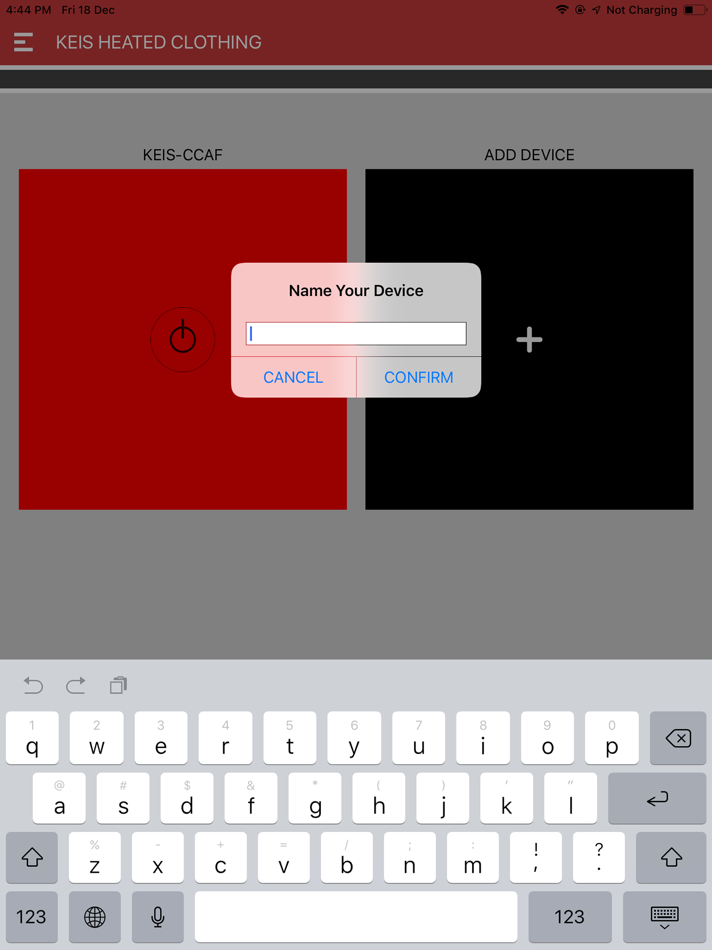
You will be asked to name the device button. Name your device controller buttons when using different Keis garments, with each button connected to a different BLUETOOTH Power Controller.
Press the device button in the iControl app to cycle through three Power settings:
Green = Low Power
Amber = Medium Power
Red = High Power.
TO SWITCH OFF:
To switch the BLUETOOTH Power Controller off, press and hold the controller’s button on the BLUETOOTH Power Controller for at least two seconds. Close the Keis iControl app on your mobile device.
Installing The BLUETOOTH Power Controller Without The Keis iControl App
This BLUETOOTH Power Controller can also be used as a STANDARD Power Controller when operated without using the Keis iControl app. These are the instructions when using this controller without connecting to the Keis iControl app.
When the Power Controller is connected to a powered garment for the first time, all the LEDs on the controller will flash for two seconds.
To SWITCH ON:
Press and hold down the controller’s button for one second to switch the controller on. The controller will default to the highest setting (shown by a red LED). Press the controller’s button again to scroll through the settings - medium (amber), low (green), and back to high (red).
To SWITCH OFF:
Press and hold the controller’s button for at least two seconds to switch off.
Safety And Environmental Considerations
DO NOT adjust the Power Controller while operating a motorcycle, or any other type of vehicle or machinery.
DO NOT allow the unit to be submerged in water.
DO NOT modify or disassemble any part of the system in any way.
DO NOT use if the product if visibly damaged, or it feels hot to the touch.
Ảnh chụp màn hình



Giá bán
- Hôm nay: Miễn phí
- Tối thiểu: Miễn phí
- Tối đa: Miễn phí
Theo dõi giá
Nhà phát triển
- David Gath
- Nền tảng: iOS Ứng dụng (1)
- Danh sách: 0 + 0
- Điểm: 0 + 0 ¡
- Xếp hạng: 0
- Đánh giá: 0
- Giảm giá: 0
- Video: 0
- RSS: Đăng ký
Điểm
0 ☹️
Xếp hạng
0 ☹️
Danh sách
0 ☹️
Đánh giá
Hãy là người đầu tiên đánh giá 🌟
Thông tin bổ sung
- Phiên bản: 1.1
- Danh mục:
iOS Ứng dụng›Tiện ích - HĐH:
iPad,iPhone,iOS 15.6 trở lên - Kích thước:
1 Mb - Ngôn ngữ được hỗ trợ:
English - Xếp hạng nội dung:
4+ - App Store Xêp hạng:
0 - Cập nhật:
- Ngày phát hành:
Keis iControl URL ngắn: Đã sao chép!- 🌟 Chia sẻ
- App Store
Bạn cũng có thể thích
-
- Summers® iControl™
- iOS Ứng dụng: Tiện ích Bởi: Summers Manufacturing Company, Inc.
- Miễn phí
- Danh sách: 0 + 0 Xếp hạng: 0 Đánh giá: 0
- Điểm: 0 + 3 (3.3) Phiên bản: 1.0.18 Summers® iControl™ provides the user with in-cab control all of the hydraulic adjustment capabilities of the Summers VRT Renegade™ on an easy to use intutitive touch screen. The ... ⥯
-
- Vector iControl
- iOS Ứng dụng: Tiện ích Bởi: Compulite Systems 2000 LTD
- Miễn phí
- Danh sách: 0 + 0 Xếp hạng: 0 Đánh giá: 0
- Điểm: 0 + 3 (2.3) Phiên bản: 2.2.0 Compulite s lighting consoles are based on the most advanced computer networking technologies which deliver unmatched performance and reliability with high level functionality and ... ⥯
-
- iCON - WiFi AirCon Control
- iOS Ứng dụng: Tiện ích Bởi: TEMPEX
- Miễn phí
- Danh sách: 0 + 0 Xếp hạng: 0 Đánh giá: 0
- Điểm: 0 + 1 (1.0) Phiên bản: 1.1.9 ICON is a mobile application that enables you to operate different air conditioners with a mobile device from anywhere. Regardless if you're just out of your home or when you are ... ⥯
-
- Arccaptain
- iOS Ứng dụng: Tiện ích Bởi: 深圳市劲擎创新科技有限公司
- Miễn phí
- Danh sách: 0 + 0 Xếp hạng: 0 Đánh giá: 0
- Điểm: 0 + 14 (1.5) Phiên bản: 1.6.15 # ARCCAPTAIN iControl Pro Welder Series A New Era of Smart Welding ## 【Product Promotion Text】 Leading the future of welding technology, Arccaptain proudly presents the ARCCAPTAIN ... ⥯
-
- ZAset mobile
- iOS Ứng dụng: Tiện ích Bởi: ZIEHL-ABEGG SE
- Miễn phí
- Danh sách: 0 + 0 Xếp hạng: 0 Đánh giá: 0
- Điểm: 0 + 2 (3.0) Phiên bản: 3.0.6 The ZAset app is the optimal tool for intelligent control and monitoring purposes of fans and controllers with MODBUS interface. ZAset enables easy and fast access to all the ... ⥯
-
- Cox Homelife
- iOS Ứng dụng: Tiện ích Bởi: Cox Communications, Inc.
- Miễn phí
- Danh sách: 0 + 0 Xếp hạng: 0 Đánh giá: 0
- Điểm: 0 + 1,182 (1.9) Phiên bản: 15.0.0 From jet-setters to go-getters and everyone in between, Cox Homelife offers home security and automation to fit any lifestyle. Customers can use the Cox Homelife app to securely view & ⥯