
| Desarrollador: | Joseph Morganelli (5) | ||
| Precio: | $1.99 | ||
| Clasificaciones: | 0 | ||
| Opiniones: | 0 Escribir una opinión | ||
| Listas: | 0 + 0 | ||
| Puntos: | 0 + 0 ¡ | ||
| Mac App Store | |||
Descripción

CORE VIEWING FEATURES
• Fast, Native PDF Viewing
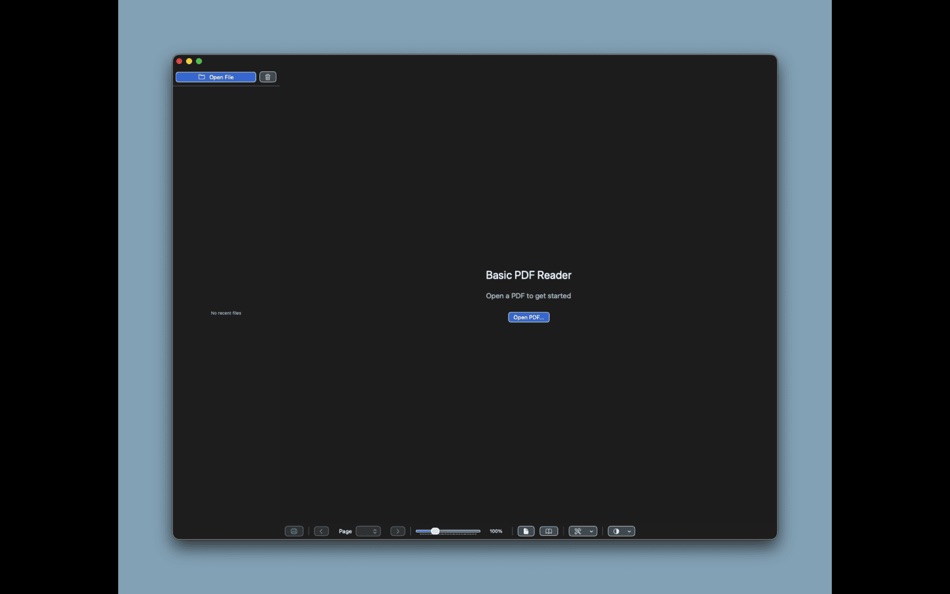
Experience smooth, responsive PDF viewing powered by macOS's native PDF rendering engine. Open multiple PDFs simultaneously with tabbed browsing, and the app remembers your open documents when you restart.
• Flexible View Modes
Choose between single page view for focused reading or facing pages mode to view two pages side-by-side, perfect for reviewing documents and books.
• Smart Navigation
Navigate through documents with intuitive page controls, including next/previous buttons, a page selection dropdown, and smooth scrolling. The app remembers your zoom level across sessions, so you can pick up right where you left off.
• Print Support
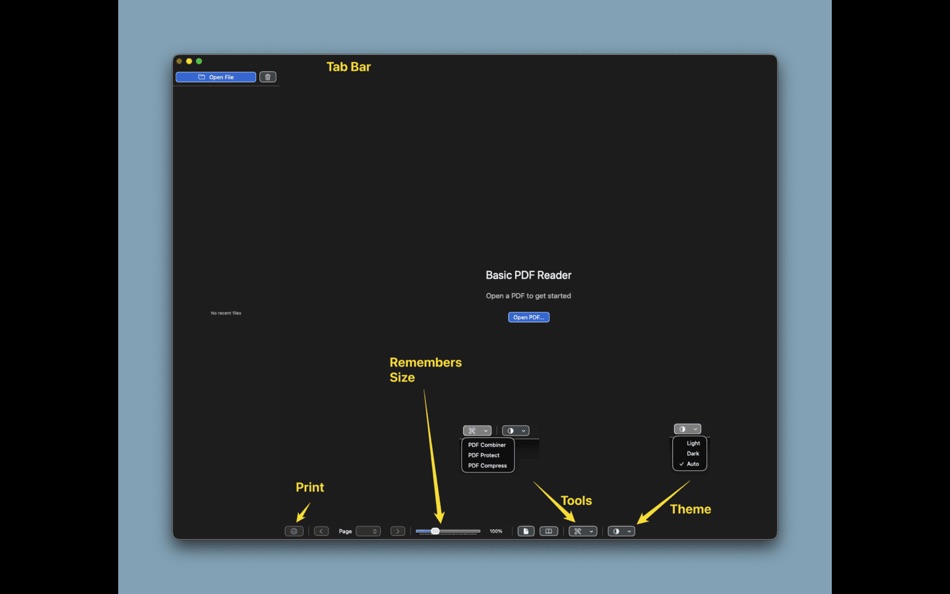
Print your PDFs directly from the app using the standard macOS print dialog. Access printing via CMD-P keyboard shortcut or the print button in the toolbar.
• Appearance Control
Customize your viewing experience with light, dark, or auto appearance modes. Auto mode automatically matches your system's appearance settings.
ORGANIZATION & RECENT FILES
• Tabbed Interface
Work with multiple PDFs at once using a clean tab interface. Each tab shows the document name, and you can close tabs with a click or middle mouse button. The app intelligently prevents duplicate tabs when opening the same document.
• Recent Files Sidebar
Quickly access your recently opened PDFs from a hideable sidebar. Clear the list anytime with a single click, and reopen files with one tap.
ESSENTIAL PDF TOOLS
• PDF Combiner
Merge multiple PDF files into a single document with ease. Simply drag and drop PDFs into the combiner, reorder them as needed, and combine them into one file. Perfect for consolidating reports, combining scanned documents, or merging related files.
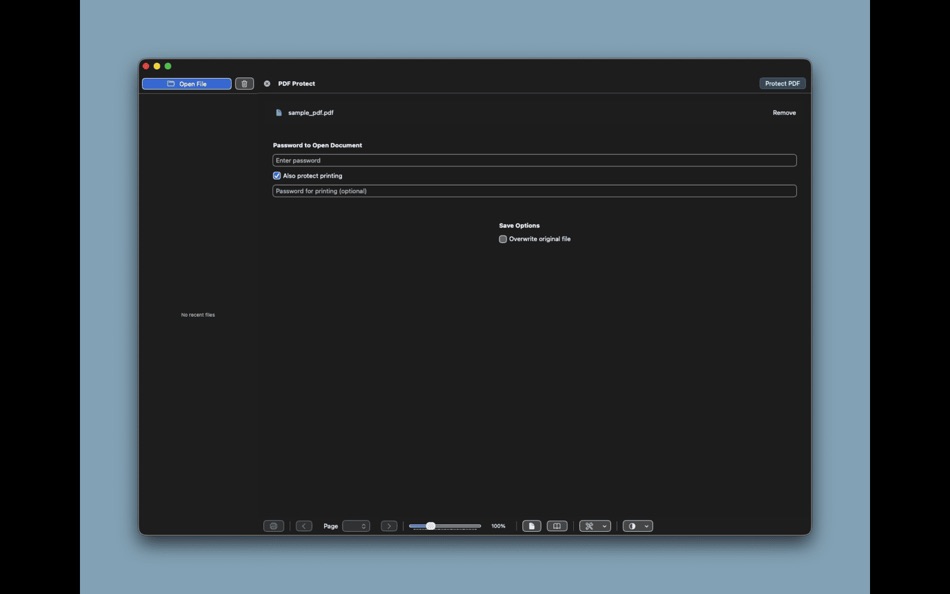
• PDF Protect
Secure your sensitive documents with password protection. Set a password to restrict opening the document, and optionally require a password for printing. Choose to overwrite the original file or save as a new protected copy.
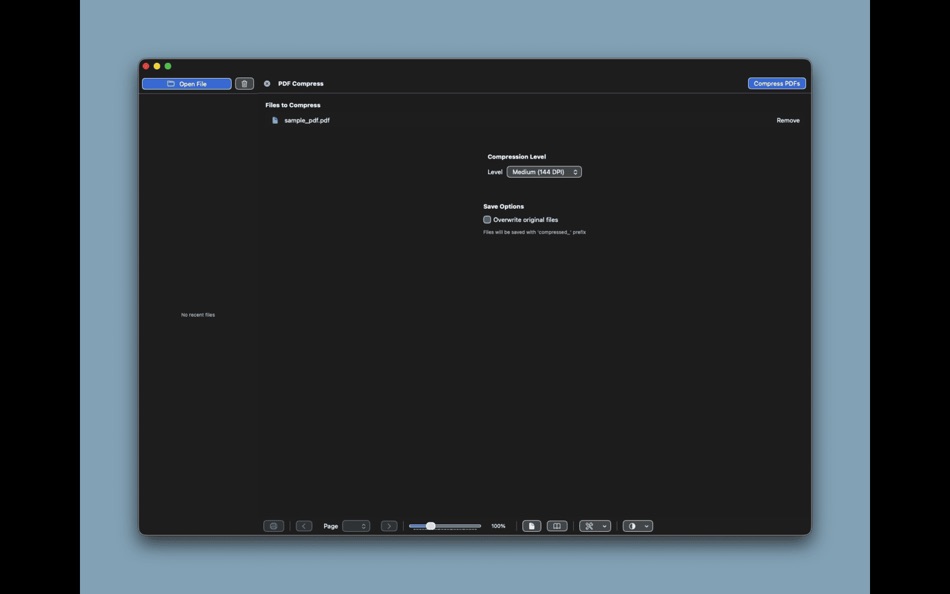
• PDF Compress
Reduce PDF file sizes to save storage space or make files easier to share. Choose from three compression levels:
- Light (200 DPI): Minimal quality loss, moderate size reduction
- Medium (144 DPI): Balanced quality and file size
- Strong (72 DPI): Maximum compression for significantly smaller files
Compress single files or batch process multiple PDFs at once. Option to overwrite originals or save compressed versions with "compressed_" prefix.
WHY BASIC PDF READER?
Most PDF readers are packed with features you'll never use, making them slow, cluttered, and resource-heavy. Basic PDF Reader focuses on what matters: fast, reliable PDF viewing and essential tools you actually need.
• Lightweight: Minimal resource usage, fast launch times
• Simple: Clean interface without feature bloat
• Fast: Optimized for quick document access and smooth performance
• Essential Tools: Built-in combiner, compressor, and protector—no need for separate apps
• Native macOS: Designed specifically for Mac with full system integration
Perfect for students, professionals, and anyone who needs a reliable PDF reader that gets out of your way and lets you focus on your documents.
Whether you're reviewing documents, combining reports, compressing files for sharing, or protecting sensitive information, Basic PDF Reader provides the tools you need in a simple, fast package.
Ad
Capturas...

Precio
- Hoy: $1.99
- Mínimo: $1.99
- Máximo: $1.99
Realizar un seguimiento de los precios
Ad
Desarrollador
- Joseph Morganelli
- Plataformas: iOS Aplicaciones (3) macOS Aplicaciones (2)
- Listas: 0 + 0
- Puntos: 1 + 0 ¡
- Clasificaciones: 0
- Opiniones: 0
- Descuentos: 0
- Vídeos: 0
- RSS: Suscribirse
Puntos
0 ☹️
Clasificaciones
0 ☹️
Listas
0 ☹️
- Basic PDF Reader
Opiniones
Sé el primero en escribir una reseña 🌟
Información adicional
- Versión: 1.30
- Categoría:
macOS Aplicaciones›Economía y empresa - Sistemas operativos:
macOS,macOS 13.0 y versiones posteriores - Tamaño:
2 Mb - Idiomas admitidos:
English - Clasificación de contenido:
4+ - Mac App Store Puntuación:
0 - Actualizado:
- Fecha de lanzamiento:
Contactos
- Sitio:
 https://www.kovertstudio.com
Basic PDF Reader URL corta: Copiado!- 🌟 Compartir
- Mac App Store
También te puede interesar
-
- PDF Reader Pro - Edit&Convert
- macOS Aplicaciones: Economía y empresa De: PDF Technologies, Inc.
- * $79.99
- Listas: 1 + 1 Clasificaciones: 0 Opiniones: 0
- Puntos: 1 + 0 Versión: 5.2.1 PDF Reader Pro is an AI-integrated PDF editor that will fulfill all your document needs. Building on solid features such as Annotate PDF, Edit, Create&Fill Form, OCR, Convert PDF, ... ⥯
-
- PDF Reader Pro
- macOS Aplicaciones: Economía y empresa De: 金玲 李
- $2.99
- Listas: 0 + 1 Clasificaciones: 0 Opiniones: 0
- Puntos: 7 + 0 Versión: 5.2.6 PDF Reader Pro is a document management application that integrates efficient reading and intelligent organization, designed specifically for users who need to read and manage PDF ... ⥯
-
- PDF Reader X - Edit Adobe PDF
- macOS Aplicaciones: Economía y empresa De: GoodPDF Limited
- Gratis
- Listas: 1 + 1 Clasificaciones: 0 Opiniones: 0
- Puntos: 3 + 0 Versión: 4.0.8 PDF Reader X is a powerful PDF editor, which allows you to edit, annotate, sign, organize (add/delete/reorder/extract pages), merge, split, compress and protect PDFs. # EDIT ORIGINAL ... ⥯
-
- PDF Reader Pro:Editor,Sign PDF
- macOS Aplicaciones: Economía y empresa De: 庭法 符
- * Gratis
- Listas: 0 + 0 Clasificaciones: 0 Opiniones: 0
- Puntos: 0 + 0 Versión: 2.6.0 PDF Reader Pro is a real all-in-one PDF Ultimate Solution letting you complete any PDF tasks, such as PDF viewing, annotating, creating, converting to Microsoft Office Word / Excel / ... ⥯
-
- Easy PDF Reader for Adobe PDF
- macOS Aplicaciones: Economía y empresa De: Cristian Gav
- Gratis
- Listas: 0 + 0 Clasificaciones: 0 Opiniones: 0
- Puntos: 0 + 0 Versión: 1.0.6 Easy PDF Reader for Adobe PDF is the perfect choice for you if you want to open, edit, sign or highlight any Adobe PDF document or any other PDF file. By using the Easy PDF Reader for ... ⥯
-
- Flyingbee Reader - PDF Reader
- macOS Aplicaciones: Economía y empresa De: Flyingbee Software Co., Ltd.
- Gratis
- Listas: 0 + 0 Clasificaciones: 0 Opiniones: 0
- Puntos: 0 + 0 Versión: 3.2.6 Flyingbee Reader makes working with pdf easier on Mac than ever before due to the simplicity of its interface and feature-rich functions. Flyingbee Reader is more than a pdf viewer, ... ⥯
-
- PDFgear: PDF Editor & Reader
- macOS Aplicaciones: Economía y empresa De: PDF GEAR TECH PTE. LTD.
- Gratis
- Listas: 0 + 1 Clasificaciones: 0 Opiniones: 0
- Puntos: 4 + 0 Versión: 2.21 PDFgear is a full-featured and free PDF editor, which provides read, edit, annotation, convert, sign, combine, merge, compress, page management, encrypt, and print PDF documents. "It s ⥯
-
- PDF to Word ++
- macOS Aplicaciones: Economía y empresa De: 科 姚
- * $12.99
- Listas: 0 + 0 Clasificaciones: 0 Opiniones: 0
- Puntos: 0 + 0 Versión: 6.0 PDF to Word ++ is an easy-to-use PDF Converter with OCR ability, which can convert both electronic and scanned PDF documents into editable and well-formatted Word document (.docx,.doc) ⥯
-
- PDF Edit All
- macOS Aplicaciones: Economía y empresa De: 东莞市青木网络科技有限公司
- Gratis
- Listas: 0 + 0 Clasificaciones: 0 Opiniones: 0
- Puntos: 1 + 0 Versión: 1.1.0 PDF Edit All is a trusted Mac PDF reader, editor and converter. Use basic PDF tools and functions to do more work and save valuable time: View PDF: Smooth navigation and fast PDF ... ⥯
-
- PDF to JPG Pro
- macOS Aplicaciones: Economía y empresa De: RootRise Technologies Pvt. Ltd.
- $4.99
- Listas: 0 + 0 Clasificaciones: 0 Opiniones: 0
- Puntos: 0 + 0 Versión: 8.0 PDF to JPG Pro is as simple as effective conversion tool for fastest ways to batch convert PDF documents into best quality images. PDF to JPG Pro has advance feature to set watch ... ⥯
-
- PDF To Word - File Converter '
- macOS Aplicaciones: Economía y empresa De: Faria Sajjad
- Gratis
- Listas: 0 + 1 Clasificaciones: 0 Opiniones: 0
- Puntos: 6 + 0 Versión: 1.8 PDF To Word Converter is an easy to use Tool. The simplicity of this app makes it an ultimate PDF TO WORD Converter for your device. PDF To Word Converter is a document converter that ... ⥯
-
- PDF Office Suite - Edit & Sign
- macOS Aplicaciones: Economía y empresa De: Global Mobile Game Limited
- $25.99
- Listas: 0 + 0 Clasificaciones: 0 Opiniones: 0
- Puntos: 0 + 0 Versión: 1.0.2 PDF Office Suite is a must-have app for anyone who reads, annotates or edits PDF documents on Mac.PDF Editor Pro is for those who want to go beyond PDF Editor to create interactive ... ⥯
-
- PDF Editor - Sign Documents
- macOS Aplicaciones: Economía y empresa De: TS Technology
- * Gratis
- Listas: 0 + 0 Clasificaciones: 0 Opiniones: 0
- Puntos: 0 + 0 Versión: 1.2 PDF Editor Fast, Simple & Complete PDF Solutions PDF Editor is a powerful all-in-one PDF solution for macOS, designed for students, teachers, professionals, and creative users who need ⥯
-
- PDF to Word: DOC Converter
- macOS Aplicaciones: Economía y empresa De: Waseem Shezad
- Gratis
- Listas: 0 + 0 Clasificaciones: 0 Opiniones: 0
- Puntos: 0 + 0 Versión: 2.3 PDF to Word converter helps you to quickly convert your PDF document into Word format or Word document into PDF format.The best thing about this application is no internet is required ... ⥯