
| 開發人員: | Armchair Engineering (96) | ||
| 價錢: | $2.99 | ||
| 排名: | 0 | ||
| 評測: | 0 寫評論 | ||
| 清單: | 0 + 0 | ||
| 點數: | 0 + 0 ¡ | ||
| Mac App Store | |||
描述

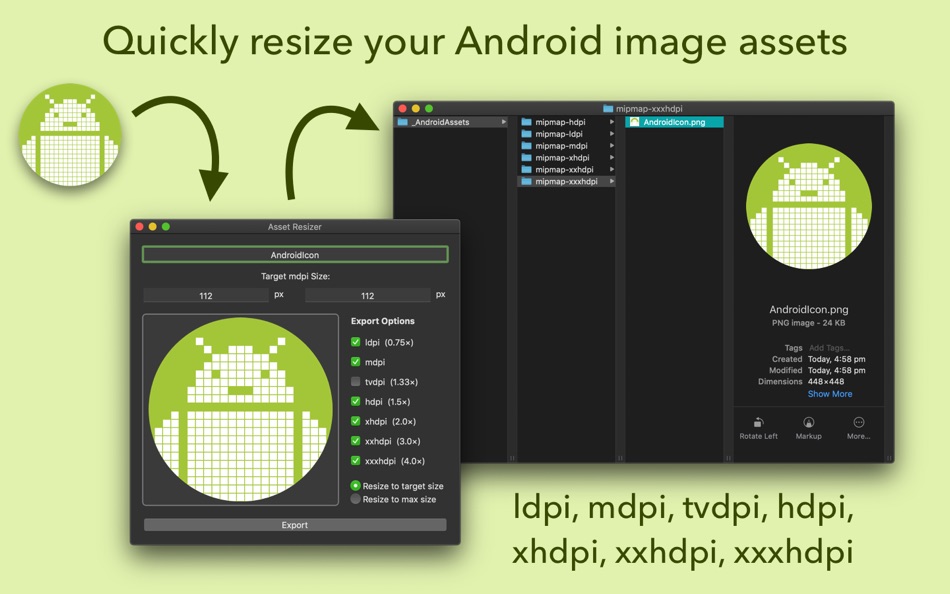
Asset Resizer quickly scales your Android app artwork to the targeted resolution sizes (ldpi, tvdpi, mdpi, hdpi, xhdpi, xxhdpi, xxxhpi).
To use, simply drop in an image asset that is the correct size for (or larger than) your largest desired export size and then hit export. The image will be resized to all chosen resolutions and saved in folders with the corresponding resolution scale names (mdpi, hdpi, etc.).
Scaling is based on the width and height values you assign the mdpi (standard) resolution, when you drop in an image these will automatically be set to the largest possible values for the resolutions you've selected in export settings.
For example, say you wish to scale an app icon image that at mdpi will be 48x48px and you wish to resize to all standard resolutions excluding tvdpi. First, set export settings to have checked all except tvdpi, then drag in your image. If the image is too small the values for mdpi will be set lower than 48x48px meaning you must either obtain higher resolution artwork or change your export targets. If the image is larger than required the width and height values will be higher and you will need to manually lower them to 48x48px to ensure correct resizing when exported. Once completed, exporting will in this case produce six folders all named according to resolution (ldpi, mdpi, hdpi, xhdpi, xxhdpi, xxxhpi), containing images at 36x36px, 48x48px, 72x72px, 96x96px, 144x144px and 192x192px.
螢幕擷取畫面
價錢
- 今天: $2.99
- 最小值: $1.99
- 最大值: $2.99
追蹤票價
開發人員
- Armchair Engineering
- 平台: Android 應用程式 (2) iOS 應用程式 (66) iOS 遊戲 (3) macOS 應用程式 (24) macOS 遊戲 (1)
- 清單: 2 + 1
- 點數: 17 + 11,961 ¡
- 排名: 0
- 評測: 0
- 折扣: 0
- 影片: 1
- RSS: 訂閱
點數
0 ☹️
排名
0 ☹️
清單
0 ☹️
評測
成為第一個評論 🌟
其他資訊
- 版本: 1.2.3
- 類別 :
macOS 應用程式›工具 - OS:
macOS,macOS 10.13 以上版本 - 大小:
171 Kb - 支援的語言 :
English - 內容分級:
4+ - Mac App Store 評分:
0 - 發佈日期:
- 發行日期:
聯絡人
 https://armchairengineering.comAsset Resizer for Android Devs 縮短網址: 已複製!
- 🌟 分享
- Mac App Store
你可能還喜歡
-
- GenIcon: Asset Resizer
- macOS 應用程式: 工具 由: Logan Voss
- * 免費
- 清單: 0 + 0 排名: 0 評測: 0
- 點數: 0 + 0 版本: 1.2 GenIcon makes it easy to produce icon assets for iOS, macOS, and watchOS. Simply drag and drop your 1024x1024 icon into the drop zone, select the platform you're building for, and ... ⥯
-
- Asset Catalog Creator
- macOS 應用程式: 工具 由: BRIDGETECH SOLUTIONS LIMITED
- * 免費
- 清單: 2 + 1 排名: 0 評測: 0
- 點數: 0 + 0 版本: 3.13 Asset Catalog Creator takes any image & turns it into a complete & ready-to-use app icon. It supports every type of icon you'll ever need for any of Apple's platforms; iOS, iPadOS, ... ⥯
-
- Asset Tools
- macOS 應用程式: 工具 由: Suayip Tavus
- 免費
- 清單: 0 + 0 排名: 0 評測: 0
- 點數: 0 + 0 版本: 1.0 Asset tools takes any image and creates a full set of icons, ios icons or pretty much any other type of image that you ll need to make an app on any of Apple and Android platforms. ... ⥯
-
- Resizer
- macOS 應用程式: 工具 由: Bonobo Labs
- 免費
- 清單: 0 + 1 排名: 0 評測: 0
- 點數: 3 + 0 版本: 1.4 Formerly Unretina / Unretiner, this is the original, and most popular resize app for developers! (Name changed at Apple's request). Develop iOS apps? Easily resize your @2x or -hd ... ⥯
-
- Asset Exporter
- macOS 應用程式: 工具 由: Aryaman Sharda
- 免費
- 清單: 0 + 1 排名: 0 評測: 0
- 點數: 5 + 0 版本: 1.0 Introducing the ultimate tool for macOS and iOS developers looking to streamline their workflow and simplify the process of creating app assets. Our app allows you to easily generate ... ⥯
-
- Asset Generator
- macOS 應用程式: 工具 由: hyeonsu jeong
- * 免費
- 清單: 0 + 0 排名: 0 評測: 0
- 點數: 0 + 0 版本: 1.0.0 Image Generator: Game Item Design Create your unique game items quickly and easily! Key Features: AI-powered image generation: Create high-quality item images in various styles from ... ⥯
-
- App Icon Resizer X
- macOS 應用程式: 工具 由: Di Nerd Apps LLC
- * 免費
- 清單: 0 + 0 排名: 0 評測: 0
- 點數: 0 + 0 版本: 3 Elevate your app's visual appeal and streamline your design workflow with Icon Resizer - the ultimate tool for macOS, iOS, and iMessage sticker app developers. Our meticulously ... ⥯
-
- Window Resizer for Safari
- macOS 應用程式: 工具 由: Alfredo Grassau
- $2.99
- 清單: 1 + 0 排名: 0 評測: 0
- 點數: 0 + 0 版本: 1.0.33 Window Resizer for Safari is a must-have browser extension for web designers, developers, and design enthusiasts alike. With a single click, simulate how your website or application ... ⥯
-
- Simple Icon Resizer
- macOS 應用程式: 工具 由: Omer UCEL
- 免費
- 清單: 0 + 0 排名: 0 評測: 0
- 點數: 0 + 0 版本: 1.0 Simple Icon Resizer can handle 1024x1024 or 2048x2048 px images and generate app icon sets with precision. Whether you're designing for macOS, iOS devices, or Apple Watch, we've got ... ⥯
-
- App Icon Resizer (AIR)
- macOS 應用程式: 工具 由: iReka Soft
- 免費
- 清單: 1 + 0 排名: 0 評測: 0
- 點數: 0 + 0 版本: 1.6 One of the essential elements for creating iOS app; to resize icon app from iTunes Connect app 1024px to multiple sizes of images for Xcode use. # Works with Xcode 9 ( 2017 - 2018 ) ... ⥯
-
- Icon Resizer Tool for xCode
- macOS 應用程式: 工具 由: Kirill Aust
- 免費
- 清單: 1 + 0 排名: 0 評測: 0
- 點數: 5 + 0 版本: 1.1.5 Icon Resizer Tool will quickly prepare icons of all required sizes for further export in xcode Supported platforms for icon: - macOS - iOS - iOS + iPad OS - watchOS How to use: 1. Drag ⥯
- 全新
- IconSync: Icon Resizer & Sync
- macOS 應用程式: 工具 由: HAKAN OZGER
- $4.99
- 清單: 0 + 0 排名: 0 評測: 0
- 點數: 0 + 0 版本: 1.0 Stop wasting time with web converters and manual file management. IconSync is the native macOS utility designed to resize and synchronize app icons for professional developers. Simply ... ⥯
-
- Simple Image Resizer Instantly
- macOS 應用程式: 工具 由: li bin
- $1.99
- 清單: 0 + 0 排名: 0 評測: 0
- 點數: 0 + 0 版本: 1.1 Image Resizer is the simplest way to batch resize images on your Mac built for speed, clarity, and privacy. Drag your images into the window, choose Pixels or Percent, optionally lock ... ⥯
-
- Icon Maker (Asset Catalog for App Store Icons) for Mac OS X
- macOS 應用程式: 工具 由: Nirmala T V
- 免費
- 清單: 1 + 0 排名: 0 評測: 0
- 點數: 0 + 0 版本: 1.5 Easy way to resize iOS, OS X, Android, Watch App icons and Asset Catalogs in just two clicks. Features: - iOS & Android App Icons - OS X App - Watch App - Custom size Icons Drag and ... ⥯