
| Nhà phát triển: | Ron DORN (3) | ||
| Giá bán: | Miễn phí | ||
| Xếp hạng: | 0 | ||
| Đánh giá: | 0 Viết đánh giá | ||
| Danh sách: | 0 + 0 | ||
| Điểm: | 1 + 0 ¡ | ||
| Mac App Store | |||
Mô tả

Introduction
CiPol (Continuous Integration Poller) is a straightforward program designed to assist you in monitoring your Jenkins builds. This software is open-source and freely available under the GPL license.
Currently, the Jenkins servers at my company effectively notify developers who check in code if their code has caused an issue that disrupted the build process. However, if you are not the developer who checked in the code but still need to be informed about any issues, you may not notice them for some time. This tool monitors selected Jenkins builds at a polling interval of your choice and promptly informs you of any changes.
Setting Up CiPol
Server Setup
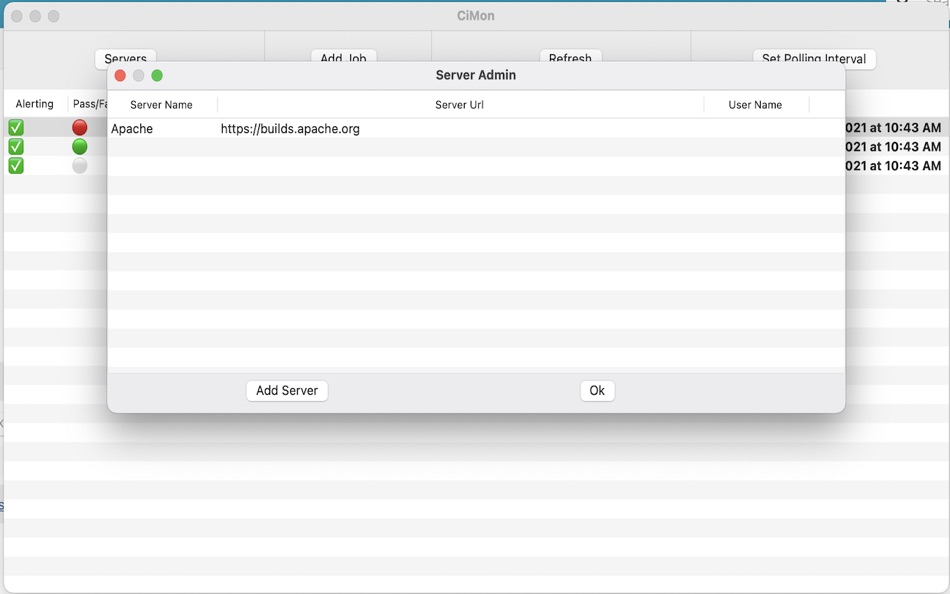
To begin, you need to define a Jenkins server. Click the ‘Servers’ button on the main window to open the Server Admin screen. From there, click the ‘Add Servers’ button.
In this section, you can select any ‘Server Name’ of your preference. The URL should be formatted as “https://myjenkinsServer/mycompany.net”. If you have a specific subdirectory you want to scan, you can add it here, but it’s not mandatory.
Username and API Token are optional. If your server doesn’t require authentication to view jobs, you can leave these fields blank. However, if authentication is necessary, you must use an API Token issued by your Jenkins server. All tokens are securely stored in your Mac OS keychain. To obtain an API Token from your Jenkins server, navigate to your user settings and then go to Configure. You should find an API Token section where you can generate a token.
To modify an entry, simply double-click on a server line and make the necessary changes.
To delete an entry, right-click on it and select the “Delete” option.
Job Setup
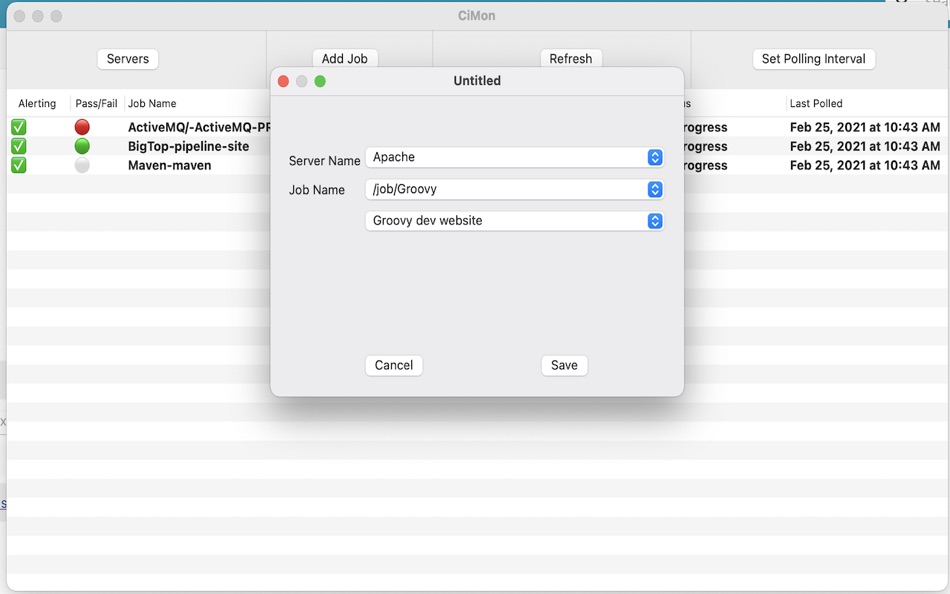
Once a server is set up, you can proceed to set up a job. To do this, click on the “Add Job” button. This will open two pull-down menus. For the server menu, select one of the servers you have just configured. This will populate the job menu with available choices that have been scanned from your server.
If a choice is represented as “/job/{job name}”, it indicates that it is a folder rather than a direct job. When you select one of these entries, a new pull-down menu will appear, displaying the job within that folder. Up to four menu levels are supported. Once you have chosen the job you wish to monitor, click on the “Save” button.
The menu will only display folders and jobs that have passed or failed tests. If a test is disabled, it will not be included in the menu.
Main Screen
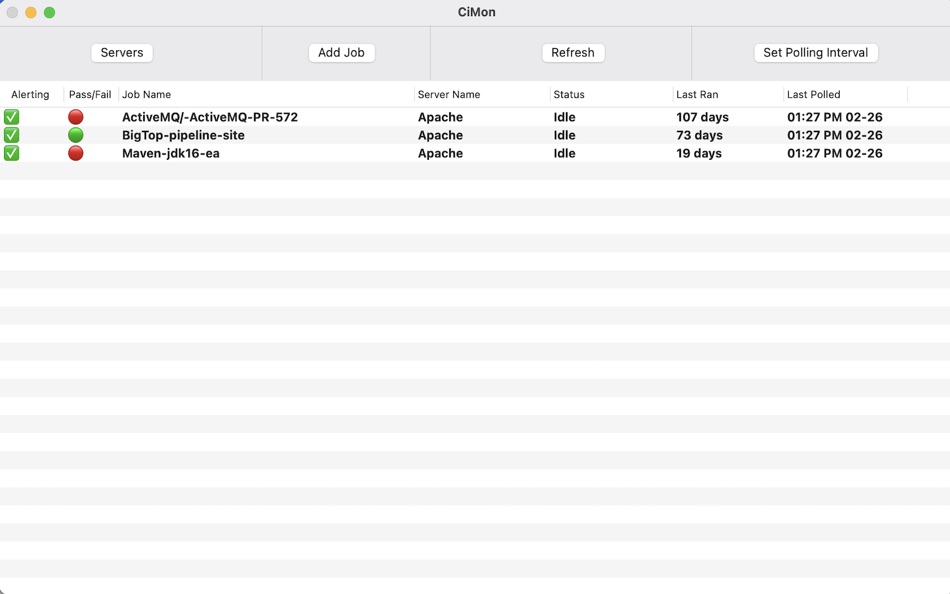
The main screen offers several features:
- Double-clicking on any job will take you to that job on your Jenkins server in your preferred browser.
- Clicking the “Refresh” button will immediately update all job data displayed.
- Clicking the “Polling Interval” button allows you to adjust the frequency of automatic data polling from the Jenkins servers and refreshing. The default setting is 10 minutes.
- Right-clicking on any job will enable you to delete it.
- Clicking the “Monitoring” checkbox in the leftmost column will toggle the monitoring status. When monitoring is off, you won’t receive alerts when the job status changes. Additionally, the icon in the tray bar will remain unaffected by the test outcome when monitoring is disabled.
Privacy Policy
This program does not collect any data of any kind. The only outgoing network traffic generated by this program is to the Jenkins servers that you have configured. All notifications are handled locally.
Ad
Ảnh chụp màn hình
Giá bán
- Hôm nay: Miễn phí
- Tối thiểu: Miễn phí
- Tối đa: Miễn phí
Theo dõi giá
Ad
Nhà phát triển
- Ron DORN
- Nền tảng: iOS Ứng dụng (2) macOS Ứng dụng (1)
- Danh sách: 0 + 0
- Điểm: 1 + 18 ¡
- Xếp hạng: 0
- Đánh giá: 0
- Giảm giá: 0
- Video: 0
- RSS: Đăng ký
Điểm
-

- 3,463 Dragon
- +1

Xếp hạng
0 ☹️
Danh sách
0 ☹️
- CiPol
Đánh giá
Hãy là người đầu tiên đánh giá 🌟
Thông tin bổ sung
- Phiên bản: 1.16
- Danh mục:
macOS Ứng dụng›Công cụ - HĐH:
macOS,macOS 10.14 trở lên - Kích thước:
3 Mb - Ngôn ngữ được hỗ trợ:
English - Xếp hạng nội dung:
4+ - Mac App Store Xêp hạng:
0 - Cập nhật:
- Ngày phát hành:
Danh bạ
- Trang web:
 https://github.com/rondorn/CiPol
CiPol URL ngắn: Đã sao chép!- 🌟 Chia sẻ
- Mac App Store
Bạn cũng có thể thích
-
- CI Demon
- macOS Ứng dụng: Công cụ Bởi: Oscar Franco
- Miễn phí
- Danh sách: 0 + 2 Xếp hạng: 0 Đánh giá: 0
- Điểm: 6 + 0 Phiên bản: 3.0.27 CI Demon is macOS menu bar app that aggregates information and notifies you when your CI builds or deployments are broken (or restored), it shows you all the relevant information in a ... ⥯
-
- Actioneer - Command your CI
- macOS Ứng dụng: Công cụ Bởi: Space In Box
- Miễn phí
- Danh sách: 0 + 0 Xếp hạng: 0 Đánh giá: 0
- Điểm: 0 + 0 Phiên bản: 1.2 Actioneer a lightweight macOS app for developers and DevOps engineers who want fast, reliable access to GitHub Actions from the desktop. Key features - Browse your GitHub repositories ... ⥯
-
- Modbus RTU to TCP
- macOS Ứng dụng: Công cụ Bởi: Nor Ci
- Miễn phí
- Danh sách: 0 + 0 Xếp hạng: 0 Đánh giá: 0
- Điểm: 0 + 0 Phiên bản: 1.0 This application reads Modbus RTU/Serial device data and publishes it as Modbus TCP Server. ⥯
-
- OctoSpace
- macOS Ứng dụng: Công cụ Bởi: Pavel Makhov
- $4.99
- Danh sách: 0 + 2 Xếp hạng: 0 Đánh giá: 0
- Điểm: 2 + 0 Phiên bản: 1.8 With this app, you'll be able to quickly access GitHub's pull requests, issues, and repositories of any organization you're part of. Key Features: - easy setup - just generate an ... ⥯
-
- CCMenu
- macOS Ứng dụng: Công cụ Bởi: ERIK DOERNENBURG
- Miễn phí
- Danh sách: 0 + 0 Xếp hạng: 0 Đánh giá: 0
- Điểm: 1 + 0 Phiên bản: 27.1 CCMenu shows the status of builds on CI/CD servers in the menu bar. It started as part of the CruiseControl project that built the first CI server. - Get a summary of the status of all ⥯
-
- CIcada Monitor for GitLab
- macOS Ứng dụng: Công cụ Bởi: Poul Nielsen
- $0.99
- Danh sách: 0 + 0 Xếp hạng: 0 Đánh giá: 0
- Điểm: 0 + 0 Phiên bản: 1.0.24 CIcada is a minimal GitLab CI monitor that lives in your Mac s menu bar. Live updates on your GitLab CI builds System notifications for successes and failures Works with both light and ⥯
-
- BrowserStack Accessibility
- macOS Ứng dụng: Công cụ Bởi: Browserstack Inc
- Miễn phí
- Danh sách: 0 + 0 Xếp hạng: 0 Đánh giá: 0
- Điểm: 0 + 0 Phiên bản: 1.0.0 Automate accessibility compliance on Safari. Detect issues 8X faster with Spectra™ & AI. Test using screen readers on real devices. BrowserStack offers an all-in-one Accessibility ... ⥯
-
- BitBot
- macOS Ứng dụng: Công cụ Bởi: Igor Igor
- Miễn phí
- Danh sách: 0 + 0 Xếp hạng: 0 Đánh giá: 0
- Điểm: 0 + 0 Phiên bản: 1.3.0 BitBot is unofficial Bitrise CI client for macOS. BitBot adds lots of comfortable features we lack in day to day use: - controlling multiple accounts - build status push notifications ... ⥯
-
- Simple Static Site
- macOS Ứng dụng: Công cụ Bởi: Drew Hoffman
- $9.99
- Danh sách: 0 + 0 Xếp hạng: 0 Đánh giá: 0
- Điểm: 0 + 0 Phiên bản: 1.0.5 This app is designed to be used in conjunction with your AWS account, and will not work without an IAM key that has s3 permissions, and an s3 bucket configured to host web pages. If ... ⥯
-
- Glance Menubar for GitLab
- macOS Ứng dụng: Công cụ Bởi: Julian Beck
- $2.99
- Danh sách: 0 + 0 Xếp hạng: 0 Đánh giá: 0
- Điểm: 0 + 0 Phiên bản: 1.5 Introducing Glance for GitLab, the ultimate menu bar app that streamlines your GitLab experience. With Glance, you can: - Easily access your favorite projects for maximum productivity ... ⥯
-
- Rails New
- macOS Ứng dụng: Công cụ Bởi: Phantom Particle
- Miễn phí
- Danh sách: 0 + 0 Xếp hạng: 0 Đánh giá: 0
- Điểm: 0 + 0 Phiên bản: 1.0 Rails New is a macOS app that helps you craft the perfect rails new command for your next project. Whether you're building a full-stack application, an API-only backend, or a minimal ... ⥯
-
- CleanRoom
- macOS Ứng dụng: Công cụ Bởi: Krueger Systems, Inc.
- $9.99
- Danh sách: 0 + 0 Xếp hạng: 0 Đánh giá: 0
- Điểm: 0 + 0 Phiên bản: 1.0 Spin up real macOS virtual machines on your Apple silicon Mac in minutes. CleanRoom makes creating a clean, disposable Mac as easy as picking a version, clicking Create, and pressing ... ⥯
-
- Universal Data Viewer: UDV
- macOS Ứng dụng: Công cụ Bởi: Pierre Stanislas
- $2.99
- Danh sách: 0 + 0 Xếp hạng: 0 Đánh giá: 0
- Điểm: 0 + 0 Phiên bản: 1.0 UDV is the essential tool for developer, analyst, and anyone who work with data file. Whether you need to inspect JSON response, explore XML configuration, or analyze CSV export, UDV ... ⥯
-
- GitPilot
- macOS Ứng dụng: Công cụ Bởi: Eduardo dos santos
- Miễn phí
- Danh sách: 0 + 0 Xếp hạng: 0 Đánh giá: 0
- Điểm: 0 + 0 Phiên bản: 1.0 GitPilot is a powerful menu bar app that monitors your Git repositories and automatically runs builds when new commits are detected. Perfect for developers who want to automate their ... ⥯