
Đã lưu
Chọn tên sẽ hiển thị trong menu Đã lưu của bạn.
Làm xong!
| Nhà phát triển: | John Bretcher (2) | ||
| Giá bán: | * Miễn phí | ||
| Đánh giá: | 4,750 | ||
| Xếp hạng: | 0 | ||
| Bình luận: | 0 Đăng bình luận | ||
| Danh sách: | 0 + 0 | ||
| Điểm: | 0 + 0 ¡ | ||
| +1 Điểm | |||
Mô tả

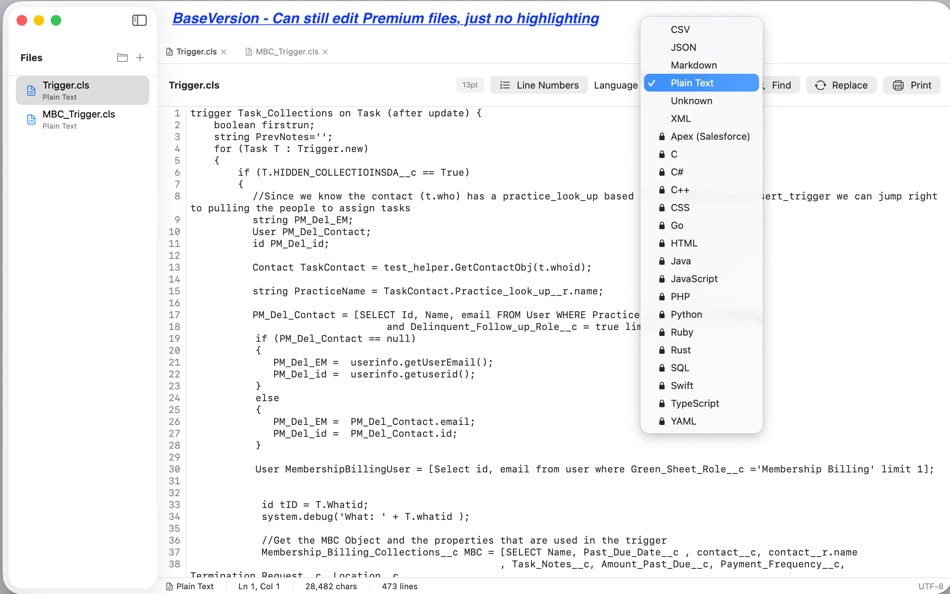
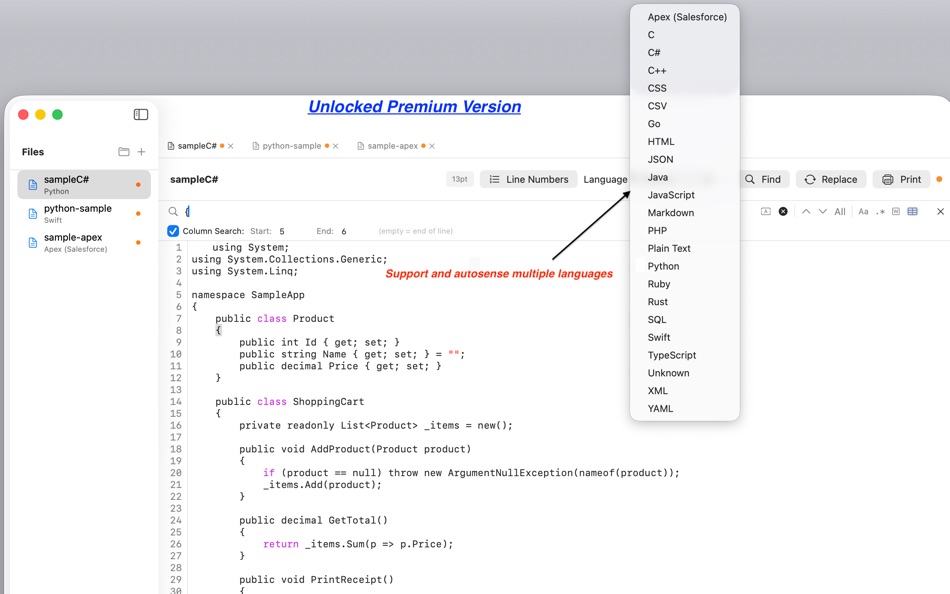
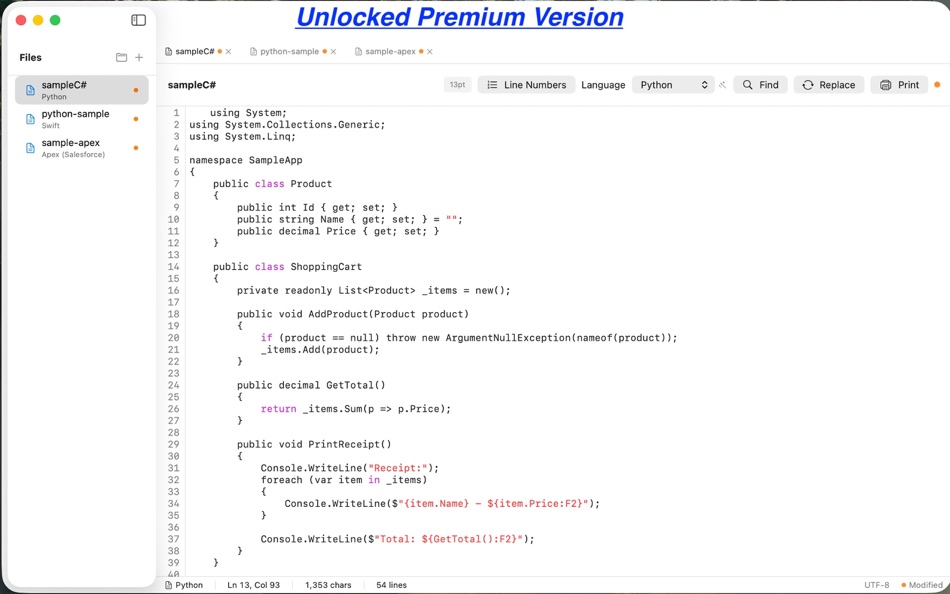
Clarity Code is a native macOS code editor designed for developers who value clarity, speed, and simplicity. Whether you're writing Swift, Python, JavaScript, C#, or any of 20+ supported languages, Clarity Code provides intelligent syntax highlighting and smart language detection to keep you focused on what matters: your code.
INTELLIGENT LANGUAGE DETECTION
Paste code and watch Clarity Code automatically detect the language. Advanced content analysis recognizes patterns from Swift to Salesforce Apex, ensuring accurate syntax highlighting every time.
FREE TIER - GET STARTED TODAY
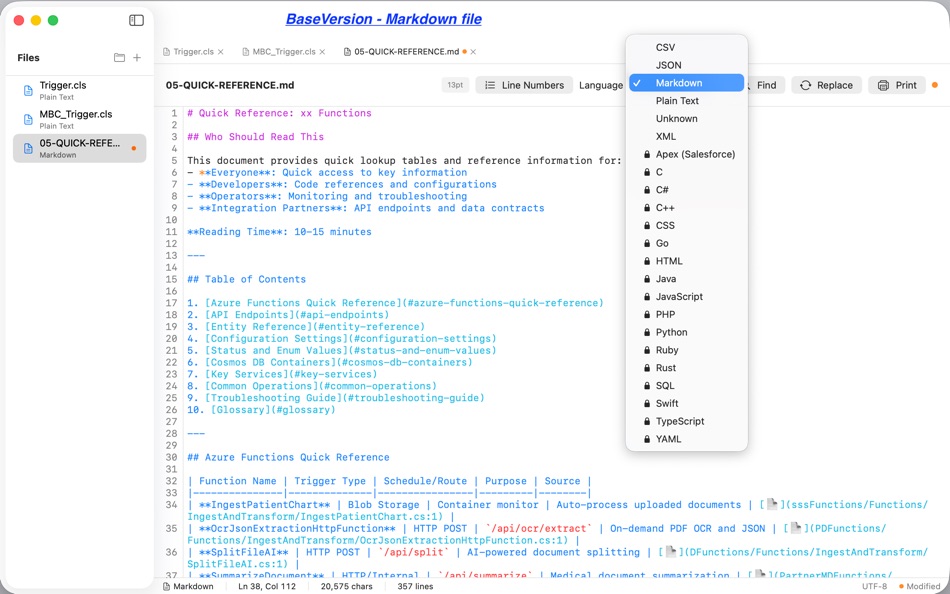
• Markdown editing with live formatting
• JSON and XML with structure highlighting
• CSV file editing
• Plain text editing
• Unlimited files and projects
• Save, open, and print documents
• Full keyboard shortcuts (Cmd+N, Cmd+O, Cmd+S, Cmd+P)
PREMIUM - UNLOCK FULL POWER
Upgrade once to unlock professional features forever:
20+ Programming Languages:
• Swift, Python, JavaScript, TypeScript
• Java, C#, C, C++
• Go, Rust, Ruby, PHP
• Salesforce Apex (classes and triggers)
• SQL, HTML, CSS
• And more!
Developer Tools:
• Intelligent code completion
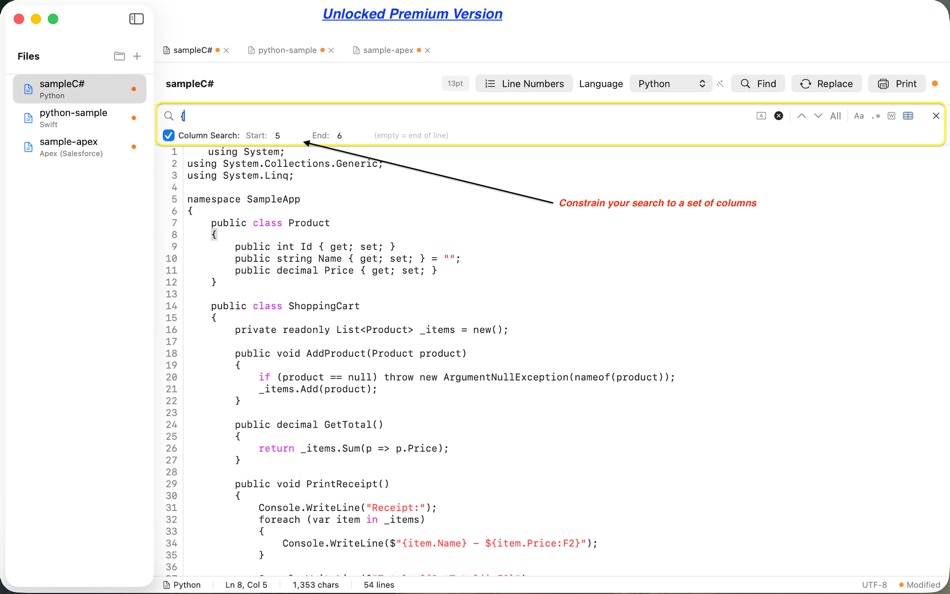
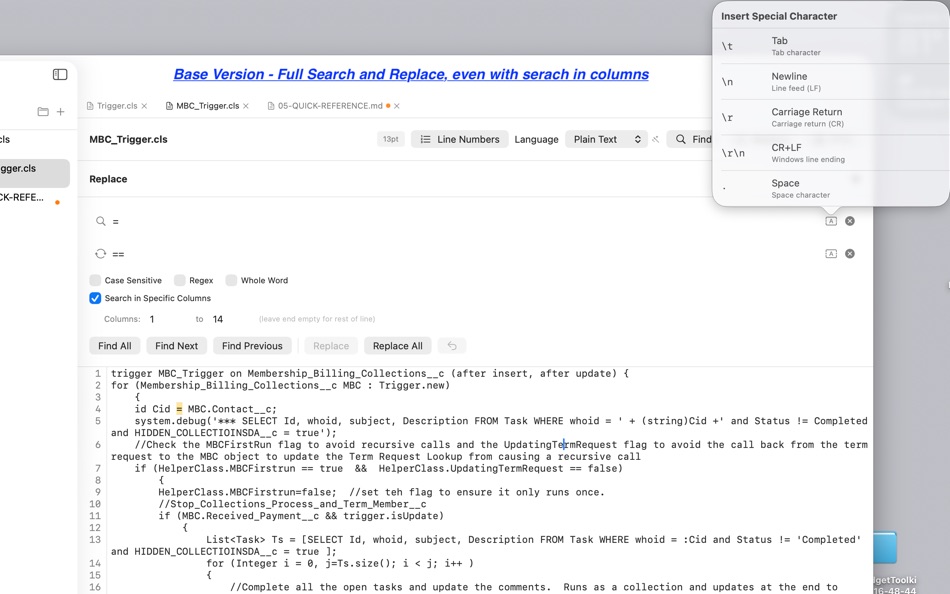
• Find and replace with regex support
• Professional syntax highlighting
• Print with preserved formatting
• Monospaced font with line numbers
• Real-time language detection
DESIGNED FOR macOS
• Native NSTextView for smooth scrolling
• Full keyboard shortcut support
• System-level undo/redo
• Standard macOS print dialogs
• Retina-optimized interface
• Light and dark mode support
PERFECT FOR:
• Learning to code in multiple languages
• Quick edits without heavy IDEs
• Reviewing code from colleagues
• Salesforce developers (Apex support!)
• Web developers (HTML, CSS, JavaScript)
• Data scientists (Python, SQL, CSV)
• Students and educators
• Anyone who writes code
PREMIUM FEATURES IN DETAIL
Advanced Syntax Highlighting: Over 20 languages with carefully crafted color schemes that highlight keywords, strings, comments, functions, and more.
Auto Language Detection: Paste any code snippet and watch Clarity Code analyze the content to determine the language automatically. No more manual selection needed.
Code Completion: Context-aware suggestions for keywords, functions, and common patterns in all supported languages. Boost your productivity with intelligent autocomplete.
Find and Replace: Powerful search with support for case-sensitive matching, whole word matching, and regular expressions.
Salesforce Apex Support: First-class support for Salesforce developers with .cls and .trigger file recognition, SOQL highlighting, and Apex-specific code completion.
FILE MANAGEMENT
• Open multiple files simultaneously
• Sidebar file organization
• Save files with Cmd+S
• Context menu actions
• File modification indicators
• UTF-8, ASCII, and Latin-1 encoding support
KEYBOARD SHORTCUTS
Cmd+N - New File
Cmd+O - Open File
Cmd+S - Save File
Cmd+P - Print
Cmd+F - Find (Premium)
Cmd+Z - Undo/Redo
PERFORMANCE AND RELIABILITY
Built with Swift and native macOS frameworks for exceptional performance. No Electron, no web wrappers - just pure native code that respects your Mac's resources.
ONE-TIME PURCHASE
No subscription. Pay once, own forever. Premium features unlock across all your Macs via Family Sharing.
PRIVACY FIRST
Your code never leaves your Mac. No cloud sync, no data collection, no analytics. What you write is yours alone.
Start coding smarter today with Clarity Code - where clarity meets capability.
Ảnh chụp màn hình

Ad
Lịch sử giá
-
* Trong ứng dụng mua hàng - Giá hiện tại: Miễn phí
- Tối thiểu: Miễn phí
- Tối đa: Miễn phí
Theo dõi giá
Đánh giá AppAgg
4,750
Đánh giá AppAgg ước tính cho
Clarity Code Edit
4,750
Đánh giá cao hơn thường cho thấy tín hiệu mạnh hơn trên AppAgg.
Dựa trên: 🔥 độ phổ biến · ⭐ đánh giá của người dùng · 🕒 độ mới · 🏷️ ưu đãi · 🏬 dữ liệu cửa hàng · 👥 hoạt động cộng đồng
Được tính lại hằng ngày từ dữ liệu AppAgg mới nhất.
URL ngắn: Đã sao chép!
Thông tin bổ sung
- Ngày phát hành:
- Danh mục:
macOS Ứng dụng›Công cụ - HĐH:
macOS,macOS 26.1 trở lên - Kích thước:
3 Mb - Ngôn ngữ được hỗ trợ:
English - Xếp hạng nội dung:
4+ - Mac App Store Xêp hạng:
0
 https://codeedit.sonomaenterprises.com/index.html
Nhà phát triển
- John Bretcher
- Nền tảng: iOS Ứng dụng (1) macOS Ứng dụng (1)
- Danh sách: 0 + 0
- Điểm: 0 + 0 ¡
- Xếp hạng: 0
- Bình luận: 0
- Giảm giá: 0
- Video: 0
- RSS: Đăng ký
Danh sách (0)
0 ☹️
- Clarity Code Edit
Điểm (0)
0 ☹️
Xếp hạng (0)
0 ☹️
Bình luận (0)
Hãy là người đầu tiên nhận xét 🌟
«Clarity Code Edit». Nền tảng: macOS. Thể loại: Công cụ. Nhà phát triển: «John Bretcher». Bản phát hành đầu tiên: . Cập nhật lần cuối: . Giá hiện tại: miễn phí. Tiêu đề này chưa nhận được xếp hạng hoặc đánh giá trên AppAgg. Ngôn ngữ có sẵn: English. AppAgg theo dõi lịch sử giá, xếp hạng và phản hồi của người dùng cho «Clarity Code Edit». Theo dõi ưu đãi và cập nhật trong tương lai qua RSS. AppAgg không lưu trữ ứng dụng hoặc phân phối phần mềm. Tất cả các nhãn hiệu, logo và ảnh chụp màn hình đều thuộc về chủ sở hữu tương ứng.
Clarity Code Edit URL ngắn: Đã sao chép!- 🌟 Chia sẻ
- Mac App Store
Tương tự
-
- Code Runner for Python
- macOS Ứng dụng: Công cụ Bởi: Omer UCEL
- $0.99
- Danh sách: 0 + 1 0 0
- Điểm: 3 + 0 5K Phiên bản: 4.0 Code Runner for Python is your personal Python sandbox, perfect for learning, experimenting, and quickly testing code snippets wherever you are. Ditch the complex server setup for ... ⥯
-
- Code Meter: Claude Codex Usage
- macOS Ứng dụng: Công cụ Bởi: StreetCoding Ltd
- * Miễn phí
- Danh sách: 0 0 0
- Điểm: 0 + 0 5K Phiên bản: 1.4 You're deep in a session, things are flowing, then your requests start failing: quota refreshes in a few hours. Again. Code Meter lives in your menu bar and tracks your AI coding quota ⥯
-
- Code Cleaner
- macOS Ứng dụng: Công cụ Bởi: Andre Yonadam
- $1.99
- Danh sách: 0 0 0
- Điểm: 0 + 0 2K Phiên bản: 1.0 Clean your HTML, CSS and Javascript files with Code Cleaner! Also great for making minified HTML, CSS and Javascript files easier to read again! Clean your code at your command within ... ⥯
-
- Code Replay
- macOS Ứng dụng: Công cụ Bởi: Aryaman Sharda
- Miễn phí
- Danh sách: 0 + 2 0 0
- Điểm: 3 + 0 1K Phiên bản: 1.0 Code Replay is an innovative and powerful tool designed specifically for developers, presenters, and teachers. It enables you to record your coding session in Xcode for playback later. ⥯
-
- Code Peek+
- macOS Ứng dụng: Công cụ Bởi: Onder Kadagan
- * Miễn phí
- Danh sách: 0 0 0
- Điểm: 0 + 0 3K Phiên bản: 1.0.3 Code Peek+ adds syntax-aware Quick Look previews for developer files on macOS. Preview source files, Markdown, Jupyter notebooks, and tabular text directly in Finder without opening an ⥯
-
- Code for SQLite3
- macOS Ứng dụng: Công cụ Bởi: ZeeZide GmbH
- $13.99
- Danh sách: 0 0 0
- Điểm: 1 + 0 4K Phiên bản: 1.0.4 Code for SQLite3 is a little macOS application that accepts either SQLite3 database files or SQL source code, and generates Swift source code for them. This is done for two main use ... ⥯
-
- Code Signing
- macOS Ứng dụng: Công cụ Bởi: Sergii Kryvoblotskyi
- $1.99
- Danh sách: 0 0 0
- Điểm: 1 + 0 4K Phiên bản: 1.0.7 Code Signing is a developer tool that reads files' signing information and validates the signature. There is no more need to use command-line tools, parse the results, or read the ... ⥯
-
- Code Architect
- macOS Ứng dụng: Công cụ Bởi: KeoGlobal
- Miễn phí
- Danh sách: 0 0 0
- Điểm: 0 + 0 660 Phiên bản: 1.1 Code Architect is a Swift code navigation tool that helps developers understand and modify their codebase by providing a structured view of Swift files. It parses and displays the ... ⥯
-
- Code Merger AI Assistant
- macOS Ứng dụng: Công cụ Bởi: TidalAurum, LLC
- Miễn phí
- Danh sách: 0 0 0
- Điểm: 0 + 0 840 Phiên bản: 1.03 Swift File Merger - Streamline Your Code Organization Effortlessly combine multiple Swift files into a single, organized document for enhanced code review, sharing, and analysis. Key ... ⥯
-
- Clone in VS Code
- macOS Ứng dụng: Công cụ Bởi: Ahnaf Mahmud
- Miễn phí
- Danh sách: 0 + 1 0 0
- Điểm: 4 + 0 1K Phiên bản: 1.4.1 A Safari extension to clone any GitHub, GitLab or Bitbucket repository in Visual Studio Code with just one click. All you need is Visual Studio Code installed on your Mac for this ... ⥯
-
- CodeX: Code AI for Xcode
- macOS Ứng dụng: Công cụ Bởi: Ayesha Javeed
- * Miễn phí
- Danh sách: 0 0 0
- Điểm: 0 + 0 4K Phiên bản: 1.3 Your AI-Powered Xcode Companion This is a macOS app that supercharges Xcode with AI, featuring a Xcode Source Editor extension called code.ai and a desktop app with an AI assistant, ... ⥯
-
- Add Analytics Code
- macOS Ứng dụng: Công cụ Bởi: Rene Rosendahl
- $2.99
- Danh sách: 0 0 0
- Điểm: 0 + 0 2K Phiên bản: 1.2 Need to add analytics tracking, e.g. for Google Analytics, to a bunch of html files? We hear you! With this app, you can select files and then process them by adding a code snippet in ... ⥯
-
- PropertyList Edit
- macOS Ứng dụng: Công cụ Bởi: 盼军 崔
- $0.99
- Danh sách: 0 + 2 0 0
- Điểm: 9 + 0 7K Phiên bản: 2.1.0 This is a Plist (Property List) file Editor that supports two modes: Outline mode and Source Code mode. Why develop this app? Because macOS has many files in Plist (Property List) ... ⥯
-
- Anycode: Code Snippet to Image
- macOS Ứng dụng: Công cụ Bởi: 宏旭 朱
- Miễn phí
- Danh sách: 0 + 2 0 0
- Điểm: 10 + 0 1K Phiên bản: 0.7.0 Anycode is a document-based app that helps you manage your code snippets. - Supports syntax highlighting for Bash, C, C++, C#, Clojure, Dart, Go, Java, JavaScript, JSON, Kotlin, ... ⥯
Bạn cũng có thể thích
Đã xem gần đây
Cập nhật lần cuối:
Toán tử tìm kiếm bạn có thể sử dụng với AppAgg