ブックマーク
このブックマークのタイトルを入力してください。
ブックマークを保存しました
| 開発者: | Harrison Creative LLC (2) | ||
| 価格: | $19.99 新着 | ||
| スコア: | 1,360 ゴールド | ||
| ランキング: | 0 | ||
| コメント: | 0 コメントを投稿する | ||
| リスト: | 0 + 0 | ||
| ポイント: | 0 + 0 ¡ | ||
| +1 ポイント | |||
スクリーンショット





広告
説明

A mapping tool for your project's codebase
This codebase cartography tool will prepare your selected project's codebase into three coordinated spreadsheets — a Project Map, a Feature Map, and a Content Map — that together provide a complete picture of what your code does, how it's organized, and what your users see.
Key insights and metadata are captured automatically through in-depth analysis, and the Feature Map accepts your own manual annotations, so the maps grow smarter as you use them.
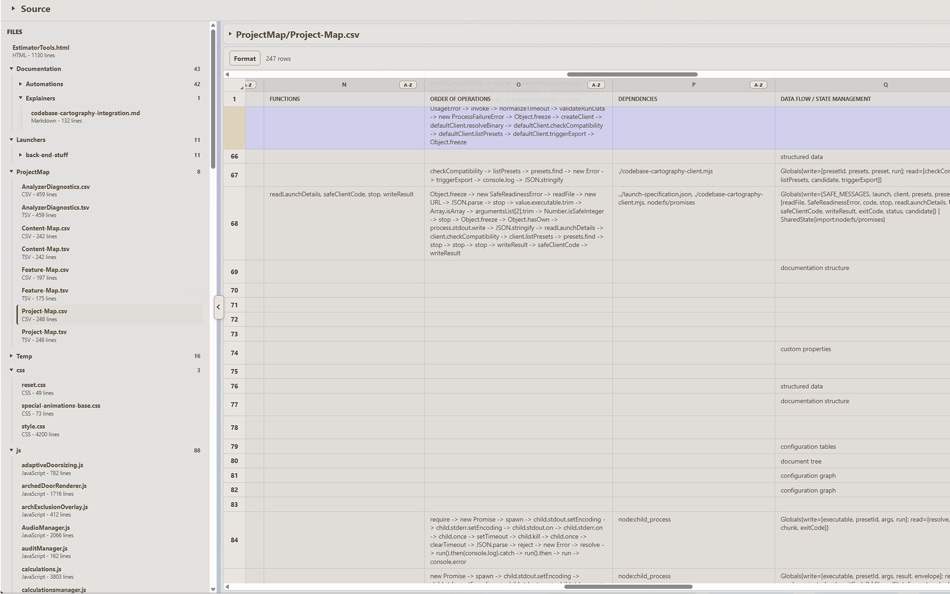
The codebase mapper scans your project's source folder and generates a detailed inventory of every file, script, and directory. Each row represents an item. Each column captures metadata about the file: its file type, size, dependencies, functions, data flow, complexity, and more.
For programming language scripts (such as Python, JavaScript, Rust, C#, and 20+ languages), the analyzers go deeper — it extracts function names, import chains, input/output operations, side-effects, and more. Additional settings can specify exclusions from the map, such that you're able to target only the files / folders that you want.
Use it to create a single-source-of-truth for your code project.
Excellent for : Code audits, architectural reviews, and tracking complexity over time.
Provide knowledge for AI-assisted vibe-coding development, and large-language-model (LLM) training.
Mapped Spreadsheets offer significant timesaving as your project evolves. Regenerate your maps often as you iterate, and diff against previous snapshots. Check for improvements, regressions, and targeted specificity.
Perfect For:
- Creating a single-source-of-truth for large codebases.
- Enterprise level documentation.
- Conducting code audits and technical assessments.
- Understanding project structure and dependencies.
- Tracking code metrics and complexity over time.
- A.I. training, use cases for large language models (LLMs).
Features:
- Folder / Files Structure Tree: Automatically plots all folders & Files.
- File Organization and categories: Identifies and categorizes scripts with specialty metrics.
- Code Analysis: Analyze scripts to track their functions, dependencies, complexity scores, data flow patterns, and more.
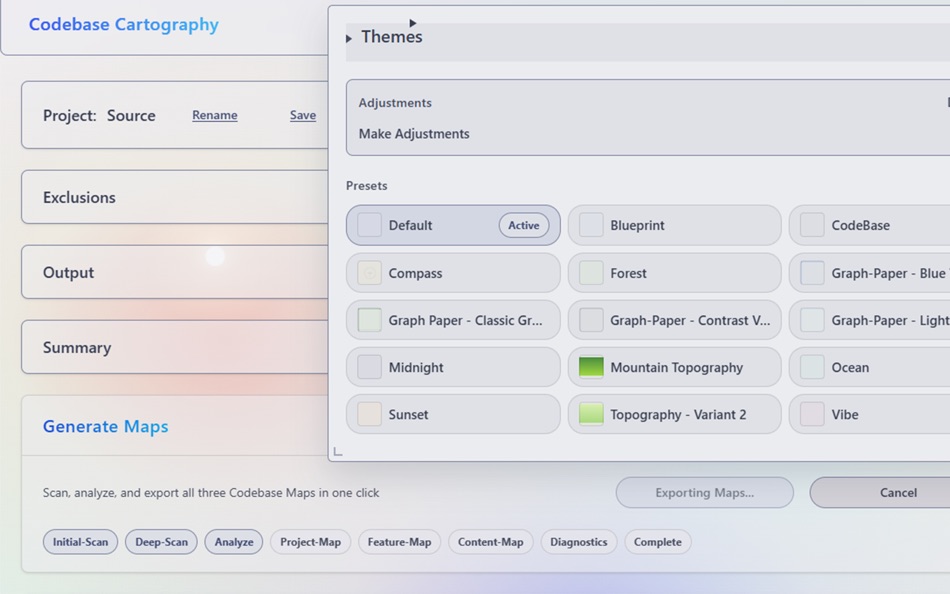
- Selective Scanning: Exclude specific paths or file types to focus on what matters most. There are options to exclude individual file types or folders containing special categories, such as behind-the-scenes .git files, License files, standalone builds, or other unnecessary files you might wish to exclude from the spreadsheet.
- Data Statistics: It populates rows, columns, and cells with detailed breakdowns of file types, sizes, and code metrics at a glance.
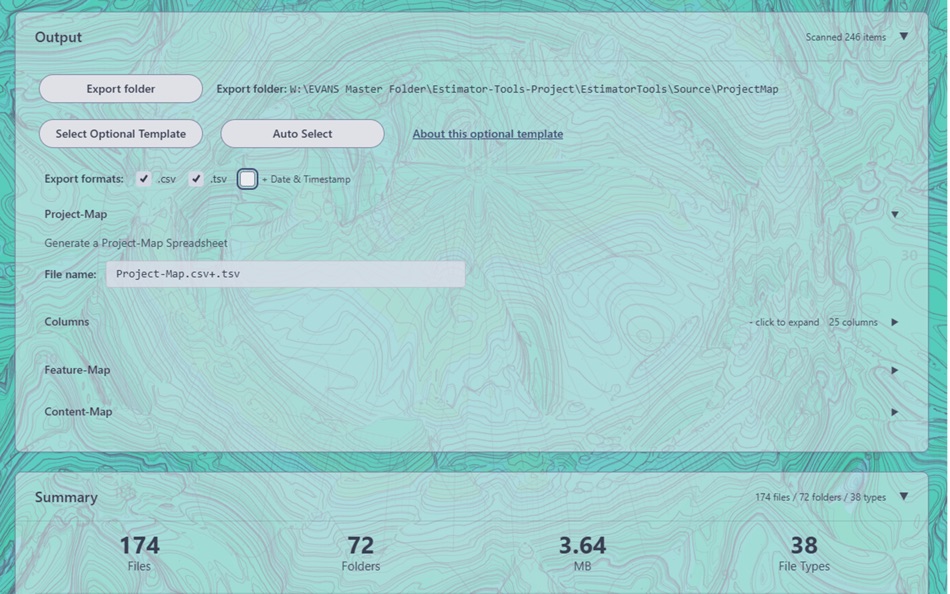
- Export Options: Export your project spreadsheet map in .csv (comma separated values), or .tsv (tabbed separated values) for ease of spreadsheet usage. The "Copy to Clipboard" button makes it easy to paste values directly into spreadsheet programs quickly.
- Export HTML Web Pages documenting your source code
- Additional Prompt Generator Tools for tailored vibecoding
How It Works:
1. Select a folder: Choose the project directory you want to analyze, or load a previously saved snapshot.
2. Configure exclusions: Optionally exclude specific folders or file types that you don't need to be included. Eliminates bloat or clutter.
3. Scan & analyze: The tool scans your entire project, analyzing code structure and extracting metadata.
4. Review results: Examine statistics, file type breakdowns.
5. Export: Generate spreadsheet files documenting your entire codebase structure.
価格履歴
- 現在の価格: $19.99
- 最小値: $19.99
- 最大値: $19.99
他のプラットフォーム (1)
| Codebase CartographyMac App Store現在のページ | $19.99 |
 | Codebase CartographyWindows Store | $19.99 |
リスト (0)
0
- Codebase Cartography
ポイント (0)
0
ランキング (0)
0
コメント (0) ¡
最初にコメントしてください
開発者
- Harrison Creative LLC
- フォロワー: 0
- プラットフォーム: macOS アプリ (1) Windows アプリ (1)
- セール: 0
- リスト: 0 + 0
- ポイント: 0 + 0 ¡
- ランキング: 0
- コメント: 0
- 動画: 0
- RSS: 購読する
新機能
- バージョン: 1.0.0
- 最終更新:
情報
- リリース日:
- カテゴリ:
macOS向けアプリ›開発ツール - オペレーティング システム:
macOS,macOS 10.15 以上 - サイズ:
51 Mb - サポートされる言語:
English - コンテンツのレーティング:
4+ - Mac App Store 評価: ¡
0 - ウェブサイト:
 https://codebasecartography.com/
AppAggスコア
1,360
AppAgg推定スコア:
Codebase Cartography
開発者: Harrison Creative LLC
1,360 ゴールド
スコアが高いほど、AppAgg上の各指標が良好な傾向にあります。
基準: 人気 · ユーザー評価 · 新しさ · セール · ストアデータ · コミュニティ活動
最新のAppAggデータに基づいて毎日再計算されます。
Webサイト用バッジ:  コピーしました!
概要
Codebase Cartography 短縮 URL: コピーしました!- Mac App Store
AppAggでは、Harrison Creative LLCが開発したアプリ「Codebase Cartography」の情報を確認できます。対応プラットフォーム:macOS。カテゴリ:開発ツール。 AppAggスコア:1,360(ゴールド)。 このアプリのAppAggポイント:確認済み 0、間接 0。 このアプリを含む公開リスト:0件。非公開リストに保存しているユーザー:0人。 このアプリには、AppAggユーザーからの評価はまだありません。 確認済みポイントは、ログインしたAppAggユーザーのストアへのアクセスを記録します。間接ポイントはストアのデータに基づきます。 2つの数字は、公開リストの数と、非公開リストに保存したユーザー数を表します。 このアプリの初回リリースはです。 このアプリの最終更新はです。 このアプリの現在の価格は$19.99です。 このアプリは次の言語に対応しています:English。 価格履歴を確認したり、アプリをリストに追加したり、開発者をフォローしたりできます。 このアプリの今後のセールや更新はRSS フィードで確認できます。 AppAggはこのアプリをホストまたは配布していません。 このアプリに関連する商標、ロゴ、スクリーンショットはすべて各権利者に帰属します。