
Lagrede
Velg navnet som skal vises i menyen Lagrede.
Ferdig!
| Utvikler: | Kang Teng-Chieh (1) | ||
| Pris: | Gratis | ||
| Vurdering: | 1,140 | ||
| Rangeringer: | 0 | ||
| Kommentarer: | 0 Legg inn kommentar | ||
| Lister: | 0 + 0 | ||
| Poeng: | 0 + 0 ¡ | ||
| +1 Poeng | |||
Beskrivelse

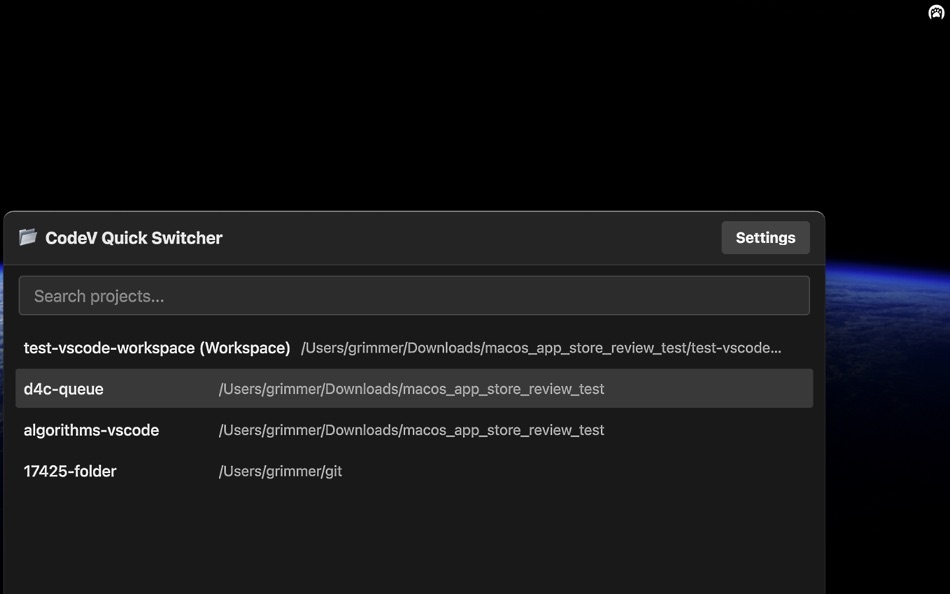
The primary usage is to press the shortcut (⌃+⌘+R) or click the CodeV icon on the menu bar to instantly launch the Quick Switcher, then select a target folder, workspace, or
recently opened file from the list to open it in VS Code or Cursor — even if the IDE is not running yet.
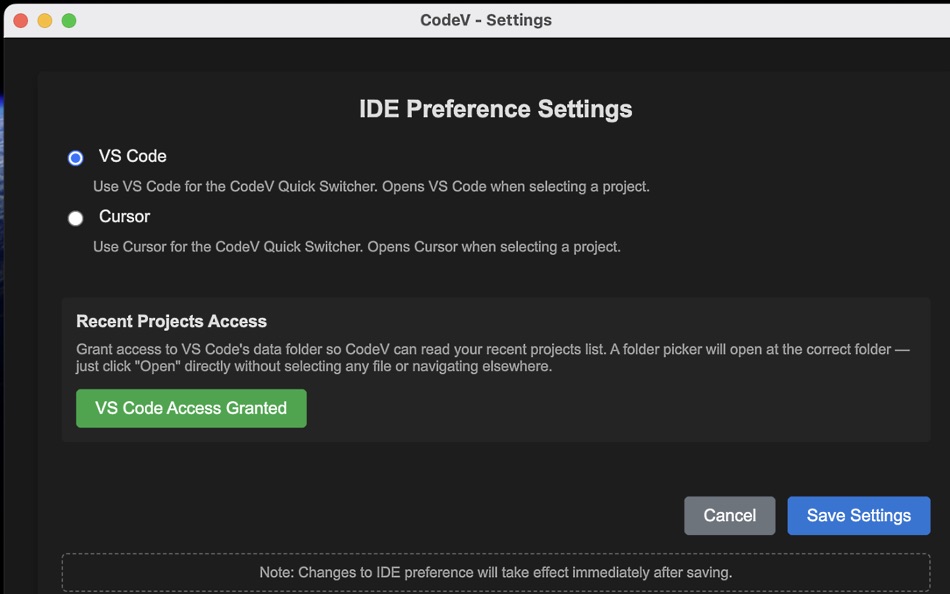
No extensions or command-line tools required. CodeV reads your IDE's recent projects data directly. For the Mac App Store version, you need to grant CodeV access to your IDE's
data folder via Settings → IDE Preference → Grant Access (a one-time setup).
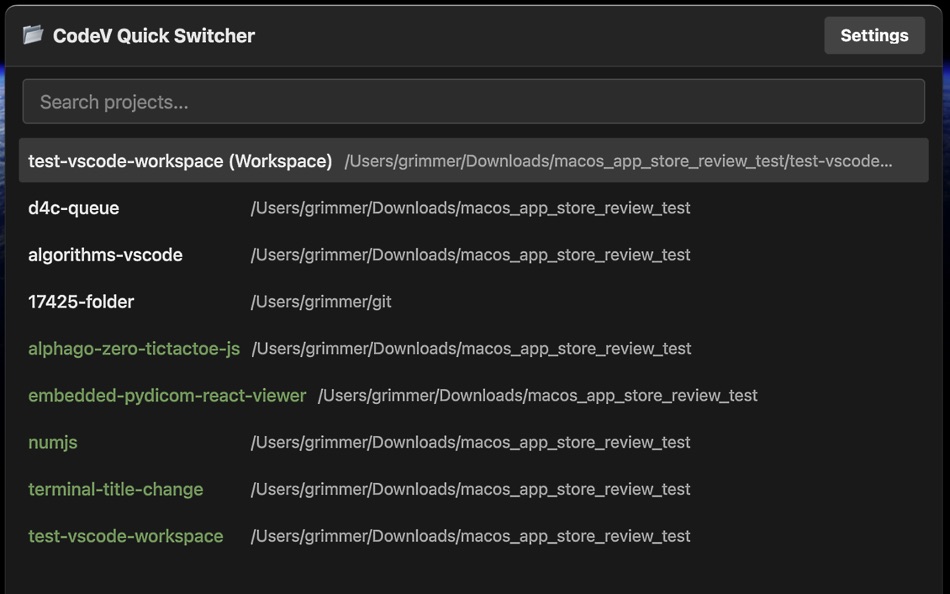
The selection list has two sources:
1. Recently opened items (shown as white items) — your latest VS Code or Cursor windows, including folders, workspaces, and recently opened files.
2. Working folder items (shown as green items) — first-level subfolders and workspace files found by scanning a folder you choose.
Features:
1. Spotlight-like quick open: use ⌃+⌘+R or the menu bar icon. Search and select an item to open or switch to it.
2. Supports VS Code and Cursor. Switch between them in Settings → IDE Preference.
3. Supports folders, VS Code workspace files, and recently opened files.
4. Remove items from the recent list by hovering and clicking "x".
5. (Optional) Scan a favorite working folder to populate the second part of the list. Click the "..." menu button in the Quick Switcher to set up.
6. (Optional) Built-in AI Assistant powered by Anthropic Claude API. Use your own API key to get code insights or chat. Trigger with ⌃+⌘+E (insight from clipboard) or ⌃+⌘+C
(chat mode). Configure via Settings → API Key Settings.
Three ways to quit CodeV: (a) open CodeV and click the quit button in the "..." menu, (b) right-click the CodeV menu bar icon and click Quit, (c) open CodeV and press ⌘+Q.
Skjermbilder

Ad
Prishistorie
- Gjeldende pris: Gratis
- Minimum: Gratis
- Maksimalt: Gratis
Spor priser
AppAgg-vurdering
1,140
Estimert AppAgg-vurdering for
CodeV - Quick Switcher
1,140 Bronse
Høyere vurderinger betyr vanligvis sterkere signaler på AppAgg.
Basert på: 🔥 popularitet · ⭐ brukervurderinger · 🕒 ferskhet · 🏷️ tilbud · 🏬 butikkdata · 👥 fellesskapsaktivitet
Beregnes på nytt hver dag med ferske AppAgg-data.
Kort nettadresse: Kopiert!
Dette er nytt
- Versjon: 1.0.33
- Sist oppdatert:
- - No longer requires VS Code extension — reads recent projects directly from VS Code/Cursor data
- Added support for recently opened files (not just folders/workspaces)
- Added Cursor IDE support alongside VS Code
- New IDE Preference Settings to switch between VS Code and Cursor
- Mac App Store sandbox compatible with folder access grant
- Bug fixes and performance improvements
Tilleggsinformasjon
- Utgivelsesdato:
- Kategori:
macOS Apper›Verktøy - OS:
macOS,macOS 12.0 og nyere - Størrelse:
84 Mb - Språk som støttes:
Afrikaans,Amharic,Arabic,Bengali,Bulgarian,Catalan,Chinese,Croatian,Czech,Danish,Dutch,English,Estonian,Finnish,French,German,Greek,Gujarati,Hebrew,Hindi,Hungarian,Indonesian,Italian,Japanese,Kannada,Korean,Latvian,Lithuanian,Malay,Malayalam,Marathi,Norwegian,Persian,Polish,Portuguese,Romanian,Russian,Serbian,Slovak,Slovenian,Spanish,Swahili,Swedish,Tamil,Telugu,Thai,Turkish,Ukrainian,Urdu,Vietnamese - Egnethet:
4+ - Mac App Store Vurdering:
0
Utvikler
- Kang Teng-Chieh
- Plattformer: macOS Apper (1)
- Lister: 0 + 0
- Poeng: 0 + 0 ¡
- Rangeringer: 0
- Kommentarer: 0
- Rabatter: 0
- Videoer: 0
- RSS: Abonner
Lister (0)
0 ☹️
- CodeV - Quick Switcher
Poeng (0)
0 ☹️
Rangeringer (0)
0 ☹️
Kommentarer (0)
Vær den første til å kommentere 🌟
Kort fortalt
CodeV - Quick Switcher Kort nettadresse: Kopiert!- 🌟 Dele
- Mac App Store
«CodeV - Quick Switcher». Plattform: macOS. Kategori: Verktøy. Utvikler: «Kang Teng-Chieh». Første utgivelse: . Siste oppdatering: . Gjeldende pris: gratis. Denne tittelen har ennå ikke mottatt vurderinger eller anmeldelser på AppAgg. Tilgjengelige språk: Afrikaans, Amharic, Arabic, Bengali, Bulgarian, Catalan, Chinese, Croatian, Czech, Danish, Dutch, English, Estonian, Finnish, French, German, Greek, Gujarati, Hebrew, Hindi, Hungarian, Indonesian, Italian, Japanese, Kannada, Korean, Latvian, Lithuanian, Malay, Malayalam, Marathi, Norwegian, Persian, Polish, Portuguese, Romanian, Russian, Serbian, Slovak, Slovenian, Spanish, Swahili, Swedish, Tamil, Telugu, Thai, Turkish, Ukrainian, Urdu, Vietnamese. AppAgg sporer prishistorikk, rangeringer og tilbakemeldinger fra brukere for «CodeV - Quick Switcher». Følg fremtidige rabatter og oppdateringer via RSS. AppAgg er ikke vert for applikasjoner eller distribuerer programvare. Alle varemerker, logoer og skjermbilder tilhører deres respektive eiere.
Lignende
-
- Code Runner for Python
- macOS Apper: Verktøy Av: Omer UCEL
- $0.99
- Lister: 0 + 1 0 0
- Poeng: 3 + 0 5K Versjon: 4.0 Code Runner for Python is your personal Python sandbox, perfect for learning, experimenting, and quickly testing code snippets wherever you are. Ditch the complex server setup for ... ⥯
-
- Code Meter: Claude Codex Usage
- macOS Apper: Verktøy Av: StreetCoding Ltd
- * Gratis
- Lister: 0 0 0
- Poeng: 0 + 0 5K Versjon: 1.4 You're deep in a session, things are flowing, then your requests start failing: quota refreshes in a few hours. Again. Code Meter lives in your menu bar and tracks your AI coding quota ⥯
-
- Code Cleaner
- macOS Apper: Verktøy Av: Andre Yonadam
- $1.99
- Lister: 0 0 0
- Poeng: 0 + 0 2K Versjon: 1.0 Clean your HTML, CSS and Javascript files with Code Cleaner! Also great for making minified HTML, CSS and Javascript files easier to read again! Clean your code at your command within ... ⥯
-
- Code Replay
- macOS Apper: Verktøy Av: Aryaman Sharda
- Gratis
- Lister: 0 + 2 0 0
- Poeng: 3 + 0 1K Versjon: 1.0 Code Replay is an innovative and powerful tool designed specifically for developers, presenters, and teachers. It enables you to record your coding session in Xcode for playback later. ⥯
-
- Code Peek+
- macOS Apper: Verktøy Av: Onder Kadagan
- * Gratis
- Lister: 0 0 0
- Poeng: 0 + 0 3K Versjon: 1.0.3 Code Peek+ adds syntax-aware Quick Look previews for developer files on macOS. Preview source files, Markdown, Jupyter notebooks, and tabular text directly in Finder without opening an ⥯
-
- Code Architect
- macOS Apper: Verktøy Av: KeoGlobal
- Gratis
- Lister: 0 0 0
- Poeng: 0 + 0 660 Versjon: 1.1 Code Architect is a Swift code navigation tool that helps developers understand and modify their codebase by providing a structured view of Swift files. It parses and displays the ... ⥯
-
- Code for SQLite3
- macOS Apper: Verktøy Av: ZeeZide GmbH
- $13.99
- Lister: 0 0 0
- Poeng: 1 + 0 4K Versjon: 1.0.4 Code for SQLite3 is a little macOS application that accepts either SQLite3 database files or SQL source code, and generates Swift source code for them. This is done for two main use ... ⥯
-
- Code Signing
- macOS Apper: Verktøy Av: Sergii Kryvoblotskyi
- $1.99
- Lister: 0 0 0
- Poeng: 1 + 0 4K Versjon: 1.0.7 Code Signing is a developer tool that reads files' signing information and validates the signature. There is no more need to use command-line tools, parse the results, or read the ... ⥯
-
- Quick Icon
- macOS Apper: Verktøy Av: Tawa Nicolas
- Gratis
- Lister: 1 0 0
- Poeng: 1 + 0 710 Versjon: 2.0 Quick Icon is a productivity tool that helps you resize your app icons from a single file to iOS or macOS the targets in Xcode! ⥯
-
- Quick Localizer
- macOS Apper: Verktøy Av: Michael Rowe
- $4.99
- Lister: 0 0 0
- Poeng: 0 + 0 3K Versjon: 2.0.1 Quick Localizer - Your One-Stop Solution for Multilingual Xcode Apps! Easily create and manage localization strings for your Xcode projects with our user-friendly macOS app. Load ... ⥯
-
- Quick Links and Turkish Chars
- macOS Apper: Verktøy Av: Eray Alparslan
- $0.99
- Lister: 0 0 0
- Poeng: 0 + 0 2K Versjon: 1.0 Quick Links and Turkish Chars app is a macOS app that runs in your menu bar. It does help you to copy turkish characters to clipboard when your current keyboard doesn't have that ... ⥯
-
- Code Merger AI Assistant
- macOS Apper: Verktøy Av: TidalAurum, LLC
- Gratis
- Lister: 0 0 0
- Poeng: 0 + 0 840 Versjon: 1.03 Swift File Merger - Streamline Your Code Organization Effortlessly combine multiple Swift files into a single, organized document for enhanced code review, sharing, and analysis. Key ... ⥯
-
- Quick Icons
- macOS Apper: Verktøy Av: Max Schlee
- $3.99
- Lister: 0 0 0
- Poeng: 0 + 0 6K Versjon: 1.25 Stop wasting time and money on multiple apps! Quick Icons is the #1 all-in-one solution that replaces 6 different tools with one powerful, easy-to-use app. Perfect for app developers, ... ⥯
-
- Clone in VS Code
- macOS Apper: Verktøy Av: Ahnaf Mahmud
- Gratis
- Lister: 0 + 1 0 0
- Poeng: 4 + 0 1K Versjon: 1.4.1 A Safari extension to clone any GitHub, GitLab or Bitbucket repository in Visual Studio Code with just one click. All you need is Visual Studio Code installed on your Mac for this ... ⥯