
| Desarrollador: | Patrik Tomas Chamelo (1) | ||
| Precio: | $2.99 | ||
| Clasificaciones: | 0 | ||
| Opiniones: | 0 Escribir una opinión | ||
| Listas: | 1 + 0 | ||
| Puntos: | 1 + 0 ¡ | ||
| Mac App Store | |||
Descripción
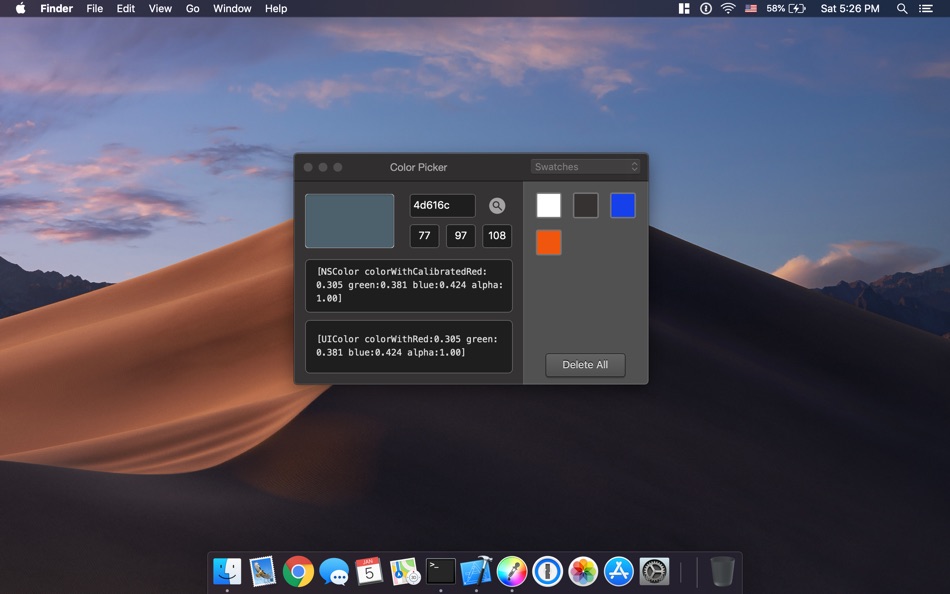
With Color Picker, you can choose any color from everywhere on your screen using the magnifier and selecting your desired pixel. Then a preview of the color, its Hexadecimal, RGB value, NSColor and UIColor is displayed.
You can copy the code with a single click, drag 'n drop or use the new shortcuts to paste it into your source code.
Color Picker has now become even better.
- With the new Menubar option, you can quickly access your recently copied or recently saved colors.
- Drag and drop your code from the application to any program you are working on. (e.g. Xcode)
Additionally, the app can read any HEX or RGB values that you might type and show you the corresponding color and code.
Last but not least, Color Picker gets you out of trouble remembering the colors you used, as it contains a library, where you can store the colors for any use in the future, simply by dragging the preview box to the library.
Especially for developers is now given the chance of Zero suppression, where they can remove redundant zeroes from the float numbers, as well as appending a semicolon in the source code.
Key Features:
- Touch bar integration
- Added menubar icon
- Added recently saved and copied colors
- Code is draggable to other apps (e.g. Xcode)
- HEX or RGB value showing in the magnifier
- Retina support
- Pick up any color using the new built-in magnifying glass tool
- Save as many colors in the library for future use.
- Copy the format you need for your source code (e.g. NSColor, UIColor, HEX, RGB)
Color Picker requires macOS 10.10 or later
Visit our website to contact us www.nscoding.co.uk for anything you may need or wonder!
Send your feature requests at: team@nscoding.co.uk
Capturas...


Novedades
- Versión: 1.6.5
- Actualizado:
- - Support for Catalina
NOTE: We had to remove the custom magnifier and fallback to Apple's default color picker as they wouldn't let us update the application with a custom magnifier that reads the pixel from the screen.
Precio
- Hoy: $2.99
- Mínimo: $2.99
- Máximo: $2.99
Realizar un seguimiento de los precios
Desarrollador
- Patrik Tomas Chamelo
- Plataformas: macOS Aplicaciones (1)
- Listas: 1 + 0
- Puntos: 1 + 0 ¡
- Clasificaciones: 0
- Opiniones: 0
- Descuentos: 0
- Vídeos: 0
- RSS: Suscribirse
Puntos
-

- 3,040 바람처어럼
- +1

Clasificaciones
0 ☹️
Listas
- Color Picker

Opiniones
Sé el primero en escribir una reseña 🌟
Información adicional
- Versión: 1.6.5
- Categoría:
macOS Aplicaciones›Para desarrolladores - Sistemas operativos:
macOS,macOS 10.10 y versiones posteriores - Tamaño:
2 Mb - Idiomas admitidos:
English - Clasificación de contenido:
4+ - Mac App Store Puntuación:
0 - Actualizado:
- Fecha de lanzamiento:
Contactos
 https://www.facebook.com/colorpickermacos/Color Picker URL corta: Copiado!
- 🌟 Compartir
- Mac App Store
También te puede interesar
-
- Color Picker Plus
- macOS Aplicaciones: Para desarrolladores De: 万林 彭
- Gratis
- Listas: 2 + 1 Clasificaciones: 0 Opiniones: 0
- Puntos: 5 + 0 Versión: 1.8 Color Picker Plus is a simple tool to pick up color for users, which can optimize their workflow and process. Pick HEX, RGB, HSL Main functions Zoom pick up a pixel color Support dark ... ⥯
-
- Color Picker For Xcode
- macOS Aplicaciones: Para desarrolladores De: Kais Karim
- Gratis
- Listas: 0 + 1 Clasificaciones: 0 Opiniones: 0
- Puntos: 3 + 0 Versión: 2.0 Color Picker for Swift is a simple but powerful tool that generates a SwiftUI, UIKit, and Cocoa color code for you. Simply pick your colors, save them, and click to see the code. ⥯
-
- Color Picker & Library
- macOS Aplicaciones: Para desarrolladores De: Dan Merlea
- $3.99
- Listas: 0 + 0 Clasificaciones: 0 Opiniones: 0
- Puntos: 0 + 0 Versión: 2.0.2 Color Picker & Library is a handy tool for our community of makers. Great for designers and developers. Easy to keep your colors organized by project and share it between team members. ⥯
-
- Color Picker - Pikka
- macOS Aplicaciones: Para desarrolladores De: Ruslan Sayfutdinov
- * Gratis
- Listas: 2 + 1 Clasificaciones: 0 Opiniones: 0
- Puntos: 6 + 0 Versión: 4.0.4 ** Apple's pick for Apps And Games We Love Right Now ** Pikka - Color Picker is an easy-to-use color picker and palette generator for developers and designers that works well with ... ⥯
-
- Color Picker Tool
- macOS Aplicaciones: Para desarrolladores De: 冬洋 梁
- $4.99
- Listas: 0 + 0 Clasificaciones: 0 Opiniones: 0
- Puntos: 0 + 0 Versión: 2.1.1 Easy and convenient color picker tool!! Features: - Hotkey to open - Menubar show - Auto copy - Supports multiple color code format Support: - Mac os [NSColor ... ⥯
-
- System Color Picker
- macOS Aplicaciones: Para desarrolladores De: Sindre Sorhus
- Gratis
- Listas: 1 + 3 Clasificaciones: 0 Opiniones: 0
- Puntos: 6 + 0 Versión: 2.2.0 Pick colors from anywhere using the built-in color picker. Note: On macOS 26, a system bug causes the color sampler to sometimes pick the wrong color. The app relies on macOS's color ... ⥯
-
- Cherry Color Picker for Safari
- macOS Aplicaciones: Para desarrolladores De: The Moonshot Lab
- $0.99
- Listas: 0 + 0 Clasificaciones: 0 Opiniones: 0
- Puntos: 0 + 0 Versión: 1.0 Cherry Color Picker - The Professional s Choice for Safari Color Sampling Transform your Safari browser into a powerful color discovery tool. Cherry Color Picker delivers pixel-perfect ⥯
-
- Colorify - Color Picker
- macOS Aplicaciones: Para desarrolladores De: Uzay Altiner
- $1.99
- Listas: 0 + 0 Clasificaciones: 0 Opiniones: 0
- Puntos: 0 + 0 Versión: 1.0.0 Colorify: Organize Your Colors with Ease Colorify is a powerful tool designed to enhance your creativity and streamline your design process. Effortlessly select and save your preferred ⥯
-
- Pixeur - Screen Color Picker
- macOS Aplicaciones: Para desarrolladores De: 海峰 陈
- Gratis
- Listas: 0 + 0 Clasificaciones: 0 Opiniones: 0
- Puntos: 1 + 2 (3.0) Versión: 1.1 Pixeur is a color management tool specially designed for designers and developers, which is convenient for collecting APP design colors. Features # Color code format: covers mainstream ⥯
-
- Color Contrast Inspector
- macOS Aplicaciones: Para desarrolladores De: Östling IT
- Gratis
- Listas: 0 + 0 Clasificaciones: 0 Opiniones: 0
- Puntos: 0 + 0 Versión: 1.1 Color Contrast Inspector helps you verify whether your color combinations meet WCAG 2.1 accessibility requirements. Features: Real-time contrast ratio calculation Support for WCAG ... ⥯
-
- Color Palette Creator
- macOS Aplicaciones: Para desarrolladores De: Jon Vogel
- Gratis
- Listas: 0 + 0 Clasificaciones: 0 Opiniones: 0
- Puntos: 0 + 0 Versión: 3.1 AI Color Picker Color palette tools are everywhere but AI Color Picker is built differently. Developed from the ground up using the latest AI and Apple-native technologies, AI Color ... ⥯
-
- Color Palette for Safari
- macOS Aplicaciones: Para desarrolladores De: Pierre Stanislas
- $4.99
- Listas: 0 + 0 Clasificaciones: 0 Opiniones: 0
- Puntos: 0 + 0 Versión: 1.0 Transform Your Workflow Color Palette is the fastest way to extract and copy colors from any website in Safari. Whether you are a designer seeking inspiration, a developer matching ... ⥯
-
- Color Code Copy
- macOS Aplicaciones: Para desarrolladores De: Albert Parti
- $1.99
- Listas: 1 + 0 Clasificaciones: 0 Opiniones: 0
- Puntos: 3 + 0 Versión: 2.0 Color Code Copy is a sleek and modern macOS utility that lets developers quickly generate and copy color codes for a wide range of programming languages and frameworks. Simply pick a ... ⥯
-
- Color Convert: Hex to UIColor
- macOS Aplicaciones: Para desarrolladores De: Wyatt Harrell
- Gratis
- Listas: 1 + 1 Clasificaciones: 0 Opiniones: 0
- Puntos: 2 + 11 (4.6) Versión: 2.0.2 Color Convert lets you easily convert hex color values to UIColor. Copy code snippets in Swift, Objective-C, SwiftUI, and Xamarin. Color Convert supports Handoff for copying and ... ⥯