
북마크
이 북마크의 제목을 입력하세요.
북마크가 저장되었습니다
홈 화면의 나만의 피드 ¡
“신규 및 업데이트” 피드의 플랫폼을 선택하면 홈 화면에 필요한 앱과 게임만 표시됩니다.
스크린샷 10


광고
설명

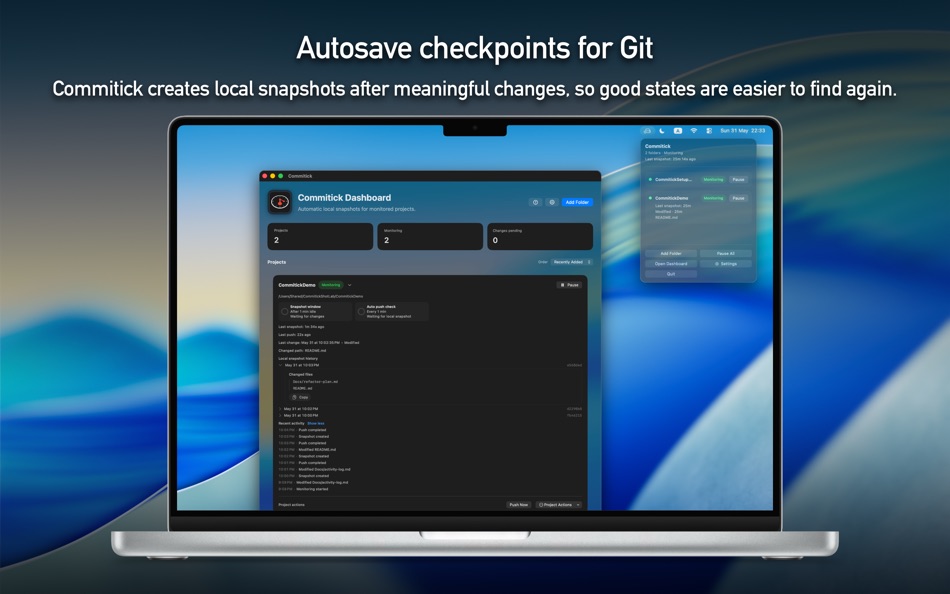
When you are experimenting, refactoring, debugging, or getting ready for a demo, it is easy to forget to make a clean checkpoint before the next risky change. Commitick watches selected folders on your Mac and creates local snapshot history in the background, so good states stay easier to find again.
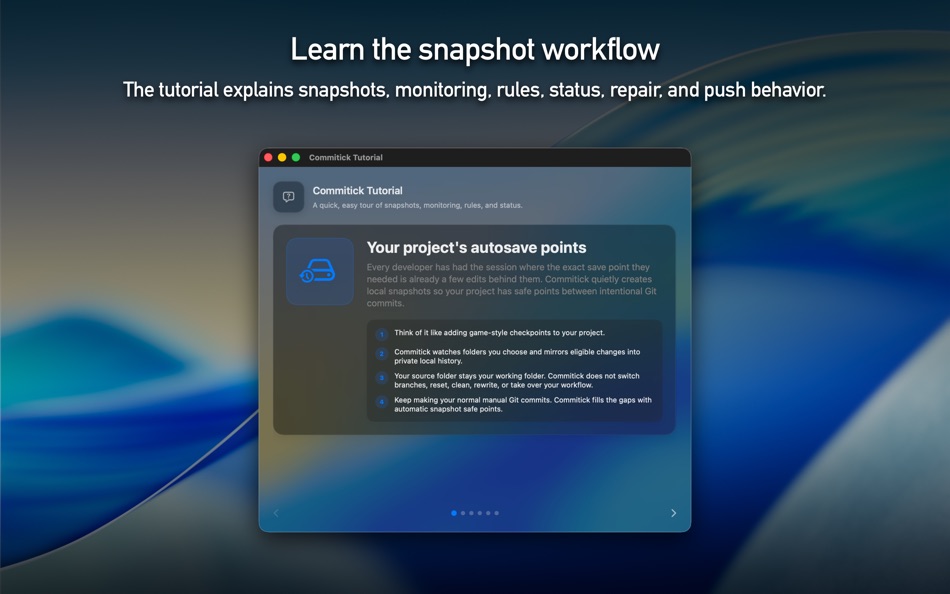
Think of it as a quiet safety net for active Mac projects: local first, low-noise, and designed not to take over your normal Git workflow.
◼ How to use
• Add a folder
Open Commitick
Choose Add Folder
Select the project folder you want Commitick to monitor
Review folder access, repository status, local history, and rules
Click Start Monitoring
• Keep working normally
Edit your project in your usual apps, editor, or terminal
Commitick watches for meaningful file changes
After the folder is quiet, Commitick creates a local snapshot
The dashboard shows monitoring status, recent activity, last snapshot, and push status
• Use manual controls when needed
Click Snapshot Now to create a safe point immediately
Click Push Now when snapshot history is ready to push
Pause or resume monitoring for a project at any time
Re-authorize folder access if macOS asks for permission again
• Adjust rules
Set snapshot delay and automatic push cadence
Review built-in ignores for common noisy folders
Use your source .gitignore rules where available
Add your own ignore rules for files or folders that should not be monitored
◼ Highlights
• Automatic local snapshots for monitored Mac project folders
• Dashboard for project status, recent activity, and snapshot health
• Snapshot Now for immediate safe points
• Push Now for user-triggered remote updates
• Pause and Resume controls for each monitored project
• Rules for snapshot timing, push cadence, and ignore patterns
• Access repair flow when a folder permission needs review
• Local-first behavior that keeps protection running even when push is not available
• In-app language selection with Follow System, English, Korean, Japanese, German, French, Spanish, Simplified Chinese, Traditional Chinese, Brazilian Portuguese, and Italian
◼ Safe by design
Commitick is designed to protect project history without surprising your working folder.
It does not switch your active branch behind your back.
It does not rewrite your source working tree as part of normal monitoring.
It keeps source-folder work separate from Commitick-managed snapshot history.
Commitick does not upload source files or diffs to Commitick-operated services. If you choose to push, snapshot history goes to the Git remote you configure.
◼ Official website
Product information, support, privacy details, and terms are available here:
https://hazybyte.studio/commitick/
Terms of Use:
https://hazybyte.studio/commitick/terms-of-use/
개발자 소식 ¡
개발자이신가요?
페이지 맨 위에 소식을 올리고 팔로워에게 이메일로 보내기
다른 플랫폼 0
| CommitickMac App Store1K 골드macOS | $14.99최소: $9.99 |
현재 이 스토어에서만 이용할 수 있습니다.
가격 기록 2
- 현재 가격: $14.99
- 최소: $9.99
- 최대: $14.99
목록 0
-
 Commitick
포인트 0
-

- +1 포인트

순위 0
-
- 내 평점
댓글 0 ¡
가장 먼저 댓글을 남겨주세요
개발자 9
새로운 기능
- 버전: 1.0
- 마지막 업데이트:
추가 정보
 https://hazybyte.studio/commitick/
AppAgg 점수
1,170
AppAgg 예상 점수:
Commitick
개발자: Iri You
1,170 골드
점수가 높을수록 대체로 AppAgg의 여러 지표에서 좋은 결과를 보인다는 뜻입니다.
기준: 인기 · 사용자 평점 · 최신성 · 할인 · 스토어 데이터 · 커뮤니티 활동
최신 AppAgg 데이터를 바탕으로 매일 다시 계산됩니다.
웹사이트용 배지:  복사됨!
요약
Commitick 단축 URL: 복사됨!- Mac App Store
AppAgg에서 앱 ‘Commitick’의 정보를 확인할 수 있습니다. 개발자: Iri You. 플랫폼: macOS. 카테고리: 개발자 도구. AppAgg 점수: 1,170 (골드). 이 앱의 AppAgg 포인트: 확인된 포인트 0, 간접 포인트 0. 이 앱이 포함된 공개 목록: 0개. 비공개 목록에 저장한 사용자: 0명. AppAgg 사용자가 아직 이 앱에 별점을 남기지 않았습니다. 확인된 포인트는 로그인한 AppAgg 사용자가 스토어로 이동한 기록을 반영합니다. 간접 포인트는 스토어 데이터를 바탕으로 합니다. 두 숫자는 공개 목록 수와 비공개 목록에 저장한 사용자 수를 나타냅니다. 이 앱의 최초 출시일은 입니다. 이 앱의 마지막 업데이트 날짜는 입니다. 이 앱의 현재 가격은 $14.99입니다. 이 앱의 최저 가격은 $9.99 (), 최고 가격은 $14.99 ()입니다. 이 앱은 다음 언어를 지원합니다: 한국어, 독일어, 스페인어, 영어, 이탈리아어, 일본어, 중국어, 포르투갈어, 프랑스어. 가격 기록을 확인하거나 앱을 목록에 추가하고 개발자를 팔로우할 수 있습니다. 이 앱의 향후 할인과 업데이트는 RSS 피드에서 확인할 수 있습니다. AppAgg는 이 앱을 호스팅하거나 배포하지 않습니다. 이 앱과 관련된 모든 상표, 로고 및 스크린샷은 각 소유자에게 귀속됩니다.

