
描述

Key Features:
• Unified Converter
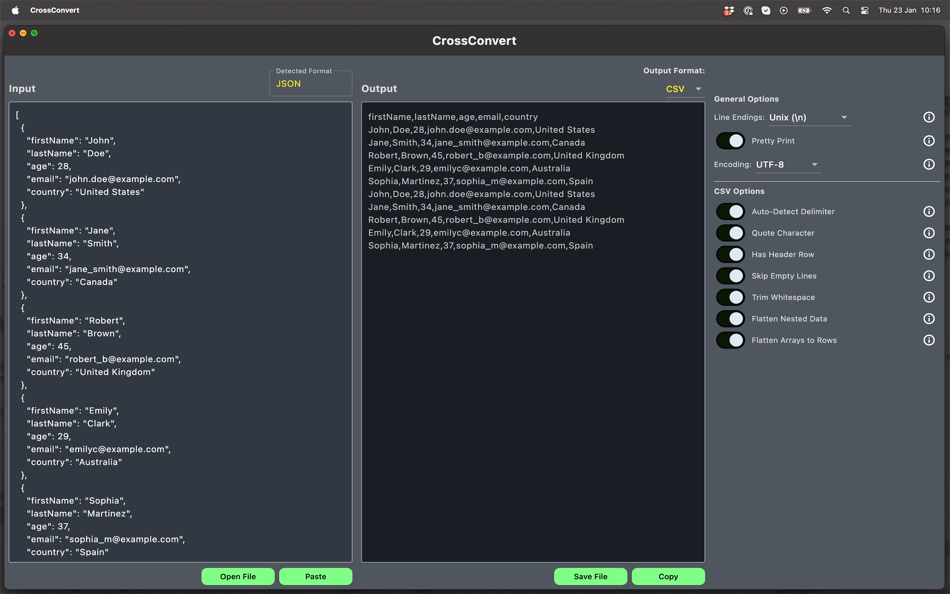
Convert between JSON, CSV, TOML, and YAML effortlessly.
Automatically detects your input format.
• Flexible Formatting Options
Pretty Print vs. Minify: Generate easy-to-read formatted output or a single-line compact file.
Custom Indentation: Select 2 or 4 spaces.
CSV Delimiters & Headers: Auto-detect your delimiter (comma, tab, semicolon, etc.) or specify it manually. Keep or omit header rows for total convenience.
• Smart Flattening & Nesting
Flatten nested data structures into dot-notation columns for a better spreadsheet experience.
Convert arrays in JSON or YAML into multiple CSV rows, making analysis straightforward.
• Versatile Export & Save
Copy, paste, or load files directly—CrossConvert seamlessly handles text-based data.
Pick the output file name and destination with ease.
• One-Stop for Pros and Beginners
Data scientists, developers, writers, or anyone dealing with structured text will find CrossConvert a breeze.
From handling an entire CSV full of nested arrays, to quickly reformatting JSON for a code review, CrossConvert gets it done.
Why CrossConvert?
‣ Accuracy: No garbled data, no lost rows—our robust parser ensures reliable transformations.
‣ Speed: Batch process large blocks of data in a matter of seconds.
‣ Customization: Tweak your output for any environment or standard.
‣ Simplicity: A single, intuitive interface covers all your main file-conversion needs—no separate tools required.
Try CrossConvert Today!
Say goodbye to time-consuming manual conversions and scattered data. With CrossConvert, keep your information consistent and your workflow efficient. Download now, and power-up your data conversion on macOS!
Ad
螢幕擷取畫面


新功能
- 版本: 1.0.0
- 發佈日期:
價格歷史
- 今天: $4.99
- 最小值: $4.99
- 最大值: $4.99
追蹤票價
Ad
開發人員
- Cleverson
- 平台: macOS 應用程式 (11)
- 清單: 0 + 0
- 點數: 0 + 0 ¡
- 排名: 0
- 評測: 0
- 註釋: 0
- 折扣: 0
- 影片: 0
- RSS: 訂閱
點數 (0)
0 ☹️
排名 (0)
0 ☹️
清單 (0)
0 ☹️
- CrossConvert - Format Transfer
評測 (0)
成為第一個評論 🌟
註釋 (0)
成為第一個發表評論的人 🌟
其他資訊
- 版本: 1.0.0
- 類別 :
macOS 應用程式›工具 - OS:
macOS,macOS 10.15 以上版本 - 大小:
18 Mb - 支援的語言 :
English - 內容分級:
4+ - Mac App Store 評分:
0 - 發佈日期:
- 發行日期:
聯絡人
 https://www.greatapps.store/
 «CrossConvert - Format Transfer». 平台: macOS. 類別: 工具. 開發商: «Cleverson». 首次發布: . 最後更新: . 目前價格: $4.99. 最低記錄價格: $4.99. 最高記錄價格: $4.99. 此項目尚未在 AppAgg 上獲得評分或評論。 可用語言: English. AppAgg 會追蹤 «CrossConvert - Format Transfer»的價格歷史、評分和用戶回饋。 關注未來折扣和更新: RSS. AppAgg 不託管應用程式或分發軟體。 所有商標、標誌和螢幕截圖均屬於其各自所有者。
CrossConvert - Format Transfer 縮短網址: 已複製!- 🌟 分享
- Mac App Store
你可能還喜歡
-
- Convert String
- macOS 應用程式: 工具 由: Siraprapa Kridakorn
- 免費
- 清單: 1 + 2 排名: 0 評測: 0
- 點數: 6 + 0 註釋: 0 版本: 1.4.0 Getting tired of looking for online tools to do simple string conversions for you? Not sure what happens with your strings when uploading them to some random website? Convert String ... ⥯
-
- Date Format Creator
- macOS 應用程式: 工具 由: BRIDGETECH SOLUTIONS LIMITED
- $1.99
- 清單: 0 + 1 排名: 0 評測: 0
- 點數: 2 + 0 註釋: 0 版本: 1.5 If you re a developer you ll know that working with dates can be difficult. Try to do anything reasonably complex with dates and before long you ll be imagining a perfect world where ... ⥯
-
- Eplist - convert data to plist
- macOS 應用程式: 工具 由: HuMinghua
- * 免費
- 清單: 1 + 2 排名: 0 評測: 0
- 點數: 10 + 0 註釋: 0 版本: 2.0.1 Eplist for Excel is a lightweight conversion tool to help developers to improve development efficiency. You can convert your datas or configuration from excel(.xls and .xlsx) document ... ⥯
-
- XCStrings Catalog Docx Convert
- macOS 應用程式: 工具 由: Alexander Tech
- * 免費
- 清單: 0 + 1 排名: 0 評測: 0
- 點數: 0 + 0 註釋: 0 版本: 1.0.6 XCStrings Catalog Docx Converter is a localization tool which connects developers and translators. In a nutshell, the app has the following features: - Convert XCStrings to Docx: ... ⥯
-
- QuickIcon Convert
- macOS 應用程式: 工具 由: Fifth Battery, LLC
- $0.99
- 清單: 0 + 0 排名: 0 評測: 0
- 點數: 0 + 0 註釋: 0 版本: 1.0 Unlock the full potential of your designs with QuickIcon Convert. Catering to developers and designers targeting multiple platforms, we bring convenience and precision to your ... ⥯
-
- Markdown2PDF: Convert Markdown
- macOS 應用程式: 工具 由: Haplo, LLC
- $1.99
- 清單: 0 + 0 排名: 0 評測: 0
- 點數: 0 + 0 註釋: 0 版本: 1.2 Easily Convert Markdown to PDF with Markdown2PDF Markdown2PDF is the fastest way to turn your Markdown files into high-quality PDFs. Whether you re writing notes, documentation, or ... ⥯
-
- Swifty - Convert Code
- macOS 應用程式: 工具 由: T.V CO., LTD
- 免費
- 清單: 0 + 0 排名: 0 評測: 0
- 點數: 0 + 0 註釋: 0 版本: 1.0 If you're moving from Objective-C to Swift, this app is start for your. just copy your objective-c code on left and see swift converted on right. Enjoy & happy code. ⥯
-
- Library Inspector
- macOS 應用程式: 工具 由: Orion Transfer Ltd
- $3.99
- 清單: 0 + 0 排名: 0 評測: 0
- 點數: 0 + 0 註釋: 0 版本: 2.1 Library Inspector is a simple tool for inspecting the contents of compiled object code, archives, dynamic libraries (dylib), frameworks and applications. There are two main components, ⥯
-
- xScope 4
- macOS 應用程式: 工具 由: The Iconfactory
- $49.99
- 清單: 3 + 3 排名: 0 評測: 0
- 點數: 0 + 0 註釋: 0 版本: 4.7.2 Created specifically for designers & developers, xScope is a powerful set of tools that are ideal for measuring, inspecting & testing on-screen graphics and layouts. xScope s tools ... ⥯
-
- Radif
- macOS 應用程式: 工具 由: Amirreza Eghtedari
- 免費
- 清單: 0 + 1 排名: 0 評測: 0
- 點數: 0 + 0 註釋: 0 版本: 1.0 Radif Format helps you to easily change between single-line and multi-line format of function definitions, function calls and arrays. ⥯
-
- JSON Power Tools
- macOS 應用程式: 工具 由: Resetnic Dragos
- $0.99
- 清單: 0 + 1 排名: 0 評測: 0
- 點數: 4 + 0 註釋: 0 版本: 1.1 Format, View, and Manage JSON effortlessly in both Xcode and Safari with JSON Power Tools! Stop switching contexts or relying on web tools. This app provides essential JSON ... ⥯
-
- Custom Symbols
- macOS 應用程式: 工具 由: Bret Lester
- * 免費
- 清單: 2 + 0 排名: 0 評測: 0
- 點數: 4 + 0 註釋: 0 版本: 2.7.4 Convert any SVG artwork into an SF Symbol file that you can use in Xcode. Configure cap & base lines and right and left margins by dragging with the mouse or precisely via text inputs. ⥯
-
- Unicycle
- macOS 應用程式: 工具 由: Zev Eisenberg
- 免費
- 清單: 0 + 0 排名: 0 評測: 0
- 點數: 0 + 0 註釋: 0 版本: 1.1.0 Convert between text, decimal, hexadecimal, and binary representations of UTF-8 text. An indispensable tool for any developer working with text, including stored files or network ... ⥯
-
- Morphling
- macOS 應用程式: 工具 由: 时旺 申
- 免費
- 清單: 0 + 0 排名: 0 評測: 0
- 點數: 1 + 0 註釋: 0 版本: 1.0.2 Convert to CSS filter be like using Hex, RGB or HSL Source Code https://github.com/shensven/Morphling ⥯