
| Nhà phát triển: | 雪峰 阳 (2) | ||
| Giá bán: | Miễn phí | ||
| Xếp hạng: | 0 | ||
| Đánh giá: | 0 Viết đánh giá | ||
| Danh sách: | 0 + 0 | ||
| Điểm: | 2 + 0 ¡ | ||
| Mac App Store | |||
Mô tả

**Free Version:**
- SSH connection and SFTP functionality
- Maximum 3 servers
- Maximum 3 terminal themes
- Port forwarding limited to 1 rule
**Pro Version:**
- All features of the free version
- Unlimited server quantity
- Unlimited terminal themes (15+ themes available)
- Unlimited port forwarding rules
- Vertical split screen layout
- Customizable download directory and terminal font settings
- Priority updates for new features and improvements
- One-time purchase, lifetime use
Ảnh chụp màn hình


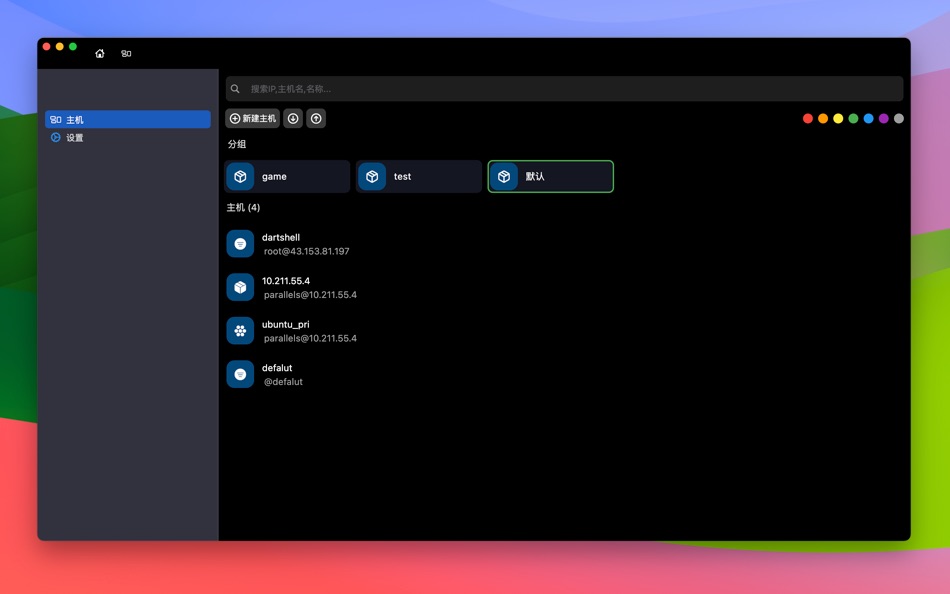


Giá bán
- Hôm nay: Miễn phí
- Tối thiểu: Miễn phí
- Tối đa: Miễn phí
Theo dõi giá
Nhà phát triển
- 雪峰 阳
- Nền tảng: macOS Ứng dụng (2)
- Danh sách: 0 + 0
- Điểm: 4 + 0 ¡
- Xếp hạng: 0
- Đánh giá: 0
- Giảm giá: 0
- Video: 0
- RSS: Đăng ký


Xếp hạng
0 ☹️
Danh sách
0 ☹️
- DartShell - Remote Terminal
Đánh giá
Hãy là người đầu tiên đánh giá 🌟
Thông tin bổ sung
- Phiên bản: 5.5.45
- Danh mục:
macOS Ứng dụng›Công cụ - HĐH:
macOS,macOS 11.5 trở lên - Kích thước:
43 Mb - Ngôn ngữ được hỗ trợ:
English - Xếp hạng nội dung:
4+ - Mac App Store Xêp hạng:
0 - Cập nhật:
- Ngày phát hành:
DartShell - Remote Terminal URL ngắn: Đã sao chép!- 🌟 Chia sẻ
- Mac App Store
Bạn cũng có thể thích
-
- DartShell Pro -Remote Terminal
- macOS Ứng dụng: Công cụ Bởi: 雪峰 阳
- $7.99
- Danh sách: 0 + 0 Xếp hạng: 0 Đánh giá: 0
- Điểm: 2 + 0 Phiên bản: 5.5.46 All-in-One remote tool supporting multiple protocols including SSH, RDP, and Telnet. **Free Version:** - SSH connection and basic SFTP functionality - Maximum 3 servers - ... ⥯
-
- Remote Desktop Scanner Pro
- macOS Ứng dụng: Công cụ Bởi: Sascha Simon
- $0.99
- Danh sách: 0 + 1 Xếp hạng: 0 Đánh giá: 0
- Điểm: 10 + 0 Phiên bản: 2.1.3 The Remote Desktop Scanner Pro lists all devices on your network that you can connect to via Remote Desktop or SSH. You can then connect with just one click. Remote Finder This app ... ⥯
-
- Shell Assistant
- macOS Ứng dụng: Công cụ Bởi: Michael Taylor
- Miễn phí
- Danh sách: 0 + 0 Xếp hạng: 0 Đánh giá: 0
- Điểm: 3 + 0 Phiên bản: 0.9.6 Great SSH server management tool SSH Client Terminal SFTP File manager View images and pdfs Stream audio and video Edit code on the server Use selections in the terminal Paste history ... ⥯
-
- Core Shell
- macOS Ứng dụng: Công cụ Bởi: Codinn Technologies
- Miễn phí
- Danh sách: 1 + 0 Xếp hạng: 0 Đánh giá: 0
- Điểm: 5 + 2 (4.0) Phiên bản: 4.0 A full featured terminal with built-in OpenSSH support, it s focused on managing and login to hosts efficiently. Don't waste your time; be productive. ## Features Full-featured ... ⥯
-
- Zzy Shell
- macOS Ứng dụng: Công cụ Bởi: 建华 郜
- Miễn phí
- Danh sách: 0 + 0 Xếp hạng: 0 Đánh giá: 0
- Điểm: 1 + 0 Phiên bản: 1.0.2 1. Completely free: support SSH and SFTP. 2. Server management is very convenient: servers can be dragged to quickly group and sort in the left bar. 3. Good looking: support custom ... ⥯
-
- Open Directory in Terminal
- macOS Ứng dụng: Công cụ Bởi: App Tyrant Corp
- $1.99
- Danh sách: 0 + 0 Xếp hạng: 0 Đánh giá: 0
- Điểm: 0 + 0 Phiên bản: 2.0 This app allows you to open a new Terminal window from Finder with the current working directory set to the directory being displayed in the Finder window. You can also open a new ... ⥯
-
- NeoServer: SSH Client|Terminal
- macOS Ứng dụng: Công cụ Bởi: Space-Time Transformation Technology Co., Ltd.
- Miễn phí
- Danh sách: 2 + 4 Xếp hạng: 0 Đánh giá: 0
- Điểm: 17 + 258 (4.7) Phiên bản: 8.0.4 NeoServer offers a comprehensive management solution via SSH without additional software installation for your servers, NAS (Network Attached Storage), and Linux-based routers across ... ⥯
-
- SSH Client - Terminal, Telnet
- macOS Ứng dụng: Công cụ Bởi: Moon Technolabs Pvt Ltd
- Miễn phí
- Danh sách: 1 + 2 Xếp hạng: 0 Đánh giá: 0
- Điểm: 5 + 393 (3.5) Phiên bản: 4.9.4 Here is one of the most intelligent & advanced SSH Client apps to manage and connect remote servers for your iOS and Mac devices About SSH Client: SSH Client is an on-the-go SSH-Telnet ⥯
-
- iTerminus: SSH Client Terminal
- macOS Ứng dụng: Công cụ Bởi: Ravi Kakadiya
- Miễn phí
- Danh sách: 1 + 0 Xếp hạng: 0 Đánh giá: 0
- Điểm: 12 + 15 (4.5) Phiên bản: 1.8.2 QuickSSH - SSH Terminal & Shell Fast, Secure, & Powerful SSH Client QuickSSH is a lightning-fast, secure, and feature-rich SSH terminal app designed for developers, system admins, and ... ⥯
-
- Termius: SSH Client & Terminal
- macOS Ứng dụng: Công cụ Bởi: Termius Corporation
- * Miễn phí
- Danh sách: 2 + 2 Xếp hạng: 0 Đánh giá: 0
- Điểm: 6 + 0 Phiên bản: 9.37.0 Termius is a modern SSH client designed for productivity and collaboration. Connect with one click from desktop and mobile no re-entering IP addresses, ports, and passwords. With a ... ⥯
-
- ServerCat - SSH Terminal
- macOS Ứng dụng: Công cụ Bởi: Early Moon, LLC
- Miễn phí
- Danh sách: 3 + 0 Xếp hạng: 0 Đánh giá: 0
- Điểm: 3 + 960 (4.6) Phiên bản: 1.30.0 ServerCat is a Linux monitor and Docker Management & SSH Terminal app. ServerCat makes it easy to monitor your server status on your mobile. It shows detail running status of your ... ⥯
-
- Shellcut - Open in Terminal
- macOS Ứng dụng: Công cụ Bởi: Leon Boettger
- Miễn phí
- Danh sách: 0 + 1 Xếp hạng: 0 Đánh giá: 0
- Điểm: 8 + 0 Phiên bản: 1.5 Shellcut lets you open a new Terminal window directly from Finder, with the working directory set to the folder currently displayed in the Finder window. Shellcut supports Apple's ... ⥯
-
- Bay Terminal
- macOS Ứng dụng: Công cụ Bởi: Parag Arora
- * Miễn phí
- Danh sách: 0 + 0 Xếp hạng: 0 Đánh giá: 0
- Điểm: 0 + 0 Phiên bản: 1.1 SSH client and terminal emulator for macOS with built-in AI assistant. Connect to remote Linux servers, VPS, AWS EC2, DigitalOcean, and cloud instances with real-time monitoring and ... ⥯
-
- File Sentinel: Shell History
- macOS Ứng dụng: Công cụ Bởi: 楚江 王
- * Miễn phí
- Danh sách: 0 + 0 Xếp hạng: 0 Đánh giá: 0
- Điểm: 1 + 0 Phiên bản: 2.1.1 File Monitor for listening to text files and saving the last line of content. It can monitor files like `.zsh_history` or `.bash_history`, automatically saving shell history, helping ... ⥯