
Salvos
Escolha o nome que será mostrado no seu menu Salvos.
Feito!
| Desenvolvedor: | Maimaitiming Abudukadier (6) | ||
| Preço: | Grátis | ||
| Avaliação: | 830 | ||
| Classificações: | 0 | ||
| Comentários: | 0 Postar comentário | ||
| Listas: | 0 + 0 | ||
| Pontos: | 0 + 0 ¡ | ||
| +1 Pontos | |||
Descrição

DownMark is built to solve exactly this.
I believe formatting should serve your content, not add a burden to your memory. As an independent developer, I built DownMark as a WYSIWYG (What You See Is What You Get) Markdown editor specifically designed for users with zero coding background. No obscure syntax, no split screens—just a pure, beautiful, and intuitive writing experience.
Key Features
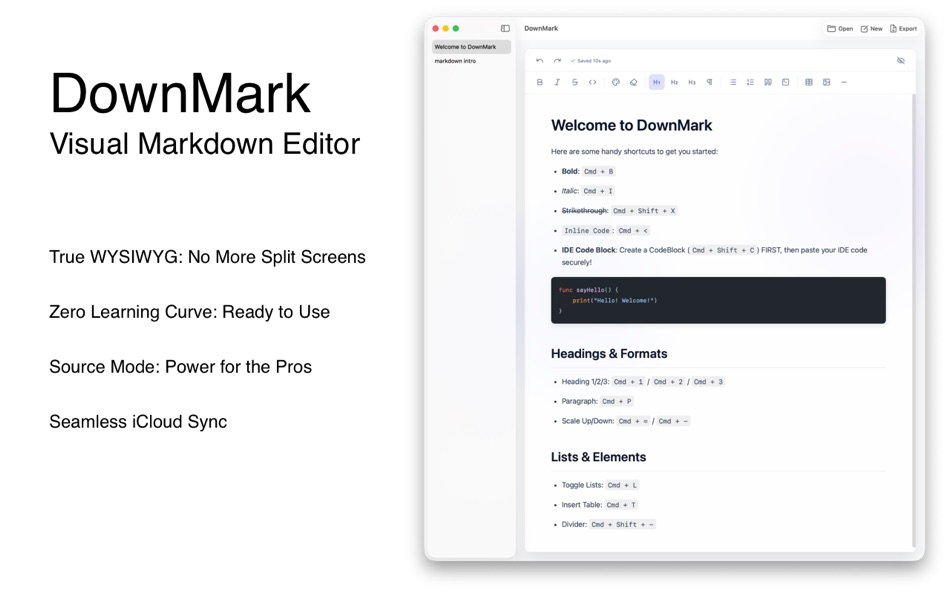
True WYSIWYG: No More Split Screens
Ditch the traditional "edit-preview" dual windows. I designed DownMark with intuitive styling buttons right in the editor. Every formatting tweak you make is instantly rendered in its final look, making the writing process itself a visual delight.
Zero Learning Curve: Ready to Use
Forget about memorizing special characters (like # or **). With a user-friendly graphical interface, even complete beginners can jump right in and craft well-structured, elegantly formatted documents in seconds.
Source Mode: Power for the Pros
While I’ve lowered the barrier to entry, I haven’t compromised on flexibility. You can seamlessly switch to "Source Mode" at any time. Experienced Markdown creators can dive into the raw text for detailed, customized editing and lightning-fast typing.
Seamless iCloud Sync
Your writing is securely backed up and automatically synced across your devices via iCloud. Capture your inspiration whenever and wherever it strikes, without worrying about losing a single word.
Whether you're a beginner wanting to try Markdown without the headache, or a seasoned writer looking for a frictionless workflow, DownMark delivers an unprecedented, smooth experience.
Download DownMark today and let your ideas flow effortlessly!
Capturas de ecrã
Ad
Histórico de preços
- Preço atual: Grátis
- Mínimo: Grátis
- Máximo: Grátis
Monitorizar preços
Avaliação AppAgg
830
Avaliação AppAgg estimada de
DownMark
830 Bronze
Avaliações mais altas geralmente indicam sinais mais fortes no AppAgg.
Com base em: 🔥 popularidade · ⭐ avaliações dos usuários · 🕒 atualidade · 🏷️ ofertas · 🏬 dados das lojas · 👥 atividade da comunidade
Recalculado diariamente com dados AppAgg atualizados.
URL abreviado: Copiado!
Novidades
- Versão: 1.0
- Última atualização:
Informações adicionais
- Data de lançamento:
- Categoria:
macOS Apps›Ferramentas de programação - Sistemas operacionais:
macOS,macOS 26.3 ou superior - Tamanho:
2 Mb - Idioma compatível:
English - Classificação do conteúdo:
4+ - Mac App Store Avaliação:
0
 https://www.reddit.com/r/DownMark/
Desenvolvedor
- Maimaitiming Abudukadier
- Plataformas: iOS Apps (4) macOS Apps (2)
- Listas: 0 + 0
- Pontos: 1 + 52 ¡
- Classificações: 0
- Comentários: 0
- Descontos: 0
- Vídeos: 0
- RSS: Subscrever
Listas (0)
0 ☹️
- DownMark
Pontos (0)
0 ☹️
Classificações (0)
0 ☹️
Comentários (0)
Seja o primeiro a comentar 🌟
Resumo
DownMark URL abreviado: Copiado!- 🌟 Compartilhar
- Mac App Store
«DownMark». Plataforma: macOS. Categoria: Ferramentas de programação. Desenvolvedor: «Maimaitiming Abudukadier». Primeiro lançamento: . Última atualização: . Preço atual: grátis. Este título ainda não recebeu classificações ou comentários no AppAgg. Idiomas disponíveis: English. AppAgg rastreia histórico de preços, classificações e feedback de usuários para «DownMark». Acompanhe futuros descontos e atualizações via RSS. AppAgg não hospeda aplicativos nem distribui software. Todas as marcas registradas, logotipos e capturas de tela pertencem aos seus respectivos proprietários.
Semelhantes
-
- Mud: Mark Up or Down
- macOS Apps: Ferramentas de programação Por: Joseph Pearson
- Grátis
- Listas: 0 0 0
- Pontos: 0 + 0 1K Versão: 2.1.0 Markdown is suddenly everywhere. It s how we speak to machines now. It s how they speak to us. We should make it nice! But you already have a favorite text editor. You don t need a ... ⥯
-
- Is It Down? Menubar Monitor
- macOS Apps: Ferramentas de programação Por: Selcuk Dolapci
- $0.99
- Listas: 0 0 0
- Pontos: 0 + 0 3K Versão: 2.0 Designed for developers, site owners, and anyone who depends on online services like APIs, this lightweight utility provides at-a-glance status checks without interrupting your ... ⥯
-
- Get Local
- macOS Apps: Ferramentas de programação Por: Mark Battistella
- Grátis
- Listas: 0 + 1 0 0
- Pontos: 0 + 0 810 Versão: 1.3.1 Never leave your user base without localised text. Export your localisations from Xcode and import them into Get Local. Select the strings you want to translate, choose from over 100 ... ⥯
-
- DoubleTake
- macOS Apps: Ferramentas de programação Por: Mark Sharvin
- Grátis
- Listas: 0 + 1 0 0
- Pontos: 0 + 0 610 Versão: 1.0 DoubleTake is an XCode extension that removes duplicate imports, @class and @protocol. It works in both Objective-C and Swift projects. The inspiration behind this extension is that I ... ⥯
-
- ProgwhizNotarizer
- macOS Apps: Ferramentas de programação Por: Mark Raymond
- $9.99
- Listas: 0 + 1 0 0
- Pontos: 0 + 0 3K Versão: 2.8 The Progwhiz Notarizer Tool is the GUI version to Sign and Notarize (or Store Submit) your Mac Apps. It's Intuitive interface makes the effort almost as easy as Compressing a file! The ⥯
-
- KGN
- macOS Apps: Ferramentas de programação Por: Mark Watson
- Grátis
- Listas: 0 0 0
- Pontos: 0 + 0 870 Versão: 1.3 This is an example program for my book "Artificial Intelligence Using Swift" (https://leanpub.com/SwiftAI). Knowledge Graph Explorer is written in Swift. It works by accepting natural ... ⥯
-
- WiFiWize
- macOS Apps: Ferramentas de programação Por: Mark Taylor
- Grátis
- Listas: 0 0 0
- Pontos: 0 + 0 1K Versão: 1.2.1 WiFiWize is a professional WiFi analysis and network diagnostic tool for macOS. Monitor your WiFi signal in real-time from the menu bar, scan nearby networks, scan for rogue APs, ... ⥯
-
- Klipped
- macOS Apps: Ferramentas de programação Por: Andrew Drake
- Grátis
- Listas: 0 + 2 0 0
- Pontos: 19 + 0 1K Versão: 3.0.2 Beauty in simplicity. Klipped is a minimalist scratch pad that is a buddy for all your other apps. Write ideas down. Paste text and use as a clipboard; delete when you re done. No ... ⥯
-
- TextMax2
- macOS Apps: Ferramentas de programação Por: Tien Thinh Vu
- * Grátis
- Listas: 1 + 2 0 0
- Pontos: 5 + 0 7K Versão: 1.4 TextMax is a fast, easy-to-use text editor with many features for editing, searching, and manipulation of text, source code, or HTML, XML, Plist content. Application's Functions: - ... ⥯
-
- Vulcan: generator for SwiftUI
- macOS Apps: Ferramentas de programação Por: Pure Creek
- * Grátis
- Listas: 0 + 2 0 0
- Pontos: 7 + 0 7K Versão: 2.14 Vulcan allows developers to generate the SwiftUI code for an entire iOS app in minutes. Vulcan is not a design tool. It's objective is to generate all the tedious bolierplate for the ... ⥯
-
- xScope 4
- macOS Apps: Ferramentas de programação Por: The Iconfactory
- $49.99
- Listas: 3 + 3 0 0
- Pontos: 0 + 0 10K Versão: 4.7.2 Created specifically for designers & developers, xScope is a powerful set of tools that are ideal for measuring, inspecting & testing on-screen graphics and layouts. xScope s tools ... ⥯
-
- Penguin - Plist Editor
- macOS Apps: Ferramentas de programação Por: Triplane
- * Grátis
- Listas: 1 + 2 0 0
- Pontos: 6 + 0 7K Versão: 2.2 Looking for an easier way to edit plist files? Penguin lets you edit any plist file in a beautiful and easy to understand tree view. Drag, drop, expand, reorder and modify your plist ... ⥯
-
- Yakitty
- macOS Apps: Ferramentas de programação Por: ReliPR, LLC
- $19.99
- Listas: 0 0 0
- Pontos: 0 + 0 3K Versão: 1.0 Yakitty is a fast, keyboard-first text and code editor for macOS. Designed for developers who prefer classic, legendary legacy editing workflows, especially in legacy DOS and Windows ... ⥯
-
- Xloc
- macOS Apps: Ferramentas de programação Por: Furnace Creek Software LLC
- $4.99
- Listas: 1 + 1 0 0
- Pontos: 7 + 0 6K Versão: 1.3.3 Xloc is a native macOS app that lets you easily count lines of code in source files. Simply drag and drop a folder or a single source file to get started -- no need to open Terminal. ... ⥯