
Tersimpan
Pilih nama yang akan ditampilkan di menu Tersimpan Anda.
Selesai!
| Pengembang: | Roberto Panetta (48) | ||
| Harga: | $7.99 | ||
| Penilaian: | 1,330 Emas | ||
| Peringkat: | 0 | ||
| Komentar: | 0 Kirimkan komentar | ||
| Daftar: | 0 + 1 | ||
| Poin: | 0 + 0 ¡ | ||
| +1 Poin | |||
Deskripsi

It's simply and powerful.
We are sure you will love it.
A text written in Markdown is a plain text which looks correctly to humans as text and automatically translates in a correctly web pages coded in html.
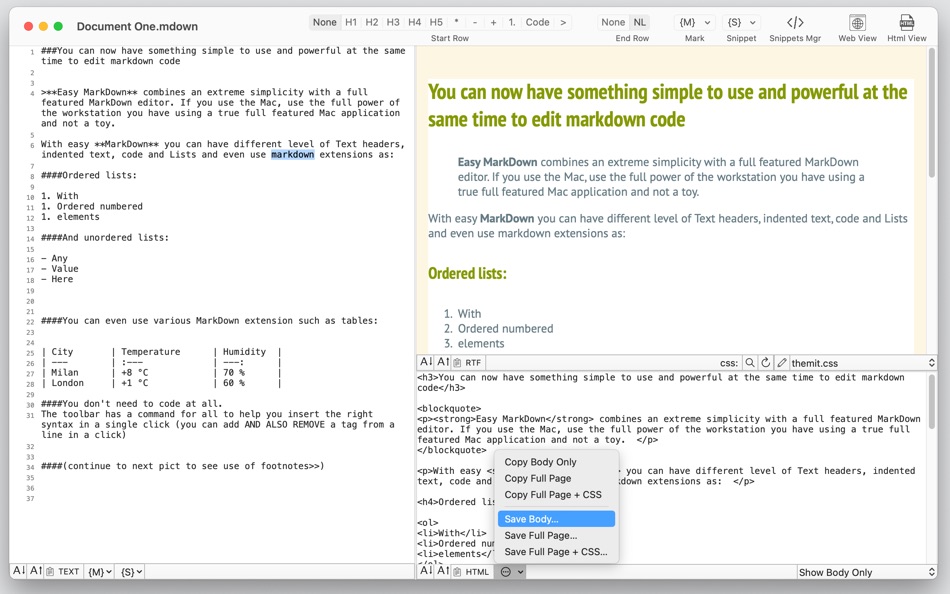
In Easy Markdown the window is split in two parts. As you type plain text on the left, you see on the right the resulting web page as it will be seen on the web.
EASY TO USE
• Showing the resulting web page as-you-type
• Auto-generating the web code
• Allowing you to have the html to use to create the web page
• Allowing you to have also an RTF version ready to copy and use
• No coding required
KEY FEATURES
• Smooth web update as-you-type. You see the result immediately
• Faster then ever HTML render
• Different style view to apply with live upgrade (you can experiment a lot)
• Full use of custom CSS you can create or modify
• Includes standard Markdown plus extensions: table, footnotes, fenced code, auto link
• Even more additional extensions: strikethrough, underline, hi light, quote, superscript, math
• Can copy to the clipboard the standard html body in a click
• Offers copy in a click of also: Html Full page ready to be used on the web and the full Html page with embedded CSS all in one page
• Can copy to clipboard also the RTF version of the page you created
• Enhanced editor with line numbering for a clear and precise work
• Can optionally shows also the HTML code as-you-type
• Variable font size for editor, html view and web view.
• Open end edit directly 66 different types of text file such as TEXT, TXT, HTML, CSS and so on..
• Can insert image link and show immediately the image in the web view
• PDF User Guide included inside the application
• Full support for Light Mode and Dark Mode appearance.
TOOLS INSIDE
• Tool bar with more common syntax applier (click everywhere in row and apply or remove)
• Smart Toolbar: it show the applied tag of the current row
• Applier for common Markdown syntax, no need to remember commands syntax
• Force NewLine in many rows in a single click
• Many other common commands in a click can apply to multiple lines
• Snippets popup to apply your more used text blocks
SUPPORTED OS FEATURES
• Tabs for managing many documents in a single window
• Merge all documents in a window
• Full screen
• Autosave
• Versions
• Automatic resume
• Tags in finder
Jepretan layar




Ad
Sejarah Harga
- Harga saat ini: $7.99
- Minimal: $3.99
- Maksimum: $9.99
Pantau harga
Penilaian AppAgg
1,330
Penilaian AppAgg estimasi untuk
Easy Markdown
1,330 Emas
Penilaian yang lebih tinggi biasanya berarti sinyal yang lebih kuat di AppAgg.
Berdasarkan: popularitas · rating pengguna · kebaruan · promo · data toko · aktivitas komunitas
Dihitung ulang setiap hari dari data AppAgg terbaru.
URL singkat: Disalin!
Info tambahan
- Tanggal rilis:
- Kategori:
macOS Aplikasi›Alat - OS:
macOS,macOS 10.13 dan yang lebih tinggi - Ukuran:
4 Mb - Bahasa yang didukung:
English - Rating Konten:
4+ - Mac App Store Peringkat:
0
 http://www.tensionsoftware.com/osx/easymarkdown/
Pengembang
- Roberto Panetta
- Platform: iOS Aplikasi (9) macOS Aplikasi (39)
- Daftar: 0 + 5
- Poin: 10 + 6 ¡
- Peringkat: 0
- Komentar: 0
- Diskon: 0
- Video: 0
- RSS: Berlangganan
Daftar (0)
0
- Easy Markdown
Poin (0)
0
Peringkat (0)
0
Komentar (0)
Jadilah yang pertama berkomentar
Ringkasan
Easy Markdown URL singkat: Disalin!- Bagikan
- Mac App Store
«Easy Markdown». Platform: macOS. Kategori: Alat. Pengembang: «Roberto Panetta». Rilis pertama: . Pembaruan terakhir: . Harga saat ini: $7.99. Harga terendah yang tercatat: $3.99 (). Harga tertinggi yang tercatat: $9.99 (). Judul ini belum mendapat rating atau ulasan di AppAgg. Bahasa yang tersedia: English. AppAgg melacak riwayat harga, peringkat, dan umpan balik pengguna «Easy Markdown». AppAgg tidak menghosting aplikasi atau mendistribusikan perangkat lunak. Semua merek dagang, logo, dan tangkapan layar adalah milik pemiliknya masing-masing. Ikuti diskon dan pembaruan di masa mendatang melalui RSS
Serupa
-
- Markdown Browser
- macOS Aplikasi: Alat Oleh: Shaun Hirst
- $1.99
- Daftar: 0 0 0
- Poin: 0 + 0 750 Versi: 1.0.0 Markdown Browser is a powerful yet elegant native Mac application designed for reading, browsing, and navigating Markdown documents with ease. Whether you're reviewing documentation, ... ⥯
-
- Easy Script Copier
- macOS Aplikasi: Alat Oleh: Benjamin Lambinet
- $1.99
- Daftar: 0 0 0
- Poin: 0 + 0 570 Versi: 1.0 Easy Script Copier is a small utility built to download a page and all necessary files. For example, you have found a demo page about a jQuery script and you want to get it, with all ... ⥯
-
- Markdown Workbench
- macOS Aplikasi: Alat Oleh: David Page
- $2.99
- Daftar: 0 + 1 0 0
- Poin: 4 + 0 1K Versi: 1.0.4 Markdown Workbench is a fast, focused document viewer and editor built for people who work with Markdown and code files every day. Open any Markdown file and see it beautifully ... ⥯
-
- Markdown Buddy
- macOS Aplikasi: Alat Oleh: Jan Tumpach
- $0.99
- Daftar: 0 0 0
- Poin: 0 + 0 570 Versi: 1.1 Markdown Buddy is a native macOS app that lets you preview Markdown files beautifully, right from your code editor or Finder. Source Editor Extension Integrates directly into your ... ⥯
-
- Markdown EditPad
- macOS Aplikasi: Alat Oleh: Damian Pieszczynski
- $4.99
- Daftar: 0 0 0
- Poin: 0 + 0 570 Versi: 1.0 Markdown editor with support for GitHub flavor. Features: - live preview - outline - bookmarks - markdown docs and interface to add markdown tags - export to HTML and RTF ⥯
-
- Easy View (Logs)
- macOS Aplikasi: Alat Oleh: Hoang Phuc Truong
- $9.99
- Daftar: 0 0 0
- Poin: 0 + 0 600 Versi: 2.1.0 Easy View is the ultimate tool for developers and system administrators to transform raw web server access logs or application log into actionable insights. Whether you are ... ⥯
-
- Easy CSV Editor
- macOS Aplikasi: Alat Oleh: VDT LABS S.R.L.
- * $9.99
- Daftar: 0 + 1 0 0
- Poin: 1 + 0 1K Versi: 2.70 Easy CSV Editor is one of the best editors for CSV and TSV files you'll find on the market. In a clean and user-friendly interface it offers simplicity and flexibility to edit both ... ⥯
-
- Easy Localized for Mac OS X
- macOS Aplikasi: Alat Oleh: PFU Shanghai Co., Ltd.
- Gratis
- Daftar: 0 0 0
- Poin: 0 + 0 500 Versi: 1.3 Easy Localized is a free application that can help you to localize your appliction,bundle and framework. Key Features Localize application, bundle and framework. Import and export ... ⥯
-
- Markdown Export
- macOS Aplikasi: Alat Oleh: Tanvir N Hasan
- * Gratis
- Daftar: 0 0 0
- Poin: 0 + 0 600 Versi: 1.3 A Professional Markdown-to-Document Converter Transform your markdown into beautifully formatted PDFs, Word documents, and PNG images with just a click. Markdown Export combines a ... ⥯
-
- Markdown Quick Look
- macOS Aplikasi: Alat Oleh: Bitfield AB
- $4.99
- Daftar: 0 0 0
- Poin: 0 + 0 570 Versi: 1.0 Stop opening files just to peek. Markdown Quick Look adds instant, beautifully rendered Markdown previews to Finder. Press the spacebar on any .md, .markdown, or .mdown file and see ... ⥯
-
- Easy XML Editor
- macOS Aplikasi: Alat Oleh: Richard Wuerflein
- $21.99
- Daftar: 0 + 1 0 0
- Poin: 0 + 0 710 Versi: 1.7.10 The XML-Editor for comfortable and simplified editing of XML. It shows XML well structured and clearly, modification is made easy by various editing features. Directly locate and edit ... ⥯
-
- Easy Mock
- macOS Aplikasi: Alat Oleh: Sergio Cardoso
- * Gratis
- Daftar: 0 0 0
- Poin: 0 + 0 580 Versi: 1.0.2 Easily Convert JSON to Swift Models and Back Again Easy Mock is a fast and lightweight macOS app designed for iOS and macOS developers. Convert raw JSON into clean Swift Codable ... ⥯
-
- Easy Converter Full Edition
- macOS Aplikasi: Alat Oleh: John D Gauchat
- Gratis
- Daftar: 0 + 1 0 0
- Poin: 1 + 0 780 Versi: 1.02 Quickly convert and process all your images in the most popular formats, including JPG, PNG, TIFF, BMP, and GIF. Convert images to and from JPG, PNG, TIFF, BMP, and GIF Resize images ... ⥯
-
- Ohai Markdown Viewer
- macOS Aplikasi: Alat Oleh: Verbari LLC
- $14.99
- Daftar: 0 0 0
- Poin: 0 + 0 1K Versi: 1.0 Stop reading raw text in your terminal. Ohai is a native macOS markdown viewer built for the age of AI. It acts as a real-time canvas for tools like Claude Code, Cursor, and Copilot. ... ⥯