
북마크
이 북마크의 제목을 입력하세요.
북마크가 저장되었습니다
| 개발자: | System Operator LLC (21) | ||
| 가격: | 무료 신규 | ||
| 종합 점수: | 600 실버 | ||
| 순위: | 0 | ||
| 댓글: | 0 댓글 게시 | ||
| 목록: | 0 + 0 | ||
| 포인트: | 0 + 0 ¡ | ||
| +1 포인트 | |||
스크린샷 5



광고
설명

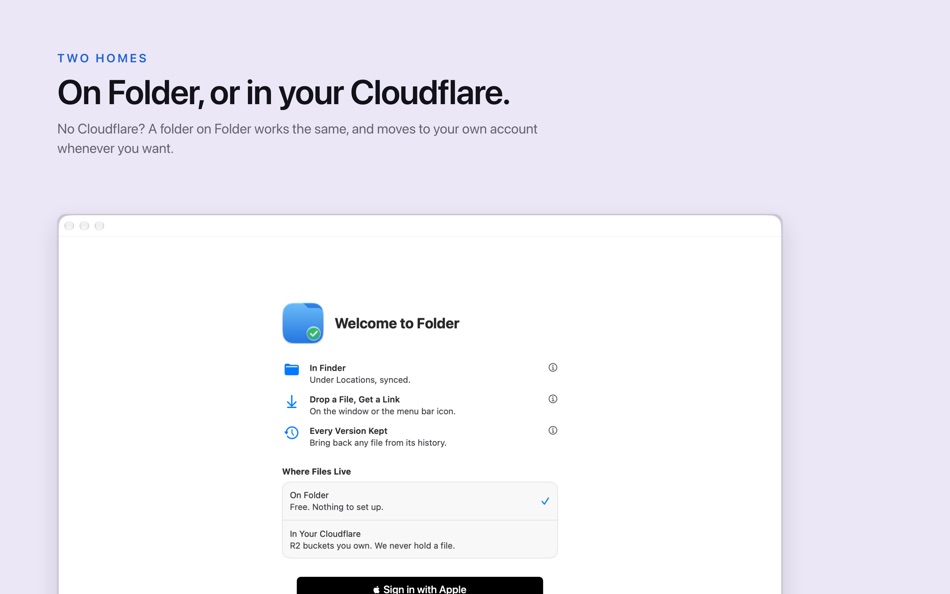
- In Finder: Folder sits under Locations in the sidebar. Files open in the apps you already use and download when you open them.
- Drop a file, get a link: drop it on the window or the menu bar icon, and its link is on your clipboard.
- Every version kept: every overwrite and every delete stays restorable, from the app or the web.
- On the web: open every file at folder.dev, from any browser.
- Share with a link: a folder in your own Cloudflare shares a file with a link, a password or an expiry.
- Your storage, or ours: start on Folder with 5 GB free and nothing to set up, or connect your Cloudflare account and your files stay in your own R2 buckets. Folder is never in the data path for those.
- On This Mac: add a folder that stays where it is. Folder keeps node_modules, build output and caches out of Dropbox and Time Machine, and copies the folder before each Claude Code session, so you can see what the session changed and put any of it back.
Sign in with Apple. Requires macOS 27 or later, or iOS 27 or later.
다른 플랫폼 0
| Folder: Cloud Storage & SyncMac App Store600 실버현재 페이지 | 무료 |
현재 이 스토어에서만 이용할 수 있습니다.
가격 기록 0
- 현재 가격: 무료
- 최소: 무료
- 최대: 무료
목록 0
0
-
 Folder: Cloud Storage & Sync
포인트 0
0
순위 0
-

- 내 평점

댓글 0 ¡
가장 먼저 댓글을 남겨주세요
개발자 21
새로운 기능
- 버전: 1.3
- 마지막 업데이트:
- - On This Mac: add a folder that stays where it is. Its junk folders stop syncing to Dropbox and Time Machine, and every Claude Code session in it starts with a copy, so you can see what it changed and put any of it back.
- Copy Link, Share…, History… and Open on the Web in Finder no longer flash an empty window.
- History and Shared Links sort by any column.
- Tags, as in Finder: tag files from the list or the preview pane, find them under Tags in the sidebar, and drag files onto a tag.
추가 정보
- 출시일:
- 카테고리:
macOS 앱›개발자 도구 - 운영체제:
macOS,macOS 27.0 이상 - 크기:
7 Mb - 지원되는 언어:
영어 - 콘텐츠 등급:
4+ - Mac App Store 평점: ¡
0 - 웹사이트:
 https://folder.dev
AppAgg 점수
600
AppAgg 예상 점수:
Folder: Cloud Storage & Sync
개발자: System Operator LLC
600 실버
점수가 높을수록 대체로 AppAgg의 여러 지표에서 좋은 결과를 보인다는 뜻입니다.
기준: 인기 · 사용자 평점 · 최신성 · 할인 · 스토어 데이터 · 커뮤니티 활동
최신 AppAgg 데이터를 바탕으로 매일 다시 계산됩니다.
웹사이트용 배지:  복사됨!
복사됨!
요약
Folder: Cloud Storage & Sync 단축 URL: 복사됨!- Mac App Store
AppAgg에서 앱 ‘Folder: Cloud Storage & Sync’의 정보를 확인할 수 있습니다. 개발자: System Operator LLC. 플랫폼: macOS. 카테고리: 개발자 도구. AppAgg 점수: 600 (실버). 이 앱의 AppAgg 포인트: 확인된 포인트 0, 간접 포인트 0. 이 앱이 포함된 공개 목록: 0개. 비공개 목록에 저장한 사용자: 0명. AppAgg 사용자가 아직 이 앱에 별점을 남기지 않았습니다. 확인된 포인트는 로그인한 AppAgg 사용자가 스토어로 이동한 기록을 반영합니다. 간접 포인트는 스토어 데이터를 바탕으로 합니다. 두 숫자는 공개 목록 수와 비공개 목록에 저장한 사용자 수를 나타냅니다. 이 앱의 최초 출시일은 입니다. 이 앱의 마지막 업데이트 날짜는 입니다. 이 앱은 현재 무료로 이용할 수 있습니다. 이 앱은 다음 언어를 지원합니다: 영어. 가격 기록을 확인하거나 앱을 목록에 추가하고 개발자를 팔로우할 수 있습니다. 이 앱의 향후 할인과 업데이트는 RSS 피드에서 확인할 수 있습니다. AppAgg는 이 앱을 호스팅하거나 배포하지 않습니다. 이 앱과 관련된 모든 상표, 로고 및 스크린샷은 각 소유자에게 귀속됩니다.

