
| Utvikler: | Denis Popov (5) | ||
| Pris: | $1.99 | ||
| Rangeringer: | 0 | ||
| Anmeldelser: | 0 Skrive en omtale | ||
| Lister: | 1 + 0 | ||
| Poeng: | 0 + 0 ¡ | ||
| Mac App Store | |||
Beskrivelse

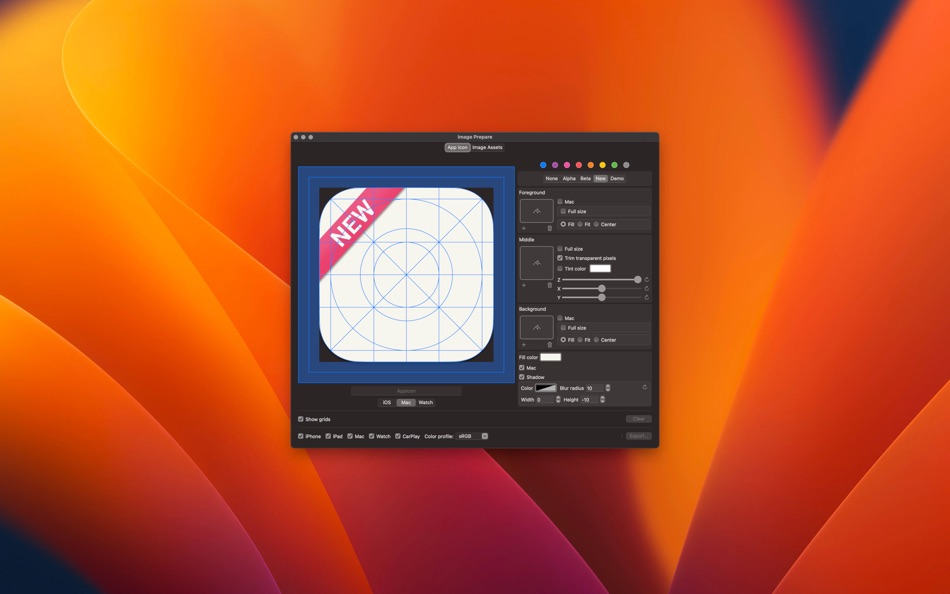
You can now easily make icons and images for your applications. Simply add an icon or an image to the App then choose the required devices and press the “Export” button. After the export drag the resulting files to your project Asset.
During the export images color profile changes to sRGB or P3, images size optimizes for the particular device and the transparency of opaque icons is removed.
Supported Devices:
▪ iPhone;
▪ iPad;
▪ macOS;
▪ Apple Watch;
Ad
Skjermbilder



Dette er nytt
- Versjon: 1.10
- Oppdatert:
- Do not process images with a width or height size less than one pixel;
You can now export images for use in projects for Apple Vision;
Pris
- I dag: $1.99
- Minimum: $1.99
- Maksimalt: $1.99
Spor priser
Ad
Utvikler
- Denis Popov
- Plattformer: iOS Apper (3) macOS Apper (2)
- Lister: 1 + 0
- Poeng: 0 + 0 ¡
- Rangeringer: 0
- Anmeldelser: 0
- Rabatter: 0
- Videoer: 0
- RSS: Abonner
Poeng
0 ☹️
Rangeringer
0 ☹️
Lister
- Image Prepare

Anmeldelser
Bli den første til å vurdere 🌟
Tilleggsinformasjon
- Versjon: 1.10
- Kategori:
macOS Apper›Verktøy - OS:
macOS,macOS 10.13 og nyere - Størrelse:
8 Mb - Språk som støttes:
English,French,German,Italian,Portuguese,Russian,Spanish - Egnethet:
4+ - Mac App Store Vurdering:
0 - Oppdatert:
- Utgivelsesdato:
Image Prepare Kort nettadresse: Kopiert!- 🌟 Dele
- Mac App Store
Du vil kanskje også like
- Ny
- Image Prep
- macOS Apper: Verktøy Av: Mike West
- $0.99
- Lister: 0 + 0 Rangeringer: 0 Anmeldelser: 0
- Poeng: 0 + 0 Versjon: 1.0 Image Prep for App submissions Stop wasting time manually resizing screenshots for App submission. Image Prep is a powerful utility designed specifically for developers and designers ... ⥯
-
- Image Styler+
- macOS Apper: Verktøy Av: 腾 崔
- $2.99
- Lister: 0 + 0 Rangeringer: 0 Anmeldelser: 0
- Poeng: 0 + 0 Versjon: 1.3.1 We give you the rendered image and corresponding SOURCE CODE!!! Working on image processing development is time consuming, adjust respective image filter parameters and create various ... ⥯
-
- Image Resize - @2 @3 Creator
- macOS Apper: Verktøy Av: 晖 姚
- * $2.99
- Lister: 0 + 0 Rangeringer: 0 Anmeldelser: 0
- Poeng: 0 + 0 Versjon: 2.0 Image Resize takes any image and creates a full set for images, icons or universal assets with 3 steps. Drop file or folder, select output type, select output folder. For iOS ... ⥯
-
- Image Resizer Toolbox
- macOS Apper: Verktøy Av: Juan Vicente Guerrero Barria
- Gratis
- Lister: 0 + 0 Rangeringer: 0 Anmeldelser: 0
- Poeng: 0 + 0 Versjon: 1.9 Helps you resize images for your iOS and OS X projects. Just drop an image, group of images or even a directory to get the corresponding 1x, 2x and 3x versions. NEW! Get the IRT Viewer ⥯
-
- Simple Image Resizer Instantly
- macOS Apper: Verktøy Av: li bin
- $1.99
- Lister: 0 + 0 Rangeringer: 0 Anmeldelser: 0
- Poeng: 0 + 0 Versjon: 1.1 Image Resizer is the simplest way to batch resize images on your Mac built for speed, clarity, and privacy. Drag your images into the window, choose Pixels or Percent, optionally lock ... ⥯
-
- Base64 Image Encoder
- macOS Apper: Verktøy Av: Friendly, Inc.
- $3.99
- Lister: 1 + 0 Rangeringer: 0 Anmeldelser: 0
- Poeng: 0 + 0 Versjon: 2.0 This handy utility will let you encode your images into base64. Converting images to Base64, and embedding them into HTML and CSS, is a great way to speed up your website or ... ⥯
-
- AppStore Image Creator
- macOS Apper: Verktøy Av: Masaharu Tsukamoto
- $0.99
- Lister: 0 + 0 Rangeringer: 0 Anmeldelser: 0
- Poeng: 0 + 0 Versjon: 1.0 AppStore Image Creator is an application that simply generates images for the AppStore. It crops the selected image by the size of the red frame and generates a resized image for ... ⥯
-
- App Image Kit
- macOS Apper: Verktøy Av: 龙 金
- * Gratis
- Lister: 1 + 0 Rangeringer: 0 Anmeldelser: 0
- Poeng: 0 + 0 Versjon: 3.3 App Image Kit is used for batch create app icons, launch images, Xcode image assets, app screenshots and effect texts. There are lots of built-in size-templates such as iOS, macOS, ... ⥯
-
- VAS Image Extractor
- macOS Apper: Verktøy Av: App Tyrant Corp
- Gratis
- Lister: 0 + 1 Rangeringer: 0 Anmeldelser: 0
- Poeng: 1 + 0 Versjon: 1.0 Quickly and easily extract images out of your Visual Attributed String document files with VAS Image Extractor! VAS is the file format used in the Visual Attributed String Mac ... ⥯
-
- B64 - Base64 Image Converter
- macOS Apper: Verktøy Av: Mahtca Global S.R.L.
- Gratis
- Lister: 0 + 1 Rangeringer: 0 Anmeldelser: 0
- Poeng: 1 + 0 Versjon: 2.1.0 This tool Is good when: - you want to encode or decode images in no time - you want to import base64 strings directly from file - reconstruct images from a base64 string you already ... ⥯
-
- My App Image
- macOS Apper: Verktøy Av: 镇 黄
- Gratis
- Lister: 0 + 0 Rangeringer: 0 Anmeldelser: 0
- Poeng: 0 + 0 Versjon: 1.0 An application designed specifically for Mac to conveniently process images for iOS, iPad, macOS development and deployment needs, meeting various requirements. 1 Adjust image size: ... ⥯
-
- Squoosh Image
- macOS Apper: Verktøy Av: 朝品 冯
- * Gratis
- Lister: 0 + 0 Rangeringer: 0 Anmeldelser: 0
- Poeng: 0 + 0 Versjon: 1.0.0 Small - The smaller the image, the faster it loads. "Squoosh Image" can reduce file size and maintain high quality. Simple - The interface is simple and easy to use, and it can help ... ⥯
-
- Base64 Image Tool
- macOS Apper: Verktøy Av: Anatolii Sukhonosov
- Gratis
- Lister: 0 + 0 Rangeringer: 0 Anmeldelser: 0
- Poeng: 0 + 0 Versjon: 1.0 Base64 Image Tool is a fast, local utility for encoding and decoding images. Drop an image, choose a format, and instantly get clean Base64 or ready to use HTML/CSS snippets. Key ... ⥯
-
- Core Image Filters
- macOS Apper: Verktøy Av: Denis Popov
- Gratis
- Lister: 0 + 0 Rangeringer: 0 Anmeldelser: 0
- Poeng: 0 + 0 Versjon: 1.0 Created by developers and for developers. You can experiment with Core Image Filters and parameters. You can export filters parameters for use in your apps on macOS, iOS and tvOS. ⥯