
الإشارات المرجعية
| المطوّر: | Tuan Truong (4) | ||
| السعر: | * مجاني | ||
| الدرجة: | 6,120 بلاتين | ||
| الترتيب: | 0 | ||
| تعليقات: | 0 انشر تعليقًا | ||
| قوائم: | 0 1 | ||
| النقاط: | 5 | ||
| +1 نقطة | |||
ملخص
تعرّف على LineSmith for Xcode، تطبيق من Tuan Truong ضمن فئة «أدوات المطوّرين».
صدر ، وما زالت التحديثات تصل، أحدثها . هذا هو الإخلاص.
تنزيله مجاني، وبعدها الأمر لك (فيه مشتريات داخلية).
يعمل على macOS 14.0 وما بعده. تحقّق من إصدار جهازك.
درجة AppAgg هي 6,120. هذا بلاتين، ولا يعلوه إلا أسطورة.
2 ميغابايت فقط، حجم يناسب حتى القرص الممتلئ.
التصنيف العمري «4+»، أي أنه مناسب للأطفال أيضًا.
يتحدث لغة واحدة فقط، وليست العربية.
5 أشخاص انتقلوا من هنا إلى المتجر. هذه نقاطه على AppAgg.
لدى هذا المطوّر على AppAgg 1 لعبة و2 تطبيقان أخرى. ألقِ نظرة.
بالمناسبة، لدى هذا المطوّر 1 عرض الآن.
تريد أن تعرف بالتحديثات والتطبيقات الجديدة أولًا؟ تابع المطور أو اشترك في موجز RSS. تصلك الإشعارات عبر تطبيق AppAgg Alerts لنظامي Android وiOS.
منصات أخرى 0
 | LineSmith for XcodeMac App Store6K بلاتينmacOSعمليات الشراء داخل التطبيق $1.99 – $9.99 | مجاني |
متاح حاليًا في هذا المتجر فقط.
سجل الأسعار 0
- السعر الحالي: مجاني
- الحد الأدنى: مجاني
- الحد الأقصى: مجاني
خلاصتك الخاصة في الصفحة الرئيسية
لقطات الشاشة 6

الوصف
Formerly TextPlus. Your existing shortcuts still work.
COMMANDS
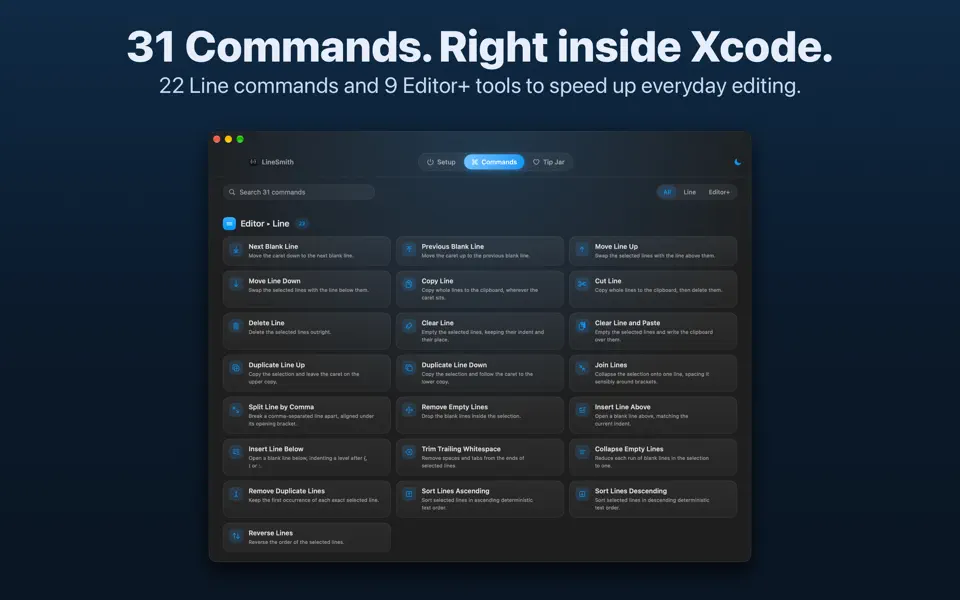
Editor > Line
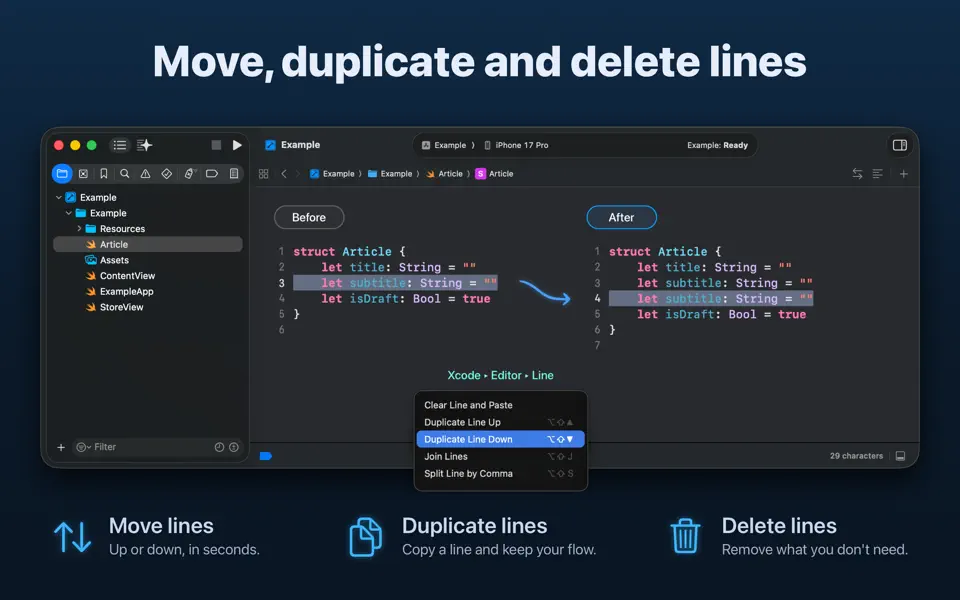
• Move Line Up / Move Line Down — swap the selection with the line above or below
• Duplicate Line Up / Duplicate Line Down — copy the selection and choose which copy keeps the caret
• Delete Line — delete whole lines wherever the caret sits
• Clear Line — empty the lines but keep their indentation and position
• Clear Line and Paste — replace the selected lines with the clipboard
• Copy Line / Cut Line — put whole lines on the clipboard, no selecting first
• Insert Line Above / Insert Line Below — open a blank line at the right indent
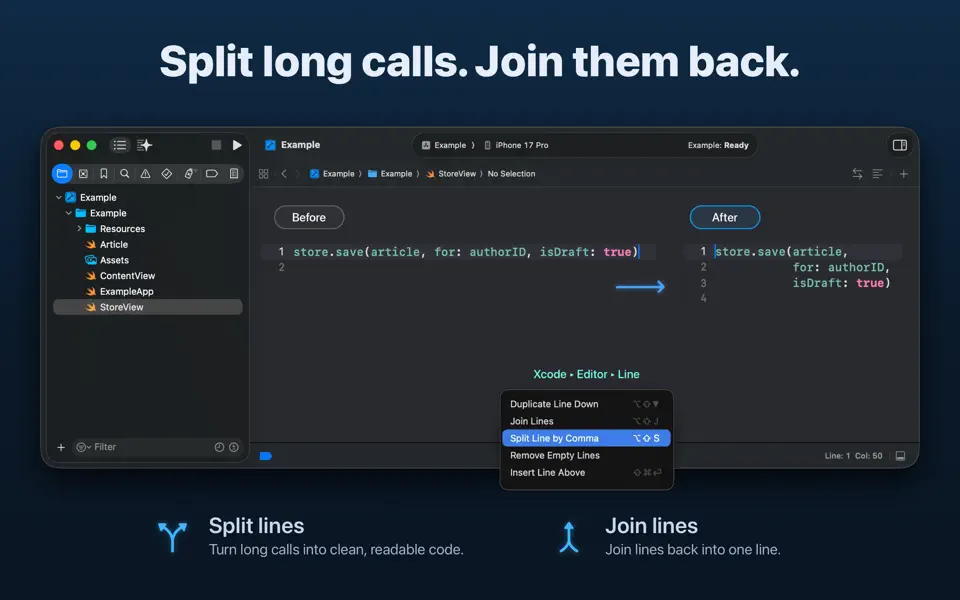
• Join Lines — collapse a selection onto one line, spacing it sensibly around brackets
• Split Line by Comma — break a comma-separated line apart, aligned under its bracket
• Remove Empty Lines — drop the blank lines inside a selection
• Next Blank Line / Previous Blank Line — move the caret between blocks
• Trim Trailing Whitespace — remove spaces and tabs from selected line endings
• Collapse Empty Lines — reduce each run of blank lines to one
• Remove Duplicate Lines — keep the first occurrence of each exact selected line
• Sort Lines Ascending / Sort Lines Descending — sort selected lines deterministically
• Reverse Lines — reverse the order of the selected lines
Editor > Editor+
• Remove Comment — strip // comments, leaving code and string or regex literals alone
• Add Type Extension — write an extension on the first type declared in the file
• Add Type Delegate — write a delegate protocol for it
• Insert MARK Section — insert a // MARK: section placeholder
• Wrap in #if DEBUG — wrap selected lines in a conditional compilation block
• Organize Imports — sort and de-duplicate safe, contiguous Swift import blocks
• Wrap in Task — wrap and indent selected lines in Task { }
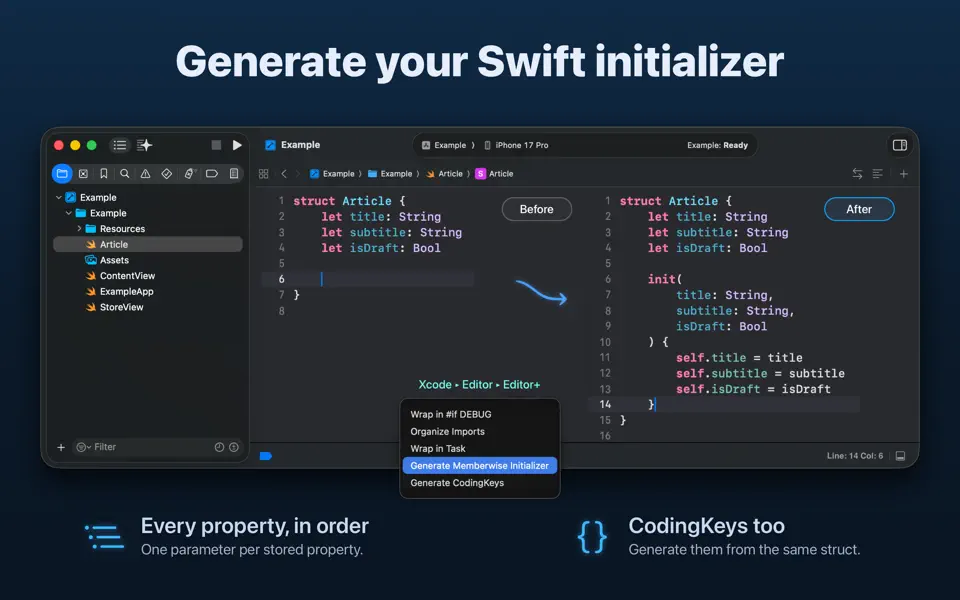
• Generate Memberwise Initializer — create an initializer from a struct's stored properties, and decline rather than guess on syntax it cannot handle
• Generate CodingKeys — create CodingKeys from direct stored properties
FREE, AND STAYING FREE
All 31 commands are free. There is no paid tier, no account, no ads and no tracking. LineSmith collects nothing about you or your code. If LineSmith saves you time, there is a tip jar in the app; a tip unlocks nothing, because there is nothing to unlock.
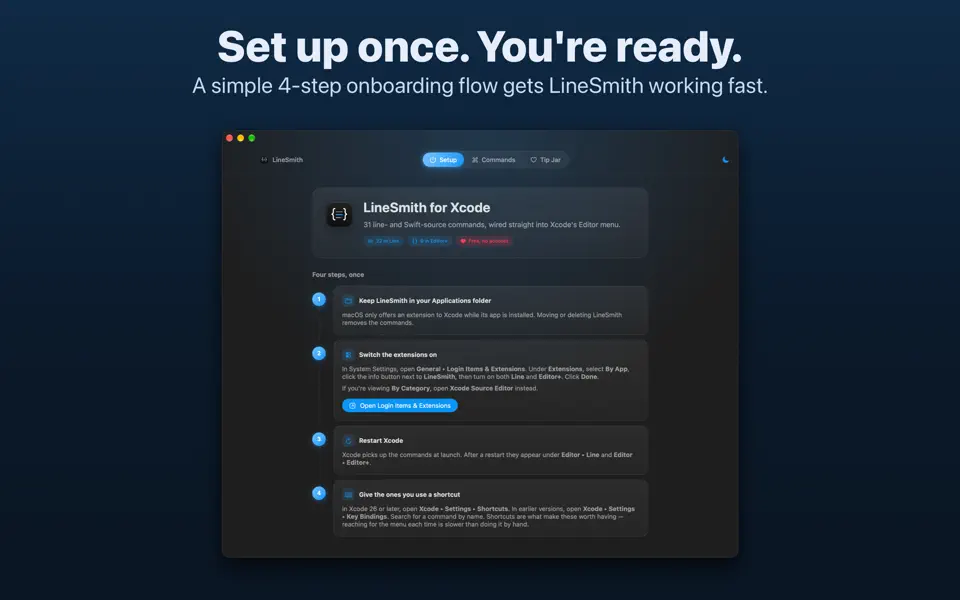
SETTING IT UP
1. Keep LineSmith in your Applications folder.
2. In System Settings, find Xcode Source Editor and enable both Line and Editor+.
3. Restart Xcode.
4. Assign shortcuts in Xcode > Settings > Shortcuts (Key Bindings in earlier Xcode versions).
Requires macOS 14 or later and Xcode.
UPGRADING FROM TEXTPLUS
The 19 command identifiers inherited from TextPlus are unchanged, so existing keyboard shortcuts carry over. Version 2.0 also brings reliability fixes and 12 new commands, for 31 in total.
من المطوّر
قوائم 0
-
 LineSmith for Xcode
النقاط 5
-

- +1 نقطة
-
- 2,002 Dragon
- +1
-
- 17 Kai Lee
- +1
-
- 1,249 바람처어럼
- +1
-
- 18,989 Simon Chan
- +1
-
- 173 upto
- +1






الترتيب 0
-
- تقييمك
المطوّر 4
- Tuan Truong
- المتابعون: 0
- المنصات: iOS تطبيقات (2) macOS تطبيقات (1) macOS ألعاب (1)
- العروض: 1
- قوائم: 0 1
- النقاط: 7
- الترتيب: 0
- تعليقات: 0
- الفيديوهات: 0
- RSS: اشتراك
ما الجديد
- الإصدار: 2.0.2
- آخر تحديث:
- LineSmith 2.0.2
• Undo after a command now restores only the lines that changed, without selecting the whole file or jumping to the top.
• Generate Memberwise Initializer and Generate CodingKeys handle trailing comments, property wrappers, property observers, and class methods correctly, and no longer guess wrong types.
• Join Lines keeps trailing comments intact and handles blank lines better.
• Split Line by Comma aligns under the innermost open bracket.
• Clear Line and Paste keeps indentation when the clipboard is empty.
• Files with mixed LF/CRLF line endings keep the endings of untouched lines.
• All 31 editing commands remain free.
معلومات إضافية
- تاريخ الإصدار:
- الفئة:
تطبيقات macOS›أدوات المطوّرين - نظام التشغيل:
macOSmacOS 14.0 والأحدث - الحجم:
2 Mb - اللغات المدعومة:
الإنجليزية - تقييم المحتوى:
4+ - Mac App Store تقييم: ¡
0 - الموقع الإلكتروني:
 https://leafworkstudio.com/linesmith
درجة AppAgg
درجة AppAgg التقديرية لـ
LineSmith for Xcode
المطوّر: Tuan Truong
تشير الدرجة الأعلى عادةً إلى أداء أفضل في مؤشرات AppAgg.
استنادًا إلى: الشعبية · تقييمات المستخدمين · الحداثة · العروض · بيانات المتاجر · نشاط المجتمع
يُعاد حسابها يوميًا بناءً على أحدث بيانات AppAgg.
تعليقات 0 ¡
مشاركة
LineSmith for Xcode عنوان URL مختصر: تم النسخ!- Mac App Store

