
Σελιδοδείκτες
| Προγραμματιστής: | Tuan Truong (4) | ||
| Τιμή: | * Δωρεάν | ||
| Βαθμολογία: | 6.120 Πλατινένιο | ||
| Κατατάξεις: | 0 | ||
| Σχόλια: | 0 Δημοσίευση σχολίου | ||
| Λίστες: | 0 1 | ||
| Πόντοι: | 5 | ||
| +1 Πόντος | |||
Σύνοψη
Γνώρισε το LineSmith for Xcode, μια εφαρμογή από Tuan Truong στην κατηγορία «Εργαλεία προγραμματισμού».
Κυκλοφόρησε και οι ενημερώσεις συνεχίζουν να έρχονται. Η πιο πρόσφατη ήρθε . Αυτό θα πει αφοσίωση.
Το κατέβασμα είναι δωρεάν. Από κει και πέρα αποφασίζεις εσύ. Υπάρχουν αγορές μέσα στην εφαρμογή.
Λειτουργεί σε macOS 14.0 και νεότερα. Αξίζει να ελέγξεις ποια έκδοση έχεις.
Η Βαθμολογία AppAgg είναι 6.120. Αυτό σημαίνει «Πλατινένιο», και πιο πάνω υπάρχει μόνο το «Θρυλικό».
Μόνο 2 megabyte, χωράει ακόμα και σε γεμάτο δίσκο.
Ηλικιακή κατάταξη «4+»: ταιριάζει και σε παιδιά.
Μιλάει μόνο μία γλώσσα, και δεν είναι τα ελληνικά.
5 άτομα έχουν ήδη πάει από εδώ στο κατάστημα. Αυτοί είναι οι Πόντοι της στο AppAgg.
Ο προγραμματιστής έχει ακόμα 1 παιχνίδι και 2 εφαρμογές στο AppAgg. Αξίζει μια ματιά.
Α, και αυτός ο προγραμματιστής έχει αυτή τη στιγμή 1 προσφορά.
Μάθε πρώτος για ενημερώσεις και νέες εφαρμογές. Ακολούθησε τον προγραμματιστή ή κάνε εγγραφή στη ροή RSS. Οι ειδοποιήσεις push έρχονται μέσω της εφαρμογής AppAgg Alerts για Android και iOS.
Άλλες πλατφόρμες 0
 | LineSmith for XcodeMac App Store6K ΠλατινένιοmacOSΑγορές εντός εφαρμογής $1.99 – $9.99 | Δωρεάν |
Προς το παρόν μόνο σε αυτό το κατάστημα.
Ιστορικό τιμών 0
- Τρέχουσα τιμή: Δωρεάν
- Ελάχιστο: Δωρεάν
- Μέγιστο: Δωρεάν
Η δική σας ροή στην αρχική σελίδα
Στιγμιότυπα οθόνης 6

Περιγραφή
Formerly TextPlus. Your existing shortcuts still work.
COMMANDS
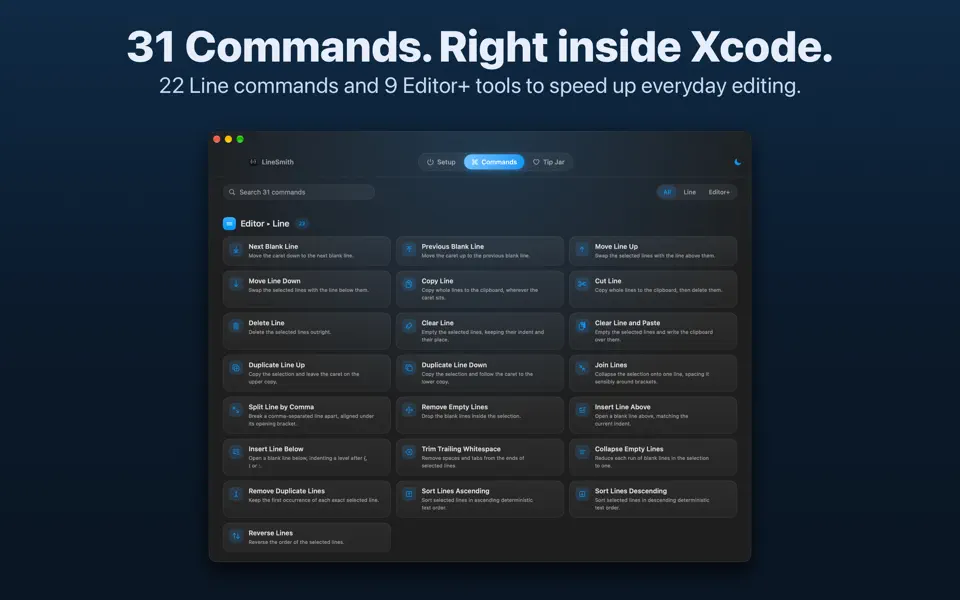
Editor > Line
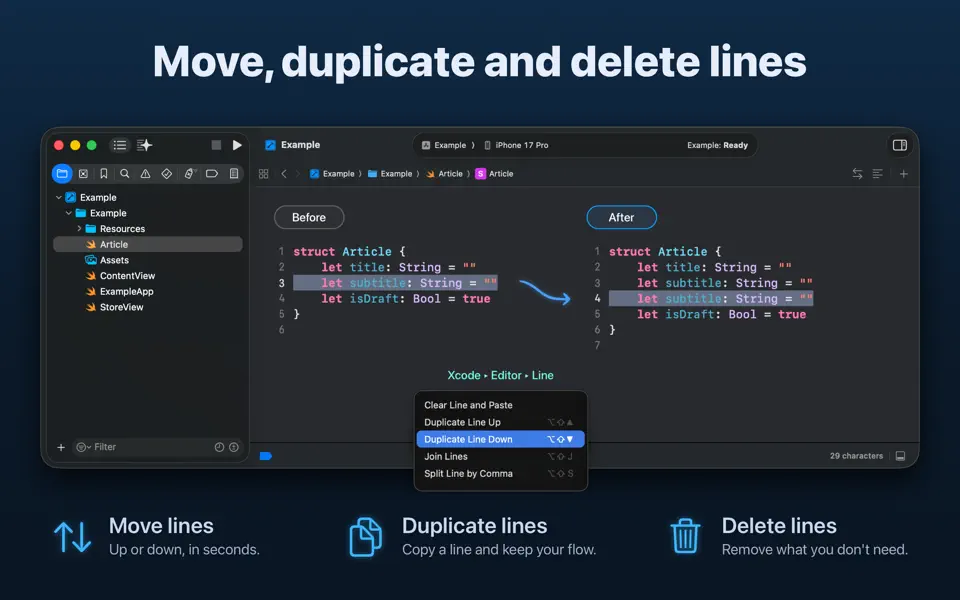
• Move Line Up / Move Line Down — swap the selection with the line above or below
• Duplicate Line Up / Duplicate Line Down — copy the selection and choose which copy keeps the caret
• Delete Line — delete whole lines wherever the caret sits
• Clear Line — empty the lines but keep their indentation and position
• Clear Line and Paste — replace the selected lines with the clipboard
• Copy Line / Cut Line — put whole lines on the clipboard, no selecting first
• Insert Line Above / Insert Line Below — open a blank line at the right indent
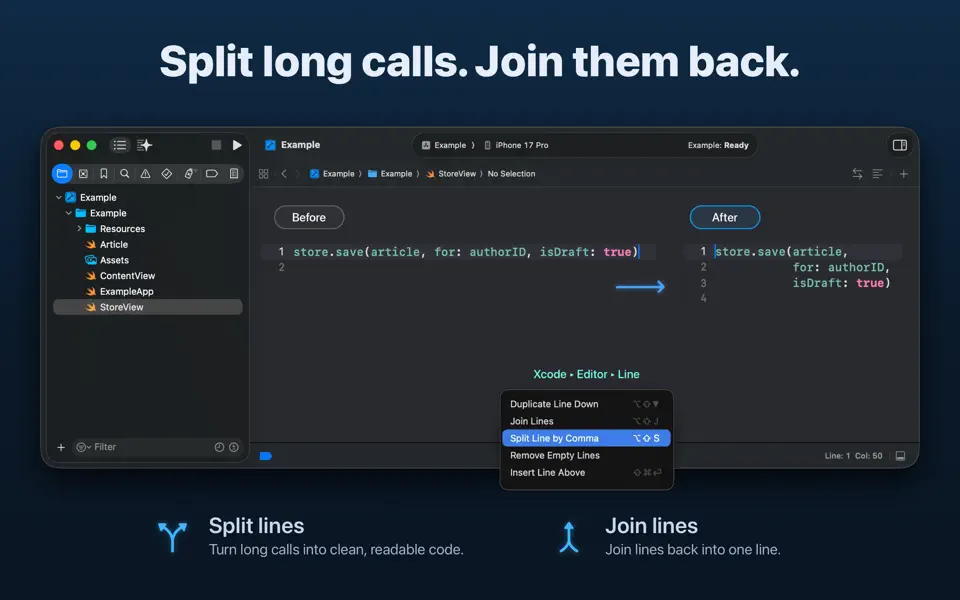
• Join Lines — collapse a selection onto one line, spacing it sensibly around brackets
• Split Line by Comma — break a comma-separated line apart, aligned under its bracket
• Remove Empty Lines — drop the blank lines inside a selection
• Next Blank Line / Previous Blank Line — move the caret between blocks
• Trim Trailing Whitespace — remove spaces and tabs from selected line endings
• Collapse Empty Lines — reduce each run of blank lines to one
• Remove Duplicate Lines — keep the first occurrence of each exact selected line
• Sort Lines Ascending / Sort Lines Descending — sort selected lines deterministically
• Reverse Lines — reverse the order of the selected lines
Editor > Editor+
• Remove Comment — strip // comments, leaving code and string or regex literals alone
• Add Type Extension — write an extension on the first type declared in the file
• Add Type Delegate — write a delegate protocol for it
• Insert MARK Section — insert a // MARK: section placeholder
• Wrap in #if DEBUG — wrap selected lines in a conditional compilation block
• Organize Imports — sort and de-duplicate safe, contiguous Swift import blocks
• Wrap in Task — wrap and indent selected lines in Task { }
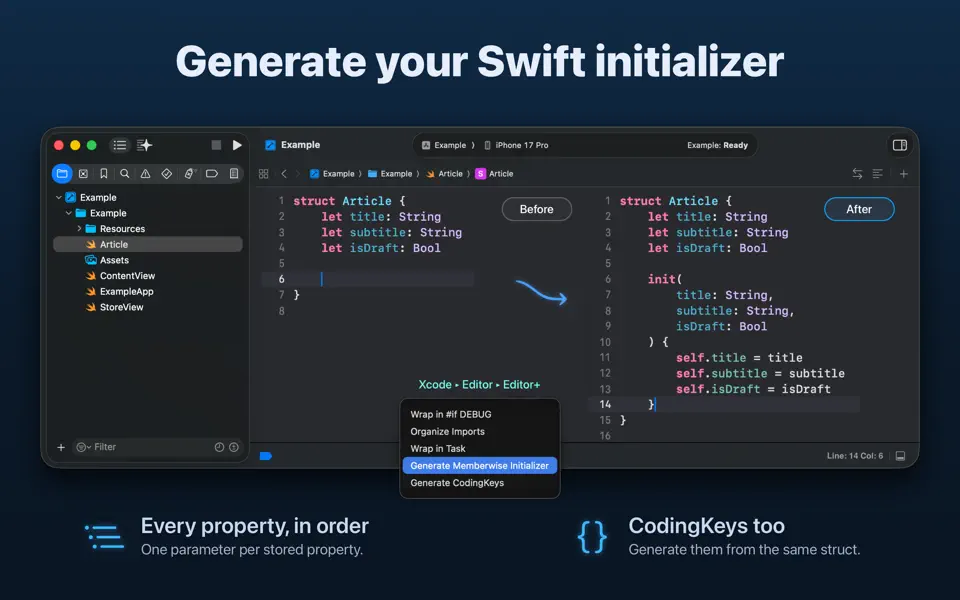
• Generate Memberwise Initializer — create an initializer from a struct's stored properties, and decline rather than guess on syntax it cannot handle
• Generate CodingKeys — create CodingKeys from direct stored properties
FREE, AND STAYING FREE
All 31 commands are free. There is no paid tier, no account, no ads and no tracking. LineSmith collects nothing about you or your code. If LineSmith saves you time, there is a tip jar in the app; a tip unlocks nothing, because there is nothing to unlock.
SETTING IT UP
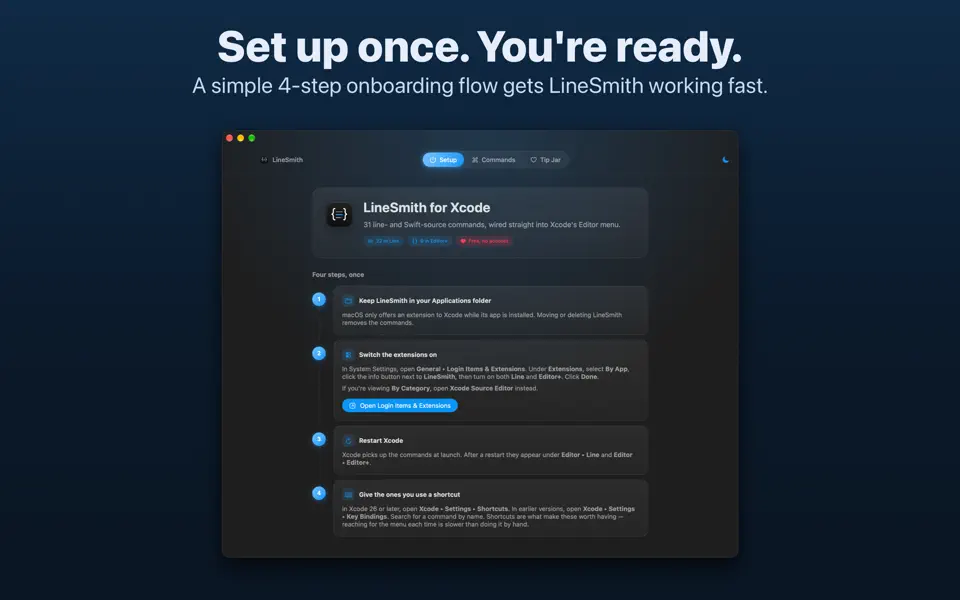
1. Keep LineSmith in your Applications folder.
2. In System Settings, find Xcode Source Editor and enable both Line and Editor+.
3. Restart Xcode.
4. Assign shortcuts in Xcode > Settings > Shortcuts (Key Bindings in earlier Xcode versions).
Requires macOS 14 or later and Xcode.
UPGRADING FROM TEXTPLUS
The 19 command identifiers inherited from TextPlus are unchanged, so existing keyboard shortcuts carry over. Version 2.0 also brings reliability fixes and 12 new commands, for 31 in total.
Από τον προγραμματιστή
Λίστες 0
-
 LineSmith for Xcode
Πόντοι 5
-

- +1 Πόντος
-
- 2.002 Dragon
- +1
-
- 17 Kai Lee
- +1
-
- 1.249 바람처어럼
- +1
-
- 18.989 Simon Chan
- +1
-
- 173 upto
- +1






Κατατάξεις 0
-
- Η βαθμολογία σας
Προγραμματιστής 4
- Tuan Truong
- Ακόλουθοι: 0
- Πλατφόρμες: iOS Εφαρμογές (2) macOS Εφαρμογές (1) macOS Παιχνίδια (1)
- Προσφορές: 1
- Λίστες: 0 1
- Πόντοι: 7
- Κατατάξεις: 0
- Σχόλια: 0
- Βίντεο: 0
- RSS: Εγγραφή
Τι νέο υπάρχει
- Έκδοση: 2.0.2
- Τελευταία ενημέρωση:
- LineSmith 2.0.2
• Undo after a command now restores only the lines that changed, without selecting the whole file or jumping to the top.
• Generate Memberwise Initializer and Generate CodingKeys handle trailing comments, property wrappers, property observers, and class methods correctly, and no longer guess wrong types.
• Join Lines keeps trailing comments intact and handles blank lines better.
• Split Line by Comma aligns under the innermost open bracket.
• Clear Line and Paste keeps indentation when the clipboard is empty.
• Files with mixed LF/CRLF line endings keep the endings of untouched lines.
• All 31 editing commands remain free.
Πρόσθετες πληροφορίες
- Ημερομηνία κυκλοφορίας:
- Κατηγορία:
Εφαρμογές για macOS›Εργαλεία προγραμματισμού - Λειτουργικό σύστημα:
macOSmacOS 14.0 και νεότερες εκδόσεις - Μέγεθος:
2 Mb - Υποστηριζόμενες γλώσσες:
Αγγλικά - Αξιολόγηση περιεχομένου:
4+ - Mac App Store Βαθμολογία: ¡
0 - Ιστοσελίδα:
 https://leafworkstudio.com/linesmith
Βαθμολογία AppAgg
Εκτιμώμενη βαθμολογία AppAgg για
LineSmith for Xcode
Προγραμματιστής: Tuan Truong
Η υψηλότερη βαθμολογία συνήθως αντανακλά ισχυρότερους δείκτες στο AppAgg.
Βασισμένο σε: δημοτικότητα · αξιολογήσεις χρηστών · επικαιρότητα · προσφορές · δεδομένα καταστημάτων · δραστηριότητα κοινότητας
Υπολογίζεται εκ νέου καθημερινά με βάση τα πιο πρόσφατα δεδομένα του AppAgg.
Σχόλια 0 ¡
Κοινή χρήση
LineSmith for Xcode Σύντομο URL: Αντιγράφηκε!- Mac App Store

