
Marcadores
| Desarrollador: | Tuan Truong (4) | ||
| Precio: | * Gratis | ||
| Puntuación: | 6120 Platino | ||
| Clasificaciones: | 0 | ||
| Comentarios: | 0 Publicar comentario | ||
| Listas: | 0 1 | ||
| Puntos: | 5 | ||
| +1 Punto | |||
Resumen
Te presentamos LineSmith for Xcode, una app de Tuan Truong de la categoría «Para desarrolladores».
Salió y las actualizaciones no paran: la más reciente llegó . Eso sí es dedicación.
Se descarga gratis. Después, tú decides (tiene compras integradas).
Funciona en macOS 14.0 o posterior. Conviene comprobar qué versión tienes.
Su Puntuación de AppAgg es 6120. Nivel Platino (por encima solo está Leyenda).
Solo 2 megabytes. Cabe hasta en un disco lleno a reventar.
Clasificación «4+»: sirve también para los más pequeños.
Habla un solo idioma, y no es el español.
5 personas ya han ido de aquí a la tienda. Esos son sus Puntos en AppAgg.
El desarrollador tiene 1 juego y 2 apps más en AppAgg. Vale la pena echar un vistazo.
Por cierto, este desarrollador tiene 1 oferta ahora mismo.
¿Quieres enterarte antes que nadie de actualizaciones y apps nuevas? Sigue al desarrollador o suscríbete al canal RSS. Las notificaciones push llegan con la app AppAgg Alerts para Android y iOS.
Otras plataformas 0
 | LineSmith for XcodeMac App Store6K PlatinomacOSCompras integradas $1.99 – $9.99 | Gratis |
Por ahora, solo en esta tienda.
Historial de precios 0
- Precio actual: Gratis
- Mínimo: Gratis
- Máximo: Gratis
Tu propio feed en la página de inicio
Capturas de pantalla 6

Descripción
Formerly TextPlus. Your existing shortcuts still work.
COMMANDS
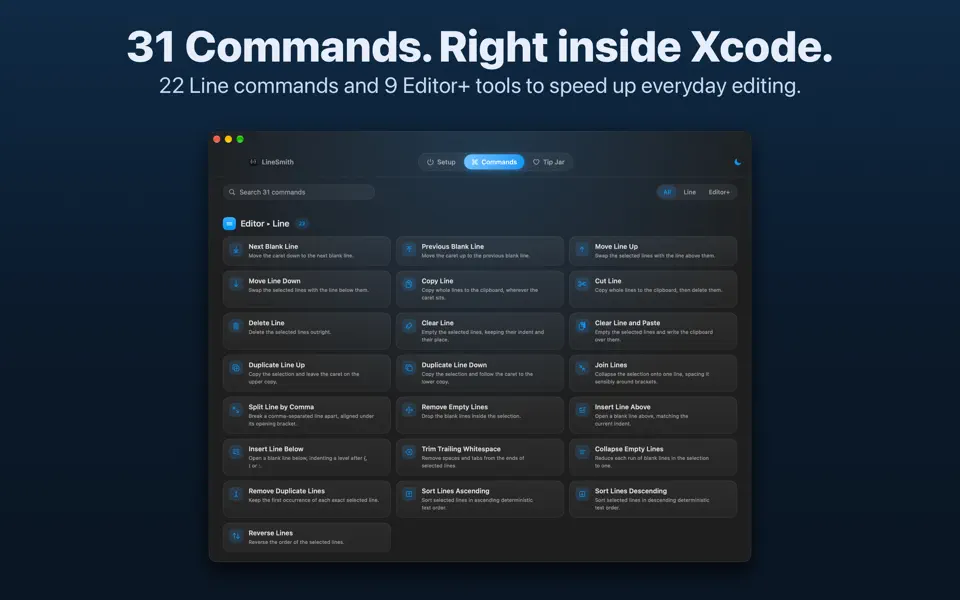
Editor > Line
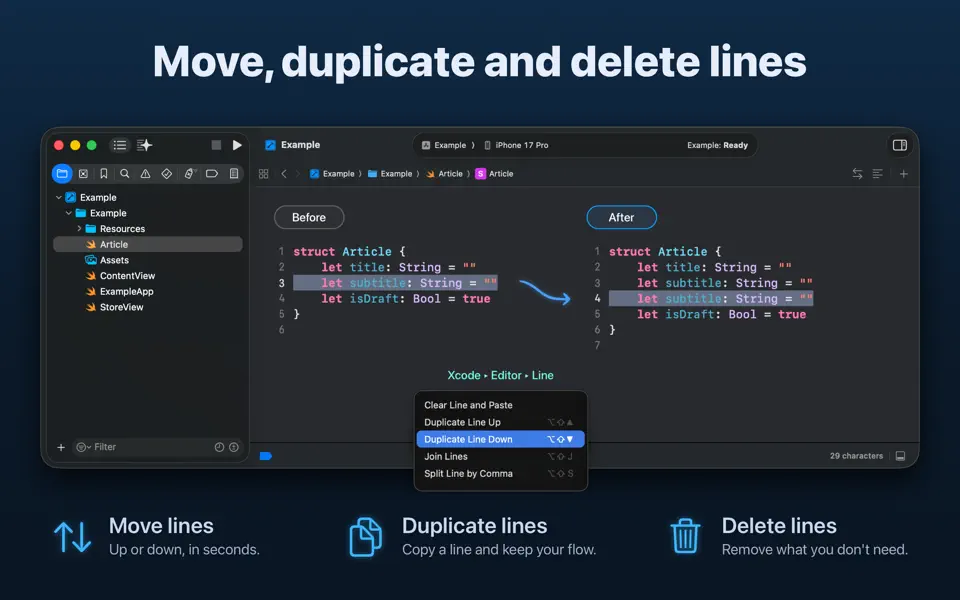
• Move Line Up / Move Line Down — swap the selection with the line above or below
• Duplicate Line Up / Duplicate Line Down — copy the selection and choose which copy keeps the caret
• Delete Line — delete whole lines wherever the caret sits
• Clear Line — empty the lines but keep their indentation and position
• Clear Line and Paste — replace the selected lines with the clipboard
• Copy Line / Cut Line — put whole lines on the clipboard, no selecting first
• Insert Line Above / Insert Line Below — open a blank line at the right indent
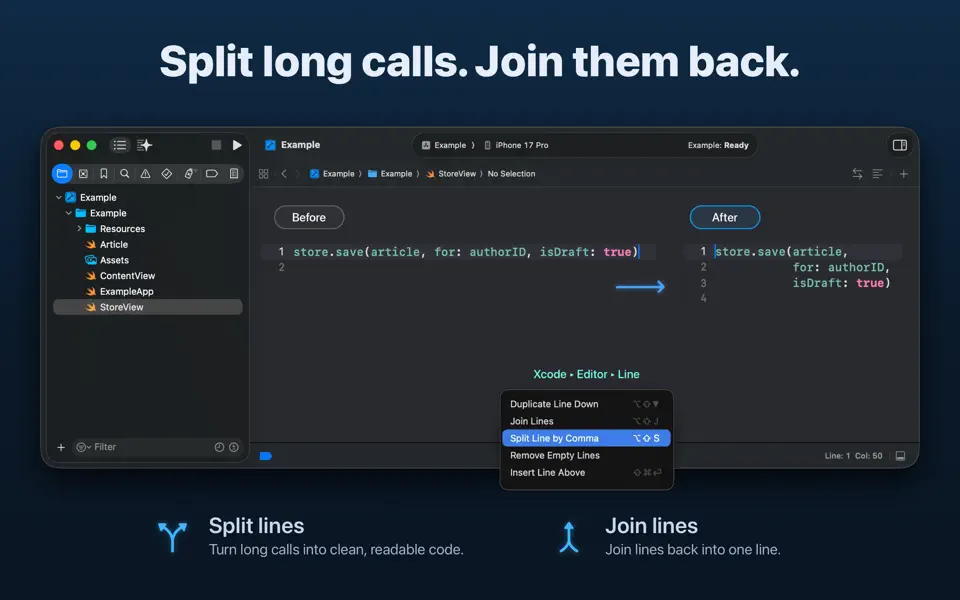
• Join Lines — collapse a selection onto one line, spacing it sensibly around brackets
• Split Line by Comma — break a comma-separated line apart, aligned under its bracket
• Remove Empty Lines — drop the blank lines inside a selection
• Next Blank Line / Previous Blank Line — move the caret between blocks
• Trim Trailing Whitespace — remove spaces and tabs from selected line endings
• Collapse Empty Lines — reduce each run of blank lines to one
• Remove Duplicate Lines — keep the first occurrence of each exact selected line
• Sort Lines Ascending / Sort Lines Descending — sort selected lines deterministically
• Reverse Lines — reverse the order of the selected lines
Editor > Editor+
• Remove Comment — strip // comments, leaving code and string or regex literals alone
• Add Type Extension — write an extension on the first type declared in the file
• Add Type Delegate — write a delegate protocol for it
• Insert MARK Section — insert a // MARK: section placeholder
• Wrap in #if DEBUG — wrap selected lines in a conditional compilation block
• Organize Imports — sort and de-duplicate safe, contiguous Swift import blocks
• Wrap in Task — wrap and indent selected lines in Task { }
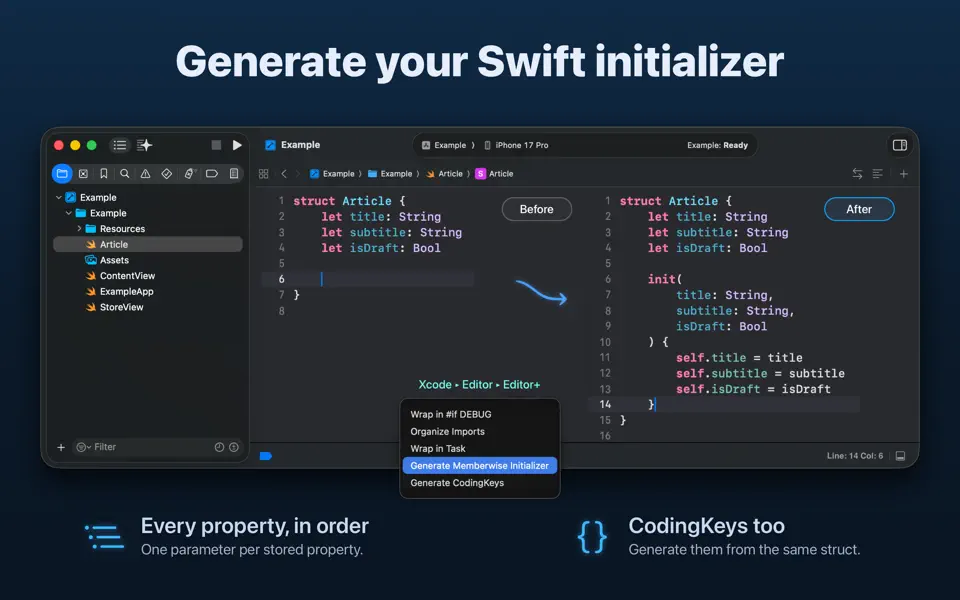
• Generate Memberwise Initializer — create an initializer from a struct's stored properties, and decline rather than guess on syntax it cannot handle
• Generate CodingKeys — create CodingKeys from direct stored properties
FREE, AND STAYING FREE
All 31 commands are free. There is no paid tier, no account, no ads and no tracking. LineSmith collects nothing about you or your code. If LineSmith saves you time, there is a tip jar in the app; a tip unlocks nothing, because there is nothing to unlock.
SETTING IT UP
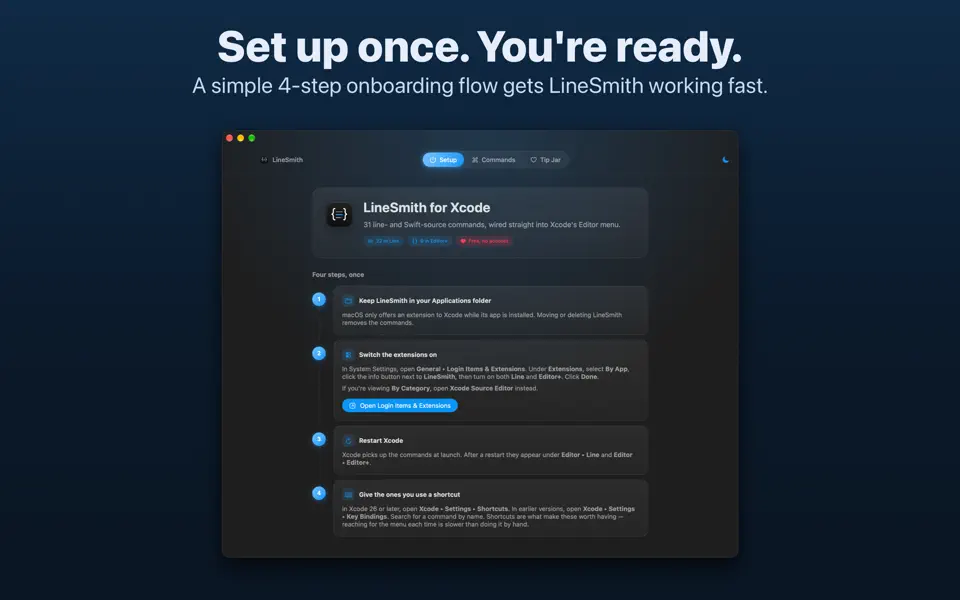
1. Keep LineSmith in your Applications folder.
2. In System Settings, find Xcode Source Editor and enable both Line and Editor+.
3. Restart Xcode.
4. Assign shortcuts in Xcode > Settings > Shortcuts (Key Bindings in earlier Xcode versions).
Requires macOS 14 or later and Xcode.
UPGRADING FROM TEXTPLUS
The 19 command identifiers inherited from TextPlus are unchanged, so existing keyboard shortcuts carry over. Version 2.0 also brings reliability fixes and 12 new commands, for 31 in total.
Del desarrollador
Listas 0
-
 LineSmith for Xcode
Puntos 5
-

- +1 Punto
-
- 2002 Dragon
- +1
-
- 17 Kai Lee
- +1
-
- 1249 바람처어럼
- +1
-
- 18.989 Simon Chan
- +1
-
- 173 upto
- +1






Clasificaciones 0
-
- Tu valoración
Desarrollador 4
- Tuan Truong
- Seguidores: 0
- Plataformas: iOS Aplicaciones (2) macOS Aplicaciones (1) macOS Juegos (1)
- Ofertas: 1
- Listas: 0 1
- Puntos: 7
- Clasificaciones: 0
- Comentarios: 0
- Vídeos: 0
- RSS: Suscribirse
Novedades
- Versión: 2.0.2
- Última actualización:
- LineSmith 2.0.2
• Undo after a command now restores only the lines that changed, without selecting the whole file or jumping to the top.
• Generate Memberwise Initializer and Generate CodingKeys handle trailing comments, property wrappers, property observers, and class methods correctly, and no longer guess wrong types.
• Join Lines keeps trailing comments intact and handles blank lines better.
• Split Line by Comma aligns under the innermost open bracket.
• Clear Line and Paste keeps indentation when the clipboard is empty.
• Files with mixed LF/CRLF line endings keep the endings of untouched lines.
• All 31 editing commands remain free.
Información adicional
- Fecha de lanzamiento:
- Categoría:
Aplicaciones para macOS›Para desarrolladores - Sistemas operativos:
macOSmacOS 14.0 y versiones posteriores - Tamaño:
2 Mb - Idiomas admitidos:
Inglés - Clasificación de contenido:
4+ - Mac App Store Valoración: ¡
0 - Sitio web:
 https://leafworkstudio.com/linesmith
Puntuación de AppAgg
Puntuación estimada de AppAgg para
LineSmith for Xcode
Desarrollador: Tuan Truong
Una puntuación más alta suele reflejar mejores resultados en los indicadores de AppAgg.
Basado en: popularidad · valoraciones de usuarios · actualidad · ofertas · datos de tiendas · actividad de la comunidad
Se recalcula a diario con datos actualizados de AppAgg.
Comentarios 0 ¡
Compartir
LineSmith for Xcode URL corta: Copiado!- Mac App Store

