
Marque-pages
| Développeur: | Tuan Truong (4) | ||
| Prix: | * Gratuit | ||
| Score: | 6 120 Platine | ||
| Classements: | 0 | ||
| Commentaires: | 0 Publier un commentaire | ||
| Listes: | 0 1 | ||
| Points: | 5 | ||
| +1 Point | |||
Résumé
Découvrez LineSmith for Xcode, une application signée Tuan Truong dans la catégorie « Outils de développement ».
Sortie , et les mises à jour continuent d’arriver : la plus récente est sortie . Ça, c’est de la fidélité.
Téléchargement gratuit. Ensuite, c’est vous qui voyez (il y a des achats intégrés).
Fonctionne sous macOS 14.0 ou version ultérieure. Mieux vaut vérifier la vôtre.
Son Score AppAgg est de 6 120. C’est le niveau Platine, et il n’y a que Légende au-dessus.
Seulement 2 mégaoctets. Ça tiendra même sur un disque plein à craquer.
Classification « 4+ » : ça convient aussi aux enfants.
Ne parle qu’une seule langue, et ce n’est pas le français.
5 personnes ont déjà filé d’ici vers la boutique. Ce sont ses Points sur AppAgg.
Ce développeur a encore 1 jeu et 2 applications sur AppAgg. Ça vaut le coup d’œil.
Au fait, ce développeur a 1 promotion en ce moment.
Envie de connaître les mises à jour et les nouvelles apps avant tout le monde ? Suivez le développeur ou abonnez-vous au Flux RSS. Les notifications push arrivent via l’app AppAgg Alerts pour Android et iOS.
Autres plateformes 0
 | LineSmith for XcodeMac App Store6K PlatinemacOSAchats intégrés $1.99 – $9.99 | Gratuit |
Pour l’instant, uniquement dans cette boutique.
Historique des prix 0
- Prix actuel : Gratuit
- Minimum: Gratuit
- Maximum: Gratuit
Votre propre fil sur la page d’accueil
Captures d'écran 6

Description
Formerly TextPlus. Your existing shortcuts still work.
COMMANDS
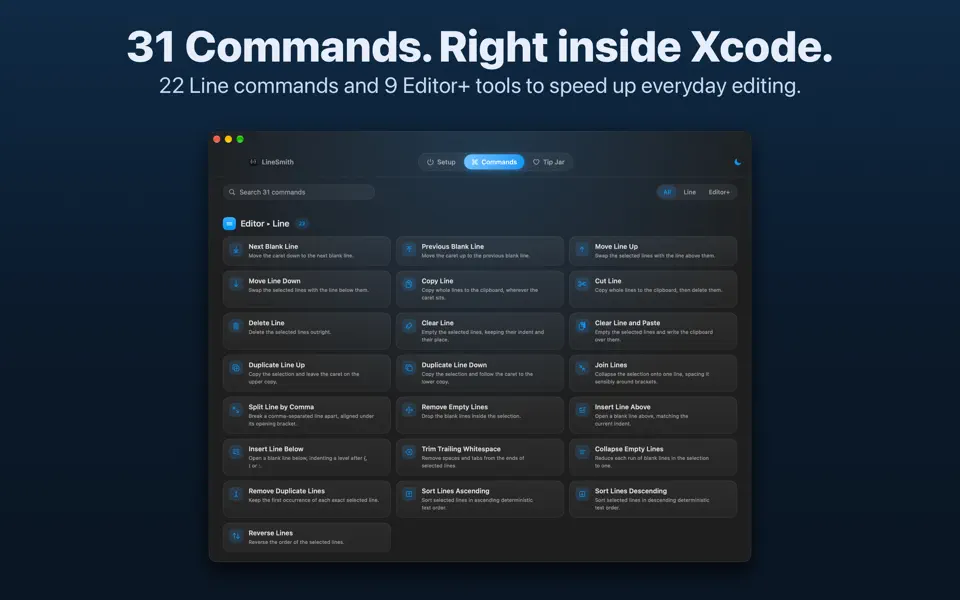
Editor > Line
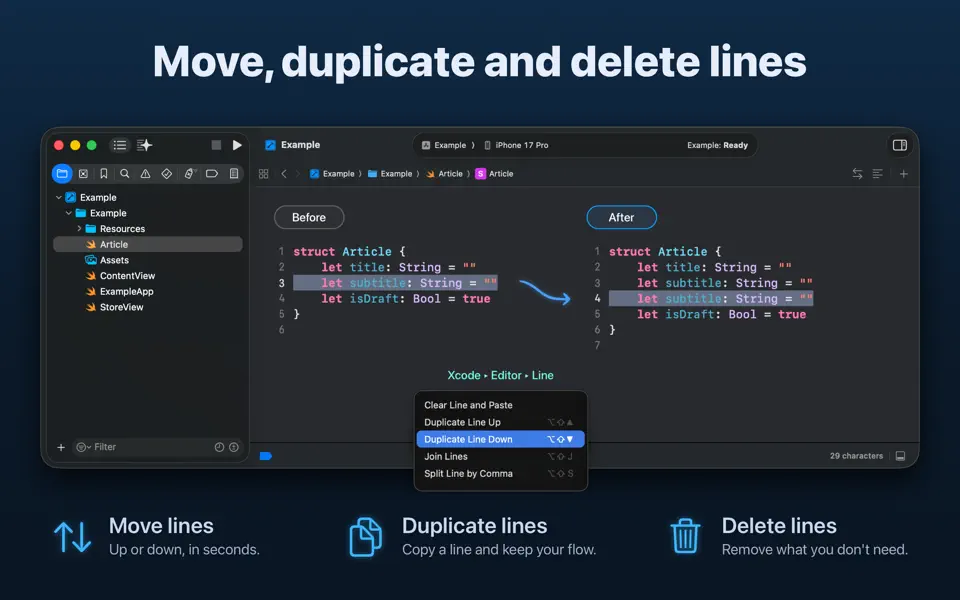
• Move Line Up / Move Line Down — swap the selection with the line above or below
• Duplicate Line Up / Duplicate Line Down — copy the selection and choose which copy keeps the caret
• Delete Line — delete whole lines wherever the caret sits
• Clear Line — empty the lines but keep their indentation and position
• Clear Line and Paste — replace the selected lines with the clipboard
• Copy Line / Cut Line — put whole lines on the clipboard, no selecting first
• Insert Line Above / Insert Line Below — open a blank line at the right indent
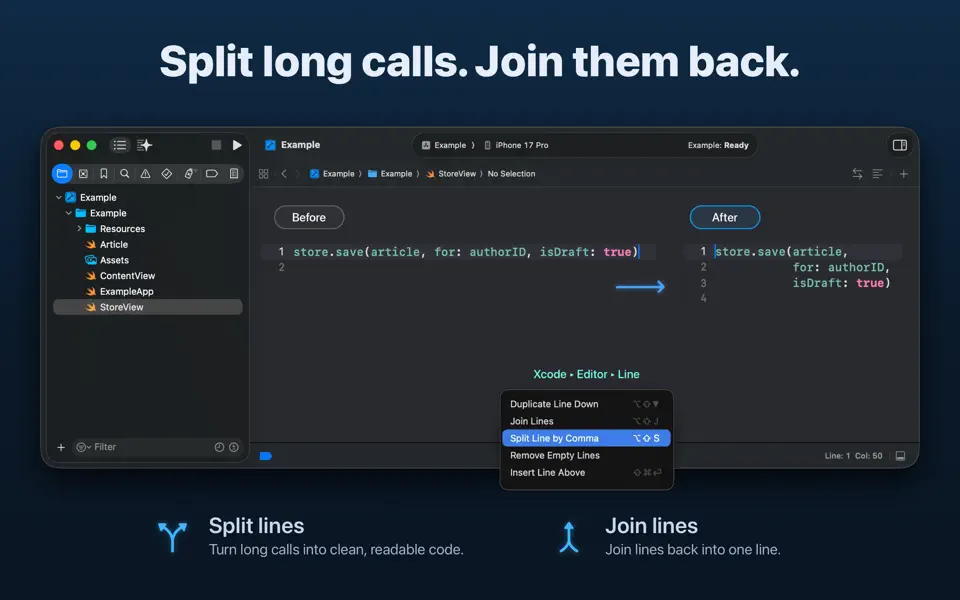
• Join Lines — collapse a selection onto one line, spacing it sensibly around brackets
• Split Line by Comma — break a comma-separated line apart, aligned under its bracket
• Remove Empty Lines — drop the blank lines inside a selection
• Next Blank Line / Previous Blank Line — move the caret between blocks
• Trim Trailing Whitespace — remove spaces and tabs from selected line endings
• Collapse Empty Lines — reduce each run of blank lines to one
• Remove Duplicate Lines — keep the first occurrence of each exact selected line
• Sort Lines Ascending / Sort Lines Descending — sort selected lines deterministically
• Reverse Lines — reverse the order of the selected lines
Editor > Editor+
• Remove Comment — strip // comments, leaving code and string or regex literals alone
• Add Type Extension — write an extension on the first type declared in the file
• Add Type Delegate — write a delegate protocol for it
• Insert MARK Section — insert a // MARK: section placeholder
• Wrap in #if DEBUG — wrap selected lines in a conditional compilation block
• Organize Imports — sort and de-duplicate safe, contiguous Swift import blocks
• Wrap in Task — wrap and indent selected lines in Task { }
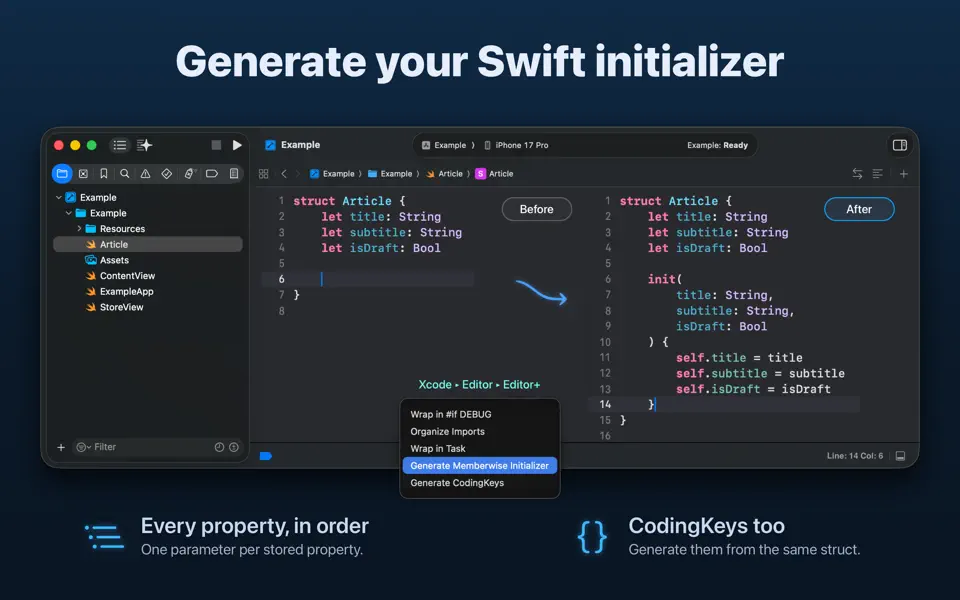
• Generate Memberwise Initializer — create an initializer from a struct's stored properties, and decline rather than guess on syntax it cannot handle
• Generate CodingKeys — create CodingKeys from direct stored properties
FREE, AND STAYING FREE
All 31 commands are free. There is no paid tier, no account, no ads and no tracking. LineSmith collects nothing about you or your code. If LineSmith saves you time, there is a tip jar in the app; a tip unlocks nothing, because there is nothing to unlock.
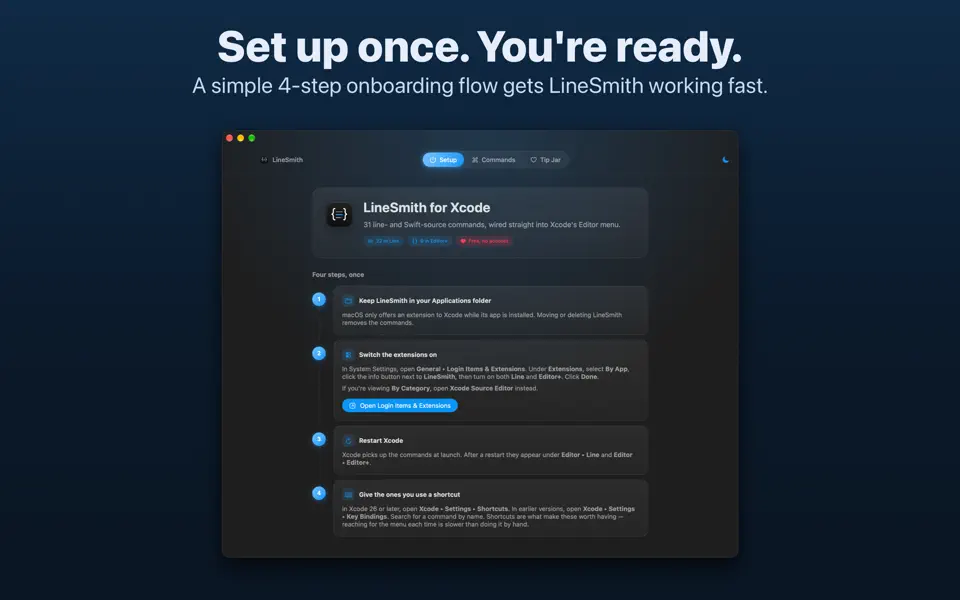
SETTING IT UP
1. Keep LineSmith in your Applications folder.
2. In System Settings, find Xcode Source Editor and enable both Line and Editor+.
3. Restart Xcode.
4. Assign shortcuts in Xcode > Settings > Shortcuts (Key Bindings in earlier Xcode versions).
Requires macOS 14 or later and Xcode.
UPGRADING FROM TEXTPLUS
The 19 command identifiers inherited from TextPlus are unchanged, so existing keyboard shortcuts carry over. Version 2.0 also brings reliability fixes and 12 new commands, for 31 in total.
Du développeur
Listes 0
-
 LineSmith for Xcode
Points 5
-

- +1 Point
-
- 2 002 Dragon
- +1
-
- 17 Kai Lee
- +1
-
- 1 249 바람처어럼
- +1
-
- 18 989 Simon Chan
- +1
-
- 173 upto
- +1






Classements 0
-
- Votre note
Développeur 4
- Tuan Truong
- Abonnés: 0
- Plateformes: iOS Applications (2) macOS Applications (1) macOS Jeux (1)
- Promotions: 1
- Listes: 0 1
- Points: 7
- Classements: 0
- Commentaires: 0
- Vidéos: 0
- RSS: S'abonner
Nouveautés
- Version: 2.0.2
- Dernière mise à jour:
- LineSmith 2.0.2
• Undo after a command now restores only the lines that changed, without selecting the whole file or jumping to the top.
• Generate Memberwise Initializer and Generate CodingKeys handle trailing comments, property wrappers, property observers, and class methods correctly, and no longer guess wrong types.
• Join Lines keeps trailing comments intact and handles blank lines better.
• Split Line by Comma aligns under the innermost open bracket.
• Clear Line and Paste keeps indentation when the clipboard is empty.
• Files with mixed LF/CRLF line endings keep the endings of untouched lines.
• All 31 editing commands remain free.
Informations supplémentaires
- Date de sortie:
- Catégorie:
Applications pour macOS›Outils de développement - Systèmes d'exploitation:
macOSmacOS 14.0 ou version ultérieure - Taille:
2 Mb - Langues prises en charge:
Anglais - Classification du contenu:
4+ - Mac App Store Note: ¡
0 - Site Web:
 https://leafworkstudio.com/linesmith
Score AppAgg
Score AppAgg estimé pour
LineSmith for Xcode
Développeur: Tuan Truong
Un score plus élevé reflète généralement de meilleurs résultats selon les indicateurs d’AppAgg.
Basé sur : popularité · notes des utilisateurs · actualité · promos · données des boutiques · activité de la communauté
Recalculé chaque jour à partir des données AppAgg les plus récentes.
Commentaires 0 ¡
Partager
LineSmith for Xcode URL courte: Copié!- Mac App Store

