
Bookmark
| Pengembang: | Tuan Truong (4) | ||
| Harga: | * Gratis | ||
| Skor: | 6.120 Platinum | ||
| Peringkat: | 0 | ||
| Komentar: | 0 Kirimkan komentar | ||
| Daftar: | 0 1 | ||
| Poin: | 5 | ||
| +1 Poin | |||
Ringkasan
Kenalan dulu dengan LineSmith for Xcode, aplikasi buatan Tuan Truong di kategori Alat pengembang.
Rilis , dan pembaruannya terus berdatangan (yang terbaru tiba ). Itu baru namanya setia.
Gratis diunduh. Selanjutnya terserah kamu, ada pembelian dalam aplikasi.
Jalan di macOS 14.0 ke atas. Cek dulu versi yang kamu pakai.
Skor AppAgg-nya 6.120. Itu level Platinum, dan di atasnya cuma ada Legenda.
Cuma 2 megabyte, muat bahkan di penyimpanan yang sudah penuh.
Rating usia “4+”, jadi aman juga untuk anak-anak.
Cuma bisa satu bahasa, dan itu bukan bahasa Indonesia.
5 orang sudah menuju toko dari sini. Itulah Poin-nya di AppAgg.
Pengembang ini punya 1 game dan 2 aplikasi lagi di AppAgg. Layak dilihat.
Omong-omong, pengembang ini sedang punya 1 diskon.
Mau jadi yang pertama tahu soal pembaruan dan aplikasi baru? Ikuti pengembang atau berlangganan lewat Umpan RSS. Notifikasi push dikirim lewat aplikasi AppAgg Alerts untuk Android dan iOS.
Platform lain 0
 | LineSmith for XcodeMac App Store6K PlatinummacOSPembelian Dalam Aplikasi $1.99 – $9.99 | Gratis |
Saat ini hanya ada di toko ini.
Riwayat harga 0
- Harga saat ini: Gratis
- Minimum: Gratis
- Maksimum: Gratis
Feed Anda sendiri di beranda
Jepretan layar 6

Deskripsi
Formerly TextPlus. Your existing shortcuts still work.
COMMANDS
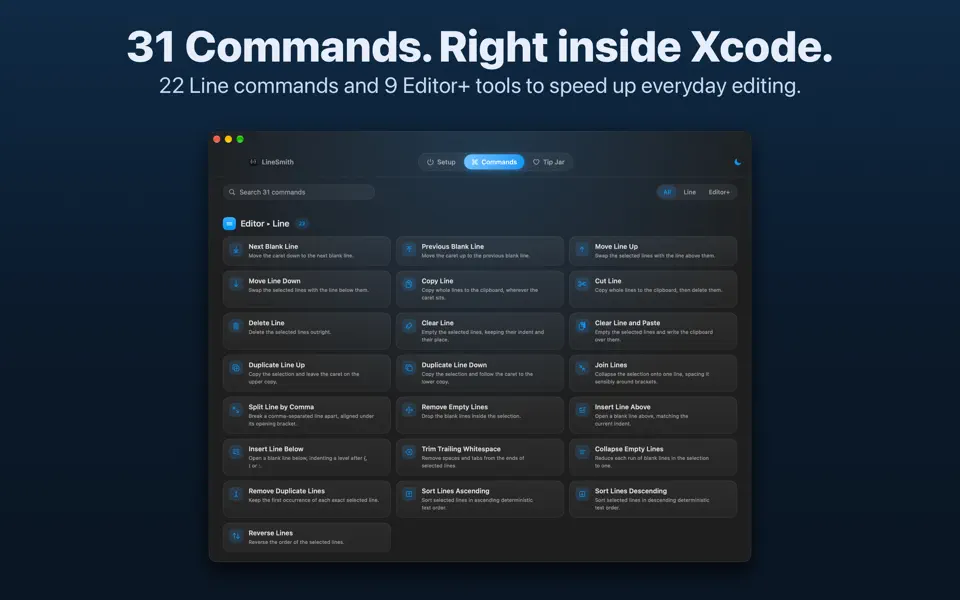
Editor > Line
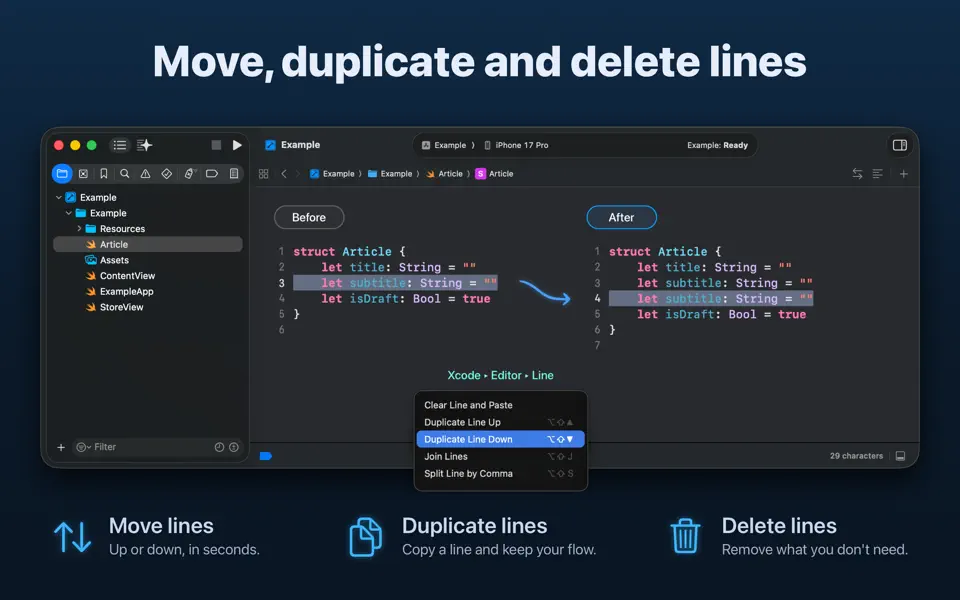
• Move Line Up / Move Line Down — swap the selection with the line above or below
• Duplicate Line Up / Duplicate Line Down — copy the selection and choose which copy keeps the caret
• Delete Line — delete whole lines wherever the caret sits
• Clear Line — empty the lines but keep their indentation and position
• Clear Line and Paste — replace the selected lines with the clipboard
• Copy Line / Cut Line — put whole lines on the clipboard, no selecting first
• Insert Line Above / Insert Line Below — open a blank line at the right indent
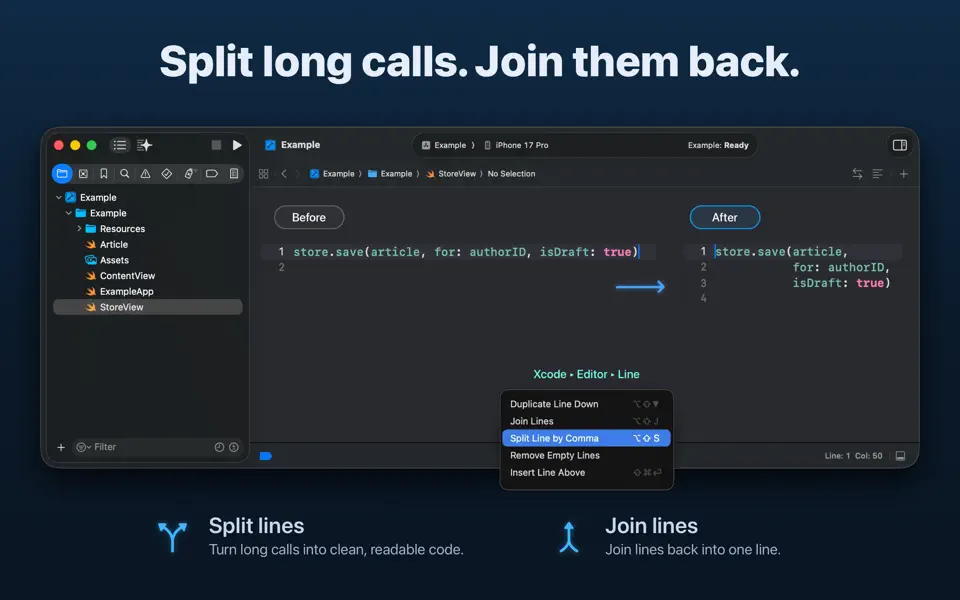
• Join Lines — collapse a selection onto one line, spacing it sensibly around brackets
• Split Line by Comma — break a comma-separated line apart, aligned under its bracket
• Remove Empty Lines — drop the blank lines inside a selection
• Next Blank Line / Previous Blank Line — move the caret between blocks
• Trim Trailing Whitespace — remove spaces and tabs from selected line endings
• Collapse Empty Lines — reduce each run of blank lines to one
• Remove Duplicate Lines — keep the first occurrence of each exact selected line
• Sort Lines Ascending / Sort Lines Descending — sort selected lines deterministically
• Reverse Lines — reverse the order of the selected lines
Editor > Editor+
• Remove Comment — strip // comments, leaving code and string or regex literals alone
• Add Type Extension — write an extension on the first type declared in the file
• Add Type Delegate — write a delegate protocol for it
• Insert MARK Section — insert a // MARK: section placeholder
• Wrap in #if DEBUG — wrap selected lines in a conditional compilation block
• Organize Imports — sort and de-duplicate safe, contiguous Swift import blocks
• Wrap in Task — wrap and indent selected lines in Task { }
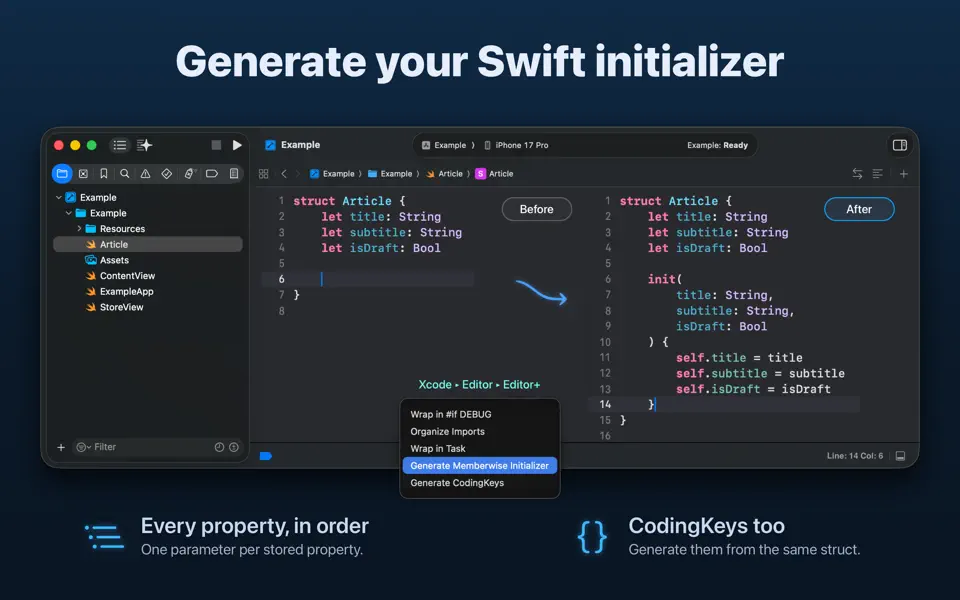
• Generate Memberwise Initializer — create an initializer from a struct's stored properties, and decline rather than guess on syntax it cannot handle
• Generate CodingKeys — create CodingKeys from direct stored properties
FREE, AND STAYING FREE
All 31 commands are free. There is no paid tier, no account, no ads and no tracking. LineSmith collects nothing about you or your code. If LineSmith saves you time, there is a tip jar in the app; a tip unlocks nothing, because there is nothing to unlock.
SETTING IT UP
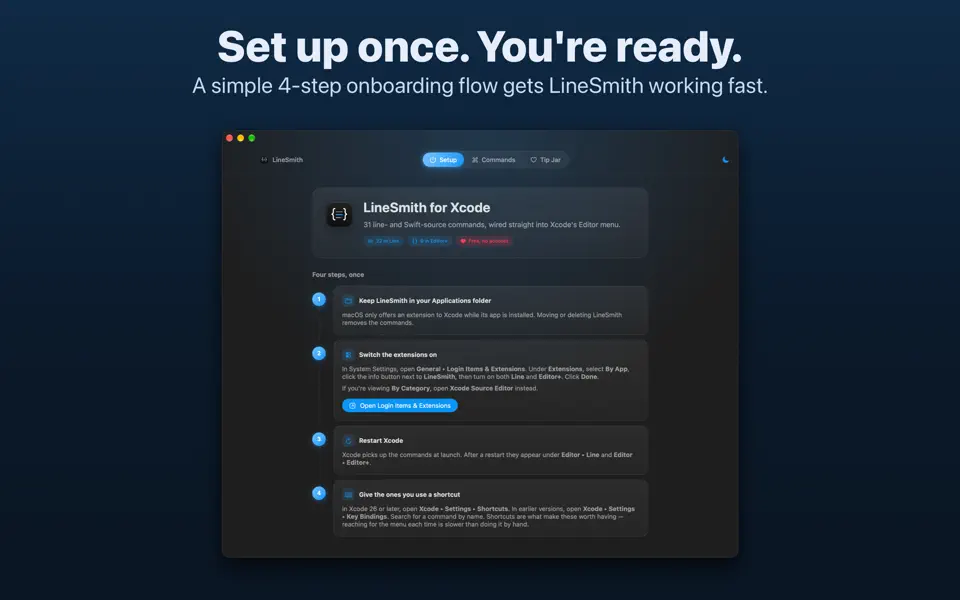
1. Keep LineSmith in your Applications folder.
2. In System Settings, find Xcode Source Editor and enable both Line and Editor+.
3. Restart Xcode.
4. Assign shortcuts in Xcode > Settings > Shortcuts (Key Bindings in earlier Xcode versions).
Requires macOS 14 or later and Xcode.
UPGRADING FROM TEXTPLUS
The 19 command identifiers inherited from TextPlus are unchanged, so existing keyboard shortcuts carry over. Version 2.0 also brings reliability fixes and 12 new commands, for 31 in total.
Dari developer
Daftar 0
-
 LineSmith for Xcode
Poin 5
-

- +1 Poin
-
- 2.002 Dragon
- +1
-
- 17 Kai Lee
- +1
-
- 1.249 바람처어럼
- +1
-
- 18.989 Simon Chan
- +1
-
- 173 upto
- +1






Peringkat 0
-
- Rating Anda
Pengembang 4
- Tuan Truong
- Pengikut: 0
- Platform: iOS Aplikasi (2) macOS Aplikasi (1) macOS Game (1)
- Diskon: 1
- Daftar: 0 1
- Poin: 7
- Peringkat: 0
- Komentar: 0
- Video: 0
- RSS: Berlangganan
Yang Baru
- Versi: 2.0.2
- Terakhir diperbarui:
- LineSmith 2.0.2
• Undo after a command now restores only the lines that changed, without selecting the whole file or jumping to the top.
• Generate Memberwise Initializer and Generate CodingKeys handle trailing comments, property wrappers, property observers, and class methods correctly, and no longer guess wrong types.
• Join Lines keeps trailing comments intact and handles blank lines better.
• Split Line by Comma aligns under the innermost open bracket.
• Clear Line and Paste keeps indentation when the clipboard is empty.
• Files with mixed LF/CRLF line endings keep the endings of untouched lines.
• All 31 editing commands remain free.
Info tambahan
- Tanggal rilis:
- Kategori:
Aplikasi macOS›Alat pengembang - OS:
macOSmacOS 14.0 dan yang lebih tinggi - Ukuran:
2 Mb - Bahasa yang didukung:
Inggris - Rating Konten:
4+ - Mac App Store Rating: ¡
0 - Situs Web:
 https://leafworkstudio.com/linesmith
Skor AppAgg
Perkiraan Skor AppAgg untuk
LineSmith for Xcode
Pengembang: Tuan Truong
Skor yang lebih tinggi biasanya menunjukkan indikator yang lebih kuat di AppAgg.
Berdasarkan: popularitas · rating pengguna · kebaruan · promo · data toko · aktivitas komunitas
Dihitung ulang setiap hari dari data AppAgg terbaru.
Komentar 0 ¡
Bagikan
LineSmith for Xcode URL singkat: Disalin!- Mac App Store

