
ブックマーク
このブックマークのタイトルを入力してください。
ブックマークを保存しました
| 開発者: | Tuan Truong (4) | ||
| 価格: | * 無料 | ||
| スコア: | 6,120 プラチナ | ||
| ランキング: | 0 | ||
| コメント: | 0 コメントを投稿する | ||
| リスト: | 0 1 | ||
| ポイント: | 5 | ||
| +1 ポイント | |||
概要
こちらはLineSmith for Xcode。Tuan Truongが贈る「開発ツール」カテゴリのアプリです。
にリリースされ、アップデートは今も続いています。最新版はに登場。この熱意、さすがです。
ダウンロードは無料。その先はお好みで。アプリ内課金があります。
macOS 14.0以降で使えます。お使いのバージョンを確認しておきましょう。
AppAggスコアは6,120。「プラチナ」で、上には「レジェンド」しかありません。
たった2メガバイト。空きの少ないドライブにも収まります。
年齢区分は「4+」なので、子どもでも安心です。
対応言語はひとつだけ、しかも日本語ではありません。
すでに5人がここからストアへ向かいました。これがAppAggでのポイントです。
この開発者の作品は、AppAggにほかにゲーム1本とアプリ2個があります。のぞいてみては?
ちなみに、この開発者は今1件のセールを開催中です。
アップデートや新しいアプリを誰よりも早く知りたい?開発者をフォローするか、RSS フィードを購読しましょう。プッシュ通知は Android と iOS 向けの AppAgg Alerts アプリで届きます。
広告
他のプラットフォーム 0
 | LineSmith for XcodeMac App Store6K プラチナmacOSアプリ内購入 $1.99 – $9.99 | 無料 |
現在はこのストアでのみ配信中です。
価格履歴 0
- 現在の価格: 無料
- 最小値: 無料
- 最大値: 無料
ホームに自分だけのフィード
「新着・アップデート」のプラットフォームを選ぶと、ホームには必要なアプリとゲームだけが表示されます。
スクリーンショット 6

説明
Formerly TextPlus. Your existing shortcuts still work.
COMMANDS
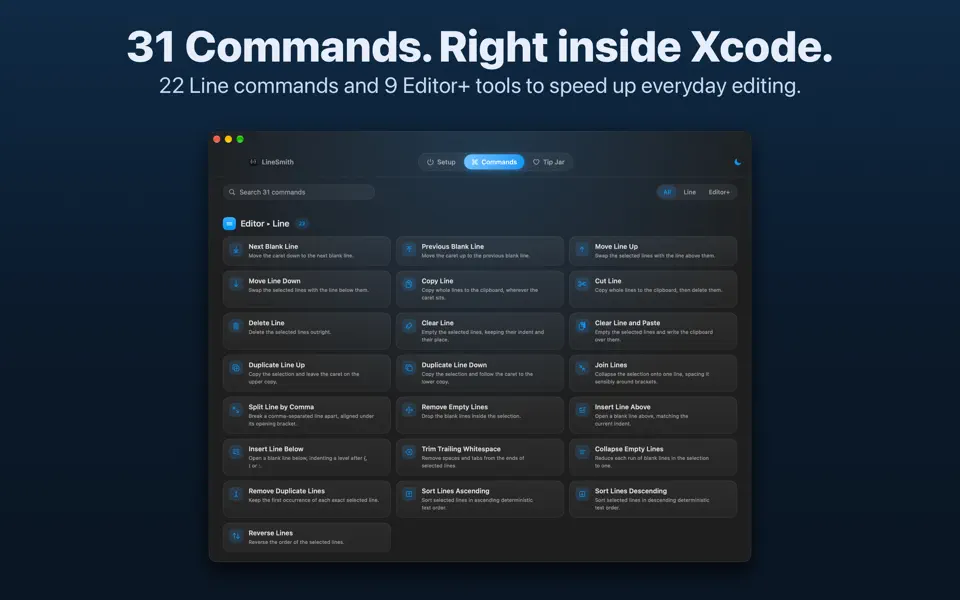
Editor > Line
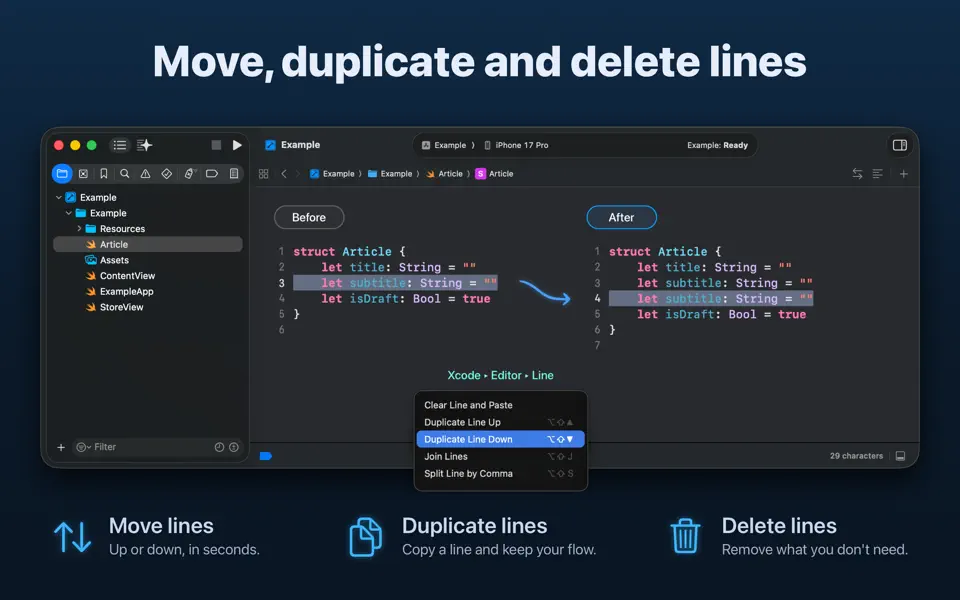
• Move Line Up / Move Line Down — swap the selection with the line above or below
• Duplicate Line Up / Duplicate Line Down — copy the selection and choose which copy keeps the caret
• Delete Line — delete whole lines wherever the caret sits
• Clear Line — empty the lines but keep their indentation and position
• Clear Line and Paste — replace the selected lines with the clipboard
• Copy Line / Cut Line — put whole lines on the clipboard, no selecting first
• Insert Line Above / Insert Line Below — open a blank line at the right indent
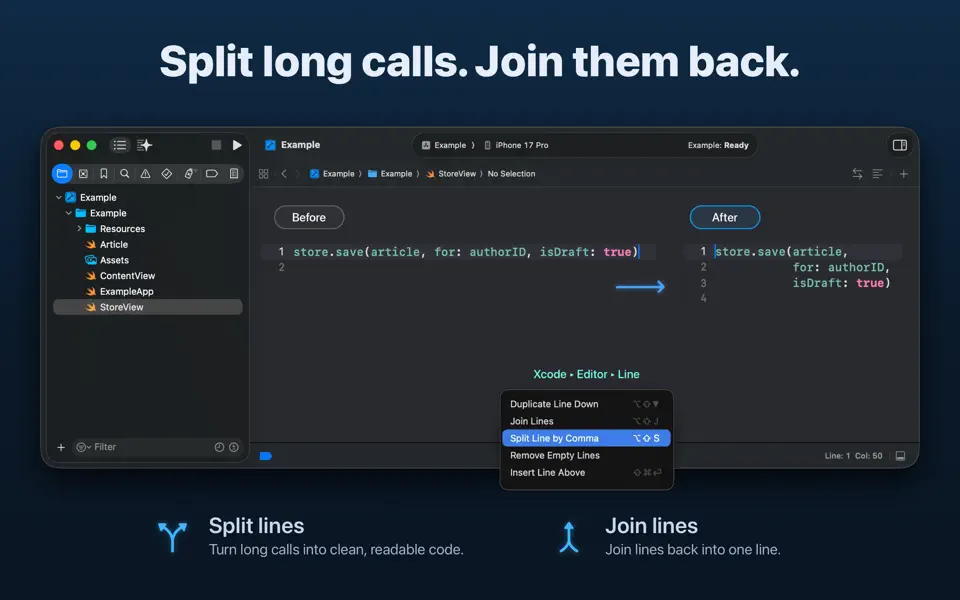
• Join Lines — collapse a selection onto one line, spacing it sensibly around brackets
• Split Line by Comma — break a comma-separated line apart, aligned under its bracket
• Remove Empty Lines — drop the blank lines inside a selection
• Next Blank Line / Previous Blank Line — move the caret between blocks
• Trim Trailing Whitespace — remove spaces and tabs from selected line endings
• Collapse Empty Lines — reduce each run of blank lines to one
• Remove Duplicate Lines — keep the first occurrence of each exact selected line
• Sort Lines Ascending / Sort Lines Descending — sort selected lines deterministically
• Reverse Lines — reverse the order of the selected lines
Editor > Editor+
• Remove Comment — strip // comments, leaving code and string or regex literals alone
• Add Type Extension — write an extension on the first type declared in the file
• Add Type Delegate — write a delegate protocol for it
• Insert MARK Section — insert a // MARK: section placeholder
• Wrap in #if DEBUG — wrap selected lines in a conditional compilation block
• Organize Imports — sort and de-duplicate safe, contiguous Swift import blocks
• Wrap in Task — wrap and indent selected lines in Task { }
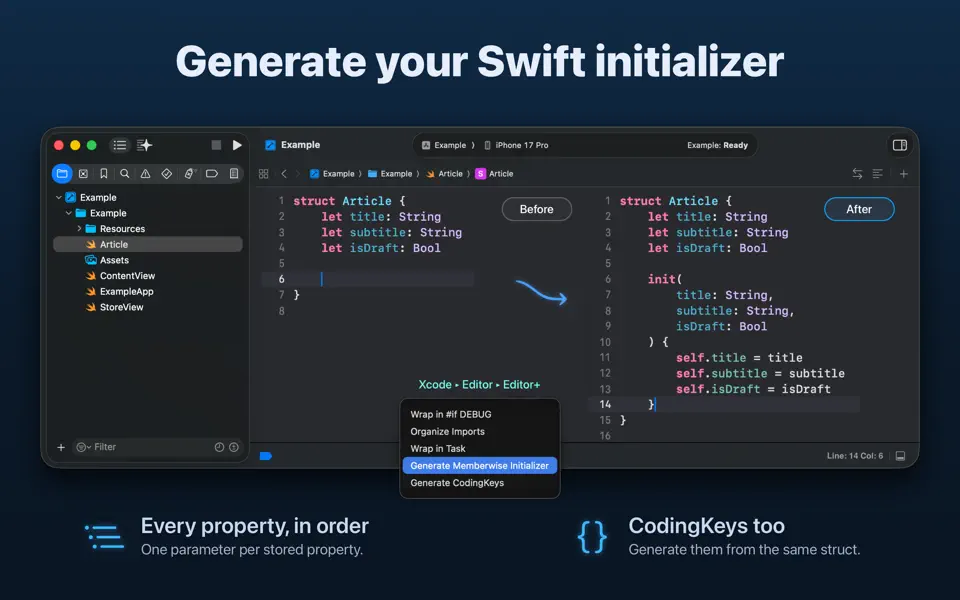
• Generate Memberwise Initializer — create an initializer from a struct's stored properties, and decline rather than guess on syntax it cannot handle
• Generate CodingKeys — create CodingKeys from direct stored properties
FREE, AND STAYING FREE
All 31 commands are free. There is no paid tier, no account, no ads and no tracking. LineSmith collects nothing about you or your code. If LineSmith saves you time, there is a tip jar in the app; a tip unlocks nothing, because there is nothing to unlock.
SETTING IT UP
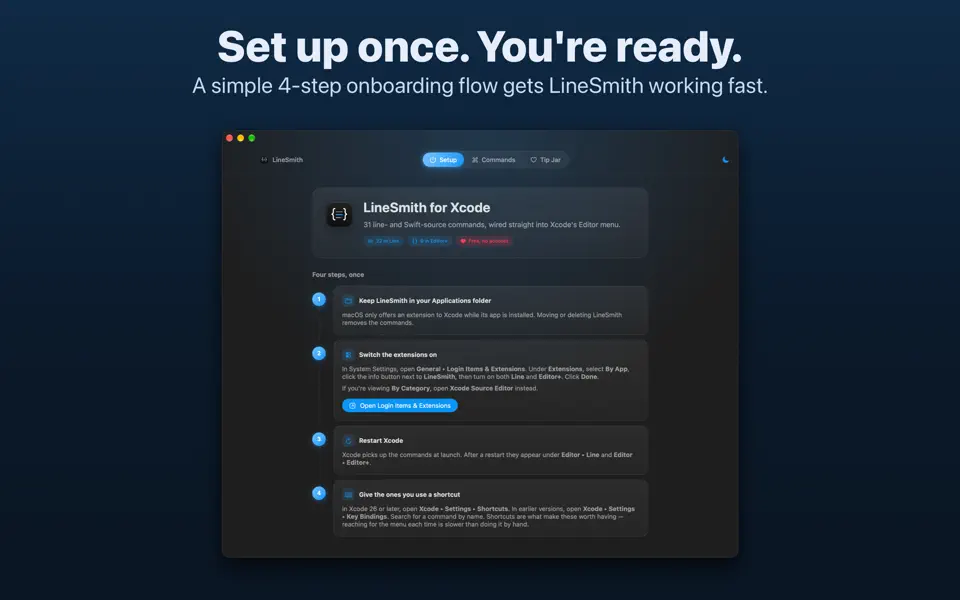
1. Keep LineSmith in your Applications folder.
2. In System Settings, find Xcode Source Editor and enable both Line and Editor+.
3. Restart Xcode.
4. Assign shortcuts in Xcode > Settings > Shortcuts (Key Bindings in earlier Xcode versions).
Requires macOS 14 or later and Xcode.
UPGRADING FROM TEXTPLUS
The 19 command identifiers inherited from TextPlus are unchanged, so existing keyboard shortcuts carry over. Version 2.0 also brings reliability fixes and 12 new commands, for 31 in total.
デベロッパーから
デベロッパーの方ですか?
ページの一番上にニュースを投稿すると、フォロワーにメールで届きます。YouTube 動画を追加すると、「動画」の一番上に表示されます。
リスト 0
-
 LineSmith for Xcode
ポイント 5
-

- +1 ポイント
-
- 2,002 Dragon
- +1
-
- 17 Kai Lee
- +1
-
- 1,249 바람처어럼
- +1
-
- 18,989 Simon Chan
- +1
-
- 173 upto
- +1






ランキング 0
-
- あなたの評価
開発者 4
新機能
- バージョン: 2.0.2
- 最終更新:
- LineSmith 2.0.2
• Undo after a command now restores only the lines that changed, without selecting the whole file or jumping to the top.
• Generate Memberwise Initializer and Generate CodingKeys handle trailing comments, property wrappers, property observers, and class methods correctly, and no longer guess wrong types.
• Join Lines keeps trailing comments intact and handles blank lines better.
• Split Line by Comma aligns under the innermost open bracket.
• Clear Line and Paste keeps indentation when the clipboard is empty.
• Files with mixed LF/CRLF line endings keep the endings of untouched lines.
• All 31 editing commands remain free.
情報
- リリース日:
- カテゴリ:
macOS向けアプリ›開発ツール - オペレーティング システム:
macOSmacOS 14.0 以上 - サイズ:
2 Mb - サポートされる言語:
英語 - コンテンツのレーティング:
4+ - Mac App Store 評価: ¡
0
 https://leafworkstudio.com/linesmith
AppAggスコア
6,120
AppAgg推定スコア:
LineSmith for Xcode
開発者: Tuan Truong
6,120 プラチナ
スコアが高いほど、AppAgg上の各指標が良好な傾向にあります。
基準: 人気 · ユーザー評価 · 新しさ · セール · ストアデータ · コミュニティ活動
最新のAppAggデータに基づいて毎日再計算されます。
ウェブサイト用バッジ:  コピーしました!
コメント 0 ¡
最初のコメントを書きましょう
シェア
LineSmith for Xcode 短縮 URL: コピーしました!- Mac App Store

