
북마크
이 북마크의 제목을 입력하세요.
북마크가 저장되었습니다
| 개발자: | Tuan Truong (4) | ||
| 가격: | * 무료 | ||
| 종합 점수: | 6,120 플래티넘 | ||
| 순위: | 0 | ||
| 댓글: | 0 댓글 게시 | ||
| 목록: | 0 1 | ||
| 포인트: | 5 | ||
| +1 포인트 | |||
요약
소개합니다. Tuan Truong에서 만든 ‘개발자 도구’ 카테고리 앱, LineSmith for Xcode.
에 출시됐는데 업데이트가 계속 나와요. 가장 최근 건 에 왔어요. 이 정도면 진심이네요.
다운로드는 무료. 그다음은 마음대로예요. 인앱 구매가 있거든요.
macOS 14.0 이상에서 쓸 수 있어요. 내 기기 버전을 확인해 보세요.
AppAgg 점수는 6,120. 플래티넘 등급이고, 그 위로는 전설뿐이에요.
겨우 2메가바이트. 꽉 찬 드라이브에도 쏙 들어가요.
연령 등급은 ‘4+’, 아이들에게도 괜찮아요.
지원 언어는 딱 하나, 그런데 한국어는 아니에요.
이미 5명이 여기서 스토어로 이동했어요. 이게 바로 AppAgg 포인트예요.
이 개발자의 게임 1개와 앱 2개가 AppAgg에 더 있어요. 한번 둘러보세요.
참고로, 이 개발자는 지금 할인 1건 진행 중이에요.
업데이트와 새 앱 소식을 가장 먼저 받고 싶나요? 개발자를 팔로우하거나 RSS 피드를 구독하세요. 푸시 알림은 Android와 iOS용 AppAgg Alerts 앱으로 받을 수 있어요.
광고
다른 플랫폼 0
 | LineSmith for XcodeMac App Store6K 플래티넘macOS인앱 구매 $1.99 – $9.99 | 무료 |
현재 이 스토어에서만 이용할 수 있습니다.
가격 기록 0
- 현재 가격: 무료
- 최소: 무료
- 최대: 무료
홈 화면의 나만의 피드
“신규 및 업데이트” 피드의 플랫폼을 선택하면 홈 화면에 필요한 앱과 게임만 표시됩니다.
스크린샷 6

설명
Formerly TextPlus. Your existing shortcuts still work.
COMMANDS
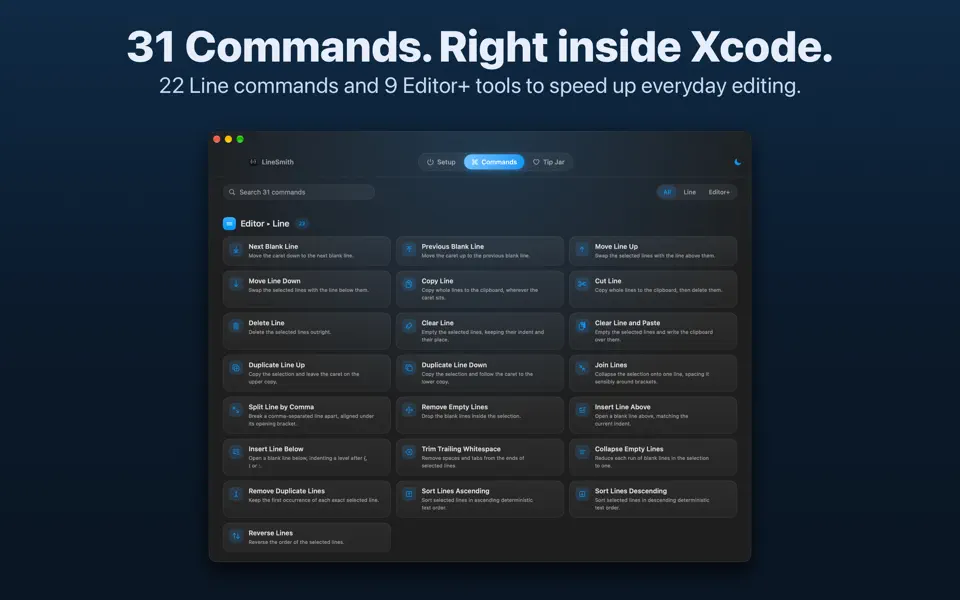
Editor > Line
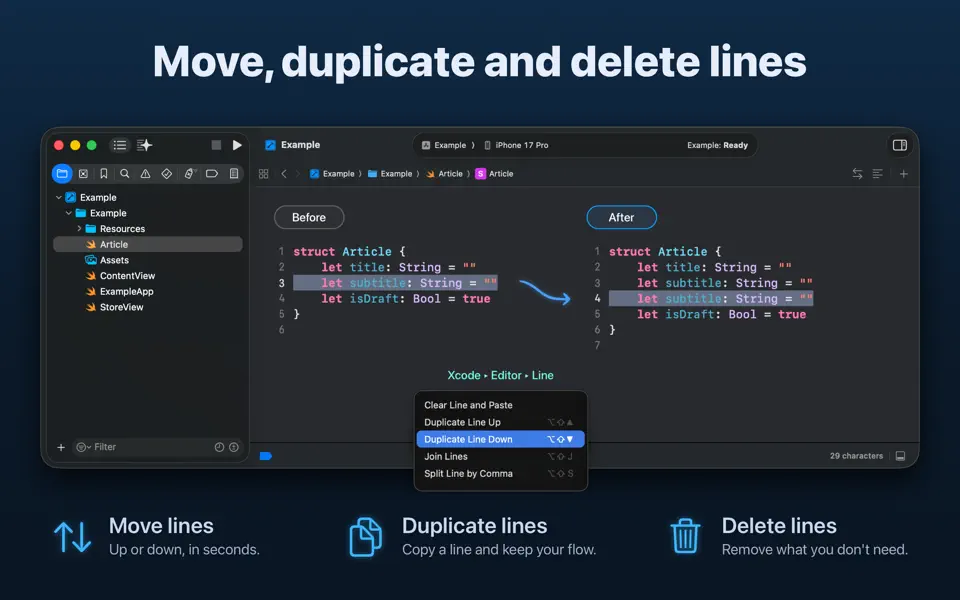
• Move Line Up / Move Line Down — swap the selection with the line above or below
• Duplicate Line Up / Duplicate Line Down — copy the selection and choose which copy keeps the caret
• Delete Line — delete whole lines wherever the caret sits
• Clear Line — empty the lines but keep their indentation and position
• Clear Line and Paste — replace the selected lines with the clipboard
• Copy Line / Cut Line — put whole lines on the clipboard, no selecting first
• Insert Line Above / Insert Line Below — open a blank line at the right indent
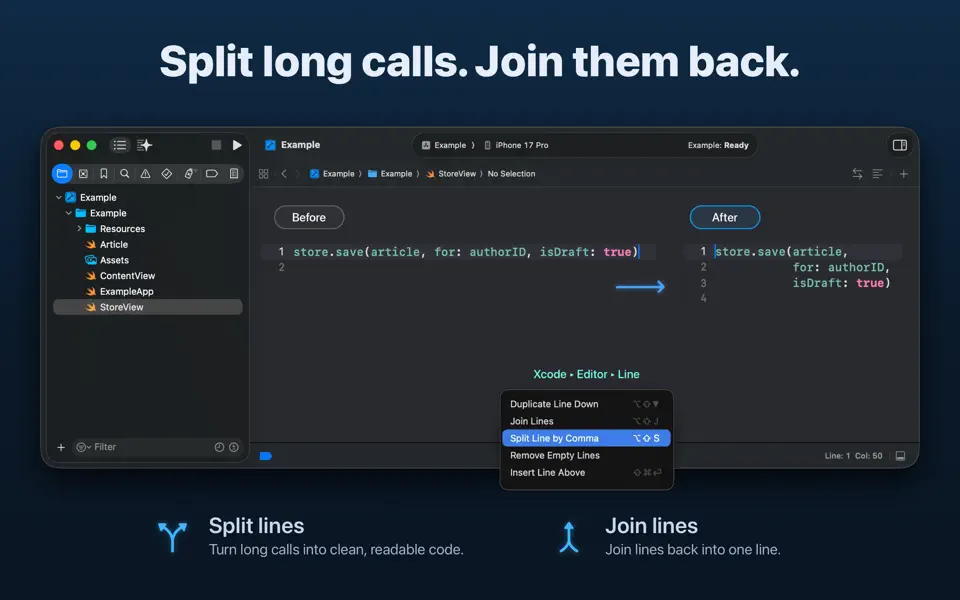
• Join Lines — collapse a selection onto one line, spacing it sensibly around brackets
• Split Line by Comma — break a comma-separated line apart, aligned under its bracket
• Remove Empty Lines — drop the blank lines inside a selection
• Next Blank Line / Previous Blank Line — move the caret between blocks
• Trim Trailing Whitespace — remove spaces and tabs from selected line endings
• Collapse Empty Lines — reduce each run of blank lines to one
• Remove Duplicate Lines — keep the first occurrence of each exact selected line
• Sort Lines Ascending / Sort Lines Descending — sort selected lines deterministically
• Reverse Lines — reverse the order of the selected lines
Editor > Editor+
• Remove Comment — strip // comments, leaving code and string or regex literals alone
• Add Type Extension — write an extension on the first type declared in the file
• Add Type Delegate — write a delegate protocol for it
• Insert MARK Section — insert a // MARK: section placeholder
• Wrap in #if DEBUG — wrap selected lines in a conditional compilation block
• Organize Imports — sort and de-duplicate safe, contiguous Swift import blocks
• Wrap in Task — wrap and indent selected lines in Task { }
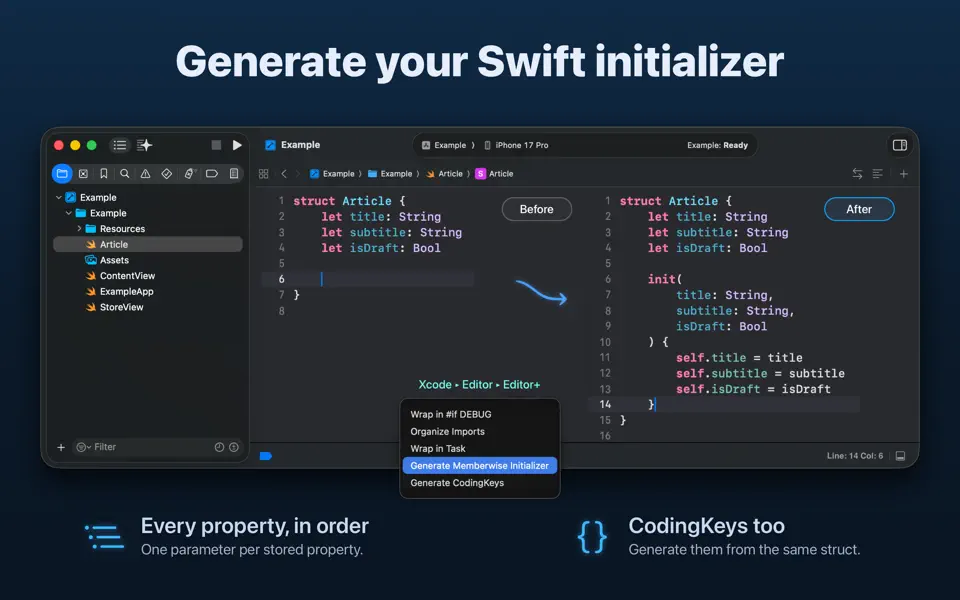
• Generate Memberwise Initializer — create an initializer from a struct's stored properties, and decline rather than guess on syntax it cannot handle
• Generate CodingKeys — create CodingKeys from direct stored properties
FREE, AND STAYING FREE
All 31 commands are free. There is no paid tier, no account, no ads and no tracking. LineSmith collects nothing about you or your code. If LineSmith saves you time, there is a tip jar in the app; a tip unlocks nothing, because there is nothing to unlock.
SETTING IT UP
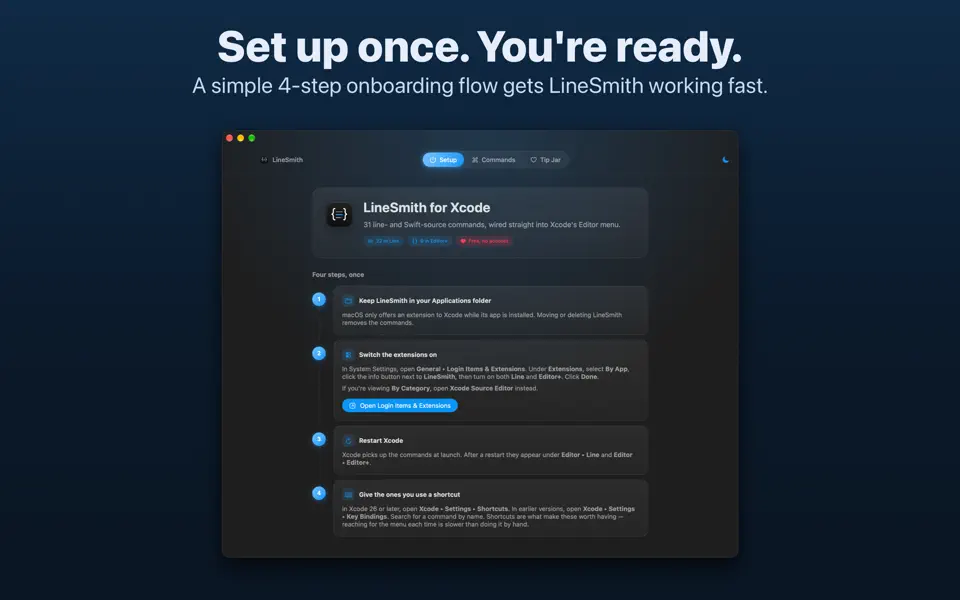
1. Keep LineSmith in your Applications folder.
2. In System Settings, find Xcode Source Editor and enable both Line and Editor+.
3. Restart Xcode.
4. Assign shortcuts in Xcode > Settings > Shortcuts (Key Bindings in earlier Xcode versions).
Requires macOS 14 or later and Xcode.
UPGRADING FROM TEXTPLUS
The 19 command identifiers inherited from TextPlus are unchanged, so existing keyboard shortcuts carry over. Version 2.0 also brings reliability fixes and 12 new commands, for 31 in total.
개발자 소식
개발자이신가요?
페이지 맨 위에 소식을 올리면 팔로워에게 이메일로 전달됩니다. YouTube 동영상을 추가하면 “동영상” 블록 맨 앞에 표시됩니다.
목록 0
-
 LineSmith for Xcode
포인트 5
-

- +1 포인트
-
- 2,002 Dragon
- +1
-
- 17 Kai Lee
- +1
-
- 1,249 바람처어럼
- +1
-
- 18,989 Simon Chan
- +1
-
- 173 upto
- +1






순위 0
-
- 내 평점
개발자 4
새로운 기능
- 버전: 2.0.2
- 마지막 업데이트:
- LineSmith 2.0.2
• Undo after a command now restores only the lines that changed, without selecting the whole file or jumping to the top.
• Generate Memberwise Initializer and Generate CodingKeys handle trailing comments, property wrappers, property observers, and class methods correctly, and no longer guess wrong types.
• Join Lines keeps trailing comments intact and handles blank lines better.
• Split Line by Comma aligns under the innermost open bracket.
• Clear Line and Paste keeps indentation when the clipboard is empty.
• Files with mixed LF/CRLF line endings keep the endings of untouched lines.
• All 31 editing commands remain free.
추가 정보
 https://leafworkstudio.com/linesmith
AppAgg 점수
6,120
AppAgg 예상 점수:
LineSmith for Xcode
개발자: Tuan Truong
6,120 플래티넘
점수가 높을수록 대체로 AppAgg의 여러 지표에서 좋은 결과를 보인다는 뜻입니다.
기준: 인기 · 사용자 평점 · 최신성 · 할인 · 스토어 데이터 · 커뮤니티 활동
최신 AppAgg 데이터를 바탕으로 매일 다시 계산됩니다.
웹사이트용 배지:  복사됨!
댓글 0 ¡
가장 먼저 댓글을 남겨주세요
공유하기
LineSmith for Xcode 단축 URL: 복사됨!- Mac App Store

