
Favoritos
| Desenvolvedor: | Tuan Truong (4) | ||
| Preço: | * Grátis | ||
| Pontuação: | 6.120 Platina | ||
| Classificações: | 0 | ||
| Comentários: | 0 Postar comentário | ||
| Listas: | 0 1 | ||
| Pontos: | 5 | ||
| +1 Ponto | |||
Resumo
Conheça LineSmith for Xcode, um app da categoria “Ferramentas de programação” feito por Tuan Truong.
Lançado , e as atualizações não param. A mais recente chegou . Isso que é dedicação.
Baixar é grátis. Depois, é com você. Tem compras no app.
Funciona no macOS 14.0 ou mais recente. Vale conferir qual versão você tem.
A Pontuação AppAgg é 6.120. É nível Platina, e só Lenda fica acima.
Só 2 megabytes, cabe até num disco lotado.
Classificação indicativa “4+”: serve para crianças também.
Fala só um idioma, e não é português.
5 pessoas já foram daqui para a loja. Esses são os Pontos dele no AppAgg.
O desenvolvedor tem mais 1 jogo e 2 apps no AppAgg. Vale dar uma olhada.
Aliás, este desenvolvedor está com 1 promoção agora.
Quer saber das atualizações e dos apps novos antes de todo mundo? Siga o desenvolvedor ou assine o feed RSS. As notificações push chegam pelo app AppAgg Alerts para Android e iOS.
Outras plataformas 0
 | LineSmith for XcodeMac App Store6K PlatinamacOSCompras no aplicativo $1.99 – $9.99 | Grátis |
Por enquanto, só nesta loja.
Histórico de preços 0
- Preço atual: Grátis
- Mínimo: Grátis
- Máximo: Grátis
Seu próprio feed na página inicial
Capturas de tela 6

Descrição
Formerly TextPlus. Your existing shortcuts still work.
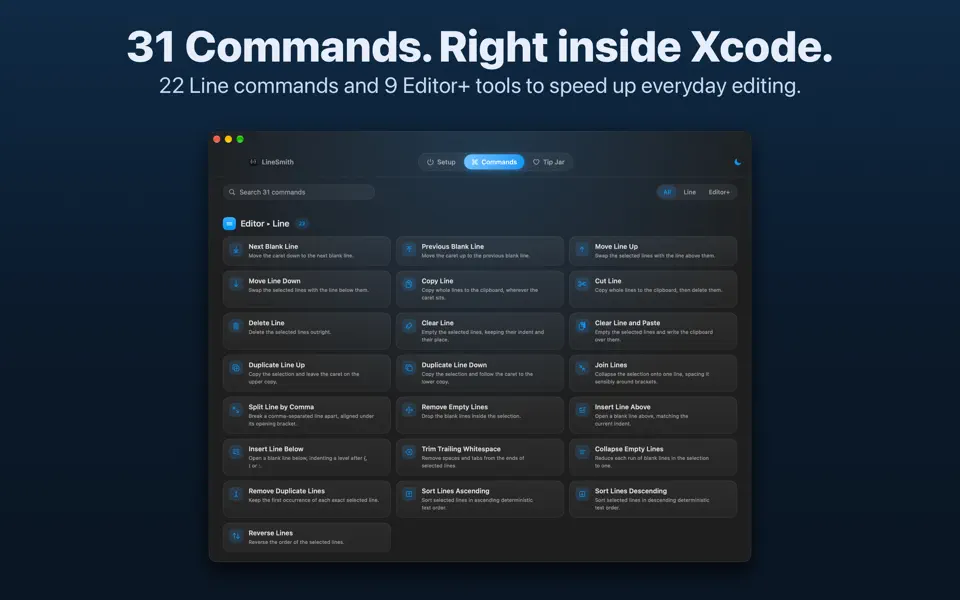
COMMANDS
Editor > Line
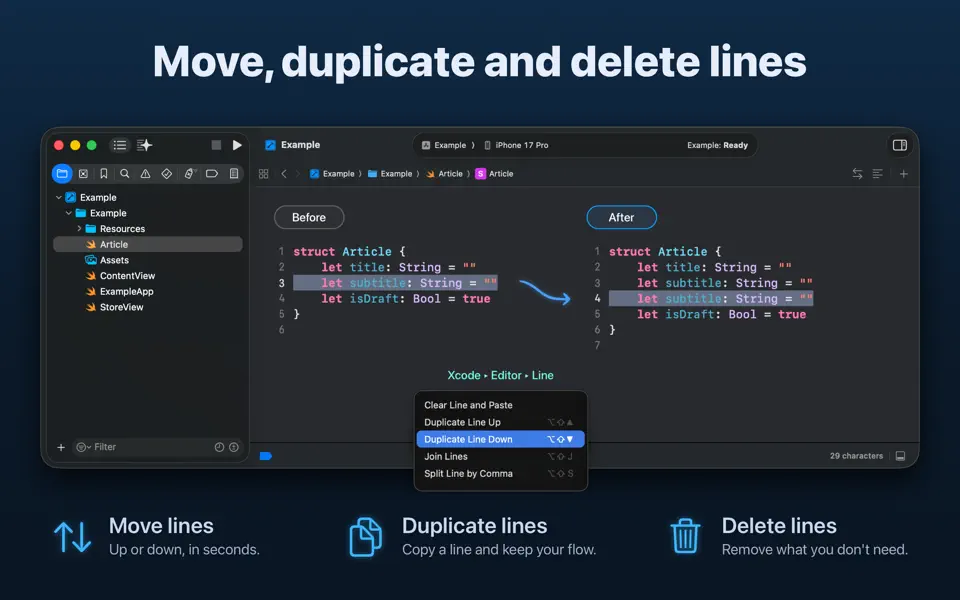
• Move Line Up / Move Line Down — swap the selection with the line above or below
• Duplicate Line Up / Duplicate Line Down — copy the selection and choose which copy keeps the caret
• Delete Line — delete whole lines wherever the caret sits
• Clear Line — empty the lines but keep their indentation and position
• Clear Line and Paste — replace the selected lines with the clipboard
• Copy Line / Cut Line — put whole lines on the clipboard, no selecting first
• Insert Line Above / Insert Line Below — open a blank line at the right indent
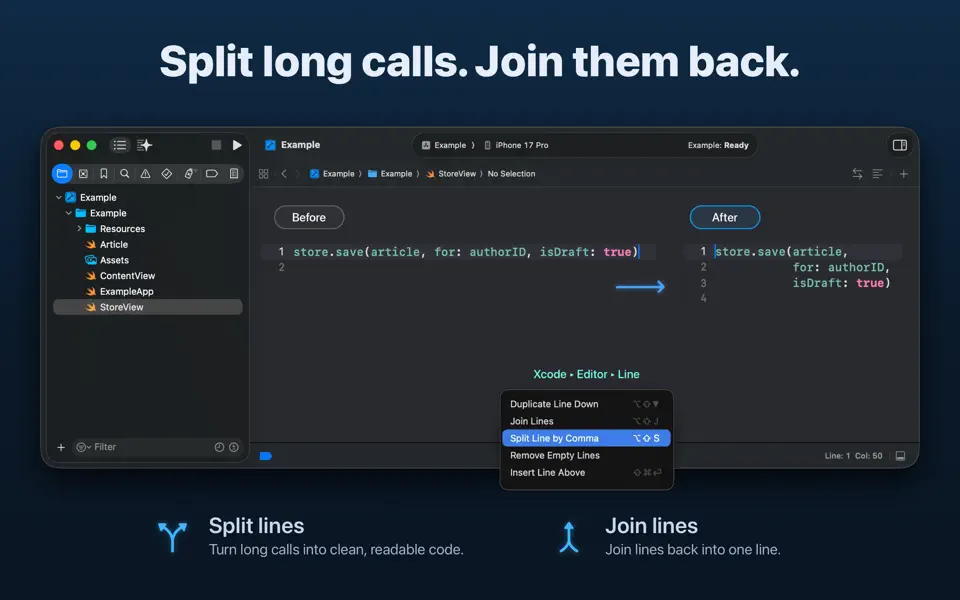
• Join Lines — collapse a selection onto one line, spacing it sensibly around brackets
• Split Line by Comma — break a comma-separated line apart, aligned under its bracket
• Remove Empty Lines — drop the blank lines inside a selection
• Next Blank Line / Previous Blank Line — move the caret between blocks
• Trim Trailing Whitespace — remove spaces and tabs from selected line endings
• Collapse Empty Lines — reduce each run of blank lines to one
• Remove Duplicate Lines — keep the first occurrence of each exact selected line
• Sort Lines Ascending / Sort Lines Descending — sort selected lines deterministically
• Reverse Lines — reverse the order of the selected lines
Editor > Editor+
• Remove Comment — strip // comments, leaving code and string or regex literals alone
• Add Type Extension — write an extension on the first type declared in the file
• Add Type Delegate — write a delegate protocol for it
• Insert MARK Section — insert a // MARK: section placeholder
• Wrap in #if DEBUG — wrap selected lines in a conditional compilation block
• Organize Imports — sort and de-duplicate safe, contiguous Swift import blocks
• Wrap in Task — wrap and indent selected lines in Task { }
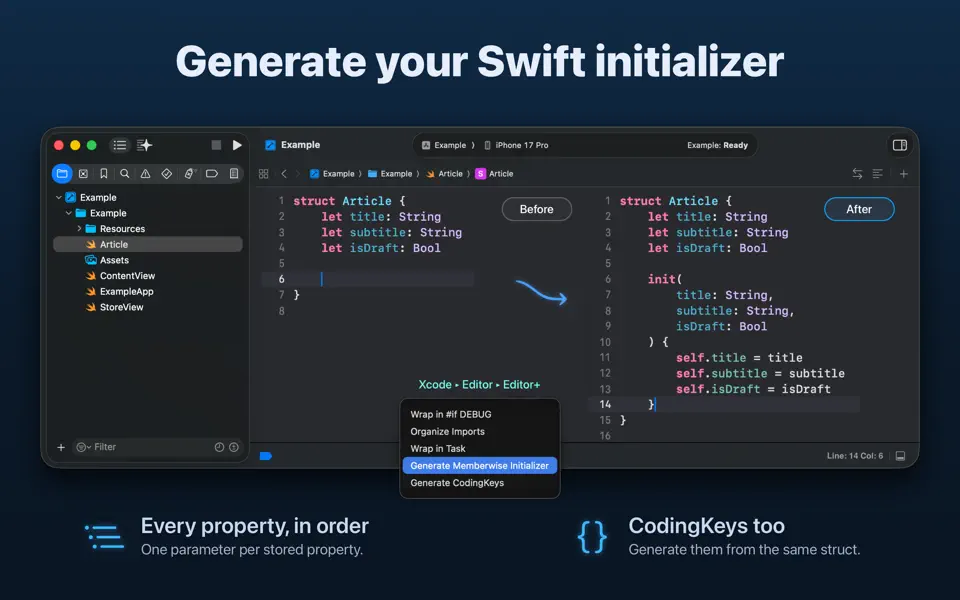
• Generate Memberwise Initializer — create an initializer from a struct's stored properties, and decline rather than guess on syntax it cannot handle
• Generate CodingKeys — create CodingKeys from direct stored properties
FREE, AND STAYING FREE
All 31 commands are free. There is no paid tier, no account, no ads and no tracking. LineSmith collects nothing about you or your code. If LineSmith saves you time, there is a tip jar in the app; a tip unlocks nothing, because there is nothing to unlock.
SETTING IT UP
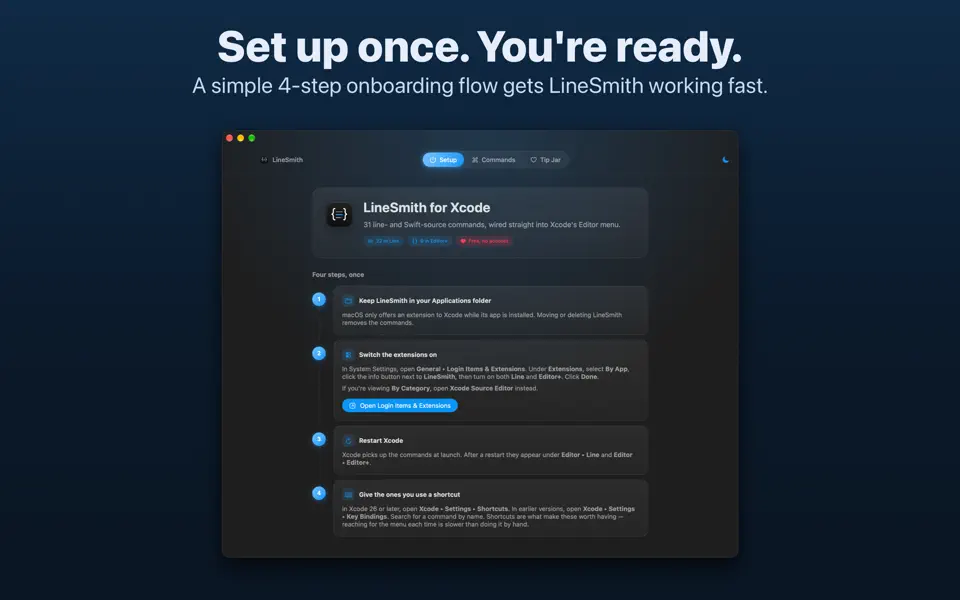
1. Keep LineSmith in your Applications folder.
2. In System Settings, find Xcode Source Editor and enable both Line and Editor+.
3. Restart Xcode.
4. Assign shortcuts in Xcode > Settings > Shortcuts (Key Bindings in earlier Xcode versions).
Requires macOS 14 or later and Xcode.
UPGRADING FROM TEXTPLUS
The 19 command identifiers inherited from TextPlus are unchanged, so existing keyboard shortcuts carry over. Version 2.0 also brings reliability fixes and 12 new commands, for 31 in total.
Do desenvolvedor
Listas 0
-
 LineSmith for Xcode
Pontos 5
-

- +1 Ponto
-
- 2.002 Dragon
- +1
-
- 17 Kai Lee
- +1
-
- 1.249 바람처어럼
- +1
-
- 18.989 Simon Chan
- +1
-
- 173 upto
- +1






Classificações 0
-
- Sua nota
Desenvolvedor 4
- Tuan Truong
- Seguidores: 0
- Plataformas: iOS Apps (2) macOS Apps (1) macOS Jogos (1)
- Promoções: 1
- Listas: 0 1
- Pontos: 7
- Classificações: 0
- Comentários: 0
- Vídeos: 0
- RSS: Assinar
Novidades
- Versão: 2.0.2
- Última atualização:
- LineSmith 2.0.2
• Undo after a command now restores only the lines that changed, without selecting the whole file or jumping to the top.
• Generate Memberwise Initializer and Generate CodingKeys handle trailing comments, property wrappers, property observers, and class methods correctly, and no longer guess wrong types.
• Join Lines keeps trailing comments intact and handles blank lines better.
• Split Line by Comma aligns under the innermost open bracket.
• Clear Line and Paste keeps indentation when the clipboard is empty.
• Files with mixed LF/CRLF line endings keep the endings of untouched lines.
• All 31 editing commands remain free.
Informações adicionais
- Data de lançamento:
- Categoria:
Aplicativos para macOS›Ferramentas de programação - Sistemas operacionais:
macOSmacOS 14.0 ou superior - Tamanho:
2 Mb - Idiomas disponíveis:
Inglês - Classificação indicativa:
4+ - Mac App Store Nota: ¡
0
 https://leafworkstudio.com/linesmith
Pontuação AppAgg
Pontuação AppAgg estimada de
LineSmith for Xcode
Desenvolvedor: Tuan Truong
Uma pontuação mais alta geralmente reflete resultados melhores nos indicadores do AppAgg.
Com base em: popularidade · avaliações dos usuários · atualidade · ofertas · dados das lojas · atividade da comunidade
Recalculado diariamente com dados AppAgg atualizados.
Comentários 0 ¡
Compartilhar
LineSmith for Xcode URL curta: Copiado!- Mac App Store

