
บุ๊กมาร์ก
| ผู้พัฒนา: | Tuan Truong (4) | ||
| ราคา: | * ฟรี | ||
| คะแนน: | 6,120 แพลทินัม | ||
| การจัดอันดับ: | 0 | ||
| ความคิดเห็น: | 0 โพสต์ความคิดเห็น | ||
| รายการ: | 0 1 | ||
| แต้ม: | 5 | ||
| +1 แต้ม | |||
สรุป
มาทำความรู้จัก LineSmith for Xcode แอปในหมวด “เครื่องมือสำหรับนักพัฒนา” จาก Tuan Truong
ออกเมื่อ และยังมีอัปเดตมาเรื่อย ๆ ล่าสุดมาเมื่อ นี่แหละความทุ่มเท
ดาวน์โหลดฟรี หลังจากนั้นแล้วแต่คุณ เพราะมีการซื้อภายในแอป
ใช้ได้บน macOS 14.0 ขึ้นไป ลองเช็กดูว่าเครื่องคุณเป็นเวอร์ชันไหน
คะแนน AppAgg คือ 6,120 อยู่ระดับ “แพลทินัม” สูงกว่านี้ก็มีแค่ “ตำนาน”
แค่ 2 เมกะไบต์ ต่อให้ไดรฟ์เต็มก็ยังลงได้
จัดเรต “4+” เหมาะกับเด็ก ๆ ด้วย
รองรับแค่ภาษาเดียว และไม่ใช่ภาษาไทย
มี 5 คนกดไปที่สโตร์จากหน้านี้แล้ว นี่แหละคือแต้มบน AppAgg
ผู้พัฒนารายนี้มีเกมอื่นอีก 1 เกม และแอปอีก 2 แอปบน AppAgg ลองไปดูกัน
อีกอย่าง ตอนนี้ผู้พัฒนารายนี้มี ดีลลดราคา 1 รายการ ด้วยนะ
อยากรู้เรื่องอัปเดตและแอปใหม่ก่อนใครไหม? ติดตาม ผู้พัฒนา หรือกดติดตาม ฟีด RSS ได้เลย การแจ้งเตือนแบบพุชส่งผ่านแอป AppAgg Alerts สำหรับ Android และ iOS
แพลตฟอร์มอื่น 0
 | LineSmith for XcodeMac App Store6K แพลทินัมmacOSการซื้อภายในแอป $1.99 – $9.99 | ฟรี |
ตอนนี้มีเฉพาะในร้านนี้
ประวัติราคา 0
- ราคาปัจจุบัน: ฟรี
- ต่ำสุด: ฟรี
- สูงสุด: ฟรี
ฟีดของคุณเองบนหน้าแรก
ภาพหน้าจอ 6

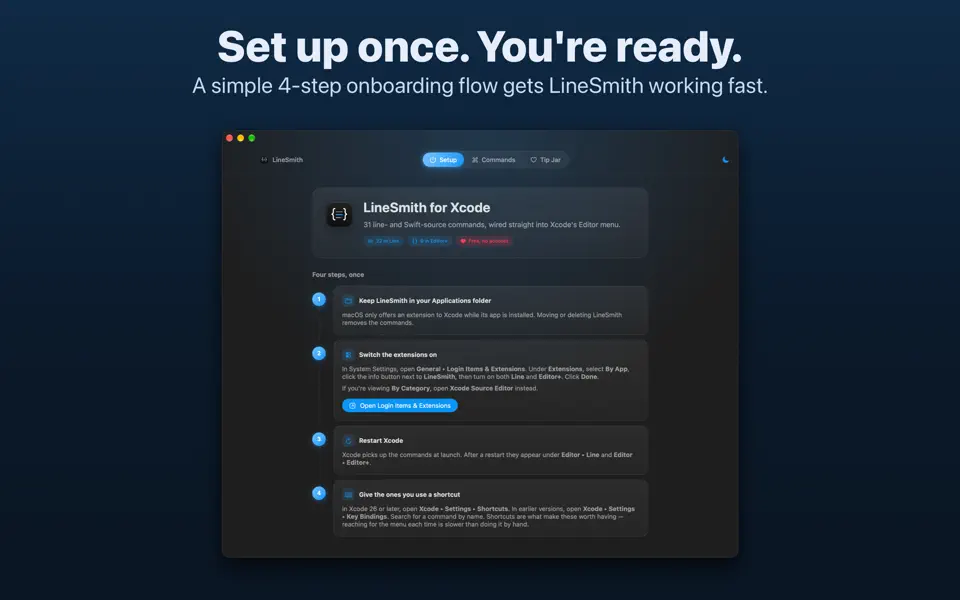
คำอธิบาย
Formerly TextPlus. Your existing shortcuts still work.
COMMANDS
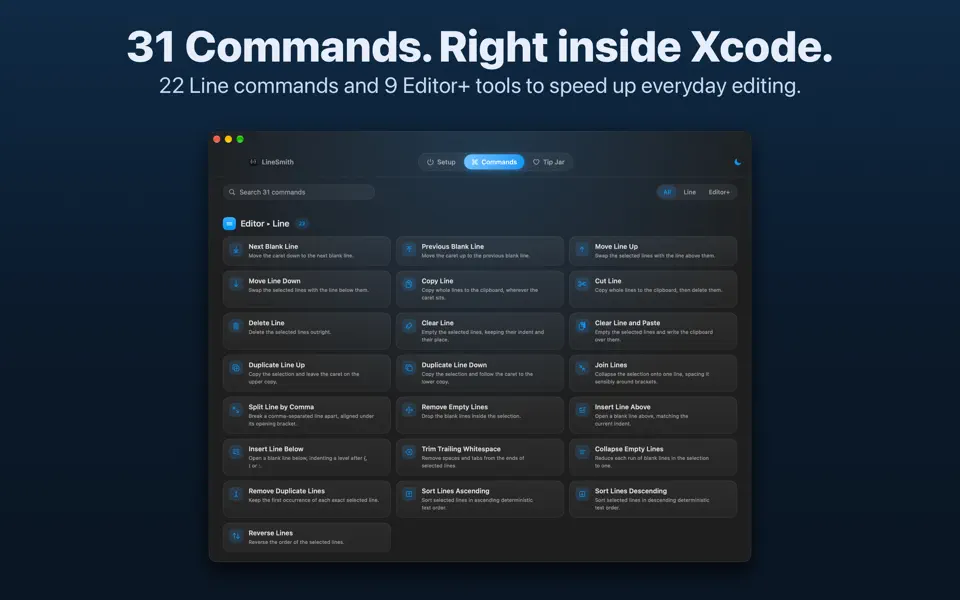
Editor > Line
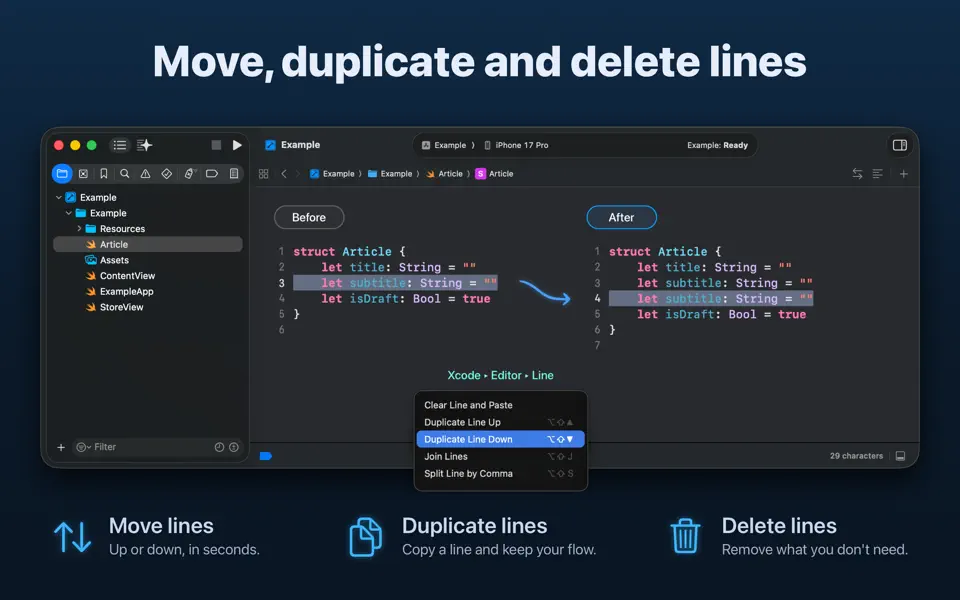
• Move Line Up / Move Line Down — swap the selection with the line above or below
• Duplicate Line Up / Duplicate Line Down — copy the selection and choose which copy keeps the caret
• Delete Line — delete whole lines wherever the caret sits
• Clear Line — empty the lines but keep their indentation and position
• Clear Line and Paste — replace the selected lines with the clipboard
• Copy Line / Cut Line — put whole lines on the clipboard, no selecting first
• Insert Line Above / Insert Line Below — open a blank line at the right indent
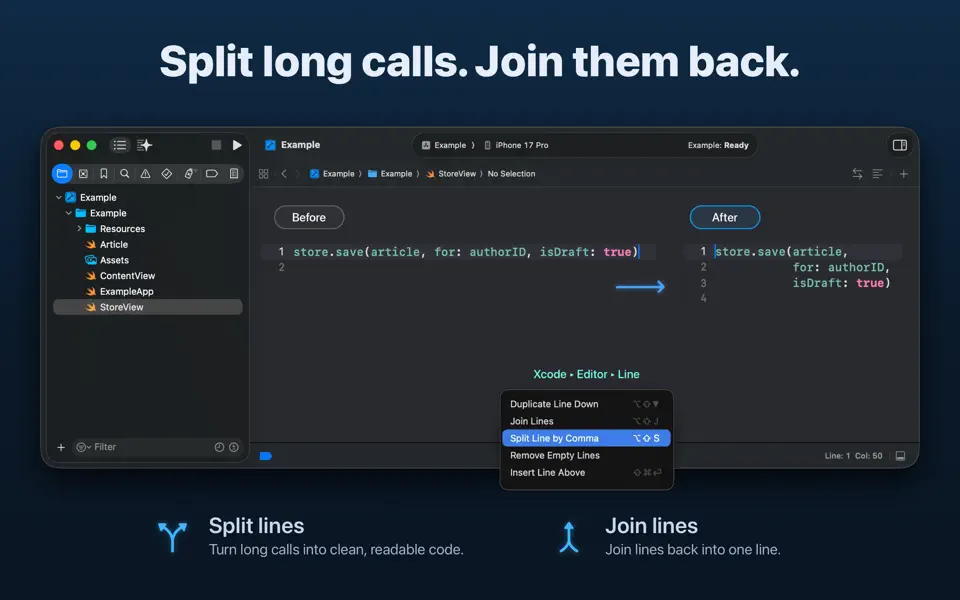
• Join Lines — collapse a selection onto one line, spacing it sensibly around brackets
• Split Line by Comma — break a comma-separated line apart, aligned under its bracket
• Remove Empty Lines — drop the blank lines inside a selection
• Next Blank Line / Previous Blank Line — move the caret between blocks
• Trim Trailing Whitespace — remove spaces and tabs from selected line endings
• Collapse Empty Lines — reduce each run of blank lines to one
• Remove Duplicate Lines — keep the first occurrence of each exact selected line
• Sort Lines Ascending / Sort Lines Descending — sort selected lines deterministically
• Reverse Lines — reverse the order of the selected lines
Editor > Editor+
• Remove Comment — strip // comments, leaving code and string or regex literals alone
• Add Type Extension — write an extension on the first type declared in the file
• Add Type Delegate — write a delegate protocol for it
• Insert MARK Section — insert a // MARK: section placeholder
• Wrap in #if DEBUG — wrap selected lines in a conditional compilation block
• Organize Imports — sort and de-duplicate safe, contiguous Swift import blocks
• Wrap in Task — wrap and indent selected lines in Task { }
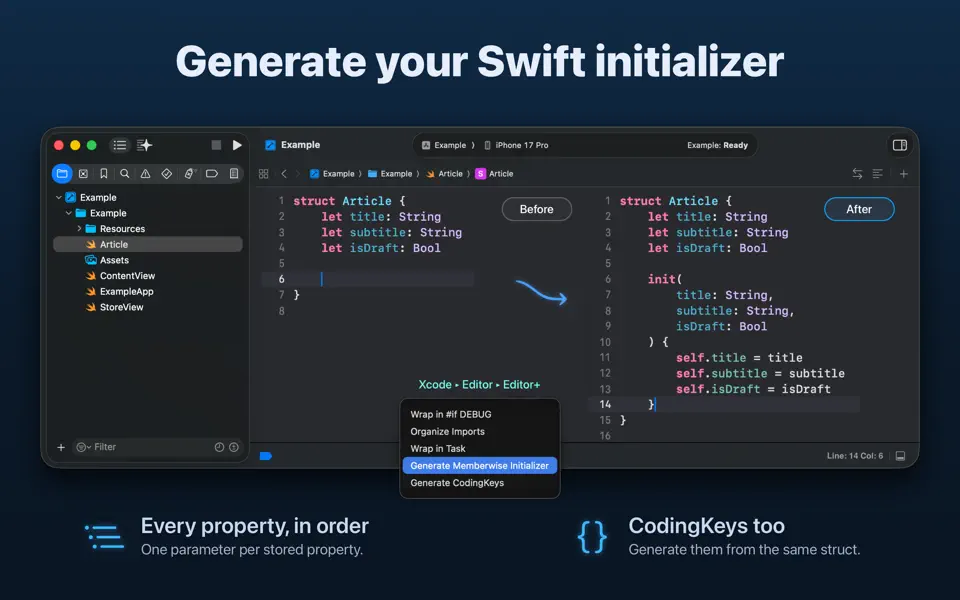
• Generate Memberwise Initializer — create an initializer from a struct's stored properties, and decline rather than guess on syntax it cannot handle
• Generate CodingKeys — create CodingKeys from direct stored properties
FREE, AND STAYING FREE
All 31 commands are free. There is no paid tier, no account, no ads and no tracking. LineSmith collects nothing about you or your code. If LineSmith saves you time, there is a tip jar in the app; a tip unlocks nothing, because there is nothing to unlock.
SETTING IT UP
1. Keep LineSmith in your Applications folder.
2. In System Settings, find Xcode Source Editor and enable both Line and Editor+.
3. Restart Xcode.
4. Assign shortcuts in Xcode > Settings > Shortcuts (Key Bindings in earlier Xcode versions).
Requires macOS 14 or later and Xcode.
UPGRADING FROM TEXTPLUS
The 19 command identifiers inherited from TextPlus are unchanged, so existing keyboard shortcuts carry over. Version 2.0 also brings reliability fixes and 12 new commands, for 31 in total.
จากนักพัฒนา
รายการ 0
-
 LineSmith for Xcode
แต้ม 5
-

- +1 แต้ม
-
- 2,002 Dragon
- +1
-
- 17 Kai Lee
- +1
-
- 1,249 바람처어럼
- +1
-
- 18,989 Simon Chan
- +1
-
- 173 upto
- +1






การจัดอันดับ 0
-
- คะแนนของคุณ
ผู้พัฒนา 4
มีอะไรใหม่
- เวอร์ชัน: 2.0.2
- อัปเดตล่าสุด:
- LineSmith 2.0.2
• Undo after a command now restores only the lines that changed, without selecting the whole file or jumping to the top.
• Generate Memberwise Initializer and Generate CodingKeys handle trailing comments, property wrappers, property observers, and class methods correctly, and no longer guess wrong types.
• Join Lines keeps trailing comments intact and handles blank lines better.
• Split Line by Comma aligns under the innermost open bracket.
• Clear Line and Paste keeps indentation when the clipboard is empty.
• Files with mixed LF/CRLF line endings keep the endings of untouched lines.
• All 31 editing commands remain free.
ข้อมูลเพิ่มเติม
- วันที่วางจำหน่าย:
- หมวดหมู่:
แอปสำหรับ macOS›เครื่องมือสำหรับนักพัฒนา - ระบบปฏิบัติการ:
macOSmacOS 14.0 และสูงกว่า - ขนาด:
2 Mb - ภาษาที่รองรับ:
อังกฤษ - การจัดประเภทเนื้อหา:
4+ - Mac App Store คะแนน: ¡
0 - เว็บไซต์:
 https://leafworkstudio.com/linesmith
คะแนน AppAgg
คะแนน AppAgg โดยประมาณของ
LineSmith for Xcode
ผู้พัฒนา: Tuan Truong
คะแนนที่สูงขึ้นมักสะท้อนตัวชี้วัดที่ดีกว่าบน AppAgg
อิงจาก: ความนิยม · คะแนนจากผู้ใช้ · ความสดใหม่ · ดีล · ข้อมูลร้านค้า · กิจกรรมชุมชน
คำนวณใหม่ทุกวันจากข้อมูล AppAgg ล่าสุด
ความคิดเห็น 0 ¡
แชร์
LineSmith for Xcode URL แบบสั้น: คัดลอกแล้ว!- Mac App Store

