
Dấu trang
| Nhà phát triển: | Tuan Truong (4) | ||
| Giá: | * Miễn phí | ||
| Điểm tổng hợp: | 6.120 Bạch kim | ||
| Bảng xếp hạng: | 0 | ||
| Bình luận: | 0 Đăng bình luận | ||
| Danh sách: | 0 1 | ||
| Điểm: | 5 | ||
| +1 Điểm | |||
Tóm tắt
Làm quen với LineSmith for Xcode, ứng dụng thuộc danh mục Công cụ cho nhà phát triển đến từ Tuan Truong.
Ra mắt mà cập nhật vẫn đều đặn, bản mới nhất ra . Đúng là tận tâm.
Tải về miễn phí. Sau đó tùy bạn, có mua hàng trong ứng dụng.
Chạy trên macOS 14.0 trở lên. Nên xem thử máy bạn đang dùng phiên bản nào.
Điểm tổng hợp AppAgg là 6.120. Đó là hạng Bạch kim, chỉ đứng sau Huyền thoại.
Chỉ 2 megabyte, ổ đĩa đầy vẫn chứa vừa.
Xếp hạng độ tuổi “4+”, nên trẻ em cũng dùng được.
Chỉ biết một thứ tiếng, và đó không phải tiếng Việt.
5 người đã từ đây sang cửa hàng. Đó chính là Điểm của ứng dụng này trên AppAgg.
Nhà phát triển còn 1 trò chơi và 2 ứng dụng khác trên AppAgg. Đáng xem đấy.
Nhân tiện, nhà phát triển này đang có 1 ưu đãi giảm giá.
Muốn biết sớm nhất về cập nhật và ứng dụng mới? Hãy theo dõi nhà phát triển hoặc đăng ký nguồn RSS. Thông báo đẩy được gửi qua ứng dụng AppAgg Alerts cho Android và iOS.
Nền tảng khác 0
 | LineSmith for XcodeMac App Store6K Bạch kimmacOSMua hàng trong ứng dụng $1.99 – $9.99 | Miễn phí |
Hiện chỉ có ở cửa hàng này.
Lịch sử giá 0
- Giá hiện tại: Miễn phí
- Tối thiểu: Miễn phí
- Tối đa: Miễn phí
Bảng tin riêng của bạn trên trang chủ
Ảnh chụp màn hình 6

Mô tả
Formerly TextPlus. Your existing shortcuts still work.
COMMANDS
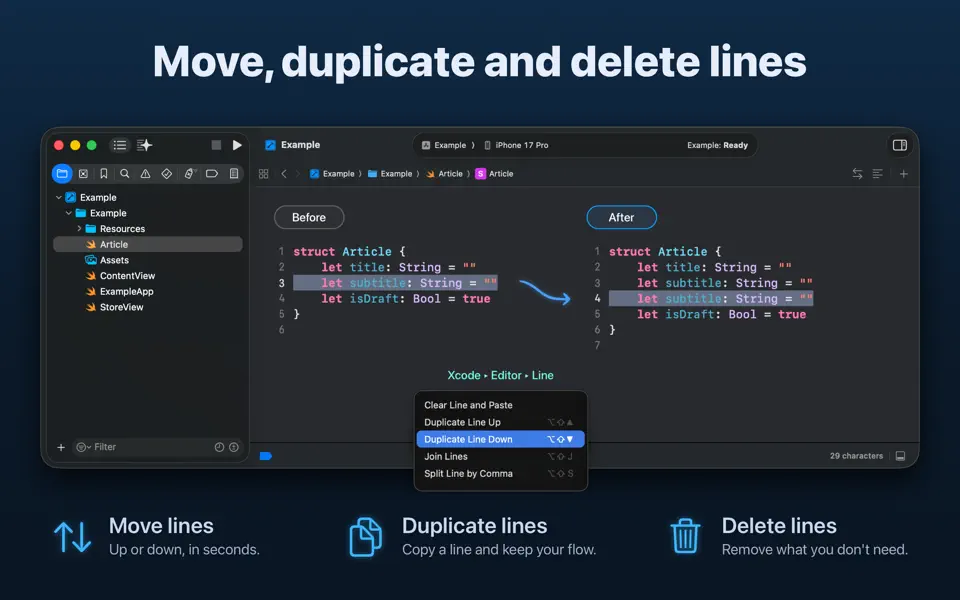
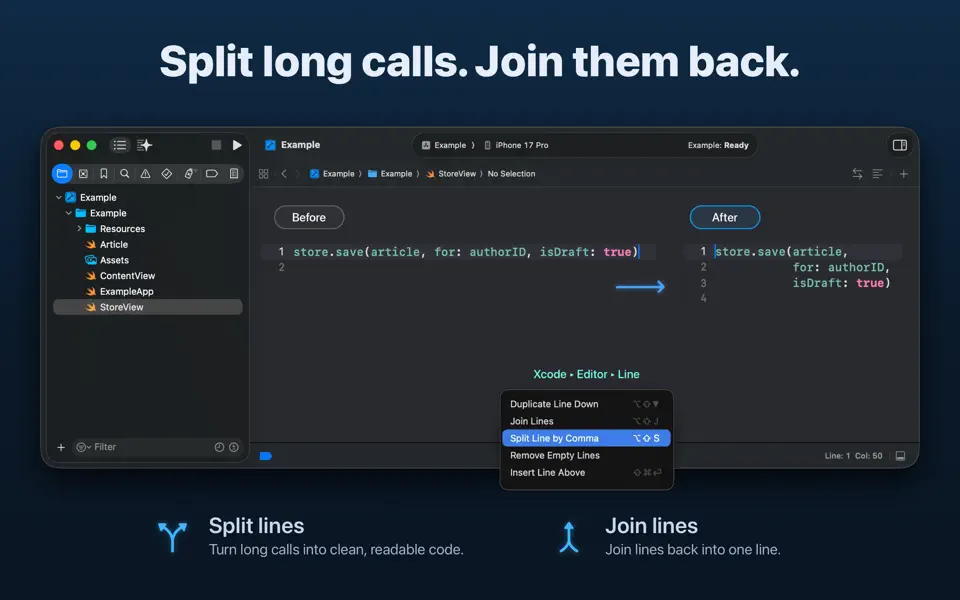
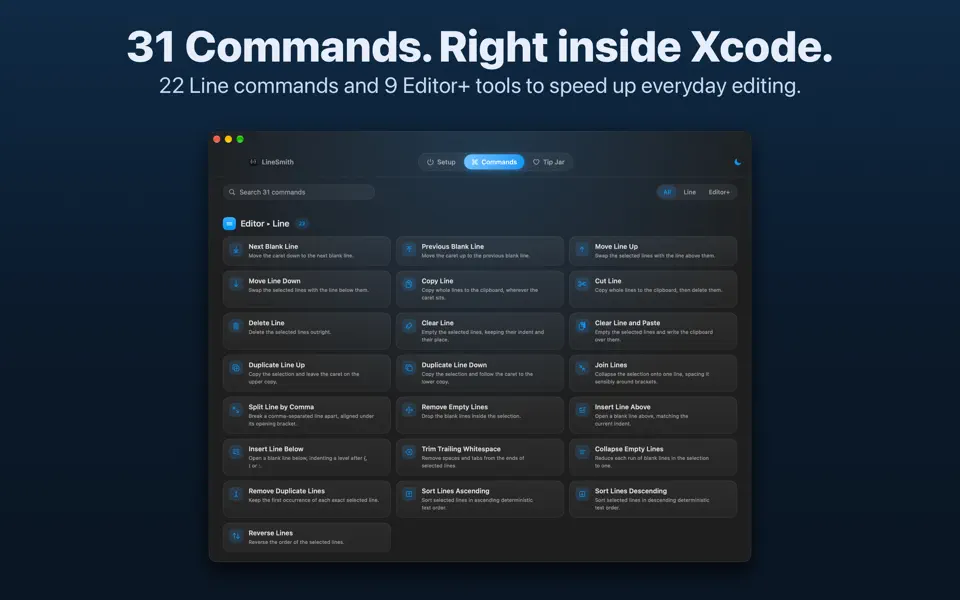
Editor > Line
• Move Line Up / Move Line Down — swap the selection with the line above or below
• Duplicate Line Up / Duplicate Line Down — copy the selection and choose which copy keeps the caret
• Delete Line — delete whole lines wherever the caret sits
• Clear Line — empty the lines but keep their indentation and position
• Clear Line and Paste — replace the selected lines with the clipboard
• Copy Line / Cut Line — put whole lines on the clipboard, no selecting first
• Insert Line Above / Insert Line Below — open a blank line at the right indent
• Join Lines — collapse a selection onto one line, spacing it sensibly around brackets
• Split Line by Comma — break a comma-separated line apart, aligned under its bracket
• Remove Empty Lines — drop the blank lines inside a selection
• Next Blank Line / Previous Blank Line — move the caret between blocks
• Trim Trailing Whitespace — remove spaces and tabs from selected line endings
• Collapse Empty Lines — reduce each run of blank lines to one
• Remove Duplicate Lines — keep the first occurrence of each exact selected line
• Sort Lines Ascending / Sort Lines Descending — sort selected lines deterministically
• Reverse Lines — reverse the order of the selected lines
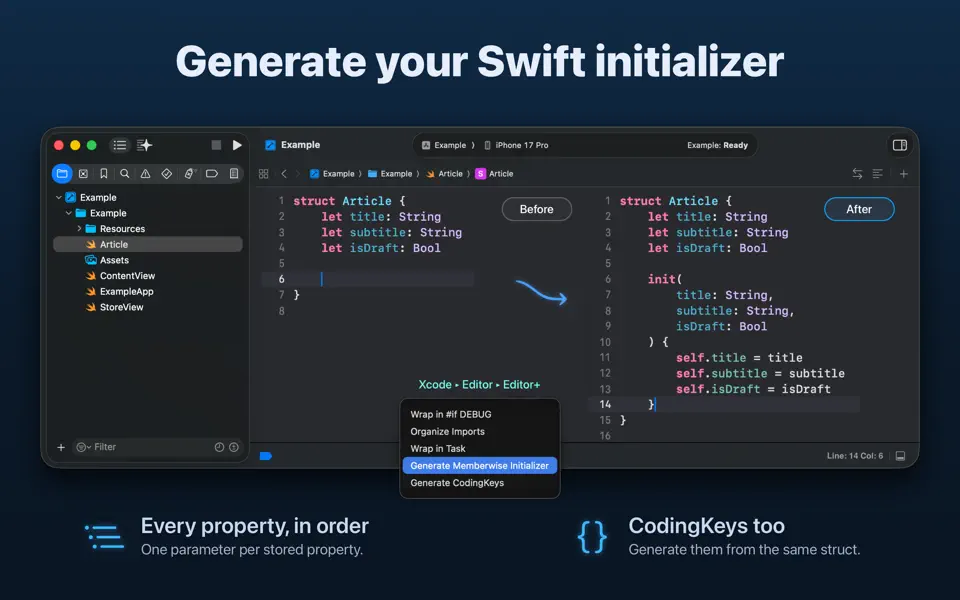
Editor > Editor+
• Remove Comment — strip // comments, leaving code and string or regex literals alone
• Add Type Extension — write an extension on the first type declared in the file
• Add Type Delegate — write a delegate protocol for it
• Insert MARK Section — insert a // MARK: section placeholder
• Wrap in #if DEBUG — wrap selected lines in a conditional compilation block
• Organize Imports — sort and de-duplicate safe, contiguous Swift import blocks
• Wrap in Task — wrap and indent selected lines in Task { }
• Generate Memberwise Initializer — create an initializer from a struct's stored properties, and decline rather than guess on syntax it cannot handle
• Generate CodingKeys — create CodingKeys from direct stored properties
FREE, AND STAYING FREE
All 31 commands are free. There is no paid tier, no account, no ads and no tracking. LineSmith collects nothing about you or your code. If LineSmith saves you time, there is a tip jar in the app; a tip unlocks nothing, because there is nothing to unlock.
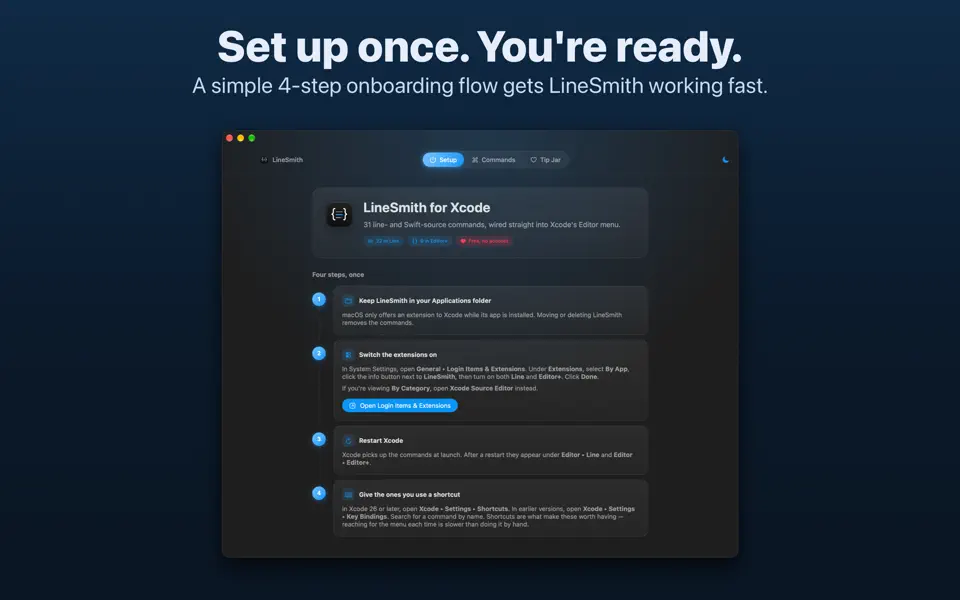
SETTING IT UP
1. Keep LineSmith in your Applications folder.
2. In System Settings, find Xcode Source Editor and enable both Line and Editor+.
3. Restart Xcode.
4. Assign shortcuts in Xcode > Settings > Shortcuts (Key Bindings in earlier Xcode versions).
Requires macOS 14 or later and Xcode.
UPGRADING FROM TEXTPLUS
The 19 command identifiers inherited from TextPlus are unchanged, so existing keyboard shortcuts carry over. Version 2.0 also brings reliability fixes and 12 new commands, for 31 in total.
Từ nhà phát triển
Danh sách 0
-
 LineSmith for Xcode
Điểm 5
-

- +1 Điểm
-
- 2.002 Dragon
- +1
-
- 17 Kai Lee
- +1
-
- 1.249 바람처어럼
- +1
-
- 18.989 Simon Chan
- +1
-
- 173 upto
- +1






Bảng xếp hạng 0
-
- Điểm bạn chấm
Nhà phát triển 4
- Tuan Truong
- Người theo dõi: 0
- Nền tảng: iOS Ứng dụng (2) macOS Ứng dụng (1) macOS Trò chơi (1)
- Giảm giá: 1
- Danh sách: 0 1
- Điểm: 7
- Bảng xếp hạng: 0
- Bình luận: 0
- Video: 0
- RSS: Đăng ký
Tính năng mới
- Phiên bản: 2.0.2
- Cập nhật lần cuối:
- LineSmith 2.0.2
• Undo after a command now restores only the lines that changed, without selecting the whole file or jumping to the top.
• Generate Memberwise Initializer and Generate CodingKeys handle trailing comments, property wrappers, property observers, and class methods correctly, and no longer guess wrong types.
• Join Lines keeps trailing comments intact and handles blank lines better.
• Split Line by Comma aligns under the innermost open bracket.
• Clear Line and Paste keeps indentation when the clipboard is empty.
• Files with mixed LF/CRLF line endings keep the endings of untouched lines.
• All 31 editing commands remain free.
Thông tin bổ sung
- Ngày phát hành:
- Danh mục:
Ứng dụng cho macOS›Công cụ cho nhà phát triển - HĐH:
macOSmacOS 14.0 trở lên - Kích thước:
2 Mb - Ngôn ngữ được hỗ trợ:
Tiếng Anh - Xếp hạng nội dung:
4+ - Mac App Store Điểm đánh giá: ¡
0 - Trang web:
 https://leafworkstudio.com/linesmith
Điểm tổng hợp AppAgg
Điểm tổng hợp AppAgg ước tính cho
LineSmith for Xcode
Nhà phát triển: Tuan Truong
Điểm cao hơn thường cho thấy các chỉ số trên AppAgg tốt hơn.
Dựa trên: độ phổ biến · đánh giá của người dùng · độ mới · ưu đãi · dữ liệu cửa hàng · hoạt động cộng đồng
Được tính lại hằng ngày từ dữ liệu AppAgg mới nhất.
Bình luận 0 ¡
Chia sẻ
LineSmith for Xcode URL ngắn: Đã sao chép!- Mac App Store

