
| 開發人員: | David Page (3) | ||
| 價錢: | $2.99 | ||
| 排名: | 0 | ||
| 評測: | 0 寫評論 | ||
| 清單: | 0 + 1 | ||
| 點數: | 4 + 0 ¡ | ||
| Mac App Store | |||
描述
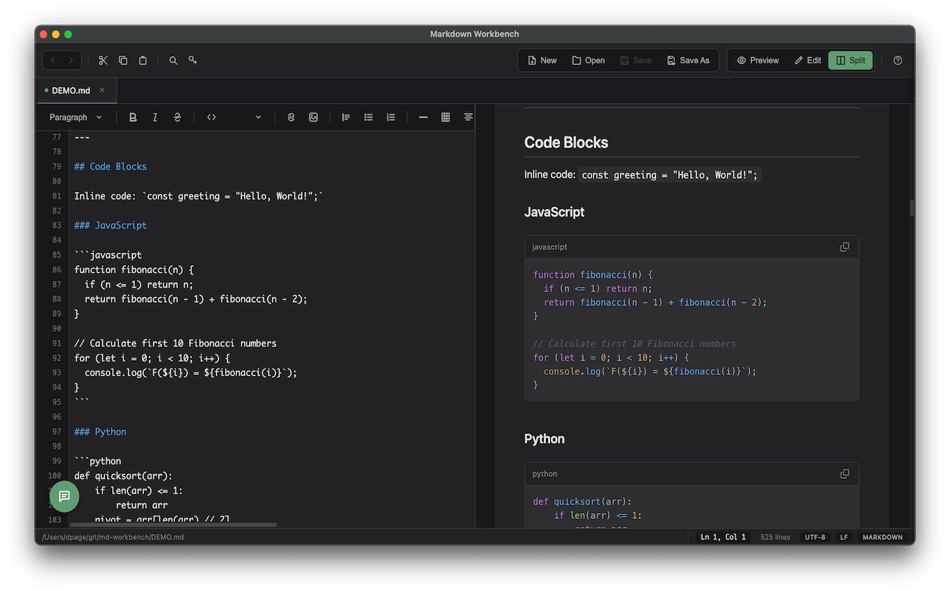
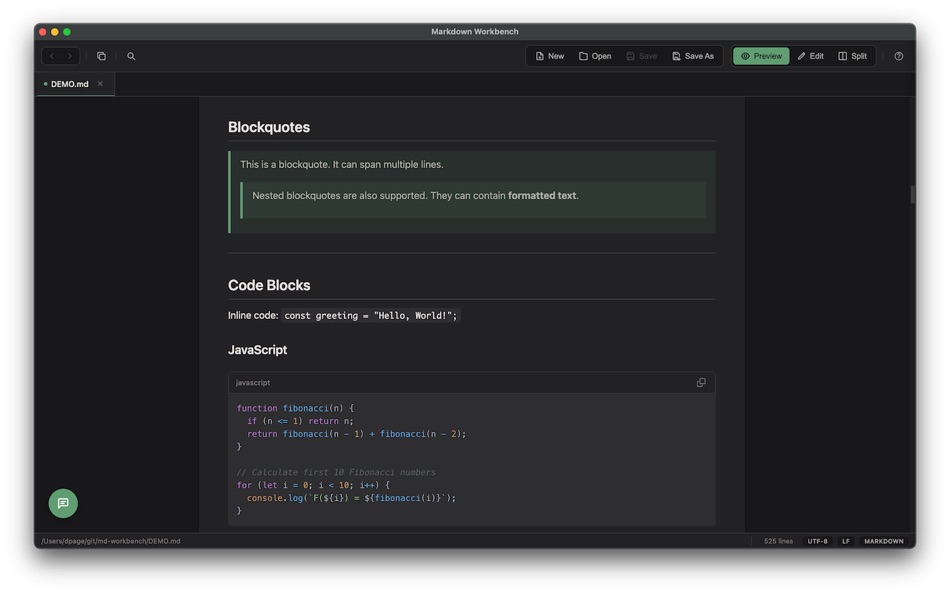
Open any Markdown file and see it beautifully rendered with full support for GitHub Flavored Markdown, including tables, task lists, footnotes, and syntax-highlighted code blocks. Switch to Edit mode for a side-by-side view with your source on the left and a live preview on the right, updating as you type.
AI Chat Assistant
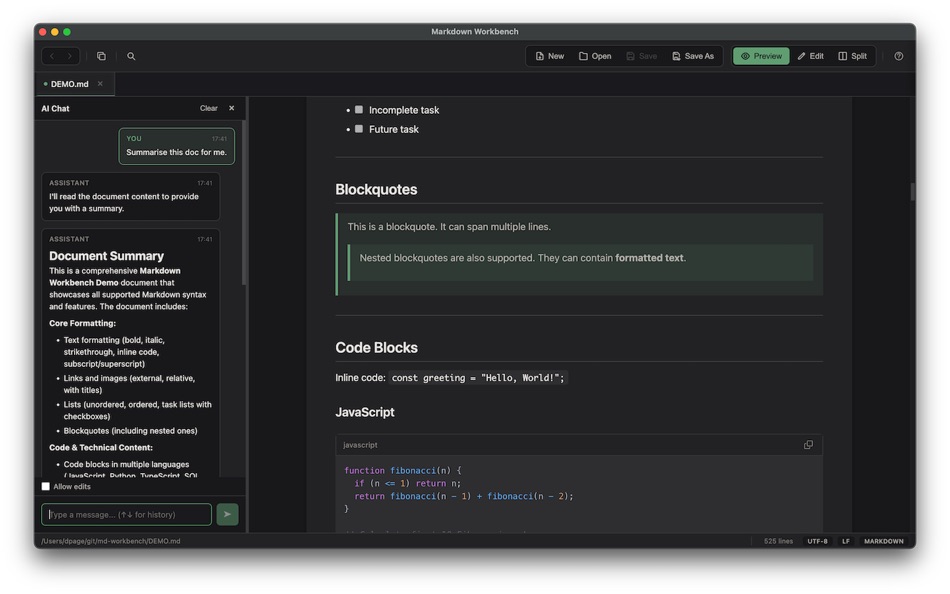
Ask questions about your documents, get summaries, request edits, or brainstorm ideas — all without leaving the app. Markdown Workbench connects to your choice of AI provider: use a local model via Ollama or LM Studio for complete privacy, or connect to Anthropic (Claude), Google (Gemini), or OpenAI (ChatGPT) with your own API key. Your conversations stay contextual to the document you're working on.
Rich Markdown Rendering
Go beyond basic Markdown with support for Mermaid diagrams, math and LaTeX equations rendered with KaTeX, admonition blocks (note, warning, tip, and more), emoji shortcodes, subscript and superscript, and an auto-generated Table of Contents. Your documents look polished and professional without any extra effort.
Work With More Than Just Markdown
Markdown Workbench handles a wide range of file types with full syntax highlighting: JSON, YAML, XML, CSV, TOML, HTML, CSS, JavaScript, TypeScript, Python, SQL, shell scripts, config files, and plain text. Every file type gets a clean, readable presentation.
Automatic Code Formatting
Format your documents with a single keystroke. Supported formats include JSON, YAML, SQL, JavaScript, TypeScript, CSS, HTML, XML, and Markdown. Configure your preferred indent size, choose tabs or spaces, set a maximum line length, and even enable format-on-save. SQL formatting supports PostgreSQL, SQLite, and Standard SQL dialects. JSON and YAML keys can be sorted alphabetically.
A Thoughtful Editor
The editor includes line numbers, current line highlighting, a configurable column ruler, and soft word wrap. A status bar shows your file path, cursor position, file type, encoding, and line endings at a glance. Auto-save keeps your work safe with a configurable debounce, and external file changes are detected and reloaded automatically.
Navigate Your Projects
Open a folder and browse its contents in the sidebar. Use tabs to keep multiple documents open at once. Navigate back and forward through your history. Click links within Markdown files to open other local files, and external links open in your default browser.
Find and Replace
Search across any viewing mode with support for case-sensitive and regular expression matching. In edit mode, use find and replace to make changes efficiently. Your search state is preserved when switching between modes.
Flexible Viewing Modes
Every file can be viewed in multiple ways. Preview mode shows rendered Markdown. Source mode displays syntax-highlighted code. Edit mode gives you a split editor with live preview for Markdown, or a full-width editor for other file types. Set your preferred default mode for each file type in Preferences.
Make It Yours
Choose from light, dark, or system-matched themes. Configure editor options like line numbers, column ruler position, and current line highlighting. Set default viewing modes per file type. Adjust formatting preferences including indent style, line length, and SQL dialect. Control auto-reload and auto-save behaviour, and choose whether links open in Preview or Source mode.
Keyboard-Driven Workflow
Every common action has a keyboard shortcut: open files, save, find and replace, format code, close tabs, navigate history, and open preferences. Markdown Workbench stays out of your way and lets you work at the speed of thought.
Ad
螢幕擷取畫面

新功能
- 版本: 1.0.4
- 發佈日期:
價錢
- 今天: $2.99
- 最小值: 免費
- 最大值: $2.99
追蹤票價
Ad
開發人員
- David Page
- 平台: iOS 應用程式 (1) macOS 應用程式 (2)
- 清單: 0 + 1
- 點數: 10 + 0 ¡
- 排名: 0
- 評測: 0
- 折扣: 0
- 影片: 0
- RSS: 訂閱
點數
-

- 3,453 Dragon
- +1
-
- 10,988 Simon Chan
- +1
-
- 2,010 Lu Chin
- +1
-
- 2,762 Alan
- +1


排名
0 ☹️
清單
0 ☹️
- Markdown Workbench
評測
成為第一個評論 🌟
其他資訊
- 版本: 1.0.4
- 類別 :
macOS 應用程式›工具 - OS:
macOS,macOS 10.15 以上版本 - 大小:
120 Mb - 支援的語言 :
Afrikaans,Amharic,Arabic,Bengali,Bulgarian,Catalan,Chinese,Croatian,Czech,Danish,Dutch,English,Estonian,Finnish,French,German,Greek,Gujarati,Hebrew,Hindi,Hungarian,Indonesian,Italian,Japanese,Kannada,Korean,Latvian,Lithuanian,Malay,Malayalam,Marathi,Norwegian,Persian,Polish,Portuguese,Romanian,Russian,Serbian,Slovak,Slovenian,Spanish,Swahili,Swedish,Tamil,Telugu,Thai,Turkish,Ukrainian,Urdu,Vietnamese - 內容分級:
4+ - Mac App Store 評分:
0 - 發佈日期:
- 發行日期:
Markdown Workbench 縮短網址: 已複製!- 🌟 分享
- Mac App Store
你可能還喜歡
- 全新
- Markdown Browser
- macOS 應用程式: 工具 由: Shaun Hirst
- $1.99
- 清單: 0 + 0 排名: 0 評測: 0
- 點數: 0 + 0 版本: 1.0.0 Markdown Browser is a powerful yet elegant native Mac application designed for reading, browsing, and navigating Markdown documents with ease. Whether you're reviewing documentation, ... ⥯
- 全新
- Markdown Buddy
- macOS 應用程式: 工具 由: Jan Tumpach
- $0.99
- 清單: 0 + 0 排名: 0 評測: 0
- 點數: 0 + 0 版本: 1.1 Markdown Buddy is a native macOS app that lets you preview Markdown files beautifully, right from your code editor or Finder. Source Editor Extension Integrates directly into your ... ⥯
-
- Markdown EditPad
- macOS 應用程式: 工具 由: Damian Pieszczynski
- $4.99
- 清單: 0 + 0 排名: 0 評測: 0
- 點數: 0 + 0 版本: 1.0 Markdown editor with support for GitHub flavor. Features: - live preview - outline - bookmarks - markdown docs and interface to add markdown tags - export to HTML and RTF ⥯
-
- Markdown Export
- macOS 應用程式: 工具 由: Tanvir N Hasan
- 免費
- 清單: 0 + 0 排名: 0 評測: 0
- 點數: 0 + 0 版本: 1.1 A Professional Markdown-to-Document Converter Transform your markdown into beautifully formatted PDFs, Word documents, and PNG images with just a click. Markdown Export combines a ... ⥯
-
- Markdown Quick Look
- macOS 應用程式: 工具 由: Bitfield AB
- $4.99
- 清單: 0 + 0 排名: 0 評測: 0
- 點數: 0 + 0 版本: 1.0 Stop opening files just to peek. Markdown Quick Look adds instant, beautifully rendered Markdown previews to Finder. Press the spacebar on any .md, .markdown, or .mdown file and see ... ⥯
-
- Dolt Workbench
- macOS 應用程式: 工具 由: DoltHub Inc
- 免費
- 清單: 0 + 0 排名: 0 評測: 0
- 點數: 1 + 0 版本: 0.3.62 A modern SQL workbench for your MySQL and PostgreSQL compatible databases, offering a modern UI for viewing and editing your data with powerful version control features when using ... ⥯
-
- Ohai Markdown Viewer
- macOS 應用程式: 工具 由: Verbari LLC
- $14.99
- 清單: 0 + 0 排名: 0 評測: 0
- 點數: 0 + 0 版本: 1.0 Stop reading raw text in your terminal. Ohai is a native macOS markdown viewer built for the age of AI. It acts as a real-time canvas for tools like Claude Code, Cursor, and Copilot. ... ⥯
- -100%
- Telescopo: Markdown & Diagrams
- macOS 應用程式: 工具 由: Bad Command AI
- ▼ * 免費
$24.99-100% - 清單: 0 + 2 排名: 0 評測: 0
- 點數: 6 + 0 版本: 5.1.0 Telescopo is the fastest, most beautiful Markdown and diagram viewer on macOS. Start free with a powerful native Markdown viewer, clean rendering, local and remote images, light and ... ⥯
-
- Easy Markdown
- macOS 應用程式: 工具 由: Roberto Panetta
- $7.99
- 清單: 0 + 1 排名: 0 評測: 0
- 點數: 0 + 0 版本: 1.9.3 Easy Markdown lets you create Web pages just writing plain text with Markdown syntax. It's simply and powerful. We are sure you will love it. A text written in Markdown is a plain text ⥯
-
- Markdown2PDF: Convert Markdown
- macOS 應用程式: 工具 由: Haplo, LLC
- $1.99
- 清單: 0 + 0 排名: 0 評測: 0
- 點數: 0 + 0 版本: 1.2 Easily Convert Markdown to PDF with Markdown2PDF Markdown2PDF is the fastest way to turn your Markdown files into high-quality PDFs. Whether you re writing notes, documentation, or ... ⥯
- 全新
- Markdowny - Markdown Viewer
- macOS 應用程式: 工具 由: RanduSoft SRL
- $1.99
- 清單: 0 + 0 排名: 0 評測: 0
- 點數: 0 + 0 版本: 1.2.0 The Perfect Companion for Your Writing Workflow Do you prefer writing in Vim, Emacs, Sublime Text, or a simple text editor? Do you need a crisp, rendered preview of your work without ... ⥯
-
- medit - Quick Markdown Editor
- macOS 應用程式: 工具 由: Rowena Ricalde
- $1.99
- 清單: 0 + 0 排名: 0 評測: 0
- 點數: 0 + 0 版本: 2.2 medit is an app to let you quickly and easily edit or create files in the Markdown formatting syntax. It is extremely easy to use - just start typing Markdown formatted text on the ... ⥯
- 全新
- Redshift Markdown
- macOS 應用程式: 工具 由: Robin Ellingsen
- 免費
- 清單: 0 + 0 排名: 0 評測: 0
- 點數: 0 + 0 版本: 1.1.2 Live Markdown Preview - Real-time preview as you type - Native macOS app no browser layer - Multiple preview styles (GitHub and more) - Mermaid diagrams supported AI Assistant - ... ⥯
- 全新
- Mud: Mark Up or Down
- macOS 應用程式: 工具 由: Joseph Pearson
- 免費
- 清單: 0 + 0 排名: 0 評測: 0
- 點數: 0 + 0 版本: 1.0.0 Markdown is suddenly everywhere. It s how we speak to machines now. It s how they speak to us. We should make it nice! But you already have a favorite text editor. You don t need a ... ⥯