
| Utvikler: | Pixeleyes Ltd (2) | ||
| Pris: | * Gratis | ||
| Rangeringer: | 0 | ||
| Anmeldelser: | 0 Skrive en omtale | ||
| Kommentarer: | 0 Legg inn kommentar | ||
| Lister: | 0 + 0 | ||
| Poeng: | 0 + 0 ¡ | ||
| Mac App Store | |||
Beskrivelse
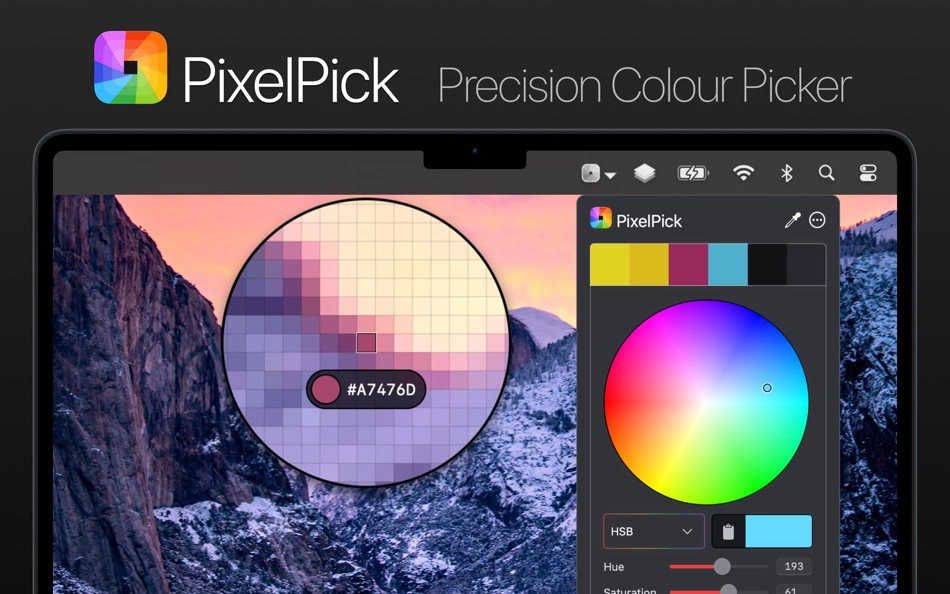
# Effortlessly pick and copy any colour from your screen from the always-ready menu bar item. Whether you're designing interfaces or debugging stylesheets, PixelPick gives you total control:
- Click the status item to instantly activate the picker
- Follow your cursor live to see a magnified view of your screen and sample any pixel
- Use arrow keys for pixel-by-pixel precision (hold Shift to move faster)
- Zoom in/out with your scroll wheel, or resize the selector with ⌥ + scroll
- Lock in your colour with Return or a click, and copy it instantly
- Hold ⌘ to keep selecting colours without interruption
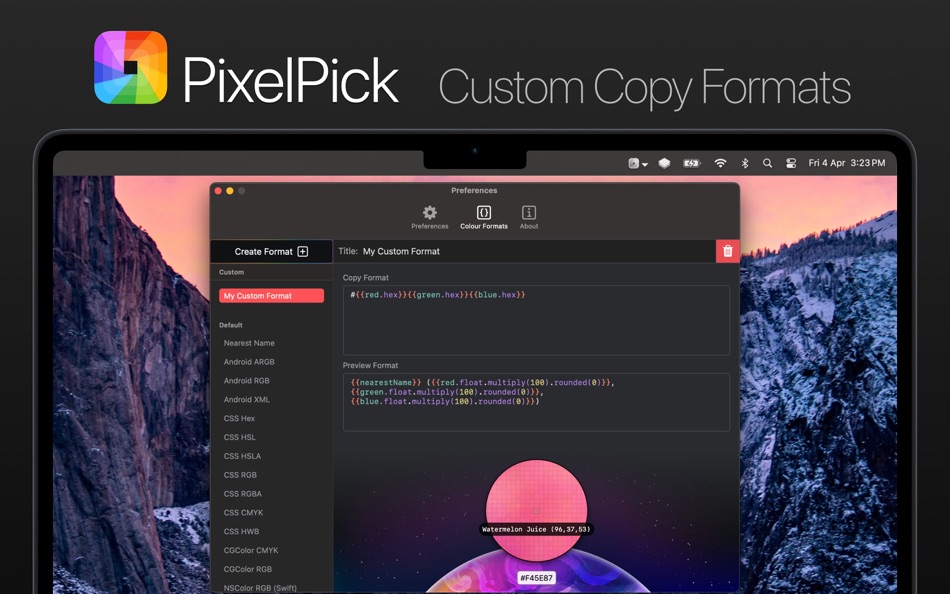
# No two workflows are the same. PixelPick lets you copy colours in the exact format you need:
- Built-in developer and designer centric formats like CSS Hex, NSColor, UIColor, and much more
- Curate your own custom formats using a flexible templating system, tapping into advanced colour attributes like RGB, HSL, HSB, CMYK, and even descriptive names
- Apply formatters and modifiers to fine-tune your output – perfect for working with APIs, design systems, or codebases
# Easily adjust a previously picked colour without needing to resample. Fine-tune brightness, saturation, or individual colour attributes and copy the updated colour in any format:
- Colour wheel with interactive adjustment
- Edit individual HSB, HSL, RGB, CMYK components
- Easily access the current colour hex value
- Convert a colour to and from a descriptive name
# Why PixelPick?
PixelPick is fully native and privacy conscious. It integrates beautifully with macOS, gives you unmatched format flexibility, and was crafted with attention to detail for those who care about precision and design.
Whether you're coding, designing, or tweaking colours in between, PixelPick gives you the exact colour you need — how you need it.
# Free to try
PixelPick is free to download, letting you try out its core features. If you find it useful, you can unlock built-in and custom colour formats with a one time in-app purchase. No subscriptions here!
Ad
Skjermbilder
Dette er nytt
- Versjon: 1.3.0
- Oppdatert:
- - Improve colour slider accuracy, allowing colour editing with decimal places
- Added hue + saturation colour picker for RGB and CMYK editing
- Added 'Variables' view to colour format editor, allowing drag of variables via tokens to templates
- Fix detection of screens when waking from sleep or logging in
- Internal performance improvements
Prishistorie
-
* Kjøp i appen - I dag: Gratis
- Minimum: Gratis
- Maksimalt: Gratis
Spor priser
Utvikler
- Pixeleyes Ltd
- Plattformer: macOS Apper (2)
- Lister: 1 + 0
- Poeng: 1 + 0 ¡
- Rangeringer: 0
- Anmeldelser: 0
- Kommentarer: 0
- Rabatter: 0
- Videoer: 0
- RSS: Abonner
Poeng (0)
0 ☹️
Rangeringer (0)
0 ☹️
Lister (0)
0 ☹️
- PixelPick
Anmeldelser (0)
Bli den første til å vurdere 🌟
Tilleggsinformasjon
- Versjon: 1.3.0
- Kategori:
macOS Apper›Verktøy - OS:
macOS,macOS 14.6 og nyere - Størrelse:
2 Mb - Språk som støttes:
English - Egnethet:
4+ - Mac App Store Vurdering:
0 - Oppdatert:
- Utgivelsesdato:
Kontakter
- Nettsted:
 https://www.pixeleyes.co.nz/pixelpick/
«PixelPick». Plattform: macOS. Kategori: Verktøy. Utvikler: «Pixeleyes Ltd». Første utgivelse: . Siste oppdatering: . Gjeldende pris: gratis. Denne tittelen har ennå ikke mottatt vurderinger eller anmeldelser på AppAgg. Tilgjengelige språk: English. AppAgg sporer prishistorikk, rangeringer og tilbakemeldinger fra brukere for «PixelPick». Følg fremtidige rabatter og oppdateringer via RSS. AppAgg er ikke vert for applikasjoner eller distribuerer programvare. Alle varemerker, logoer og skjermbilder tilhører deres respektive eiere.
Kommentarer (0)
Vær den første til å kommentere 🌟
PixelPick Kort nettadresse: Kopiert!- 🌟 Dele
- Mac App Store
Ad
Du vil kanskje også like
-
- Pixel Forge
- macOS Apper: Verktøy Av: Big Byte Studios, Inc.
- $9.99
- Lister: 0 + 1 Rangeringer: 0 Anmeldelser: 0
- Poeng: 0 + 0 Kommentarer: 0 Versjon: 1.2.0 Pixel Forge is a shader playground for Apple s Metal where your digital artwork comes to life! Don't want to learn all the complexities of setting up a Metal app but want to use ... ⥯
-
- Pixel Perfect Tool
- macOS Apper: Verktøy Av: Pavel Alekseev
- Gratis
- Lister: 2 + 1 Rangeringer: 0 Anmeldelser: 0
- Poeng: 3 + 0 Kommentarer: 0 Versjon: 1.0.1 Overlay your mockup image above the Browser or Simulator and spot the differences like wrong paddings and fonts. The easiest way is to take screenshot from Figma/Sketch/Photoshop/XD ... ⥯
-
- Pixel Picker #
- macOS Apper: Verktøy Av: Khang Le
- Gratis
- Lister: 0 + 0 Rangeringer: 0 Anmeldelser: 0
- Poeng: 2 + 0 Kommentarer: 0 Versjon: 2.0 - Capture colors from your screen with real-time previews. - Extract color palette from snipping tool. - Snip a screenshot and suggest a dominant color palette. - Input colors via HEX ... ⥯
-
- System Color Picker
- macOS Apper: Verktøy Av: Sindre Sorhus
- Gratis
- Lister: 1 + 3 Rangeringer: 0 Anmeldelser: 0
- Poeng: 6 + 0 Kommentarer: 0 Versjon: 2.2.1 Pick colors from anywhere using the built-in color picker. Note: On macOS 26, a system bug causes the color sampler to sometimes pick the wrong color. The app relies on macOS's color ... ⥯
-
- PreviewMaster
- macOS Apper: Verktøy Av: 鑫 宋
- $0.99
- Lister: 0 + 1 Rangeringer: 0 Anmeldelser: 0
- Poeng: 4 + 0 Kommentarer: 0 Versjon: 2.0.2 - Pixel-Perfect Frames : High-fidelity mockups for iPhone 16 Pro Max, iPad Pro, and more. - Layout Templates : Choose from professional presets designed for high conversion. - Ready ... ⥯
-
- RocketSim for Xcode Simulator
- macOS Apper: Verktøy Av: SwiftLee
- * Gratis
- Lister: 1 + 3 Rangeringer: 0 Anmeldelser: 0
- Poeng: 9 + 0 Kommentarer: 0 Versjon: 14.5.0 Join thousands of iOS developers who build, test, and debug apps up to 2x faster with RocketSim. Supercharge your Xcode Simulator with 30+ powerful tools designed to boost ... ⥯
-
- Color Picker Plus
- macOS Apper: Verktøy Av: 万林 彭
- Gratis
- Lister: 2 + 1 Rangeringer: 0 Anmeldelser: 0
- Poeng: 5 + 0 Kommentarer: 0 Versjon: 1.8 Color Picker Plus is a simple tool to pick up color for users, which can optimize their workflow and process. Pick HEX, RGB, HSL Main functions Zoom pick up a pixel color Support dark ... ⥯
-
- Screenshot Creator
- macOS Apper: Verktøy Av: BRIDGETECH SOLUTIONS LIMITED
- * Gratis
- Lister: 0 + 0 Rangeringer: 0 Anmeldelser: 0
- Poeng: 3 + 0 Kommentarer: 0 Versjon: 1.86 Create beautiful, engaging, screenshots for your apps and maximise your downloads. Screenshot Creator makes it easy for you to design your own professional-looking screenshots that ... ⥯
-
- Color Picker - Pikka
- macOS Apper: Verktøy Av: Ruslan Sayfutdinov
- * Gratis
- Lister: 2 + 1 Rangeringer: 0 Anmeldelser: 0
- Poeng: 6 + 0 Kommentarer: 0 Versjon: 4.0.4 ** Apple's pick for Apps And Games We Love Right Now ** Pikka - Color Picker is an easy-to-use color picker and palette generator for developers and designers that works well with ... ⥯
-
- Gitfox
- macOS Apper: Verktøy Av: Erik Aigner
- * Gratis
- Lister: 0 + 3 Rangeringer: 0 Anmeldelser: 0
- Poeng: 6 + 0 Kommentarer: 0 Versjon: 4.1.2 REPOSITORY MANAGER Quickly see all your repositories at a glance and if they have uncommitted changes. If your repository has a Markdown README, it is automatically rendered. Have your ⥯
-
- xScope 4
- macOS Apper: Verktøy Av: The Iconfactory
- $49.99
- Lister: 3 + 3 Rangeringer: 0 Anmeldelser: 0
- Poeng: 0 + 0 Kommentarer: 0 Versjon: 4.7.2 Created specifically for designers & developers, xScope is a powerful set of tools that are ideal for measuring, inspecting & testing on-screen graphics and layouts. xScope s tools ... ⥯
-
- App Icons Maker & Generator
- macOS Apper: Verktøy Av: Harshad Jadav
- $0.99
- Lister: 0 + 1 Rangeringer: 5 (1) Anmeldelser: 0
- Poeng: 4 + 0 Kommentarer: 0 Versjon: 1.6 App Icons Maker & Generator Easy Icon Creator Tool Create professional-quality app icons in seconds no design skills needed. With App Icons Maker & Generator, generating app icons for ... ⥯
-
- ColorSnip
- macOS Apper: Verktøy Av: Yung Chou Wu
- $0.49
- Lister: 0 + 0 Rangeringer: 0 Anmeldelser: 0
- Poeng: 0 + 0 Kommentarer: 0 Versjon: 1.0.1 ColorSnip is a simple color picker that sits in your Mac's menu bar. Need to grab a color from your screen? Just click the icon, point at any color, and click again. That's it. The ... ⥯
-
- Snippet - Code Sharing
- macOS Apper: Verktøy Av: Sebastien Vidal
- Gratis
- Lister: 2 + 2 Rangeringer: 0 Anmeldelser: 0
- Poeng: 3 + 0 Kommentarer: 0 Versjon: 1.0 Create beautiful screenshots of your code with Snippet! Snippet is a developer tool for sharing images of your code in a way that is eye-catching and social media ready. With dozens of ⥯