
保存済み
保存済みメニューに表示する名前を選択してください。
完了
| デベロッパー: | BARTOSZ MACIEJ SROCZYNSKI (1) | ||
| 価格: | * フリー | ||
| 評価: | 500 ブロンズ | ||
| ランキング: | 0 | ||
| コメント: | 0 コメントを投稿する | ||
| リスト: | 0 + 0 | ||
| ポイント: | 0 + 0 ¡ | ||
| +1 ポイント | |||
説明
INSTANT LAUNCH
• Opens in milliseconds — no loading screens
• Native macOS app — no Electron bloat
• Lightweight — respects your disk space
COMPLETE MARKDOWN SUPPORT
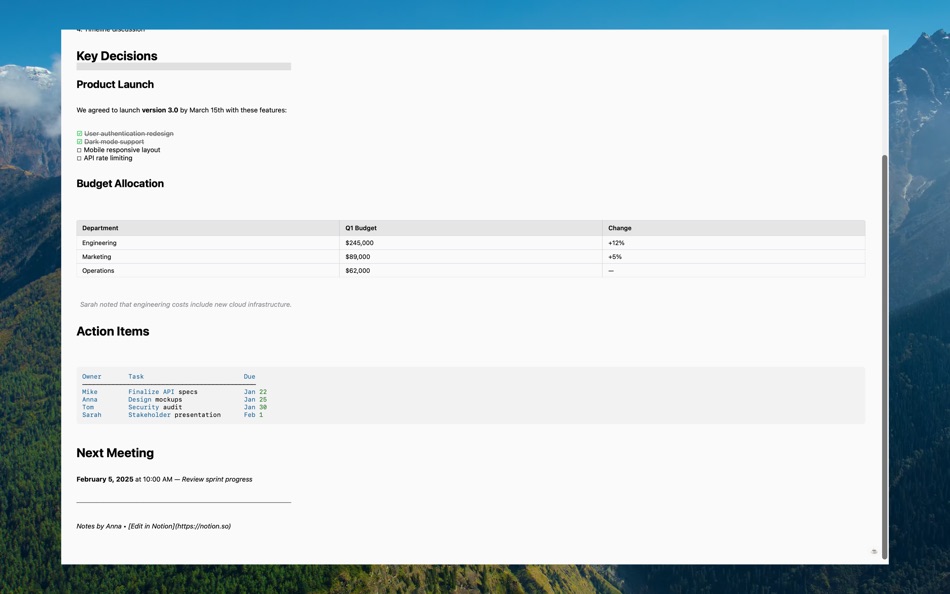
• Headers, bold, italic, strikethrough
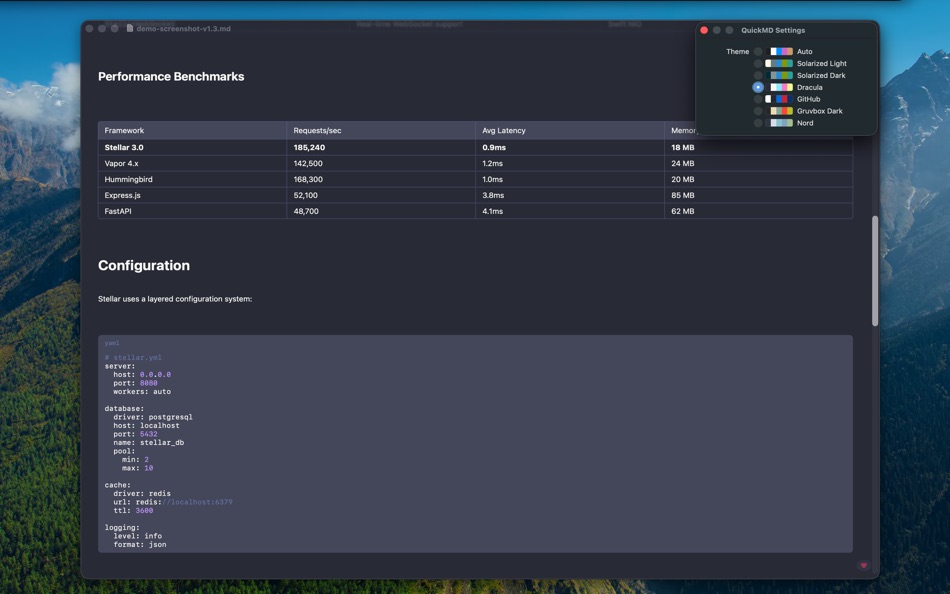
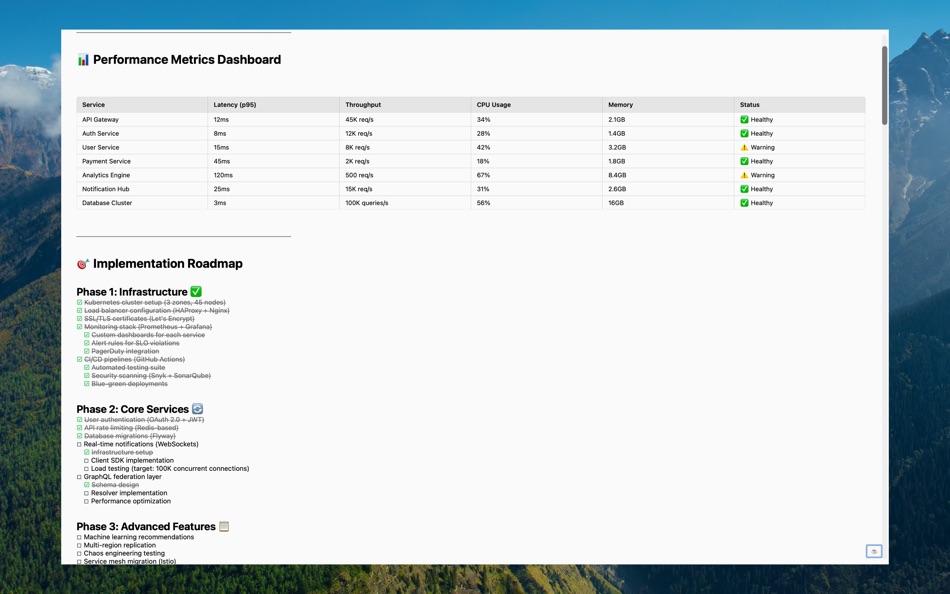
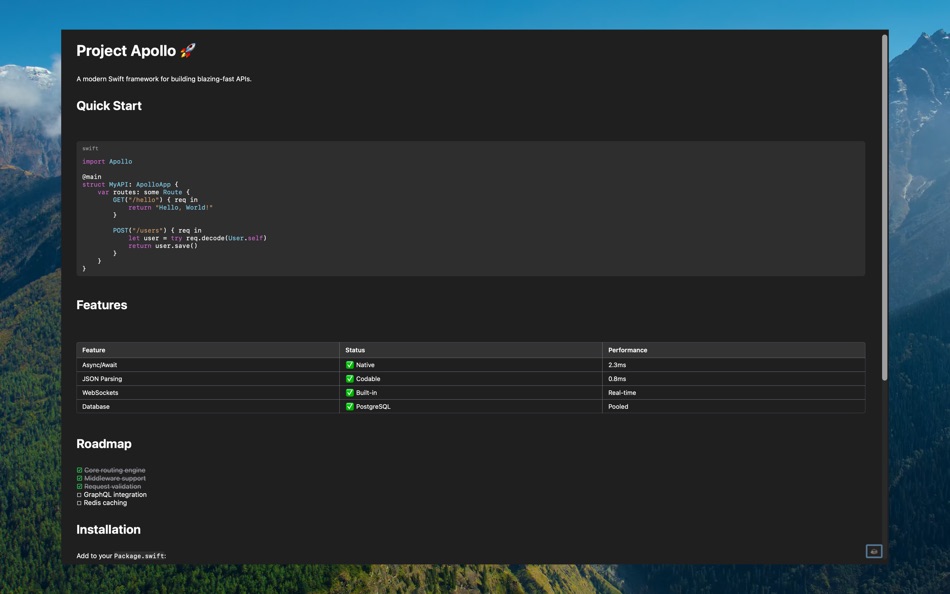
• Tables with proper column alignment
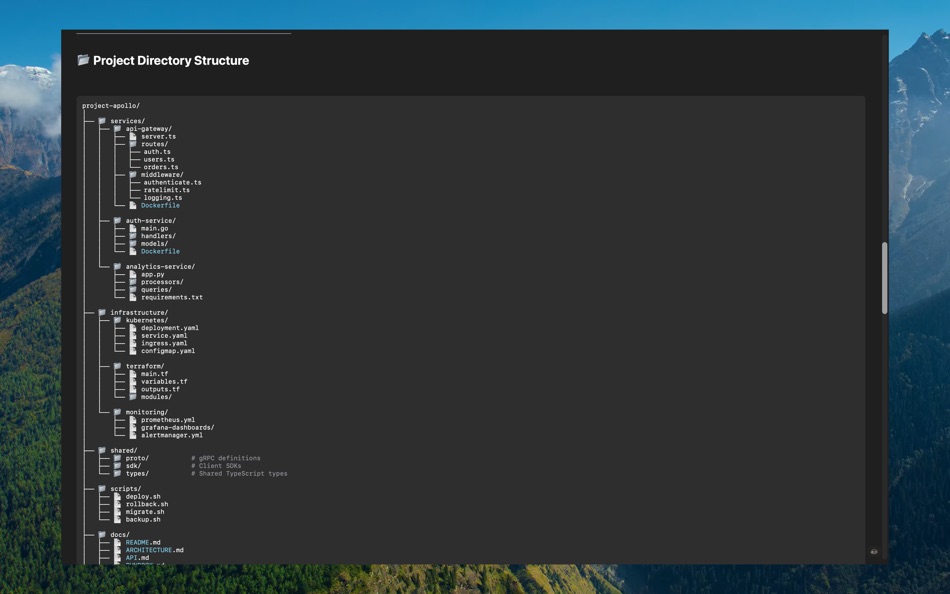
• Code blocks with syntax highlighting
• Task lists with checkboxes
• Nested lists (ordered and unordered)
• Nested blockquotes with level indicators
• Images (local and remote URLs)
• Links (inline, reference-style, autolinks)
• Horizontal rules
LATEX MATH & DIAGRAMS
• Display math ($$...$$) rendered with TeX-quality typography
• Inline math ($...$) embedded in paragraph text
• Mermaid diagrams — flowcharts, sequence, pie, class, and more
• Footnotes ([^id]) with auto-numbered definitions
WORK WITH MULTIPLE DOCUMENTS
• Native macOS tabs — every file opens as a tab in one window
• Recent Documents sidebar (⇧⌘D) — click to re-open, drag to resize, hover to remove
• Switch tabs with ⌘⇧→ / ⌘⇧←
• Remembers your sidebar width and toggle state
NAVIGATION & SEARCH
• Find in document (⌘F) with per-word match count
• Word-level highlighting across all block types (code, tables, blockquotes)
• Table of Contents sidebar (⌘⇧T) — auto-generated from headings
• Copy entire document (⌘⇧C) or individual sections (hover heading → copy icon)
• Export to PDF (⌘⇧E) and Print (⌘P)
CUSTOM COLOR THEMES
• 7 built-in themes: Auto, Solarized Light, Solarized Dark, Dracula, GitHub, Gruvbox Dark, Nord
• Drop your own theme JSON into the QuickMD Themes folder — appears in the picker with live reload
• Import Theme button — pick a JSON file from anywhere on disk
• 14 customizable color slots (background, text, links, code, syntax, and more)
• Theme persists across launches
DEVELOPER-FRIENDLY
• Native NSTextView code blocks — cross-line selection with auto-scroll
• Syntax highlighting for 10+ languages (Swift, Python, JavaScript, Go, Rust, etc.)
• Perfect for README files and project documentation
• Handles AI-generated markdown perfectly
• Dark mode follows system, or pick a fixed theme
PRIVACY FOCUSED
• No analytics, no tracking
• Works completely offline (except remote images)
• Your files stay on your device
Perfect for developers, writers, students, researchers, and anyone who works with Markdown daily. QuickMD is the Preview.app equivalent for Markdown files.
スクリーンショット


Ad
価格履歴
-
* アプリ内購入あり - 現在の価格: フリー
- 最小値: フリー
- 最大: フリー
料金のチェック
AppAgg評価
500
AppAgg推定評価:
QuickMD
500 ブロンズ
評価が高いほど、AppAgg 上のシグナルが強い傾向があります。
基準: 人気 · ユーザー評価 · 新しさ · セール · ストアデータ · コミュニティ活動
最新のAppAggデータに基づいて毎日再計算されます。
短縮 URL: コピーしました!
新機能
- バージョン: 1.5.0
- 最終更新:
- Version 1.5.0 — Custom Themes, Recent Documents, Native Tabs
NEW
• Custom Themes from Disk — drop a JSON file into the QuickMD Themes folder and it appears in the picker. Live reload, no app restart. Settings adds Import Theme, Open Themes Folder, and Reload buttons. Schema documented on GitHub with two starter palettes.
• Recent Documents Sidebar (⇧⌘D) — see every document you've opened in this session. Click to re-open, drag the right edge to resize (160-500pt, persisted), hover any row to remove it.
• Native macOS Tabs — every QuickMD document opens as a tab in one window. Switch with ⌘⇧→ / ⌘⇧← or drag tabs to reorder.
IMPROVED
• Code blocks now render through native NSTextView — cross-line text selection with auto-scroll-during-drag, like Xcode or Pages.
• Per-tab keyboard shortcuts — ⌘F, ⌘⇧T, ⌘⇧D, ⌘⇧C now correctly target the active tab instead of every open tab.
• Search input is debounced — no per-keystroke recompute when typing fast.
• Loading indicator while parsing long documents.
• Parser splits long bullet/link lists into smaller chunks for smoother rendering.
Thank you to @cameronsjo for the custom themes feature request and to @COSMAX-JYP for the recent documents sidebar contribution!
情報
- リリース日:
- カテゴリ:
macOS アプリ›開発ツール - オペレーティング システム:
macOS,macOS 13.0 以上 - サイズ:
7 Mb - サポートされる言語:
English - コンテンツのレーティング:
4+ - Mac App Store 評価:
0 - ウェブサイト:
 https://qmd.app/
デベロッパー
- BARTOSZ MACIEJ SROCZYNSKI
- プラットフォーム: macOS アプリ (1)
- リスト: 0 + 0
- ポイント: 0 + 0 ¡
- ランキング: 0
- コメント: 0
- 割引: 0
- 動画: 0
- RSS: 購読する
リスト (0)
0
- QuickMD
ポイント (0)
0
ランキング (0)
0
コメント (0)
最初にコメントしてください
概要
QuickMD 短縮 URL: コピーしました!- シェア
- Mac App Store
«QuickMD». プラットフォーム: macOS. カテゴリ: 開発ツール. 開発者: «BARTOSZ MACIEJ SROCZYNSKI». 最初のリリース: . 最終更新日: . 現在の価格: 無料. このタイトルはまだ AppAgg で評価やレビューを受けていません。 利用可能な言語: English. AppAgg は «QuickMD»の価格履歴、評価、ユーザーフィードバックを追跡します。 AppAgg はアプリケーションをホストしたり、ソフトウェアを配布したりしません。 すべての商標、ロゴ、スクリーンショットはそれぞれの所有者に帰属します。 今後の値下げと更新をフォロー: RSS で確認できます
類似
-
- Sitemap Plus
- macOS アプリ: 開発ツール 作者: OurBigAdventure, LLC
- フリー
- リスト: 1 + 1 0 0
- ポイント: 26 + 0 2K バージョン: 2.4 Sitemap Plus is designed for web developers, to build a list of pages on websites that they own, the server status at the time of the crawl and the download time for each page. Sitemap ⥯
-
- DevTools - Smarter coding
- macOS アプリ: 開発ツール 作者: Anh Nguyen
- * フリー
- リスト: 2 + 3 0 0
- ポイント: 22 + 0 15K バージョン: 1.2.3 DevTools is an all-in-one offline application that provides developers with essential tools for daily tasks and ensures data security. The app has been trusted by over 15,000 ... ⥯
-
- Klipped
- macOS アプリ: 開発ツール 作者: Andrew Drake
- フリー
- リスト: 0 + 2 0 0
- ポイント: 19 + 0 1K バージョン: 3.0.2 Beauty in simplicity. Klipped is a minimalist scratch pad that is a buddy for all your other apps. Write ideas down. Paste text and use as a clipboard; delete when you re done. No ... ⥯
-
- 18 Strings
- macOS アプリ: 開発ツール 作者: Remote Sunrise LTD
- フリー
- リスト: 0 + 1 0 0
- ポイント: 17 + 0 1K バージョン: 2022.6 Hate doing localization for your project? Now you can hate it a little less: Save tons of money by doing automatic translation using strings from your other projects you have already ... ⥯
- -100%
- Base64 Coder
- macOS アプリ: 開発ツール 作者: Pavel Kosykh
- ▼ フリー
$1.99-100% - リスト: 0 + 2 0 0
- ポイント: 14 + 0 2K バージョン: 2.1.0 Base64 Coder is a fast and easy converter files to a Base64 format. Features: Fast work; Automatically string copy; Drag & Drop; MIME prefix support; Save result to file; Result ... ⥯
-
- SnippetsLab
- macOS アプリ: 開発ツール 作者: Renfei Song
- フリー
- リスト: 6 + 8 5 (1) 0
- ポイント: 13 + 0 3K バージョン: 2.6.4 Mac App Store Best of 2015 Featured in App Store editorial All Your Code, Brilliantly Organized , Keep Your Code at Your Fingertips and Welcome to the Mac App Store! Featured app in ... ⥯
-
- Eplist - convert data to plist
- macOS アプリ: 開発ツール 作者: HuMinghua
- * フリー
- リスト: 1 + 2 0 0
- ポイント: 10 + 0 5K バージョン: 2.0.1 Eplist for Excel is a lightweight conversion tool to help developers to improve development efficiency. You can convert your datas or configuration from excel(.xls and .xlsx) document ... ⥯
-
- Anycode: Code Snippet to Image
- macOS アプリ: 開発ツール 作者: 宏旭 朱
- フリー
- リスト: 0 + 2 0 0
- ポイント: 10 + 0 1K バージョン: 0.7.0 Anycode is a document-based app that helps you manage your code snippets. - Supports syntax highlighting for Bash, C, C++, C#, Clojure, Dart, Go, Java, JavaScript, JSON, Kotlin, ... ⥯
-
- Network Debugger
- macOS アプリ: 開発ツール 作者: 志健 袁
- * フリー
- リスト: 0 + 1 0 0
- ポイント: 10 + 0 1K バージョン: 1.2.0 Professional network debugging tool for macOS Network Debugger helps developers and testers quickly build TCP and UDP connections, send and inspect messages, and automate repetitive ... ⥯
-
- Application Localizer
- macOS アプリ: 開発ツール 作者: Serhii Tal
- フリー
- リスト: 0 + 1 0 0
- ポイント: 9 + 0 1K バージョン: 2.0.1 What this app does? It's a powerful tool for macOS designed to help developers easily localize their apps. So you can translate your SwiftUI app's text strings into any language using ... ⥯
-
- RocketSim for Xcode Simulator
- macOS アプリ: 開発ツール 作者: SwiftLee
- * フリー
- リスト: 1 + 3 0 0
- ポイント: 9 + 0 9K バージョン: 16.0.0 RocketSim enhances the Xcode Simulator for iOS and iPadOS development: boost productivity and streamline your workflow with capture, networking, build insights, and quick actions ... ⥯
-
- LocalizApp: Translate your app
- macOS アプリ: 開発ツール 作者: Dimitri Giani
- * フリー
- リスト: 0 + 3 0 0
- ポイント: 9 + 0 9K バージョン: 3.2.1 Make app localization effortless with LocalizApp. Harness the power of AI and smart translation tools to transform your development workflow. Key features: AI-Powered Translation with ... ⥯
-
- KeyPad - Keyboard and Remote
- macOS アプリ: 開発ツール 作者: Toolbunch LLC
- * フリー
- リスト: 0 0 0
- ポイント: 9 + 0 1K バージョン: 2.20 Use your Mac keyboard to control all your devices. From smartphones and tablets to TVs and even the raspberry pi, KeyPad turns your Mac into a powerful universal Bluetooth keyboard, ... ⥯