
Kaydedilenler
Kaydedilenler menünüzde görünecek adı seçin.
Tamamlandı!
| Geliştirici: | KAZUHIRO KAKIMOTO (14) | ||
| Fiyat: | Ücretsiz | ||
| Değerlendirme: | 750 Gümüş | ||
| Sıralamalar: | 0 | ||
| Yorumlar: | 0 Yorum gönderin | ||
| Listeler: | 0 + 0 | ||
| Puanlar: | 0 + 0 ¡ | ||
| +1 Puanlar | |||
Açıklama

TERMINAL:
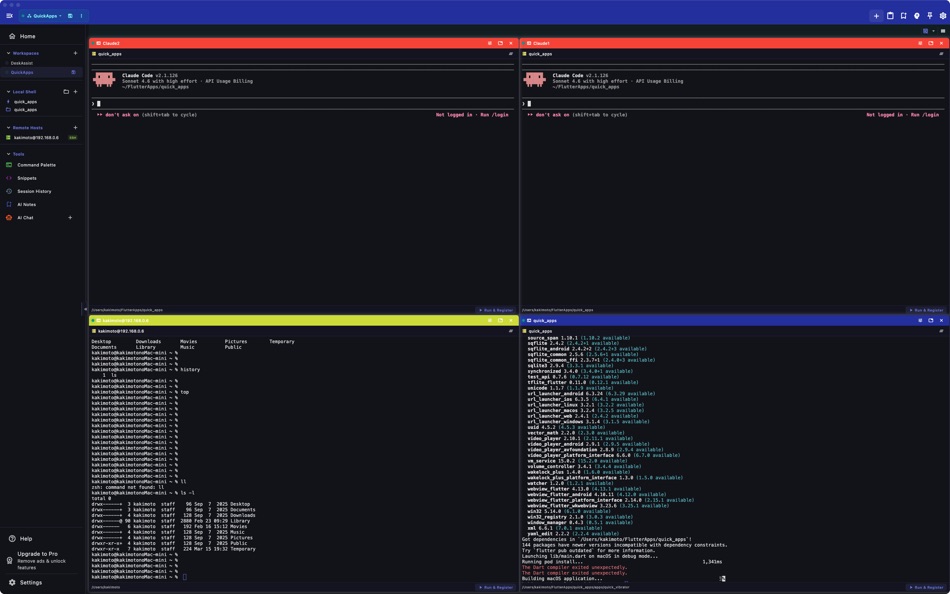
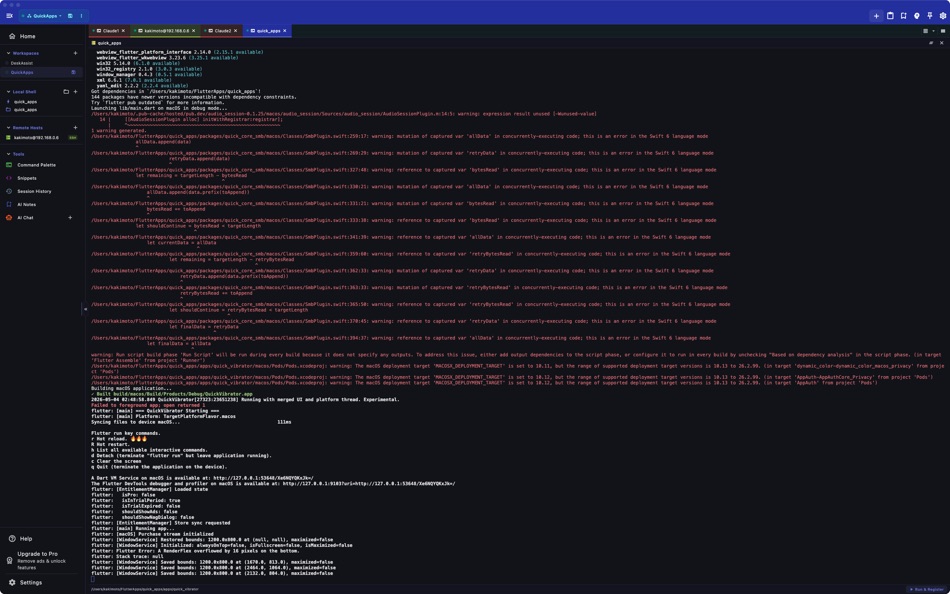
- Full xterm-256color terminal emulation
- Local shell support (bash, zsh, fish, sh, ksh)
- Multiple concurrent sessions with tabs
- Horizontal and vertical terminal splitting
- Customizable fonts: Fira Code, JetBrains Mono, Source Code Pro, Cascadia Code
- Adjustable font size (8–32px) and cursor styles (block, underline, bar)
- Scrollback buffer up to 50,000 lines
SSH & SFTP:
- SSH remote sessions with saved host profiles
- Key-based and password authentication
- SSH jump host / bastion support
- SFTP file browser for remote directories
- Connection pooling and session reuse
- Secure credential storage
AI ASSISTANT (Pro):
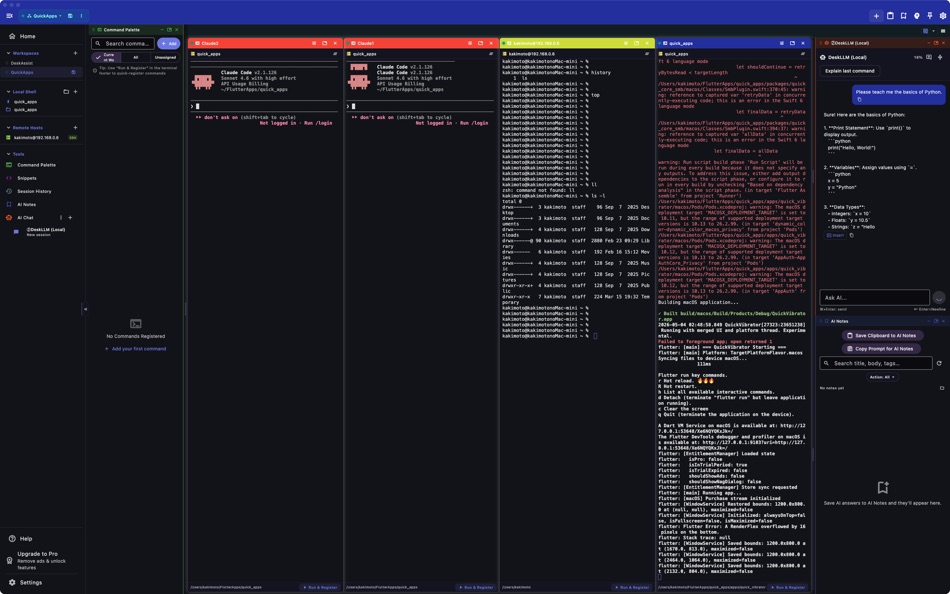
- Claude and Gemini AI integration
- Natural language command suggestions and explanations
- Command safety analysis before execution
- Context-aware help with working directory and git status
COMMAND TOOLS:
- Command snippets: save, categorize, search, and import/export as JSON
- Command history with search, favorites, and directory tracking (500 entries)
- Command palette for unified search across actions and snippets
SECURITY POLICIES:
- Command approval modes: None, Risky Only, Always
- Risky command detection (rm -rf, mkfs, dd, shutdown, etc.)
- Directory-based sandboxing with allowed paths
- Configurable safety levels
WORKSPACE:
- Dockable floating panels
- Integrated file browser
- Resizable sidebar with icon-only mode
- Grid and tabbed layout modes
CUSTOMIZATION:
- 20+ theme colors with dark/light mode
- Customizable keyboard shortcuts
- Responsive layout for mobile, tablet, and desktop
QuickTerminal Pro unlocks:
- Unlimited AI agent execution
- Ad-free experience
- Advanced security policies
- Priority support
Terms of Use: https://kakitiro.com/quickapps/quickterminal/terms/
Ekran görüntüleri



Ad
Fiyat Geçmişi
- Güncel fiyat: Ücretsiz
- En az: Ücretsiz
- Maksimum: Ücretsiz
Fiyatları takip et
AppAgg Değerlendirmesi
750
Tahmini AppAgg değerlendirmesi:
QuickTerminal - Multi-Shell
750 Gümüş
Daha yüksek değerlendirmeler genellikle AppAgg üzerinde daha güçlü sinyaller anlamına gelir.
Şunlara göre: popülerlik · kullanıcı puanları · güncellik · fırsatlar · mağaza verileri · topluluk etkinliği
Güncel AppAgg verileriyle her gün yeniden hesaplanır.
Kısa URL: Kopyalandı!
Yenilikler
- Sürüm: 5.0
- Son güncelleme:
Ek Bilgi
- Satışa çıkış tarihi:
- Kategori:
macOS Uygulamalar›Araçlar - İşletim Sistemleri:
macOS,macOS 10.15 ve sonrası - Boyut:
21 Mb - Desteklenen diller:
English - İçerik Derecelendirmesi:
4+ - Mac App Store Kullanıcı Oyu:
0 - Web sitesi:
 https://kakitiro.com/
Geliştirici
- KAZUHIRO KAKIMOTO
- Platformlar: iOS Uygulamalar (12) macOS Uygulamalar (2)
- Listeler: 0 + 1
- Puanlar: 4 + 315 ¡
- Sıralamalar: 0
- Yorumlar: 0
- İndirimler: 0
- Video: 0
- RSS: Abone ol
Listeler (0)
0
- QuickTerminal - Multi-Shell
Puanlar (0)
0
Sıralamalar (0)
0
Yorumlar (0)
İlk yorum yapan siz olun
Özet
QuickTerminal - Multi-Shell Kısa URL: Kopyalandı!- Paylaş
- Mac App Store
«QuickTerminal - Multi-Shell». Platform: macOS. Kategori: Araçlar. Geliştirici: «KAZUHIRO KAKIMOTO». İlk sürüm: . Son güncelleme: . Güncel fiyat: ücretsiz. Bu başlık henüz AppAgg'de derecelendirme veya inceleme almadı. Mevcut diller: English. AppAgg, «QuickTerminal - Multi-Shell» için fiyat geçmişini, derecelendirmeleri ve kullanıcı geri bildirimlerini takip eder. AppAgg uygulamaları barındırmaz veya yazılım dağıtmaz. Tüm ticari markalar, logolar ve ekran görüntüleri ilgili sahiplerine aittir. Gelecekteki indirimler ve güncellemeler: RSS
Benzerleri
- Yeni
- Terminal Manager
- macOS Uygulamalar: Araçlar Göre: Julian Buursink
- Ücretsiz
- Listeler: 0 0 0
- Puanlar: 0 + 0 560 Sürüm: 1.0.0 Terminal Manager turns your shell history into searchable, structured workflow insight on macOS. Find commands instantly, analyze usage trends, and organize what matters so you can ... ⥯
-
- Quick Icon
- macOS Uygulamalar: Araçlar Göre: Tawa Nicolas
- Ücretsiz
- Listeler: 1 0 0
- Puanlar: 1 + 0 650 Sürüm: 2.0 Quick Icon is a productivity tool that helps you resize your app icons from a single file to iOS or macOS the targets in Xcode! ⥯
-
- Quick Localizer
- macOS Uygulamalar: Araçlar Göre: Michael Rowe
- $4.99
- Listeler: 0 0 0
- Puanlar: 0 + 0 600 Sürüm: 2.0.1 Quick Localizer - Your One-Stop Solution for Multilingual Xcode Apps! Easily create and manage localization strings for your Xcode projects with our user-friendly macOS app. Load ... ⥯
-
- Quick Links and Turkish Chars
- macOS Uygulamalar: Araçlar Göre: Eray Alparslan
- $0.99
- Listeler: 0 0 0
- Puanlar: 0 + 0 550 Sürüm: 1.0 Quick Links and Turkish Chars app is a macOS app that runs in your menu bar. It does help you to copy turkish characters to clipboard when your current keyboard doesn't have that ... ⥯
-
- Shell Assistant
- macOS Uygulamalar: Araçlar Göre: Michael Taylor
- Ücretsiz
- Listeler: 0 0 0
- Puanlar: 3 + 0 870 Sürüm: 0.9.6 Great SSH server management tool SSH Client Terminal SFTP File manager View images and pdfs Stream audio and video Edit code on the server Use selections in the terminal Paste history ... ⥯
- Yeni
- Multi Sync Terminal
- macOS Uygulamalar: Araçlar Göre: HubInSoft Inc.
- * Ücretsiz
- Listeler: 0 0 0
- Puanlar: 0 + 0 560 Sürüm: 1.0 A Professional Terminal That Will Change the Paradigm of Server Management Managing multiple servers individually is inefficient and time-consuming. Multi Sync Terminal integrates all ... ⥯
-
- Quick Icons
- macOS Uygulamalar: Araçlar Göre: Max Schlee
- $3.99
- Listeler: 0 0 0
- Puanlar: 0 + 0 1K Sürüm: 1.25 Stop wasting time and money on multiple apps! Quick Icons is the #1 all-in-one solution that replaces 6 different tools with one powerful, easy-to-use app. Perfect for app developers, ... ⥯
- Yeni
- Quick Data Insights
- macOS Uygulamalar: Araçlar Göre: Moustafa Elsayed
- $4.99
- Listeler: 0 0 0
- Puanlar: 0 + 0 750 Sürüm: 1.0 Stop launching heavy IDEs just to check a schema. Quick Data Insights extends macOS QuickLook to give you an instant preview of your data files directly in Finder. Hit the spacebar and ⥯
-
- SimpleSSM - Terminal for EC2
- macOS Uygulamalar: Araçlar Göre: Colemaco LLC
- * Ücretsiz
- Listeler: 0 0 0
- Puanlar: 0 + 0 1K Sürüm: 1.1 Effortless EC2 Access. Zero SSH Hassle. Full SSM Security. SimpleSSM provides a clean, native macOS experience for securely connecting to your Amazon EC2 instances using AWS Systems ... ⥯
-
- Open Directory in Terminal
- macOS Uygulamalar: Araçlar Göre: App Tyrant Corp
- $1.99
- Listeler: 0 0 0
- Puanlar: 0 + 0 690 Sürüm: 2.0 This app allows you to open a new Terminal window from Finder with the current working directory set to the directory being displayed in the Finder window. You can also open a new ... ⥯
-
- Termius: SSH Client & Terminal
- macOS Uygulamalar: Araçlar Göre: Termius Corporation
- * Ücretsiz
- Listeler: 2 + 2 0 0
- Puanlar: 6 + 0 12K Sürüm: 9.38.1 Termius is a modern SSH client designed for productivity and collaboration. Connect with one click from desktop and mobile no re-entering IP addresses, ports, and passwords. With a ... ⥯
-
- Peek — A Quick Look Extension
- macOS Uygulamalar: Araçlar Göre: Big Z Labs LLC
- $7.99
- Listeler: 4 + 3 0 0
- Puanlar: 4 + 0 5K Sürüm: 2.6.4 Accelerate your workflow with the Quick Look conveniences that only Peek can deliver: searching, jumping, scroll restoring, syntax highlighting, & more. -- Due to system limitations, ... ⥯
-
- File Sentinel: Shell History
- macOS Uygulamalar: Araçlar Göre: 楚江 王
- * Ücretsiz
- Listeler: 0 0 0
- Puanlar: 1 + 0 590 Sürüm: 2.1.1 File Monitor for listening to text files and saving the last line of content. It can monitor files like `.zsh_history` or `.bash_history`, automatically saving shell history, helping ... ⥯
-
- Shellcut - Open in Terminal
- macOS Uygulamalar: Araçlar Göre: Leon Boettger
- Ücretsiz
- Listeler: 0 + 1 0 0
- Puanlar: 8 + 0 1K Sürüm: 1.5 Shellcut lets you open a new Terminal window directly from Finder, with the working directory set to the folder currently displayed in the Finder window. Shellcut supports Apple's ... ⥯