
保存済み
保存済みメニューに表示する名前を選択してください。
完了
| 開発者: | TraLand.com (14) | ||
| 価格: | 無料 | ||
| スコア: | 890 シルバー | ||
| ランキング: | 0 | ||
| コメント: | 0 コメントを投稿する | ||
| リスト: | 0 + 0 | ||
| ポイント: | 0 + 0 ¡ | ||
| +1 ポイント | |||
説明

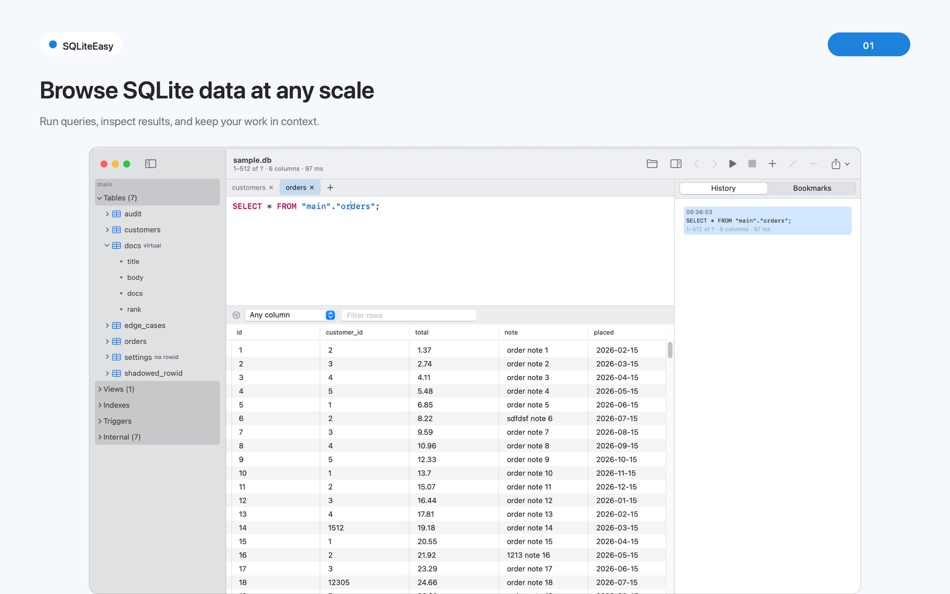
SQLiteEasy opens a 4 GB database and shows you rows in milliseconds. It streams the result instead of loading it, so memory stays flat whether you scroll ten rows or ten million.
IT TELLS YOU WHAT IT ACTUALLY KNOWS
A result says "1–512 of ?" because SQLite genuinely cannot know the total without running the query to the end. Other clients pick a number. SQLiteEasy shows what it has read, keeps reading as you scroll, and will count the rest on request — separately, and labelled as such.
NULL, an empty string and a zero-length blob are three different values, and they look different here. Every cell is drawn from what it holds, not from the column's declared type, because a column declared INTEGER can hold a string in row three. Text that is not valid UTF-8 is marked rather than quietly repaired, and saving it writes the original bytes.
SEE THE SHAPE, AND SEE WHAT CHANGED
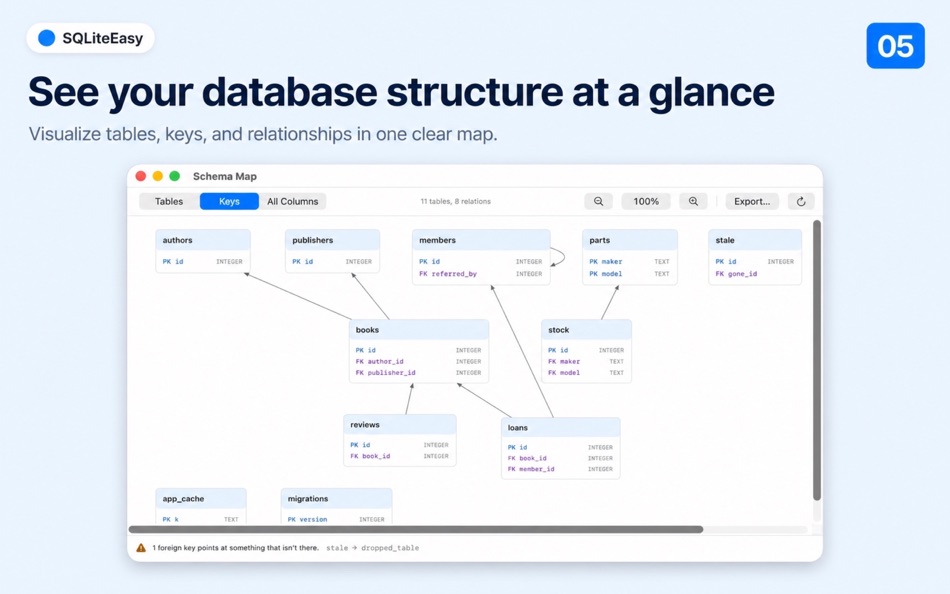
Schema Map draws every table and the foreign keys between them. A composite key is one relationship, not one per column, and a key pointing at a table that no longer exists is flagged rather than quietly dropped.
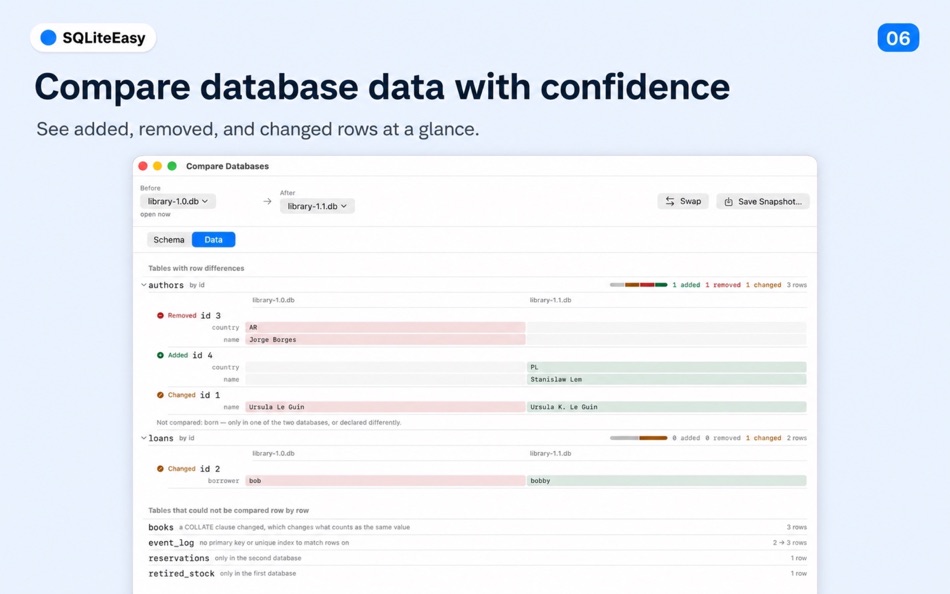
Compare Databases shows what differs between two SQLite files, or between a database and a schema snapshot saved months ago. It compares what things mean rather than how they were typed, so reformatting a CREATE statement is not a difference and a changed CHECK constraint is. Every change is named in words, and a loss is named as one: "Column dropped — its values go with it".
Rows too: which were added, removed or changed, and for a changed row, only the columns that moved. Rows are matched on a real key, never on SQLite's internal rowid, which does not survive a VACUUM. A table that cannot be compared honestly says why. Both files are opened read-only.
EVERY QUERY IS A PLACE YOU CAN GO BACK TO
Back and forward through the queries you have run, the way a browser works. Navigate onto a DELETE and it is restored into the editor, not re-executed: going back should show you what you did, not do it again.
EDITING THAT REFUSES TO GUESS
Edit cells in the grid and nothing reaches the database until you press Apply, when everything goes in one transaction. Add Row and Edit Row show the exact statement they will run, and let you copy it.
Every update carries the row's original values in its WHERE clause. If somebody changed that row after you read it, the write is refused and explained rather than silently replacing their work.
And when a result cannot be edited — a join, an aggregate, a view — it says why, instead of leaving cells that look editable and are not.
BUILT FOR FILES THAT MATTER
A one-click backup before the first statement of a session that changes anything.
Values too large for the grid are never loaded into it. The inspector fetches them on demand and can save any size to a file.
An integrity check that reports what SQLite finds and explains your options — and never attempts a repair, because every automatic repair discards what it could not read. That decision is yours.
If another program changes the database while you are looking at it, the rows stay on screen, labelled as the snapshot they are.
THE REST
Saved queries and result tabs, each with its own history. Schema sidebar with columns, types, keys and constraints. Schema-aware autocomplete. Syntax highlighting. Find and replace. Multi-statement scripts in a single transaction. Run just the statement your cursor is in. Export to CSV, JSON, SQL or Markdown. Full keyboard control.
NO NETWORK. AT ALL.
SQLiteEasy itself makes no network connections of any kind. Not for updates, not for analytics, not for anything. Nothing to opt out of.
The diagnostics report contains no database contents, no query text and no file paths. A schema snapshot holds the schema only — no table data, and the database's name but never its path.
Requires macOS 14.0 or later. Works with any SQLite database file, including WAL databases and those written by other applications.
広告
スクリーンショット



価格履歴
- 現在の価格: 無料
- 最小値: 無料
- 最大値: 無料
AppAggスコア
890
AppAgg推定スコア:
SQLiteEasy
開発者: TraLand.com
890 シルバー
スコアが高いほど、AppAgg上の各指標が良好な傾向にあります。
基準: 人気 · ユーザー評価 · 新しさ · セール · ストアデータ · コミュニティ活動
最新のAppAggデータに基づいて毎日再計算されます。
Webサイト用バッジ:  コピーしました!
新機能
- バージョン: 1.4
- 最終更新:
- Now runs on macOS 14
SQLiteEasy asked for macOS 15.6 and did not need it. It runs on macOS 14 and
later from this version, so it installs on Macs it previously refused.
Safer opening of databases that are in use
SQLiteEasy now reads a database's journal mode before opening it rather than
after an attempt fails, and picks the one approach that is correct for that
mode. Two things follow:
- A database in write-ahead-log mode with no active log is opened without
creating a sidecar file next to it.
- A database with an unfinished transaction in its rollback journal is
reported plainly, rather than being opened in a way that could show
uncommitted rows as though they were committed.
The second is the one that mattered. Replaying such a journal needs write
access, and the read-only shortcut that avoids it can return rows that were
never committed while an integrity check still reports the file as fine.
SQLiteEasy would rather tell you it cannot answer.
Rate SQLiteEasy
A new item in the Help menu, if you would like to leave a review. Nothing is
gated behind it and nothing nags: the app asks at most once a season, and only
after several separate days on which something worked.
情報
- リリース日:
- カテゴリ:
macOS向けアプリ›開発ツール - オペレーティング システム:
macOS,macOS 14.0 以上 - サイズ:
2 Mb - サポートされる言語:
English - コンテンツのレーティング:
4+ - Mac App Store 評価: ¡
0
 https://www.traland.com/sqliteeasy
開発者
リスト (0)
0
- SQLiteEasy
ポイント (0)
0
ランキング (0)
0
コメント (0)
最初にコメントしてください
概要
SQLiteEasy 短縮 URL: コピーしました!- Mac App Store
AppAggでは、TraLand.comが開発したアプリ「SQLiteEasy」の情報を確認できます。対応プラットフォーム:macOS。カテゴリ:開発ツール。 AppAggスコア:890(シルバー)。 このアプリのAppAggポイント:確認済み 0、間接 0。 このアプリを含む公開リスト:0件。非公開リストに保存しているユーザー:0人。 このアプリには、AppAggユーザーからの評価はまだありません。 確認済みポイントは、ログインしたAppAggユーザーのストアへのアクセスを記録します。間接ポイントはストアのデータに基づきます。 2つの数字は、公開リストの数と、非公開リストに保存したユーザー数を表します。 このアプリの初回リリースはです。 このアプリの最終更新はです。 このアプリは現在無料です。 このアプリは次の言語に対応しています:English。 価格履歴を確認したり、アプリをリストに追加したり、開発者をフォローしたりできます。 このアプリの今後のセールや更新はRSS フィードで確認できます。 AppAggはこのアプリをホストまたは配布していません。 このアプリに関連する商標、ロゴ、スクリーンショットはすべて各権利者に帰属します。

