
| Desenvolvedor: | Paradigma Software (1) | ||
| Preço: | * Grátis | ||
| Classificações: | 0 | ||
| Resenhas: | 0 Escrever um comentário | ||
| Listas: | 0 + 1 | ||
| Pontos: | 2 + 0 ¡ | ||
| Mac App Store | |||
Descrição

=== DuckDB, SQLite, MS SQL Server, MariaDB, MongoDB, MySQL, PostgreSQL and Valentina databases ===
Valentina Studio brings you powerful, visual editors for your data including:
* Schema Editor (tree view and column view) - create and modify all schema objects of supported databases: Tables, Views, Fields, Enums, Links, Constraints, Triggers, Indexes, Stored Procedures, and more.
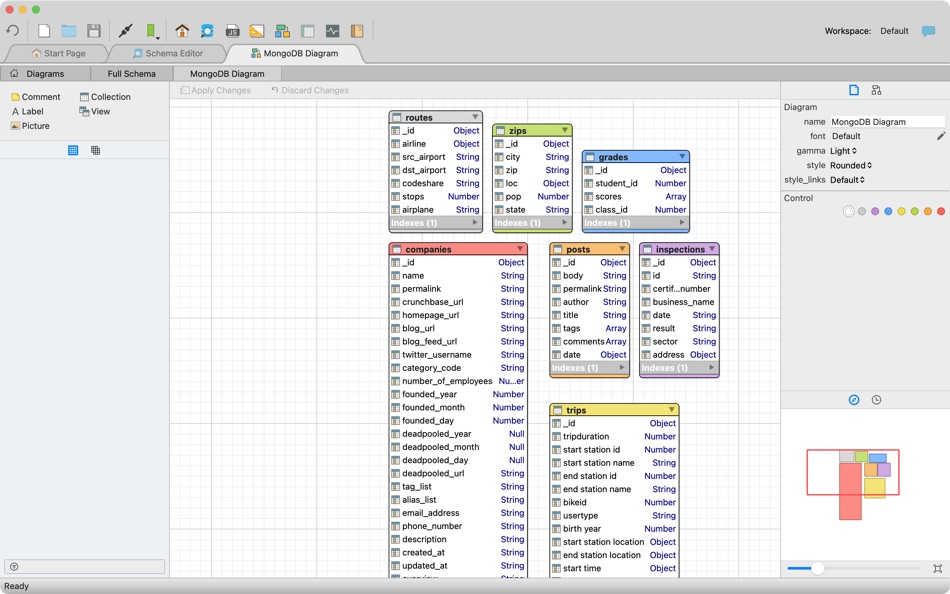
* Diagram Editor - design new diagrams or do reverse engineering, i.e., explore existing databases visually.
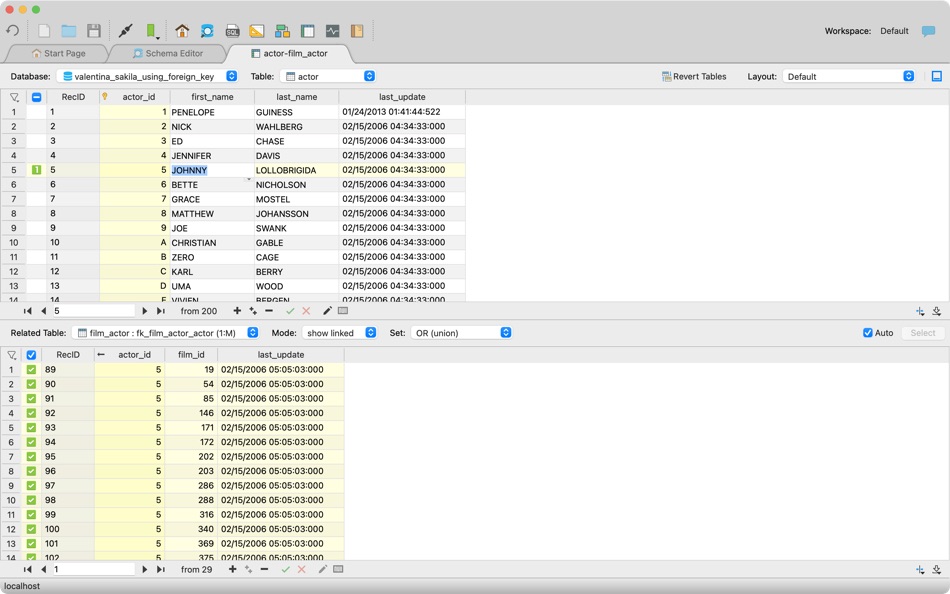
* Data Editor - easily browse table records in the grid, modify records, inline editing of values, sort, filter records and save favorite filters, preview images, hex editors for binary values, and more.
* Related Data Editor - easily learn and manage linked records of two tables, link/unlink records by a mouse click, perform set operations over linked records, and more.
* SQL Editor - with color syntax, auto-completion, recent and saved favorite queries, templates, console with error/warning reporting, and more.
* Query Editor - build SQL queries visually using just a few mouse clicks.
* Server Admin - where you can manage users, learn logs and other parameters of servers.
Open as many editors as you like at the same time for different databases/servers opened in tab-panels. You also get different DB-related utilities, including Import/Export, Dumps, Diagnose, Clone and Reindex, and more.
Valentina Studio uses iCloud to share bookmarks between your devices!
*** See also: Valentina Studio Pro ($199 only) ***
Get Valentina Studio Pro as an in-app purchase (pay only once) to get additional advanced pro-features such as:
* Report Editor - visual editor of Valentina Reports that can be saved into Valentina Project file (.vsp). Reports can use as datasource MS SQL, MySQL, PostgreSQL, SQLite, Valentina DB, ODBC.
* Form Editor - visual editor of Valentina Forms that can be saved into Valentina Project file (.vsp). Forms can use all supported databases as the datasource.
* Data Editor - enables 'go to parent record' function.
* Data Editor Layouts - save columns and their order as a named layout.
* Data Editor Multiple Update - update multiple records at once.
* Data Transfer - copy data between different databases.
* Diagram Editor - enables forward engineering - i.e., generation of SQL scripts for new/changed database objects.
* Dump Wizard - enables filter for tables to select them for a dump.
* Error Lookup - search for error description by its code.
* Keyboard Shortcuts - enables the ability to redefine the shortcuts and create own shortcut sets.
* Object Colors - enables marking objects with specific colors.
* Query Editor - enables the ability to copy the generated query.
* Schema Cache - save and reuse schema cache.
* Schema Editor - copy one or multiple schema objects using drag&drop mechanism.
* Schema Editor - expanding and collapsing the tree items with subitems using OPTION + click.
* Schema Snapshot - save and load schema in structured format.
* Source Control - develop database using any VCS.
* SQLDiff - find differences between two states of databases and generate SQL script to move between these states.
* SQL Search - search of schema objects.
* SQL Editor - integrated AI Chat with ASK and AGENT modes.
* SQL Editor - format SQL queries.
* SQL Editor - edit the result of SQL queries.
* SQL Editor - use bind parameters in SQL queries.
*** See also: Valentina Studio Single ($79.99 only) ***
Get Valentina Studio Single as an in-app purchase (pay only once) to get additional advanced pro-features for a single database engine, except for Valentina Project development (reports, forms, JavaScript) and AI functionality.
Ad
Capturas de ecrã





Novidades
- Versão: 16.5
- Atualizado:
- === NEW ===
Valentina Studio introduces integrated AI Chat to enhance your SQL workflow.
[SQL Editor]
* AI Chat in SQL Editor
* Integrated AI chat inside the SQL Editor.
* AI can help explain queries, suggest improvements, generate SQL, and more.
* Easily add context to your question (current query, database schema, schema of specific tables/views mentioned in the query)
* Answers from the AI can be copied directly into your SQL or anywhere else.
* ASK and AGENT modes to work with AI.
* In the Agent mode, AI can modify (with confirmation ) the text of SQL Editor.
* In Agent Mode, AI has access to:
* SQL Editor — execute and modify queries
* Python engine of Valentina Studio
* Custom instructions via the “Remember…” command
* Each SQL Editor has own AI Chat with own context.
* Multiple Cursors support (Cmd+Shift+Up/Down to add cursor, Option+Click to insert cursor, Option+D for Find Next Occurrence).
* Information button showing available keyboard shortcuts.
[Data Editor]
* Improved layout settings dialog - rename layouts, select columns to display, and set their order.
* Information button showing available keyboard shortcuts.
[Schema Editor]
* Tabs with child lists in Tree mode.
* Button to toggle the property inspector.
[Query Editor]
* Directional arrows on connection lines between joined tables indicating parent table direction.
[Forms]
* TabWidget properties and methods exposed for scripting.
* Added ToolButton popupMode property (MenuButtonPopup, InstantPopup, DelayedPopup).
* ToolButton QMenu support.
[Valentina DB]
* External aggregation functions (C, Python, JS) as extensions.
* Aggregation User Defined Functions (UDF) in SQL, Python, JS.
* CREATE AGGREGATE and DROP AGGREGATE SQL statements.
* Any aggregation function may be used in window context.
* Added column MethodDeterministicLevel in GET/SHOW properties of calculated fields.
=== IMPROVEMENTS ===
[Valentina Studio]
* Updated PostgreSQL client libraries and dump utilities to version 18.0.
* Translated helpful tips for all available interface languages.
* HELP -> "Report issue" menu now selects "VStudio" project when opening Mantis web-page.
[Connection Dialog]
* Improved Valentina Server connection dialog - clearer labels for Embedded Server ("Signature" -> "Embedded Signature", placeholder "Optional" -> "Required for Embedded Server").
* Added tooltips for all controls.
[Valentina DB]
* All built-in and external aggregation functions can now be used in the WINDOW clause of SELECT statements.
* Performance improvements.
* Added diagnostics for table storage.
* Improved unclear deterministic level warning in Diagnose.
[Data Editor]
* Automatic layout saving upon modification.
* Reorganized layouts menu for improved usability.
=== FIXES ===
[Data Editor]
* Ensured the current table is selected in the table selector drop-down on macOS.
[Form Editor]
* Corrected the behavior of 'Stretched' and 'Title' options for TableView fields in forms.
* Fixed the setValue method of QSettings to correctly store values in forms.
[Schema Editor]
* Fixed sorting by column header click in tree mode.
* Preserved original field order as returned by the server when updating the fields list.
* Prevented collapsing of the property inspector panel.
* Fixed slow reading of fields in MySQL tables caused by the correlated query used for JSON support detection.
[Valentina DB]
* Fixed potential VarChar data corruption issue.
* Fixed weird result of aggr_func(distinct ...) - now correctly counts distinct values inside each group instead of producing new groups.
* Fixed deterministic level for skipped optional function argument (Const instead of Volatile).
* Fixed deterministic level for list_itemcount(), size(), IsNormalized() (Immutable instead of Volatile).
=== LIBRARY UPDATES ===
* DuckDB updated to 1.4.1
* PostgreSQL client libraries updated to 18.0
Preço
-
* Compras no aplicativo - Hoje: Grátis
- Mínimo: Grátis
- Máximo: Grátis
Monitorizar preços
Ad
Desenvolvedor
- Paradigma Software
- Plataformas: macOS Apps (1)
- Listas: 0 + 1
- Pontos: 2 + 0 ¡
- Classificações: 0
- Resenhas: 0
- Descontos: 0
- Vídeos: 0
- RSS: Subscrever
Pontos
-

- 190 Brandon
- +1
-
- 11,014 Simon Chan
- +1


Classificações
0 ☹️
Listas
0 ☹️
- Valentina Studio
Resenhas
Seja o primeiro a comentar 🌟
Informações adicionais
- Versão: 16.5
- Categoria:
macOS Apps›Ferramentas de programação - Sistemas operacionais:
macOS,macOS 12.0.0 ou superior - Tamanho:
147 Mb - Idioma compatível:
English - Classificação do conteúdo:
4+ - Mac App Store Avaliação:
0 - Atualizado:
- Data de lançamento:
Valentina Studio URL abreviado: Copiado!- 🌟 Compartilhar
- Mac App Store
Você também pode gostar de
-
- CoreData Studio: SQLite Editor
- macOS Apps: Ferramentas de programação Por: Momentarium LLC
- $4.99
- Listas: 0 + 0 Classificações: 0 Resenhas: 0
- Pontos: 0 + 0 Versão: 2.0 The Ultimate Developer Tool for CoreData and SwiftData. CoreData Studio is a professional SQLite viewer, editor, and database inspector built specifically for Apple developers. Stop ... ⥯
-
- String Studio
- macOS Apps: Ferramentas de programação Por: 阿卜杜热伊木 阿卜杜力木
- Grátis
- Listas: 0 + 0 Classificações: 0 Resenhas: 0
- Pontos: 0 + 0 Versão: 1.0.0 String Studio is a modern internationalization string management tool designed specifically for macOS, helping Apple developers efficiently manage multilingual localization files for ... ⥯
-
- Database Studio
- macOS Apps: Ferramentas de programação Por: 腾 崔
- $3.99
- Listas: 0 + 0 Classificações: 0 Resenhas: 0
- Pontos: 0 + 0 Versão: 1.5.0 Database Studio let you design your data schema in the UI with inline editing experience, and 1-click to generate source code for you to maximize your development productivity. In ... ⥯
-
- SQLPro Studio
- macOS Apps: Ferramentas de programação Por: Hankinsoft Development Inc
- * Grátis
- Listas: 2 + 2 Classificações: 0 Resenhas: 0
- Pontos: 6 + 0 Versão: 2026.07 SQLPro Studio is the premium database management tool for Postgres, MySQL, Microsoft SQL Server and Oracle databases. Some of the great features include: + Intellisense/SQL ... ⥯
- -100%
- Localizer Studio
- macOS Apps: Ferramentas de programação Por: Mohamed Amine souiden
- ▼ * Grátis
$1.99-100% - Listas: 0 + 1 Classificações: 0 Resenhas: 0
- Pontos: 3 + 0 Versão: 1.2 Localizer Studio is your powerful, developer-first tool for extracting, managing, and translating localization keys in Swift and SwiftUI projects. Designed to streamline the ... ⥯
-
- Iconic Asset Studio
- macOS Apps: Ferramentas de programação Por: Anton Belousov
- $0.99
- Listas: 0 + 1 Classificações: 0 Resenhas: 0
- Pontos: 2 + 0 Versão: 1.0.1 Iconic Asset Studio turns a single image into a complete, ready-to-use app icon set for your apps. Stop manually exporting dozens of sizes and focus on building your product instead. ... ⥯
-
- Particle Creator Studio
- macOS Apps: Ferramentas de programação Por: Fifth Battery, LLC
- * Grátis
- Listas: 0 + 1 Classificações: 0 Resenhas: 0
- Pontos: 2 + 0 Versão: 1.5 Transform your visual effects from ordinary to extraordinary with Particle Creator Studio. Built specifically for Cocos2d and Axmol developers but flexible enough to power any creative ⥯
-
- VibeCode Studio
- macOS Apps: Ferramentas de programação Por: Tomas Klinger
- Grátis
- Listas: 0 + 0 Classificações: 0 Resenhas: 0
- Pontos: 0 + 0 Versão: 1.01 # Supercharge Your AI Coding Workflow VibeCode Studio is the essential tool for Swift developers working with AI language models. In large codebases, pasting your entire project wastes ⥯
-
- Gravio Studio
- macOS Apps: Ferramentas de programação Por: Asteria Technology Pte. Ltd.
- Grátis
- Listas: 0 + 0 Classificações: 0 Resenhas: 0
- Pontos: 2 + 0 Versão: 6.2.1 This application is Gravio Studio, which is used to configure the Gravio server. You will still need to download and install the Gravio server on a device such as Mac, a Raspberry Pi, ... ⥯
-
- SQL Studio
- macOS Apps: Ferramentas de programação Por: codeBuilder
- $5.99
- Listas: 0 + 0 Classificações: 0 Resenhas: 0
- Pontos: 0 + 0 Versão: 1.25 SQL Studio is the simplest way to access your Microsoft SQL Servers natively from your Mac. With SQL Studio you can:- - Attach to multiple servers - Authenticate with SQL or Windows ... ⥯
-
- Base64 Studio
- macOS Apps: Ferramentas de programação Por: SeungHoon Kam
- * Grátis
- Listas: 0 + 0 Classificações: 0 Resenhas: 0
- Pontos: 0 + 0 Versão: 1.0 Base64 Studio is a powerful encoding/decoding tool for developers and designers. It provides an all-in-one solution to convert text, files, and images into various formats. * All ... ⥯
-
- ER Modeling Studio
- macOS Apps: Ferramentas de programação Por: hirokazu murabe
- $39.99
- Listas: 0 + 0 Classificações: 0 Resenhas: 0
- Pontos: 0 + 0 Versão: 1.0 ER Modeling Studio: Conceptual Data Modeler 【Description】 The longevity of any system hinges on the quality of its data modeling. The foundation of a system that will support your ... ⥯
- Novo
- Master Coder - Terminal Studio
- macOS Apps: Ferramentas de programação Por: SECKIN SEFA DURASI
- $1.99
- Listas: 0 + 0 Classificações: 0 Resenhas: 0
- Pontos: 0 + 0 Versão: 4.0 Master Coder - Terminal Studio is the most powerful and customizable terminal application for macOS. Built for developers and designers who demand the best. KEY FEATURES: - Multi-Tab ... ⥯
-
- Storyteller TTS Voice Studio
- macOS Apps: Ferramentas de programação Por: BuildLoop
- * $2.99
- Listas: 0 + 1 Classificações: 0 Resenhas: 0
- Pontos: 9 + 0 Versão: 1.4.21 Storyteller App brings your text to life! Storyteller's artificial intelligence helps you create and share stories with style and an authentic voice, making it the perfect solution for ⥯