
| 開發人員: | PASCO scientific (9) | ||
| 價錢: | * 免費 | ||
| 排名: | 0 | ||
| 評測: | 0 寫評論 | ||
| 清單: | 0 + 0 | ||
| 點數: | 1 + 0 ¡ | ||
| Mac App Store | |||
描述

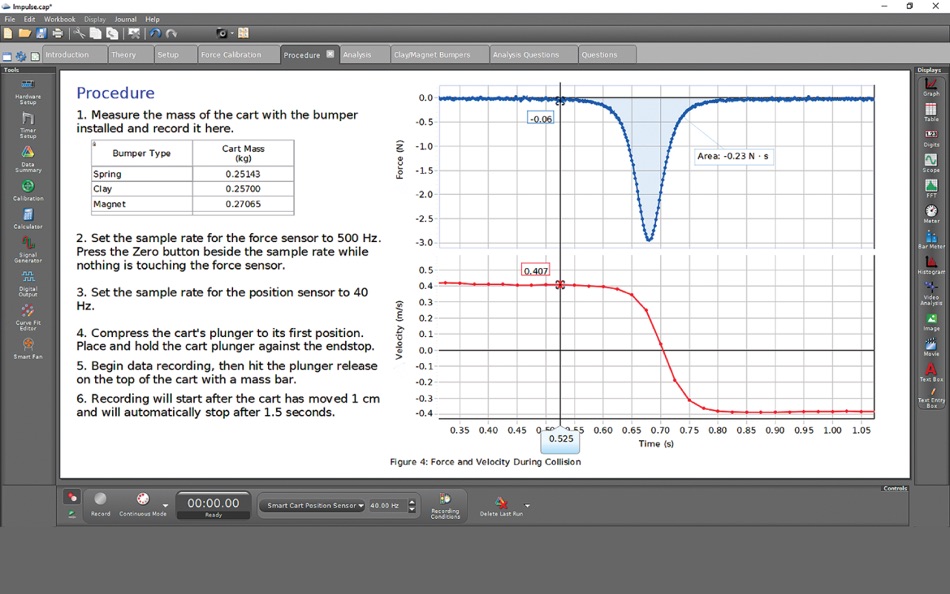
Data is collected and displayed in real time on a graph or your choice of display type. Use Capstone in the basic graph/table mode or choose to configure your own workspace with any of the many displays available.
Display Types
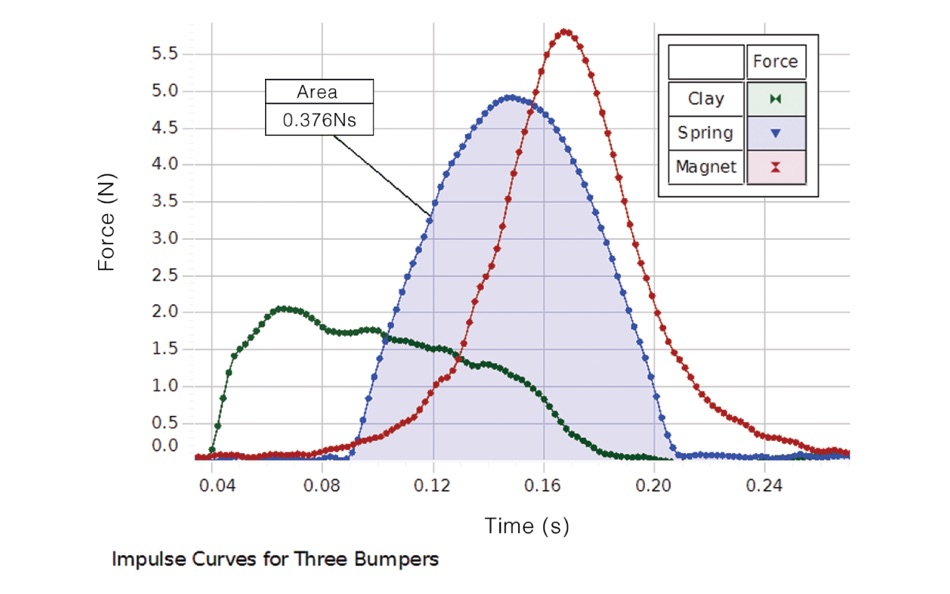
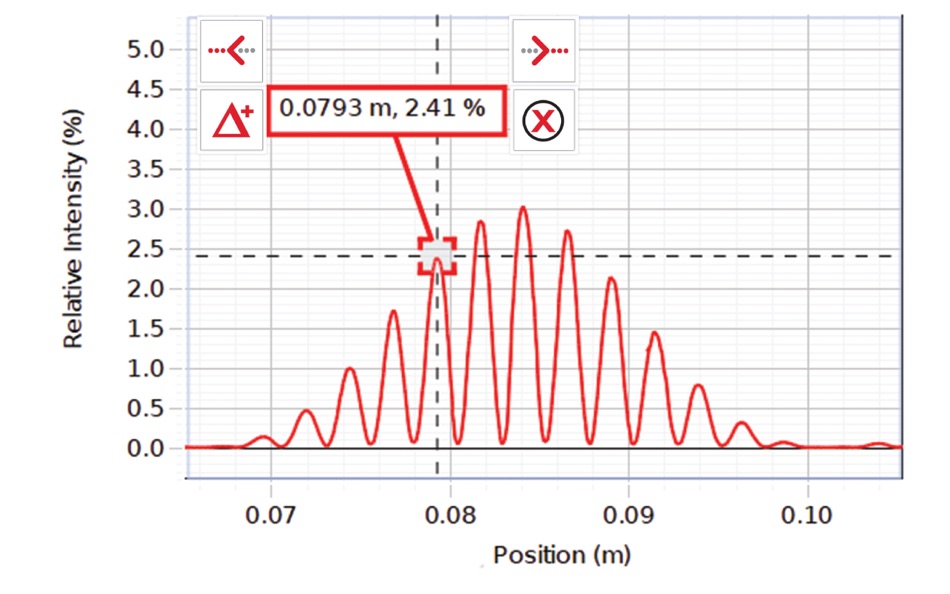
-Graph: Plot multiple measurements on a single plot area or create multiple plot areas with analysis tools including coordinates tool, curve fits, error bars, and area under the curve
-Table: Easily add or subtract columns. Add calculated columns
-Digits: The display can be sized to fill the whole screen. This display can also display text output from Blockly code
-Oscilloscope: This display supports multiple measurements and x-y mode. The scale can be changed directly by dragging the axes
-FFT: Supports multiple measurements and can zoom in for more resolution. Displays statistics such as mean and standard deviation
-Meter: Choose from small arc to full circle
-Bar Meter: Bar length responds to changes in the data
-Histogram: Bin data and apply statistics for statistical experiments
-Circuit Emulator: Construct circuit diagrams and see current flow as measured by sensors
-Video Analysis: Record a movie, track a moving object, and convert the motion into data on a graph
-Image Display: Insert an image, add annotations, and make measurements on the image
-Text Input Box: Make notes and respond to questions. Choose font type, size, and color. Includes Greek letters
Tools
-Calculator: Make calculations on data sets using the usual scientific functions as well as special functions (period, amplitude, filters, and logic statements) required for analyzing data
-Calibration Wizard: Takes you through the steps required to calibrate sensors
-Photogate Timer Wizard: Choose from an assortment of standard timers or create your own timing sequence
-Signal Generator: For controlling interfaces with signal output, choose the wave type and settings such as DC offset and frequency sweep
-Data Collection Modes: Sample periodically, or manually sample when you press a key, or sample at high-speed when using an oscilloscope
-Start and Stop Conditions: Begin and/or stop recording when a condition on time or a sensor measurement is met
-Data Playback: Play back data with or without a synchronized movie. The speed of playback can be adjusted from slow to fast
-Journal: Save and print snapshots of graphs or other displays
-Blockly coding: Use Blockly coding in Capstone to program sensors and controllers to sense the environment around you and control a wide variety of things like motors, lights, and fans
Highlights
-Undo/Redo: Made a mistake? Just undo. Undo/redo gives you the freedom to explore without losing data
-Visual Statistics: Unique to Capstone is the ability to show minimum, maximum, and mean as lines on the graph and to show the standard deviation as a shaded area. This view makes clear how much spread there is in the data
-Exclude or delete outlier data points from analysis
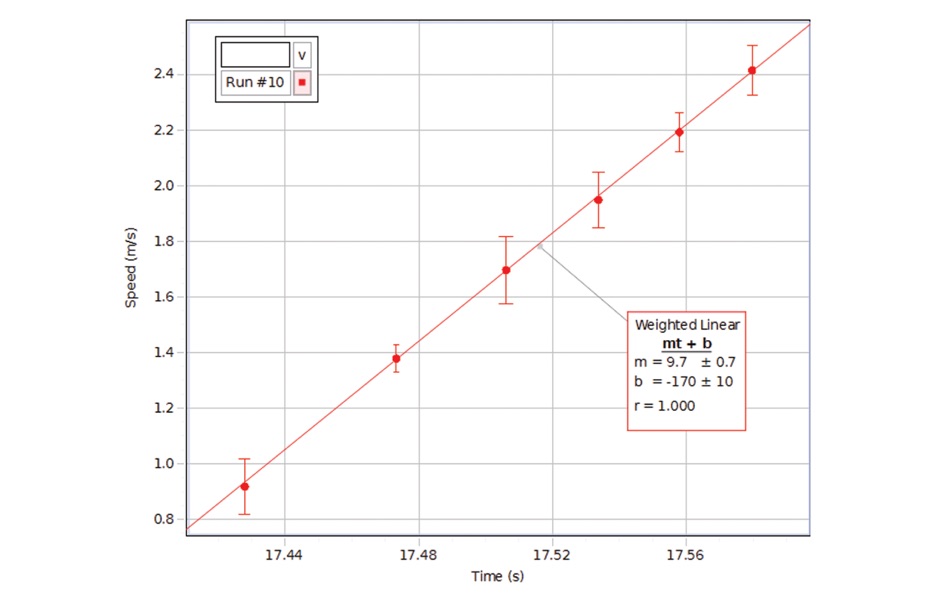
-Utilize complex curve fits like damped sine, Gaussian, sine series, and custom user-defined fits
-Add error bars to the graph. Choose from percent error, fixed error, or point-by-point error defined by a data set
-Draw predictions on the graph to compare to future data runs
-Quick-Calcs on the graph axes allow you to linearize the data plot by changing the quantity to the quantity squared or other calculations
-Synchronize videos of the phenomenon with the corresponding sensor data and replay it to see the relationship between the motion and the graph
-Set your preferences for properties of the graph and many other parts of the program so the program opens with your choices of appearance and behavior
Purchase:
-Capstone requires a purchase of a one-year license which will grant full access to all features of Capstone
-There is no trial period for Capstone
螢幕擷取畫面
新功能
- 版本: 2.12
- 發佈日期:
- - Fixed an issue where the data could glitch sometimes in a Scope during high speed sampling.
- Added a new Student license type.
價錢
-
* 應用內購買 - 今天: 免費
- 最小值: 免費
- 最大值: 免費
追蹤票價
開發人員
- PASCO scientific
- 平台: Android 應用程式 (4) iOS 應用程式 (3) macOS 應用程式 (2)
- 清單: 0 + 0
- 點數: 2 + 1,523 ¡
- 排名: 0
- 評測: 0
- 折扣: 0
- 影片: 1
- RSS: 訂閱
點數
-

- 549 expat4i
- +1

排名
0 ☹️
清單
0 ☹️
評測
成為第一個評論 🌟
其他資訊
 https://www.pasco.com/products/software/capstonePASCO Capstone 縮短網址: 已複製!
- 🌟 分享
- Mac App Store
你可能還喜歡
-
- Calculate84
- macOS 應用程式: 教育 由: Century Light LLC
- 免費
- 清單: 0 + 0 排名: 0 評測: 0
- 點數: 0 + 48,618 (4.8) 版本: 2.6.0 A MODERN GRAPHING CALCULATOR ON THE iPHONE 1. Fast, Interactive Touch-Screen Graphing 2. Everything is where you d expect it to be 3. Scrollable windows (no more spamming the up arrow ... ⥯
-
- Kahoot! Play & Create Quizzes
- macOS 應用程式: 教育 由: Kahoot ASA
- 免費
- 清單: 0 + 1 排名: 0 評測: 0
- 點數: 0 + 47,021 (4.6) 版本: 6.5.5 Play engaging quiz-based games (kahoots) at school, at home and at work, create your own kahoots, and learn something new! Kahoot! brings the magic of learning to students, teachers, ... ⥯
-
- AlgoApp Flashcards
- macOS 應用程式: 教育 由: AlgoApp Inc
- 免費
- 清單: 1 + 0 排名: 0 評測: 0
- 點數: 4 + 19,557 (4.7) 版本: 11.2.1 Learn languages, or study for school and tests, with the most powerful and user-friendly flashcard app. Millions of language-learners and students have studied over 2 billion ... ⥯
-
- Time Timer
- macOS 應用程式: 教育 由: Time Timer LLC
- 免費
- 清單: 3 + 3 排名: 0 評測: 0
- 點數: 9 + 14,068 (4.6) 版本: 4.2.10 Feel time move. Stay on track. Stress less. From the makers of the original red disk timer, the Time Timer® App transforms the powerful visual tool trusted by families, teachers, ... ⥯
-
- Photo Math AI Problem Solver
- macOS 應用程式: 教育 由: RLAM FZCO
- 免費
- 清單: 0 + 0 排名: 0 評測: 0
- 點數: 1 + 13,287 (4.4) 版本: 3.5 MathBox Instantly Solve & Learn Any Math Problem MathBox is your personal AI math tutor. Just take a photo of any math problem typed or handwritten and get instant, step-by-step ... ⥯
-
- NCalc Scientific Calculator +
- macOS 應用程式: 教育 由: Tran Duy
- 免費
- 清單: 1 + 0 排名: 5 (1) 評測: 0
- 點數: 4 + 11,278 (4.7) 版本: 3.5.0 NCalc Powerful Scientific Calculator, Graphing, and Converter NCalc combines a natural-display scientific calculator, advanced math tools, a full graphing module (as 83/84 calculator), ⥯
-
- Sporty's Pilot Training
- macOS 應用程式: 教育 由: Sporty's Pilot Shop
- * 免費
- 清單: 0 + 0 排名: 0 評測: 0
- 點數: 0 + 11,009 (4.9) 版本: 9.12.1 Sporty s innovative Pilot Training app brings a variety of aviation training courses to one location, allowing you to access all of your Sporty's aviation content from your iPad, ... ⥯
-
- Explain Everything Whiteboard
- macOS 應用程式: 教育 由: Promethean Ltd.
- 免費
- 清單: 1 + 0 排名: 0 評測: 0
- 點數: 2 + 8,569 (4.6) 版本: 9.0.4 The iPad App Store Trend of the Year 2020 award-winning interactive whiteboard and note taking app for iPad. With over 25 million downloads across the globe, Explain Everything helps ... ⥯
-
- Ticulator 84 Graphing Calc
- macOS 應用程式: 教育 由: Di Venisco UG (haftungsbeschrankt)
- 免費
- 清單: 0 + 0 排名: 0 評測: 0
- 點數: 0 + 7,426 (4.5) 版本: 1.4.0 TACULATOR GRAPHING CALCULATOR Your graphing calculator for high school and college students. Includes all the commands and functions for advanced math, list, statistics, distribution, ... ⥯
-
- 3D Earth & moon, sun and stars
- macOS 應用程式: 教育 由: DeluxeWare
- 免費
- 清單: 1 + 0 排名: 0 評測: 0
- 點數: 28 + 5,143 (4.5) 版本: 1.3.8 Immerse yourself in a breathtaking 3D Earth experience on your iPhone or iPad. Harnessing the power of Apple s Metal engine, this app offers a beautifully rendered, real-time 3D model ... ⥯
-
- Homework AI - Math Helper
- macOS 應用程式: 教育 由: Netron
- 免費
- 清單: 0 + 1 排名: 0 評測: 0
- 點數: 0 + 4,758 (4.8) 版本: 6.0.3 Introducing "Homework AI - Math Helper" your ultimate academic companion, empowering you to conquer various challenges effortlessly. Whether you need to solve complex math equations, ... ⥯
-
- Scratch Tutorial - Coding Game
- macOS 應用程式: 教育 由: 海涛 赵
- 免費
- 清單: 0 + 0 排名: 0 評測: 0
- 點數: 0 + 4,239 (4.2) 版本: 1.1.5 The latest scratch course - easy to use, let children fall in love with programming. Innovative design intelligent system guides children to learn step by step. 4-14-year-old children ... ⥯