
| Concepteur: | 军 龙 (11) | ||
| Prix: | * Gratuit | ||
| Classements: | 0 | ||
| Avis: | 0 Rédiger un avis | ||
| Listes: | 0 + 0 | ||
| Points: | 0 + 0 ¡ | ||
| Mac App Store | |||
Description

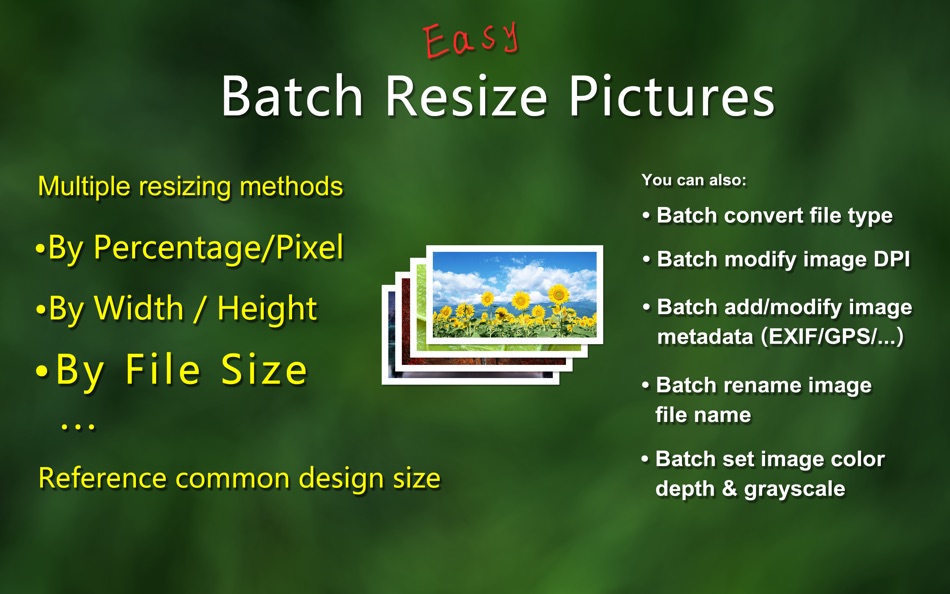
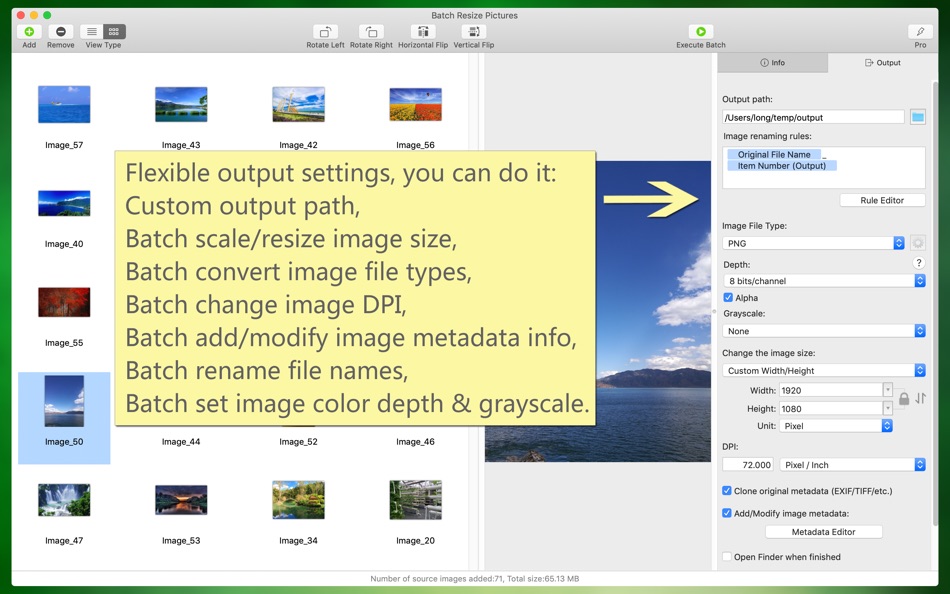
"Batch Resize Pictures" can easily and quickly resize a large number of images, zoom in or out, and also convert image file types in batches, modify image DPI in batches, and add/modify image metadata in batches, batch rename file name. These features can be used individually or together, greatly helping you to work more efficiently, which is both convenient and powerful.
Main function introduction:
1. Batch zoom/adjust the size of the image, which can be enlarged or reduced based on the original size. The adjustment methods are various:
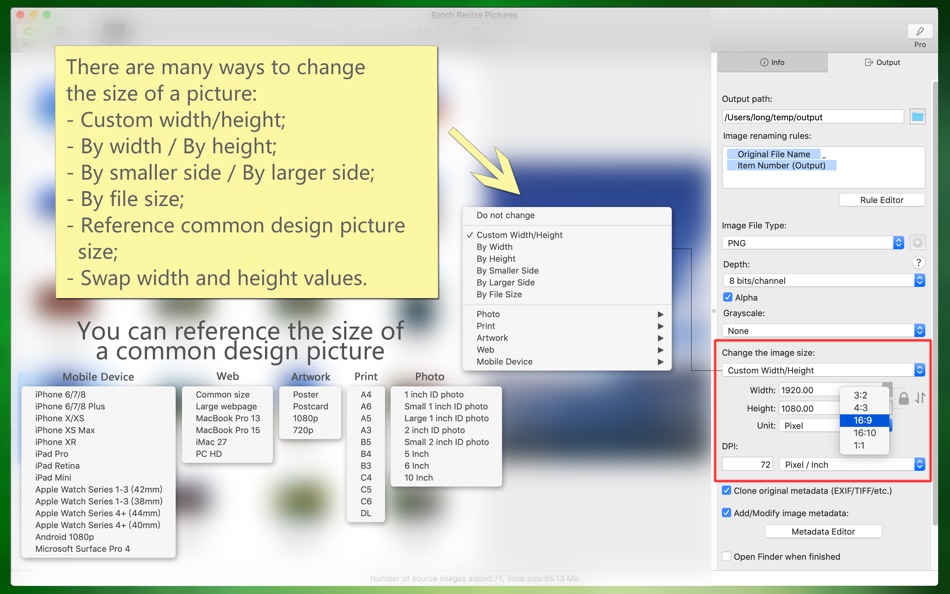
(1) Custom width and height; according to width; according to height; according to the smaller side; according to the larger side.
(2) It can be adjusted in percentage, pixel, centimeter, and inch.
(3) The width and height values can be exchanged; the width or height can be converted proportionally (eg, 3:2, 4:3, 16:9, 16:10, etc.).
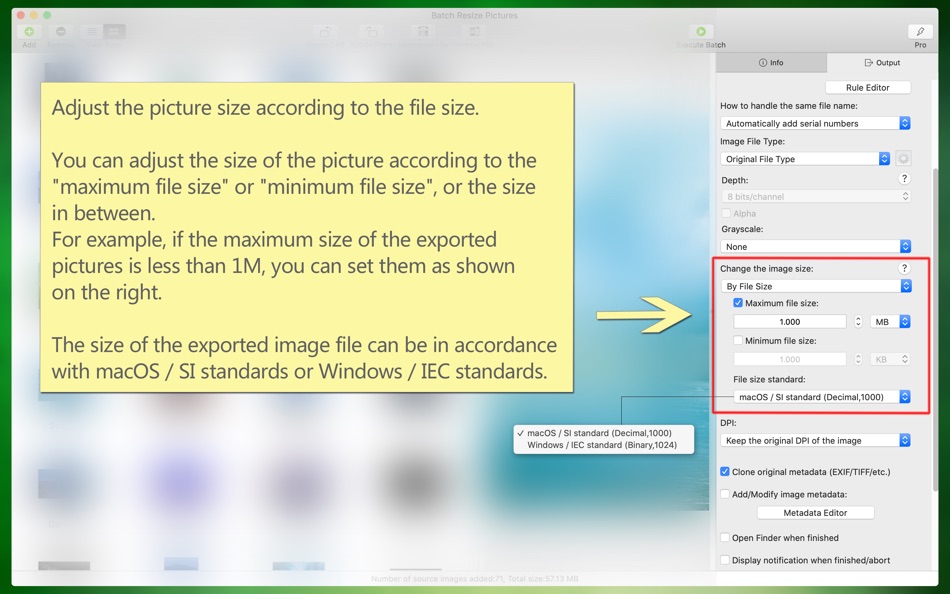
(4) You can adjust the picture size according to the file size. You can adjust the size of the picture according to the "maximum file size" or "minimum file size", or the size in between. The size of the exported image file can be in accordance with macOS/SI standards or Windows/IEC standards.
2. You can refer to the size of common design pictures, such as: a variety of ID photo size, print related A4/B5/etc., posters/postcards/etc., various web page sizes, iPhone/iPad/Android and other sizes.
3. Batch conversion image file types, including TIFF, PNG, BMP, JPG, JPG2000, GIF, PSD, HEIC, WebP, AVIF, etc. and the conversion between animated images, including GIF, HEIC, WebP, PNG, AVIF, etc.
4. Modify picture DPI in batches, or keep original DPI.
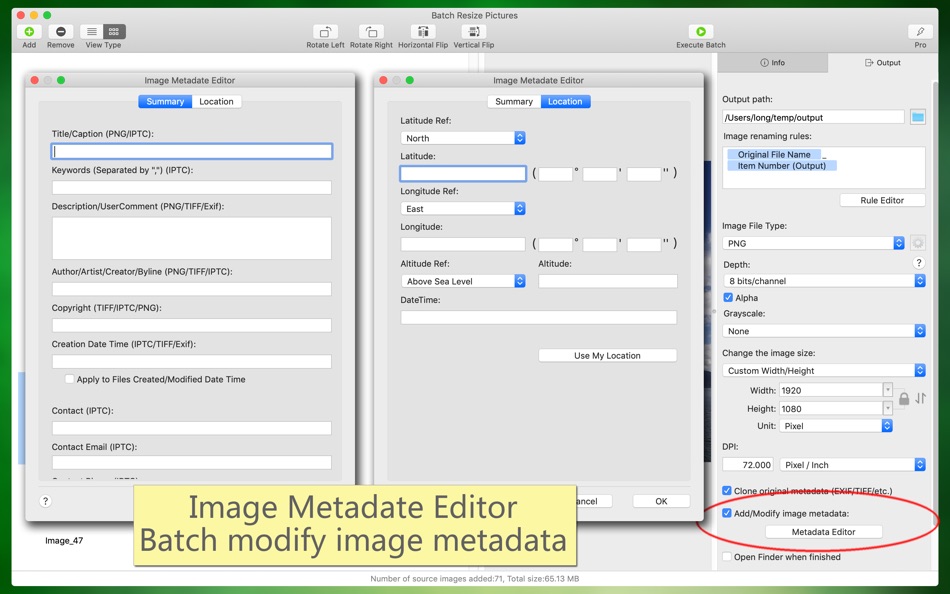
5. Add/modify image metadata information (EXIF/TIFF/JFIF/GPS/...) in batches, such as: author, copyright, description, keyword, creation date and time, contact information, etc.
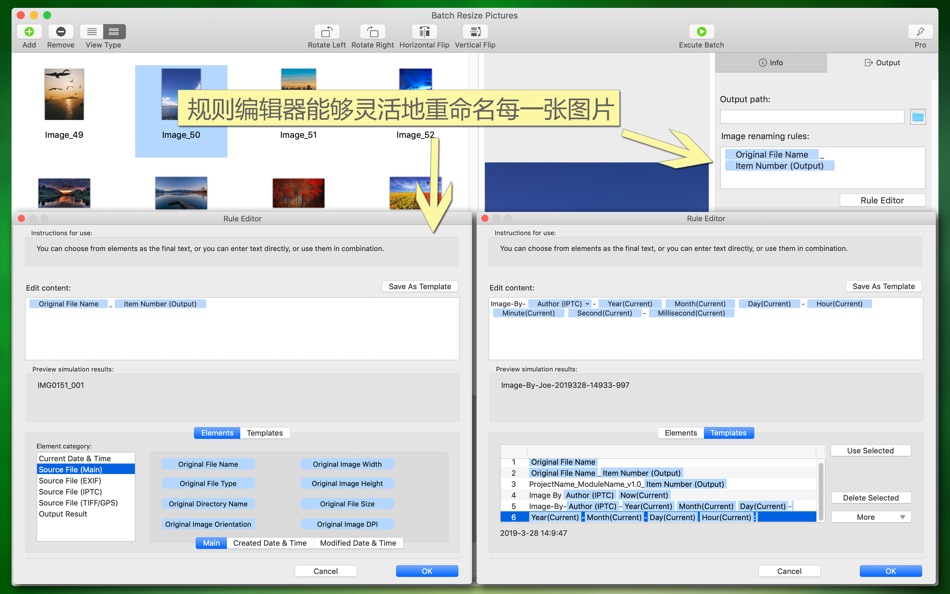
6. Batch rename/custom output image file name, file name can be dynamically generated (according to time, EXIF, serial number, template, etc.).
7. Modify the color depth of the picture in batches (8 bits/channel or 16 bits/channel, ie 24 bits, 32 bits, 46 bits, 64 bits), Alpha, color profiles.
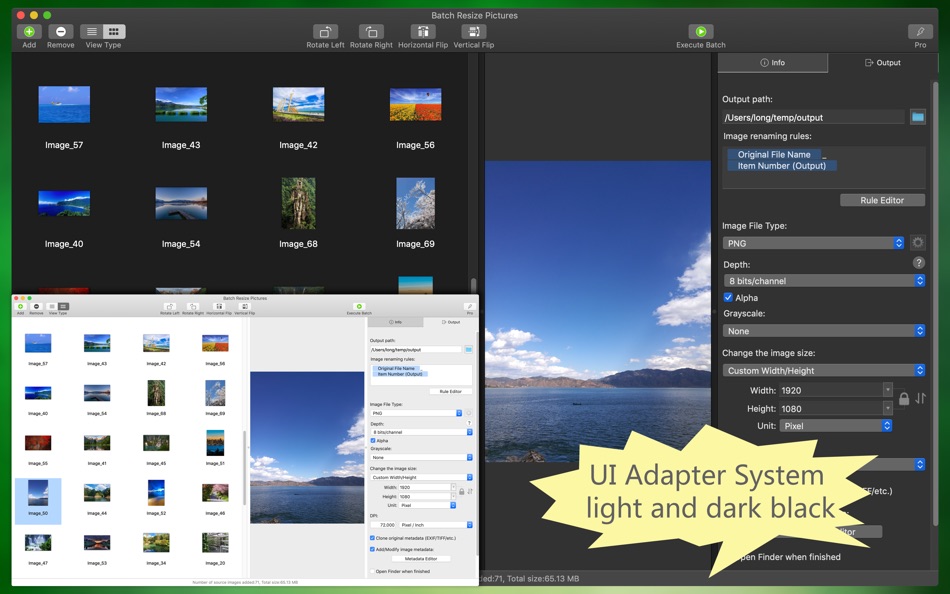
8. The software supports macOS light color and dark appearance mode, switch freely, the interface is perfectly adapted.
9. The software supports multiple languages, including: English, Simplified Chinese, Traditional Chinese, Japanese, Spanish, Portuguese, French, German, Russian, Korean, Italian (the new version will support more languages).
The software is free to use, and we also offer a more professional version of the advanced features, you can get a professional version through the subscription within the software.
Automatic renewal professional version:
-- Professional edition benefits: (1) All professional features. (2) New professional features or advanced features in the new version.
-- Subscription period: 1 month (professional version of continuous monthly product), 6 months (professional version of continuous packaging for half a year), 12 months (professional version of continuous annual product).
-- Subscription price: subject to IAP application information, such as $4.99 per month for consecutive monthly subscriptions and $29.99 per year for consecutive annual subscriptions.
-- Payment: The user confirms the purchase and payment and then credits it to the iTunes account.
-- Cancel Renewal: To cancel renewal, manually turn off auto-renew in iTunes/Apple ID Settings Management 24 hours before the current subscription period expires.
-- Renewal: Apple's iTunes account will be charged within 24 hours before expiration. After the deduction is successful, the subscription period will be postponed for one subscription period.
-- Privacy Policy: http://www.arwer.com/Software2/PrivacyPolicy.html
-- Service Agreement: http://www.arwer.com/Software2/TermsOfService.html
Captures d'écran



Nouveautés
- Version: 3.7
- Mis à jour:
- 1. New: Support AVIF type static and animated images.
(1) You can open the AVIF image, preview the static AVIF image, or play the animated AVIF image.
(2) Static AVIF images and other image types (TIFF, JPG, BMP, GIF, HEIC, WebP, PNG, PSD) can be converted to each other in batches.
(3) Animated AVIF images and other animated image types (GIF, HEIC, WebP, PNG) can be converted to each other in batches.
(4) In the Finder, you can open the AVIF file through the right-click menu.
2. Improved: The rule editor dialog box of the output settings can be resized.
3. Other minor modifications and improvements.
Prix
-
* Achats intégrés - Aujourd’hui: Gratuit
- Minimum: Gratuit
- Maximum: Gratuit
Suivre l'évolution des prix
Concepteur
- 军 龙
- Plateformes: iOS Applications (2) iOS Jeux (1) macOS Applications (8)
- Listes: 1 + 0
- Points: 3 + 10 ¡
- Classements: 0
- Avis: 0
- Remises: 0
- Vidéos: 0
- RSS: S'abonner
Points
0 ☹️
Classements
0 ☹️
Listes
0 ☹️
Avis
Soyez le premier à donner votre avis 🌟
Informations supplémentaires
- Version: 3.7
- Catégorie:
macOS Applications›Graphisme et design - Systèmes d'exploitation:
macOS,macOS 11 ou version ultérieure - Taille:
20 Mb - Langues prises en charge:
Chinese,English,French,German,Italian,Japanese,Korean,Portuguese,Russian,Spanish - Classification du contenu:
4+ - Mac App Store Note:
0 - Mis à jour:
- Date de sortie:
Batch Resize Pictures URL courte: Copié!- 🌟 Partager
- Mac App Store
Découvrez également
-
- Batch Crop Pictures
- macOS Applications: Graphisme et design De: 军 龙
- * Gratuit
- Listes: 0 + 0 Classements: 0 Avis: 0
- Points: 0 + 0 Version: 2.0.1 "Batch Crop Pictures" is a professional tool software to solve the problem of cropping a large number of picture files. You can crop multiple pictures at once, and you can also crop ... ⥯
-
- Batch Image Converter
- macOS Applications: Graphisme et design De: 方成 印
- $2.99
- Listes: 0 + 0 Classements: 0 Avis: 0
- Points: 0 + 0 Version: 1.5 Time Limited Special Offer (reg. $9.99 USD) Batch Image Converter is an application that allows you to convert one image format to another format in batches. Batch Image Converter can ... ⥯
-
- Resize Sense - Image Resizer
- macOS Applications: Graphisme et design De: VeprIT
- $19.99
- Listes: 0 + 0 Classements: 0 Avis: 0
- Points: 0 + 0 Version: 2.3.3 Eliminate hours of tedious work needed to resize, crop, straighten, rotate, flip, and rename many images! Edit IPTC and even EXIF metadata in multiple images at a time. Whether you ... ⥯
-
- PaintMagick for pictures
- macOS Applications: Graphisme et design De: SSA
- Gratuit
- Listes: 0 + 0 Classements: 0 Avis: 0
- Points: 2 + 0 Version: 1.1 PaintMagick is an image editor for photos and draws with advanced drawing features, effects and filters. It allows to create and edit images directly in the web browser. You can create ⥯
-
- WebP image batch converter
- macOS Applications: Graphisme et design De: Aliaksandr Melnikau
- $3.99
- Listes: 0 + 0 Classements: 0 Avis: 0
- Points: 0 + 0 Version: 3.0 WebP image batch converter - allows export to JPEG and JPEG2000 (with compression ratio setting), PNG, BMP, TIFF, GIF and PDF files; - can use multi-threading (multitasking), ... ⥯
-
- WebP Batch Image Converter
- macOS Applications: Graphisme et design De: Rodrigo Dutra de Oliveira
- $9.99
- Listes: 0 + 0 Classements: 0 Avis: 0
- Points: 0 + 0 Version: 1.4 WebP Batch Image Converter allows you to: -> Convert your images between the major types: WebP, Heic, PNG, JPEG, TIFF, BMP... What's WebP? "WebP is a modern image format that provides ... ⥯
-
- Bulk Cropper: Resize & Crop
- macOS Applications: Graphisme et design De: Pelle de Graaf
- * Gratuit
- Listes: 1 + 0 Classements: 0 Avis: 0
- Points: 0 + 0 Version: 1.3 Bulk Cropper is a powerful yet easy-to-use macOS tool designed to streamline your image workflow. Whether you're a photographer, designer, or e-commerce professional, Bulk Cropper ... ⥯
-
- GSi Batch Image Resizer
- macOS Applications: Graphisme et design De: Genuine Soundware
- Gratuit
- Listes: 0 + 0 Classements: 0 Avis: 0
- Points: 0 + 0 Version: 1.0.1 INTRODUCTION We know that there are hundreds of programs, even free ones, that can process images in batches, but we searched for a long time, we couldn't find one that could export ... ⥯
-
- ShotFit – Screenshot Resize
- macOS Applications: Graphisme et design De: Zebin Huang
- * Gratuit
- Listes: 0 + 0 Classements: 0 Avis: 0
- Points: 0 + 0 Version: 1.1.1 ShotFit is a Mac app that turns raw screenshots into polished, platform-ready preview images in seconds. Perfect for App Store listings, social media posts, cover designs, or tutorial ... ⥯
-
- LinBatch-Batch Image Editor
- macOS Applications: Graphisme et design De: 侠光 邢
- Gratuit
- Listes: 0 + 0 Classements: 0 Avis: 0
- Points: 0 + 0 Version: 1.2 LinBatch can edit pictures and process pictures in batches. You can add text and picture watermarks in batches, change the size of pictures, crop pictures in batches, rename pictures, ... ⥯
-
- AI Batch Background Eraser
- macOS Applications: Graphisme et design De: Ivan Blajic
- Gratuit
- Listes: 1 + 0 Classements: 0 Avis: 0
- Points: 0 + 0 Version: 1.0 Powered by one of the best AI engines in the world, this simple but powerful tool automatically detects and removes photo background. You can use it to easily make transparent images ... ⥯
- Nouvel
- Mr. Crop Batch
- macOS Applications: Graphisme et design De: Hirotoshi MAKINO
- Gratuit
- Listes: 0 + 0 Classements: 0 Avis: 0
- Points: 0 + 0 Version: 1.1 Perfect for Cropping out large amounts of screenshots Are you still struggling with the tedious task of cropping images one by one? Mr. Crop Batch is a macOS utility app that lets you ... ⥯
-
- Reimager Batch Image Converter
- macOS Applications: Graphisme et design De: Kevin Edwards
- $19.99
- Listes: 0 + 0 Classements: 0 Avis: 0
- Points: 0 + 0 Version: 1.1 What s New: 1.1 First public release! - Fast batch conversions with a simple, preset-driven workflow. - High-quality WEBP, JPEG, PNG, HEIC, JPEG XL and TIFF output (HEIC via Apple ... ⥯
-
- Bezel Batch Exporter
- macOS Applications: Graphisme et design De: Fabio Jorge Conceicao Sousa
- $1.99
- Listes: 0 + 0 Classements: 0 Avis: 0
- Points: 0 + 0 Version: 1.0 O Bezel Batch Exporter simplifica uma das tarefas mais repetitivas para quem desenvolve aplicações: preparar capturas de ecrã com molduras de dispositivos para publicação. Em vez de ... ⥯