
| Concepteur: | Thomas Liebl (6) | ||
| Prix: | $3.99 | ||
| Classements: | 0 | ||
| Avis: | 0 Rédiger un avis | ||
| Listes: | 1 + 0 | ||
| Points: | 3 + 0 ¡ | ||
| Mac App Store | |||
Description

Highlights:
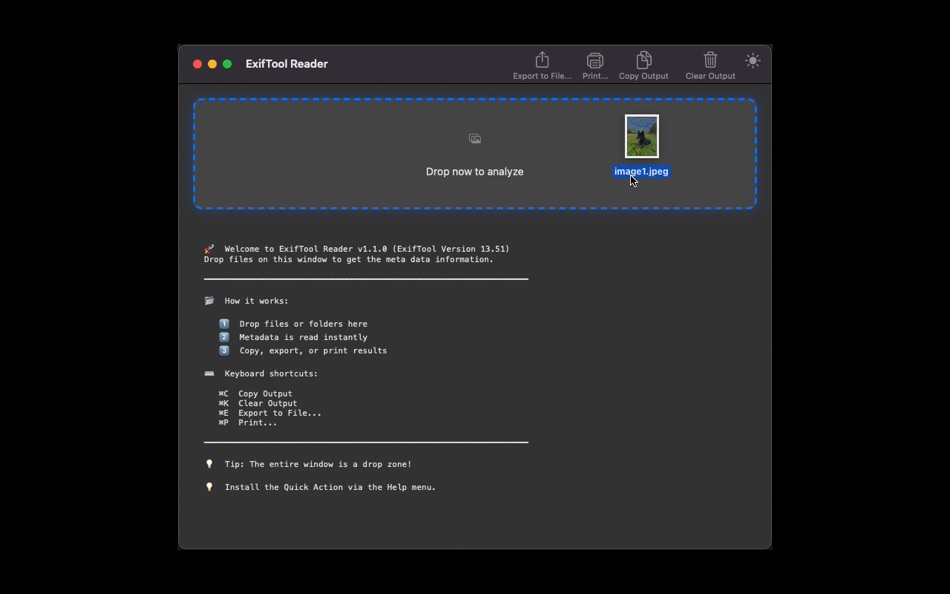
- Drag and drop files or folders (all supported formats)
- Instant EXIF, IPTC, XMP readout
- Clean, readable metadata view
- Copy, export, print – directly from the app
- Built for photographers and metadata checks
Perfect for quick inspection before editing, archiving, or sharing.
Ad
Captures d'écran




Nouveautés
- Version: 1.1.0
- Mis à jour:
- ExifTool Reader v1.1.0
========================
What's New in this Version:
ExifTool 13.51 Update:
- Added a new Nikon LensID (thanks Johan)
- Decode more tags from Windows LNK files
- Decode some new Nikon tags
- Fixed round-off error in GPSDateTime seconds for camm6 metadata in MP4
ExifTool 13.50 Update:
- Updated Sony maker note decoding for ILCE-7M5
- Decode BlackLevels from Canon CRW files
- Decode Samsung trailer tags
- Added new Canon and Sony lenses
- Fixed MacOS security issue
- Improved metadata extraction accuracy
Complete Native Swift Rewrite
- Built from scratch in Swift for optimal performance
- Modern Cocoa UI with smooth animations
- Better stability and responsiveness
- Universal Binary (Apple Silicon + Intel)
Enhanced Drop Zone
- Beautiful hover effects with glow animation
- Visual feedback during file processing
- Supports all file types
Productivity Features
- Copy Output (Cmd+C) - Clipboard integration
- Clear Output (Cmd+K) - Quick reset
- Export to File (Cmd+E) - Save as .txt
- Print Support (Cmd+P) - Professional printing
- Select All (Cmd+A) - Text selection
Modern macOS Integration
- Customizable Toolbar with SF Symbols
- Touch Bar support (Copy/Clear/Export)
- Services integration (Finder context menu)
- Drag files to Dock icon
- Window position/size restoration
- Native Full Screen support (Cmd+F)
Appearance Control
- Dark Mode toggle (Light/Dark/Auto)
- Appearance preference persisted
- App-specific (independent of system setting)
Help & Documentation
- Direct links to ExifTool documentation
- Quick access to support resources
- Release Notes window (this window!)
Multilingual Interface
- Full localization in 26 languages
- System language auto-detection
---
Technical Details:
- ExifTool: Version 13.51
- Compatibility: macOS 10.13 - 15.x+ (High Sierra to Tahoe)
- Security: App Sandbox enabled with proper entitlements
- Architecture: Universal Binary (ARM64 + x86_64)
- UI Framework: Native Cocoa/AppKit
---
Getting Started:
1. Drop files onto the main window
2. Or use Finder > Services > ExifTool Reader
3. Or drag files to Dock icon
4. View metadata, copy, export, or print
---
Thank you for using ExifTool Reader!
Support: [LINK:App Store:https://apps.apple.com/de/app/exiftool-reader/id1636199770]
(c)2026 MSAMmedia - Thomas Liebl
Prix
- Aujourd’hui: $3.99
- Minimum: Gratuit
- Maximum: $3.99
Suivre l'évolution des prix
Ad
Concepteur
- Thomas Liebl
- Plateformes: macOS Applications (6)
- Listes: 1 + 0
- Points: 3 + 0 ¡
- Classements: 0
- Avis: 0
- Remises: 0
- Vidéos: 0
- RSS: S'abonner
Points
-

- 13,326 cahiba7911@agenra.com
- +1
-
- 1,722 sam
- +1
-
- 3,463 Dragon
- +1


Classements
0 ☹️
Listes
- ExifTool Reader

Avis
Soyez le premier à donner votre avis 🌟
Informations supplémentaires
- Version: 1.1.0
- Catégorie:
macOS Applications›Photo et vidéo - Systèmes d'exploitation:
macOS,macOS 10.13 ou version ultérieure - Taille:
6 Mb - Langues prises en charge:
Arabic,Chinese,Czech,Danish,Dutch,English,Finnish,French,German,Greek,Hindi,Hungarian,Indonesian,Italian,Japanese,Korean,Norwegian,Polish,Portuguese,Russian,Spanish,Swedish,Turkish,Vietnamese - Classification du contenu:
4+ - Mac App Store Note:
0 - Mis à jour:
- Date de sortie:
Contacts
- Site Web:
 https://software.msam.media/en/
ExifTool Reader URL courte: Copié!- 🌟 Partager
- Mac App Store
Découvrez également
-
- EXIF Tool : Metadata Tool
- macOS Applications: Photo et vidéo De: Dongwook Cho
- $9.99
- Listes: 0 + 0 Classements: 0 Avis: 0
- Points: 0 + 0 Version: 1.0.14 [EXIF Tool] is the most powerful EXIF and meta data tool for your photos and videos. You can import image files from not only from Finder, but also from photo gallery. It also supports ⥯
-
- Photos Exif Tool
- macOS Applications: Photo et vidéo De: Samotya Software Private Limited
- Gratuit
- Listes: 0 + 0 Classements: 0 Avis: 0
- Points: 0 + 0 Version: 1.3 Read, Write and Edit Meta Information! Ever needed to read in EXIF data from images? Photos Exif Tool is the most comprehensive tool available for reading, writing and editing meta ... ⥯
-
- Exif Viewer - Photo Metadata+
- macOS Applications: Photo et vidéo De: 婧 李
- $2.99
- Listes: 0 + 0 Classements: 0 Avis: 0
- Points: 1 + 0 Version: 1.8 This is a powerful metadata tool for your photos and videos. You can easily view, edit, and remove exif metadata, including date, time, gps location, camera model, aperture, author and ⥯
-
- Exif Editor
- macOS Applications: Photo et vidéo De: Martin Novak
- $13.99
- Listes: 0 + 1 Classements: 0 Avis: 0
- Points: 1 + 0 Version: 1.2.7 Exif Editor is an application that allows you to edit metadata in directly your photos. The tool is useful when you don't want to expose camera to your customers. When your RAW ... ⥯
-
- EXIF Studio - Metadata Editor
- macOS Applications: Photo et vidéo De: Wise Tech Labs Private Limited
- $9.99
- Listes: 0 + 0 Classements: 0 Avis: 0
- Points: 1 + 0 Version: 2.9 EXIF Studio is a simple app to help you edit EXIF, IPTC, GPS & XMP metadata of several photos or images in just few clicks! You can easily select images, folders with images or the ... ⥯
-
- Exifで写真整理
- macOS Applications: Photo et vidéo De: Tomohiko Shimizu
- $2.99
- Listes: 0 + 0 Classements: 0 Avis: 0
- Points: 0 + 0 Version: 2.2 写真ファイルに記録されている撮影日や撮影場所あるいは焦点距離などのExifデータをもとに写真ファイルの名前を変換したりExifデータを書き換える写真専用の一括編集ツールです。 [ 写真に記録されているExifをもとに編集 ] 写真に記録されている以下 12種類の写真データをサポートしています。 ・撮影日時 ・撮影場所 ・焦点距離 ・35mm換算の焦点距離 ・F ... ⥯
-
- Exif Gps Editor
- macOS Applications: Photo et vidéo De: 栋梁 周
- * Gratuit
- Listes: 0 + 0 Classements: 0 Avis: 0
- Points: 0 + 0 Version: 1.0.2 This is an application that can add GPS information to photos. Currently, most professional digital cameras on the market do not carry GPS functions, and the photos taken do not carry ... ⥯
-
- EXIF Sync
- macOS Applications: Photo et vidéo De: Lemke Software GmbH
- * $4.99
- Listes: 0 + 0 Classements: 0 Avis: 0
- Points: 0 + 0 Version: 1.9.8 Modern digital cameras store information about the time when each shot was taken directly within the image files. This data is used, for example, to sort photos in the correct order. ... ⥯
-
- Epson Exif Label Tool
- macOS Applications: Photo et vidéo De: Seiko Epson Corporation
- Gratuit
- Listes: 0 + 0 Classements: 0 Avis: 0
- Points: 0 + 0 Version: 1.00 [Notice] Need to install the printer driver to use Epson Exif Label Tool. Please visit the support page of your local Epson website and download the driver. [Description] Epson Exif ... ⥯
-
- TEPRA Exif Labeler
- macOS Applications: Photo et vidéo De: KING JIM CO.,LTD.
- Gratuit
- Listes: 0 + 0 Classements: 0 Avis: 0
- Points: 0 + 0 Version: 1.0.0 説明 [ご注意] 必ずご確認ください TEPRA Exif Labelerで印刷をするためには、別途「プリンタドライバ TEPRA Driver 」のインストールが必要です 当社ホームページからダウンロードしてください http://www.kingjim.co.jp 対応OS Mac OS X 10.11 / 10.10 / 10.9 対応機種 SR970 / ... ⥯
-
- Rename with Exif
- macOS Applications: Photo et vidéo De: Mykola Blokhin
- $1.99
- Listes: 0 + 0 Classements: 0 Avis: 0
- Points: 0 + 0 Version: 1.3 The application renames your photos using date from Exif (meta information in the file with photo). You can create different patterns for renaming based on the file name, file ... ⥯
-
- Simple Perspective Tool
- macOS Applications: Photo et vidéo De: SHIMON SHMUELI
- Gratuit
- Listes: 0 + 0 Classements: 0 Avis: 0
- Points: 0 + 0 Version: 1.0 My perspective correction tool does about 90% of what professional tools do. I made it after growing frustrated with expensive software that constantly pushed upgrades for negligible ... ⥯
-
- Media Sync Tool
- macOS Applications: Photo et vidéo De: Vitalii Vashchenko
- * Gratuit
- Listes: 0 + 0 Classements: 0 Avis: 0
- Points: 1 + 0 Version: 1.3 Media Sync Tool is a revolutionary sync tool for Final Cut Pro. By utilizing jam-synced SMPTE timecode and metadata from the source media, it automates the sync process to the point ... ⥯
-
- Video Tool: Cut, Crop, Convert
- macOS Applications: Photo et vidéo De: Erik Wegener
- $2.99
- Listes: 0 + 0 Classements: 0 Avis: 0
- Points: 1 + 0 Version: 1.2 Video Tool is a fast app designed for light-weight video edits: Trimming/cutting (changing video start and end time) Resizing (changing video dimensions) Reformatting to MP4, MOV, QT ... ⥯