
| Ontwikkelaar: | Sketch B.V. (3) | ||
| Prijs: | * Gratis | ||
| Beoordelingen: | 0 | ||
| Recensies: | 0 Schrijf een review | ||
| Lijsten: | 0 + 0 | ||
| Punten: | 2 + 0 ¡ | ||
| Mac App Store | |||
Beschrijving

A native macOS app for design and prototyping
— Powerful tools built for designers, by designers
— Nestable frames and flexible stack layouts
— Fast, immersive prototyping to bring your ideas to life
— Shared Libraries, styles and components to scale your work
— Full control over color profiles, including P3 support
— Variable and OpenType font support
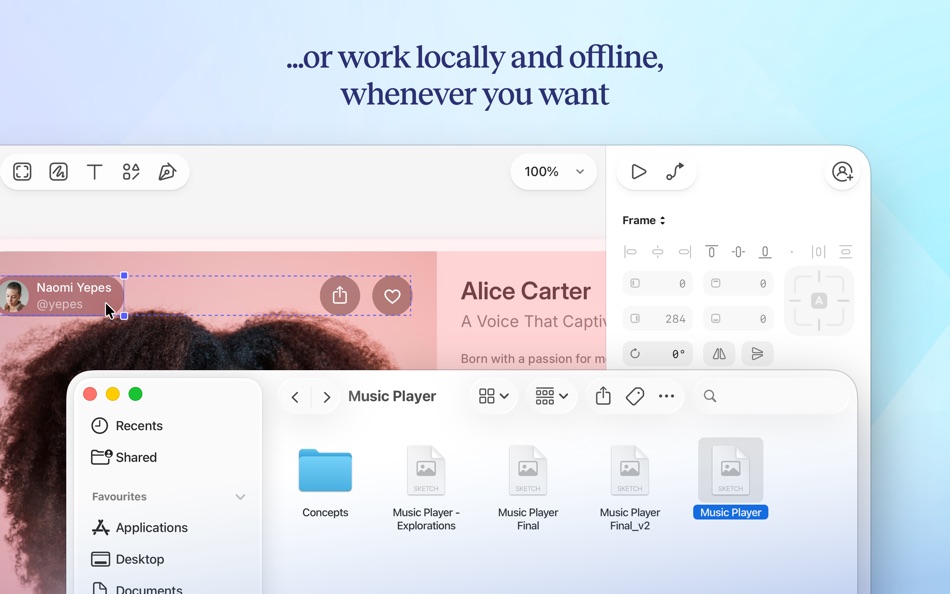
— Offline and local file support
— Ready for real-time collaboration, or working solo
A flexible web app for feedback, sharing and handoff
— Store, sync and share documents
— Document and project permissions
— Easy Workspace admin
— Annotate documents with feedback
— File version history
— Share Libraries, components and templates
— Developer handoff tools
— Test prototypes in any browser
— View, comment and handoff for free
With our free companion app, Sketch — View and Mirror, you can view designs, mirror from your Mac, and play prototypes on your iPhone or iPad.
---
CREATE WITH EASE
Sketch is perfect for beginners and professional designers. With powerful tools built for designers, by designers, you can bring your ideas to life. Whether you’re crafting a stunning logo, or designing apps and infographics, you do it effortlessly.
POWERFUL LAYOUT TOOLS
With nestable, stylable frames, you have infinite flexibility when building screens, UIs and more. Add stack layouts to your designs to make them adapt to their content, or adapt content to their size.
FAST, INTUITIVE PROTOTYPING
Test your ideas quickly and efficiently with our intuitive prototyping tools. Create immersive prototypes in just a few clicks. Test and share your concepts easily, with a link to a browser-based prototype, or in our native iOS and iPadOS app.
FULL CONTROL OVER YOUR DESIGNS
Get complete control over every aspect of your designs. Sketch supports a variety of color profiles, including P3, for vibrant and true-to-life visuals. With variable and OpenType font support, you can customize your typography too.
WORK FASTER WITH THE COMMAND BAR
Invoke almost any action, find and insert components, and so much more — all without leaving your keyboard. The Command Bar gives you a faster way to do almost anything in Sketch.
EFFICIENT DOCUMENT MANAGEMENT
Easily store, sync, and share your design documents with your Workspace. With intuitive admin tools and a browsable document version history, you can track changes and collaborate with ease.
FULL OFFLINE SUPPORT
Work when and where inspiration strikes! Our design software supports offline access and local file management, so you can create without interruptions.
EXPLORE, CREATE, AND SHARE
Our tools make it easy to provide feedback, share your work, and hand off projects seamlessly to developers, making it easy for you to collaborate with others.
GET STARTED TODAY
Download Sketch today to get all the power of professional design tools combined with user-friendly features. Whether you’re a seasoned designer or just starting, our app is your go-to solution for all your graphic design needs.
Sketch comes with a 30-day free trial. After that, you can sign up for flexible subscription, which includes your own Workspace to store and sync documents, wherever you use Sketch.
Terms of Service: https://www.sketch.com/tos/
Privacy Policy: https://www.sketch.com/privacy/
Screenshots




Wat is er nieuw?
- Versie: 2025.3.1
- Bijgewerkt:
- This update brings performance improvements and bug fixes, plus all the great features from our Copenhagen release.
- We’ve improved performance in the Inspector when you edit layers with Symbol overrides.
- When you enter any value to an Inspector field with a math symbol (+ - % *) we’ll now treat that value as a math expression. For example, if a layer’s Y value is set to 10 and you enter -5, the Y value will become 5. To override this and set a negative value, add a ! to the end of the value (e.g. -5!).
- The Artboard Manager plugin is incompatible with 2025.1 and above.
- Fixes a bug that stopped sizing options from showing for lines within stacks.
- Fixes a bug that meant you couldn’t set a negative spread for shadows by dragging the Inspector field.
- Fixes a bug where segmented and toggle controls could behave unexpectedly when you reordered shadows in the Inspector.
- Fixes a bug where the border position control was active for open paths, even though you can’t use it.
- Fixes a crash that could occur if you quickly switched between the Components and Canvas views on a pre-Tahoe macOS version.
- Fixes a bug where the minimap wouldn’t refresh immediately after you switched pages.
- Fixes a bug that stopped the refresh data command in the Command Bar from working.
Prijs
-
* In-app aankopen - Vandaag: Gratis
- Minimum: Gratis
- Maximaal: Gratis
Prijzen volgen
Ontwikkelaar
- Sketch B.V.
- Platforms: iOS Apps (2) macOS Apps (1)
- Lijsten: 2 + 1
- Punten: 3 + 196 ¡
- Beoordelingen: 0
- Recensies: 0
- Kortingen: 0
- Videos: 0
- RSS: Abonneren


Beoordelingen
0 ☹️
Lijsten
0 ☹️
Recensies
Schrijf als eerste een review 🌟
Aanvullende informatie
- Versie: 2025.3.1
- Categorie:
macOS Apps›Graphics en ontwerp - Besturingssystemen:
macOS,macOS 14.0.0 en hoger - Grootte:
72 Mb - Ondersteunde talen:
Chinese,English,Spanish - Beoordeling van content:
4+ - Mac App Store Beoordeling:
0 - Bijgewerkt:
- Releasedatum:
Contacten
- Website:
 https://www.sketch.com
Sketch Korte URL: Gekopieerd!- 🌟 Delen
- Mac App Store
Mogelijk vindt u dit ook interessant
-
- Sketch.IO Sketchpad
- macOS Apps: Graphics en ontwerp Door: Sketch.IO, Inc
- Gratis
- Lijsten: 0 + 0 Beoordelingen: 0 Recensies: 0
- Punten: 0 + 0 Versie: 2021.4.25 Whether you re working on a school poster or brainstorming your next comic book character, Sketchpad makes it easy to bring your ideas to life. Easily draw, edit photos, or design your ⥯
-
- Sketch Fashion
- macOS Apps: Graphics en ontwerp Door: Splash Colors
- $9.99
- Lijsten: 2 + 0 Beoordelingen: 0 Recensies: 0
- Punten: 12 + 0 Versie: 1.3.2 Sketch Fashion gives you all the tools you need to prototype and create good apparel design. It all starts here. Sketch Fashion is a beautiful, easy to use apparel design creator ... ⥯
-
- photo to sketch pencil drawing
- macOS Apps: Graphics en ontwerp Door: Sounak Sarkar
- $0.99
- Lijsten: 0 + 0 Beoordelingen: 0 Recensies: 0
- Punten: 0 + 7 (4.3) Versie: 1.4 Transform your cherished memories into timeless art with our Photo to Sketch app. Whether it's a special moment captured with your loved ones or a breathtaking landscape, our app ... ⥯
-
- EnBoard: Sketch & Write
- macOS Apps: Graphics en ontwerp Door: Enid Hadaj
- $1.99
- Lijsten: 1 + 0 Beoordelingen: 0 Recensies: 0
- Punten: 12 + 13 (4.9) Versie: 1.03 Do you want to sketch something? Do you want to write some notes? Why not doing both at the same time with EnBoard? EnBoard is here for you, easy to use, practical and very useful for ... ⥯
-
- Mybrushes-Sketch,Paint,Design
- macOS Apps: Graphics en ontwerp Door: effectmatrix
- $7.99
- Lijsten: 1 + 0 Beoordelingen: 0 Recensies: 0
- Punten: 20 + 0 Versie: 2.1.6 - On sale. Original $29.99. - Pay one time only. Get FREE regular updates and technical support forever. MyBrushes is an unique, INFINITE canvas drawing tool. Packed with an ultimate ... ⥯
-
- Doodle Joy - Draw, Sketch, Pad
- macOS Apps: Graphics en ontwerp Door: Digital Hole Pvt. Ltd.
- $0.99
- Lijsten: 1 + 0 Beoordelingen: 0 Recensies: 0
- Punten: 8 + 1 (2.0) Versie: 1.2 Doodlejoy is an easy and fun app for drawing, doodling, and being creative. You can make sketches and drawings using simple tools, clear controls, and many brush and color options. It ... ⥯
-
- SVG Vector Editor Sketch Maker
- macOS Apps: Graphics en ontwerp Door: Rainbow Factory LTD - Sticky Notes
- Gratis
- Lijsten: 3 + 0 Beoordelingen: 0 Recensies: 0
- Punten: 3 + 28 (4.4) Versie: 2.0.5 Introducing SVG Editor: The Ultimate Vector Graphics Design and Editing App for iPhone and iPad Unleash your creativity and transform your ideas into stunning visual masterpieces with ... ⥯
-
- Whiteboard - Sketch, Doodle and Share
- macOS Apps: Graphics en ontwerp Door: Daeo Corp. Software
- $1.99
- Lijsten: 0 + 0 Beoordelingen: 0 Recensies: 0
- Punten: 0 + 0 Versie: 1.0 A simple whiteboard app designed to make sketching and drawing quick and easy. - Built in "undo" and "redo" for when mistakes happen. - Draw on the whiteboard in "Marker" mode. - Erase ⥯
-
- Tattoo AI - sketch ideas
- macOS Apps: Graphics en ontwerp Door: Iaroslav Mironov
- * $5.99
- Lijsten: 0 + 0 Beoordelingen: 0 Recensies: 0
- Punten: 0 + 1 (1.0) Versie: 1.0 Find the best tattoo idea for yourself or your friends. Tattoo AI is a simple and entertaining way of creating tattoo designs, sketches and character art. Here's how the app works: ... ⥯
-
- Pixelmator Pro
- macOS Apps: Graphics en ontwerp Door: Apple
- $49.99
- Lijsten: 28 + 21 Beoordelingen: 0 Recensies: 0
- Punten: 22 + 0 Versie: 3.7.1 Pixelmator Pro is an incredibly powerful, beautiful, and easy-to-use image editor designed exclusively for Mac. With over 50 image editing tools, Pixelmator Pro has everything you need ⥯
-
- Lithium 2D/3D CAD
- macOS Apps: Graphics en ontwerp Door: Ashlar-Vellum
- * Gratis
- Lijsten: 0 + 0 Beoordelingen: 0 Recensies: 0
- Punten: 0 + 0 Versie: 12.1204.209 Sketch ideas with precision faster than ever. Lithium CAD combines the speed of sketching with the accuracy of professional drafting. Create floor plans, technical diagrams, or 3D ... ⥯
-
- Graph Paper
- macOS Apps: Graphics en ontwerp Door: Accidental Fish Ltd.
- Gratis
- Lijsten: 0 + 0 Beoordelingen: 0 Recensies: 0
- Punten: 1 + 8 (2.8) Versie: 2.1 Sketch fast. Think clearly. Graph Paper gives you a beautifully simple space to draw ideas with an authentic, hand-drawn feel now with Blueprint Mode and Vector Drawing. Whether you're ⥯
-
- Linearity Curve Graphic Design
- macOS Apps: Graphics en ontwerp Door: Linearity GmbH
- Gratis
- Lijsten: 7 + 4 Beoordelingen: 5 (1) Recensies: 0
- Punten: 7 + 14,226 (4.5) Versie: 6.4.4 Vector drawing. Vector art. Graphic design. SVG. Vectorize in seconds. Linearity Curve is a modern vector drawing program and complete Graphic Design Software for iPhone, iPad, and ... ⥯
-
- Photo Art Filters: DeepStyle
- macOS Apps: Graphics en ontwerp Door: 秀英 朱
- $7.99
- Lijsten: 2 + 2 Beoordelingen: 0 Recensies: 0
- Punten: 28 + 0 Versie: 1.0.2 * "Super PhotoCut" - A great photo background eraser. 50% OFF! Get it Now! DeepStyle is a cool revolutionary photo editor that combines neural networks and AI to make your digital art ... ⥯