
| デベロッパー: | Tomoyuki Okawa (64) | ||
| 価格: | * フリー | ||
| ランキング: | 0 | ||
| レビュー: | 0 レビューを書く | ||
| リスト: | 0 + 0 | ||
| ポイント: | 0 + 0 ¡ | ||
| Mac App Store | |||
説明

- Steps -
1. Drag and drop image files onto the application window.
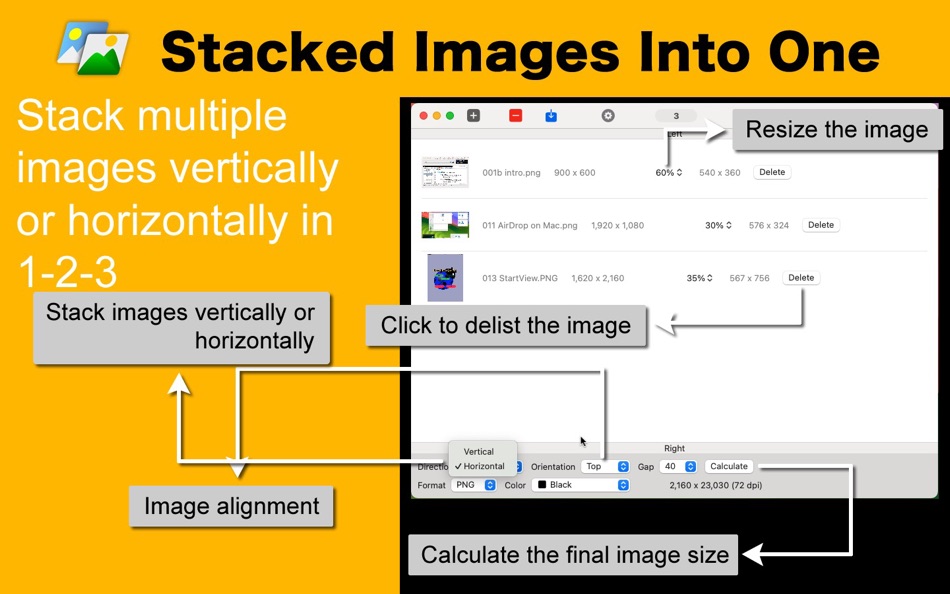
2. Set a direction (horizontal or vertical) and orientation (alignment).
3. Select a background color and a gap.
4. Click on the export toolbar buttons.
- Features
1. Drag and drop multiple image files directly onto application’s window.
2. Stack multiple images together horizontally. Choose right, center or left alignment.
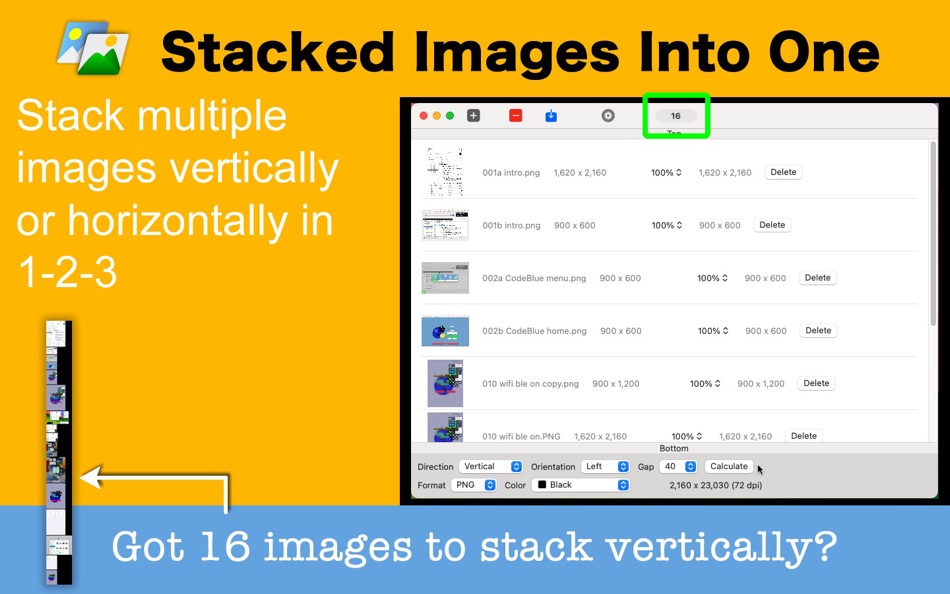
3. Stack multiple images together vertically. Choose top, middle or bottom alignment.
4. Resize images individually.
5. Select a gap (0, 10, 20, …100 points).
6. Calculate a final image size.
7. Select one of seventeen background colors.
8. Set your own default final image file name.
9. Set your own default open folder where to select image files.
10.Set your own default folder where to save a final stack image.
11. Pile one image over another. (Version 1.1.0)
12.The application supports the dark mode.
13.The fullScreen mode is supported.
14.The application supports the retina screen. (tested with 2019 3 GHz 27″ iMac)
15.Languages: English only.
16.Application file size: 7.0 MB.
17.The application comes with a built-in 10-page user's guide. Click on Quick guide over the Introduction screen.
- System requirements
1. macOS 13.5 (Universal)
- Limitations
1. One can stack as many as two images together without an in-app purchase.
2. One can pile as many as two images without an in-app purchase.
3. How many images this application can stack into one depends on several factors. One may be able to manage to stack 41 images vertically, each of which has a size of 1,200 px x 750 px (72 dpi), with a 50-point gap into one, producing a 1200 px × 32,750 px final image (72 dpi), using a 16-GB memory Mac mini (Apple M2). Yet, there are always limits as to what a software application can do.
スクリーンショット



新機能
- バージョン: 1.1.2
- アップデート:
- 1. Fix: The dark green and the green colors incorrectly appeared in the color drop-down menu.
価格
-
* アプリ内購入あり - 今日: フリー
- 最小値: フリー
- 最大: フリー
料金のチェック
デベロッパー
ポイント
0 ☹️
ランキング
0 ☹️
リスト
0 ☹️
レビュー
最初のクチコミを書こう 🌟
情報
- バージョン: 1.1.2
- カテゴリ:
macOS アプリ›グラフィック&デザイン - オペレーティング システム:
macOS,macOS 13.5 以上 - サイズ:
2 Mb - サポートされる言語:
English - コンテンツのレーティング:
4+ - Mac App Store 評価:
0 - アップデート:
- リリース日:
Stacked Images Into One 短縮 URL: コピーしました!- 🌟 シェア
- Mac App Store
あなたも好きかも
-
- Images 2 JPEG - Batch convert
- macOS アプリ: グラフィック&デザイン 作者: BraveCloud
- $6.99
- リスト: 0 + 0 ランキング: 0 レビュー: 0
- ポイント: 0 + 0 バージョン: 4.0 Turn whole sets of images into clean, ready to share JPEGs in seconds. Images 2 JPEG Batch convert is a focused, Mac native tool that does one thing exceptionally well: batch convert ... ⥯
-
- Angry Images
- macOS アプリ: グラフィック&デザイン 作者: Tomoyuki Okawa
- * フリー
- リスト: 0 + 0 ランキング: 0 レビュー: 0
- ポイント: 0 + 0 バージョン: 1.0.1 One night, I was given a task of converting a bunch of PNG images into JPEG files with a white background. It was supposed to be a 3-minute easy task done and going home, but I failed ... ⥯
-
- 2000 Plus Royalty Free Images for Mac OS X
- macOS アプリ: グラフィック&デザイン 作者: Infinite Loop Apps
- $5.99
- リスト: 0 + 1 ランキング: 0 レビュー: 0
- ポイント: 0 + 0 バージョン: 1.3.1 The 2000 Royalty Free Images library contains over 2000 royalty free stock images that can be used for your commercial and non-commercial projects. Most of the photos are extra ... ⥯
-
- Background Images for Safari
- macOS アプリ: グラフィック&デザイン 作者: UAB Macmanus
- $4.99
- リスト: 0 + 0 ランキング: 0 レビュー: 0
- ポイント: 2 + 0 バージョン: 1.0 Easily changeable and professionally designed backgrounds for unforgettable and even better internet browsing experiences. - Stylish browsing simplicity. Browsing could be more playful ⥯
-
- GoProd: Enhance images with AI
- macOS アプリ: グラフィック&デザイン 作者: Icons8 LLC
- フリー
- リスト: 0 + 0 ランキング: 0 レビュー: 0
- ポイント: 2 + 0 バージョン: 1.2.2 GoProd is an image upscaler and background remover in a single app. Powered by AI, it is an absolute no-brainer. Drop your images onto the app window and get the resulting images a few ⥯
-
- iCutout - Cut Out Images
- macOS アプリ: グラフィック&デザイン 作者: 永康 李
- * フリー
- リスト: 0 + 0 ランキング: 0 レビュー: 0
- ポイント: 1 + 0 バージョン: 9.5.6 Cutting out images becomes easier. 1. About Eraser Tool The eraser tool operates in roughly the same way as the brush tool, but instead of changing the pixels in the stroke to the ... ⥯
-
- Pixelate - Redact Your Images!
- macOS アプリ: グラフィック&デザイン 作者: Jan-Niklas FREUNDT
- $4.99
- リスト: 0 + 0 ランキング: 0 レビュー: 0
- ポイント: 0 + 0 バージョン: 1.0 Pixelate helps you to redact parts of your photos and images quickly. Hide sensitive details of your documents, agreements, passport, driver s license and everything else you can think ⥯
-
- Convert All Images
- macOS アプリ: グラフィック&デザイン 作者: Clovis Michel Pedroso Picanco
- $6.99
- リスト: 0 + 0 ランキング: 0 レビュー: 0
- ポイント: 0 + 0 バージョン: 2.2 65% Off - Limited Time Offer Convert All Images is the best solution for who wants to convert any type of image to a different format. It s easy and simple and it has an intuitive ... ⥯
-
- Optimize Images
- macOS アプリ: グラフィック&デザイン 作者: App Manufacture GmbH
- フリー
- リスト: 0 + 0 ランキング: 0 レビュー: 0
- ポイント: 0 + 0 バージョン: 1.0.6 Compress your images without losing quality. Save disk space and make your website load faster. Optimize your images for the web and score 100/100 in the Google PageSpeed Test. ... ⥯
-
- Paint Pad
- macOS アプリ: グラフィック&デザイン 作者: 勇 陈
- $9.99
- リスト: 0 + 0 ランキング: 0 レビュー: 0
- ポイント: 0 + 0 バージョン: 7.12.0 Paint Pad is a paint app for macOS which is similar to Microsoft Paint. It provides you the basic tools to draw quickly and allows the users to add text on images and resize, rotate, ... ⥯
-
- Blayz
- macOS アプリ: グラフィック&デザイン 作者: Yasuhiko Machino
- $2.99
- リスト: 0 + 0 ランキング: 0 レビュー: 0
- ポイント: 0 + 0 バージョン: 1.3.3 Blayz is a powerful yet simple macOS application designed to streamline your image slicing workflow. # Main Features Drag & Drop Simplicity Simply drag your images into Blayz to get ... ⥯
-
- Icon Composer
- macOS アプリ: グラフィック&デザイン 作者: David Thompson
- $0.99
- リスト: 0 + 0 ランキング: 0 レビュー: 0
- ポイント: 0 + 0 バージョン: 1.22 Icon Composer is a tool for those who want to reduce the time they spend creating high quality icons from existing images. Icons can be used on any device, Apple or otherwise. Use them ⥯
-
- Linearity Curve Graphic Design
- macOS アプリ: グラフィック&デザイン 作者: Linearity GmbH
- フリー
- リスト: 7 + 4 ランキング: 5 (1) レビュー: 0
- ポイント: 7 + 14,216 (4.5) バージョン: 6.4.4 Vector drawing. Vector art. Graphic design. SVG. Vectorize in seconds. Linearity Curve is a modern vector drawing program and complete Graphic Design Software for iPhone, iPad, and ... ⥯
-
- Mangekyou Studio
- macOS アプリ: グラフィック&デザイン 作者: 卓 尹
- * フリー
- リスト: 0 + 0 ランキング: 0 レビュー: 0
- ポイント: 0 + 0 バージョン: 1.2 Mangekyou Studio turns your ideas into production-ready images in seconds. Connect to your own Stable Diffusion WebUI (A1111/forge/reforge) or NovelAI server and create stunning ... ⥯