
| Concepteur: | Shiny Frog Ltd. (3) | ||
| Prix: | * Gratuit | ||
| Classements: | 0 | ||
| Avis: | 0 Rédiger un avis | ||
| Listes: | 0 + 2 | ||
| Points: | 2 + 0 ¡ | ||
| Mac App Store | |||
Description

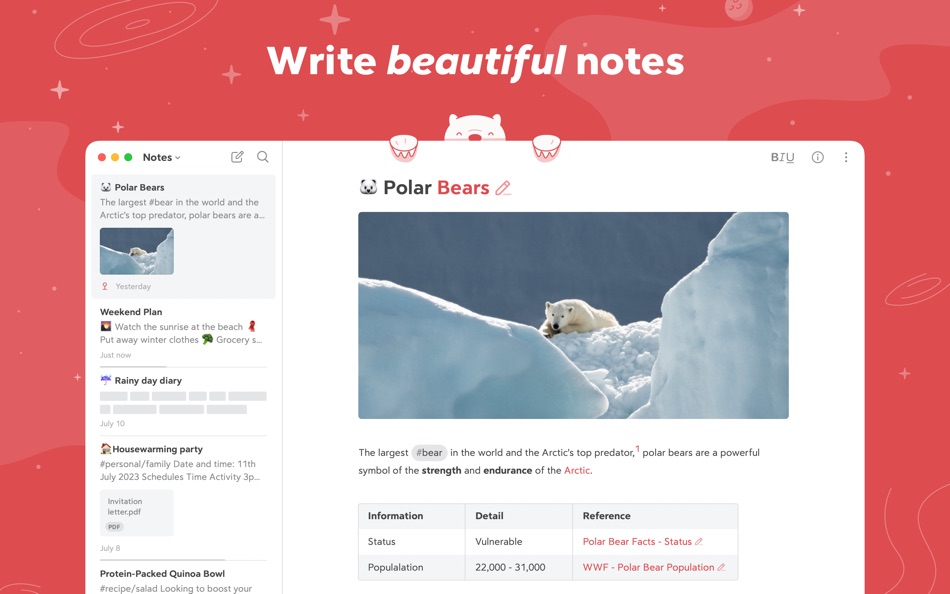
Take notes, plan your day, journal thoughts, organize tables, create lists and tasks, sketch ideas, link notes together, write a book, and much more. Bear is used by writers, lawyers, chefs, CEOs, teachers, doctors, engineers, students, parents.. you get the picture. Getting started couldn’t be faster—no signup and no account. Just open a note and write naturally.
"My journaling app of choice is Bear" - Kit Eaton, New York Times
* 2017 Apple Design Award
* 2016 App Store App of the Year
* Editors' choice for 7 consecutive years
* Most of our parents love it
## BEAUTIFUL. SIMPLE. POWERFUL. PRIVATE
- Tools stay out of your way so you can just write
- Clip web pages and other content with Bear’s app extension
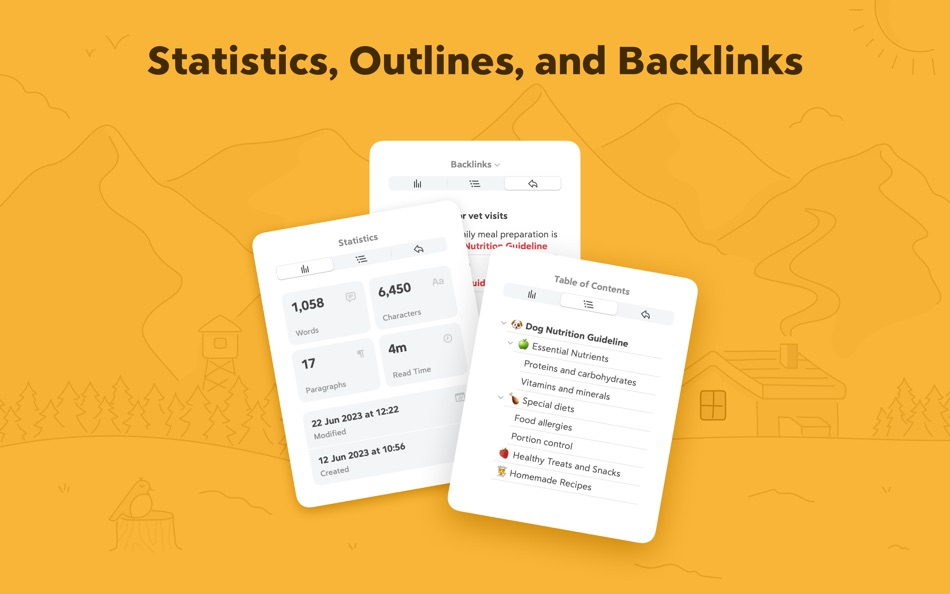
- The redesigned Info Panel now with Table of Contents and Backlinks
- Support for all the scripts including RTL languages like Arabic, Hebrew, and Persian
- Easily create notes with Siri and Shortcuts
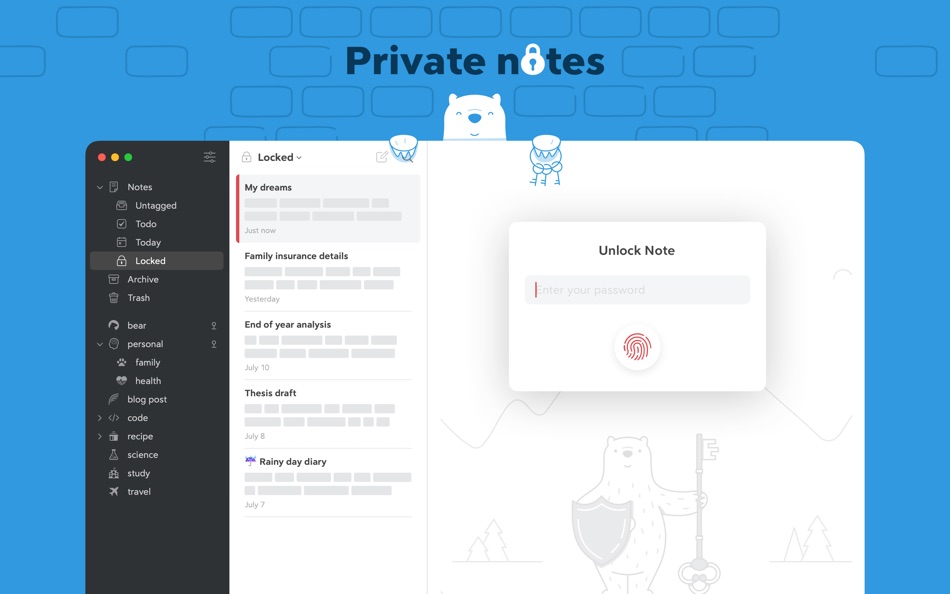
- Your notes, not ours - Bear is private at its core: We cannot see your notes, tags, or anything else
## FLEXIBLE MARKDOWN
- Work in plain text - easy to move between apps
- Still use formatting like bold, italics, strikethrough, links, tables, and more with Markdown
- Combine text styles like bold and underline, even in headings
- Markdown hides for a clean reading experience
- Use WikiLinks to connect notes and build a personal wiki or knowledge management tool
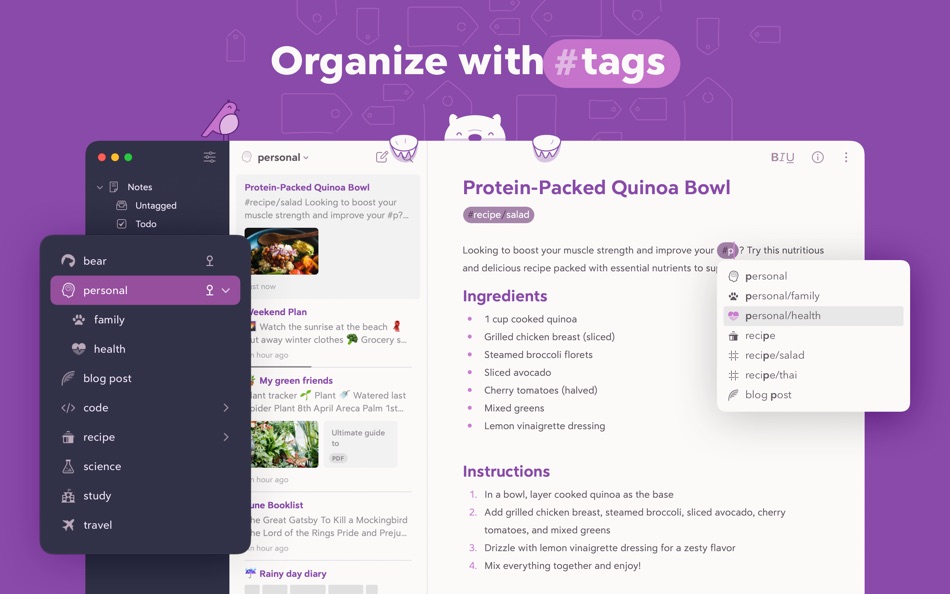
## GET ORGANIZED with #tags, tasks, and more
- Add #tags, #multi-word tags# and even #multiple/nested/tags anywhere in a note for quick organization
- Pin important tags to the top of the Sidebar
- Make important tags stand out in the Sidebar with TagCons
- Add tasks to notes and easily view all notes that include tasks
- Fold sections to get them out of the way
## SHARING MADE EASY
- Export notes to plain text, Markdown, TextBundle, Bear note, and rich text
- Export notes to HTML, DocX, PDF, JPG, and ePub (Bear Pro required)
- Easily share your notes to any third-party app with the Share Sheet
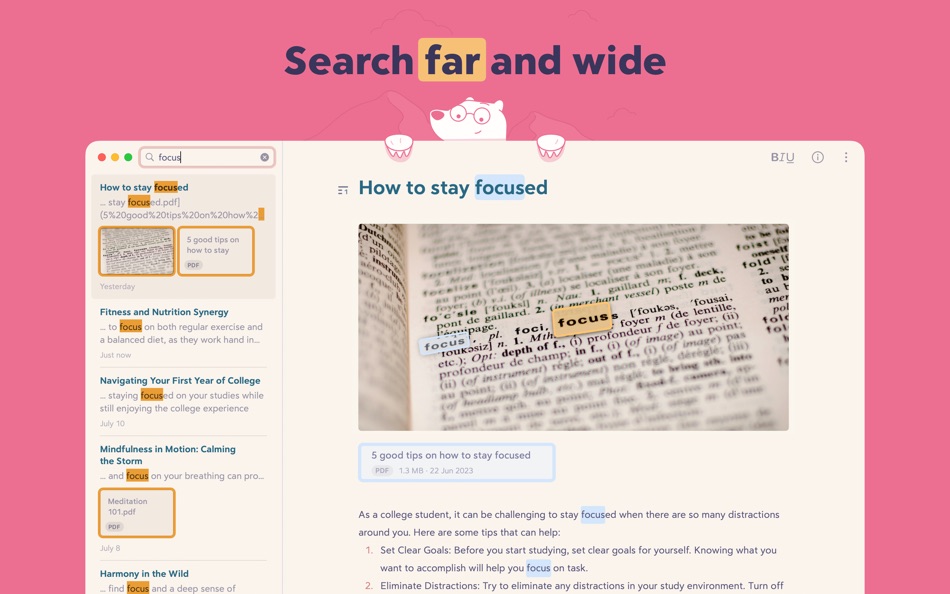
## SEARCH FAR AND WIDE
- Use Spotlight to search your notes from anywhere
- Search for text inside photos and PDFs (Bear Pro required)
- Focus on specific types of notes with powerful Special Searches like @todo, @images, and @yesterday
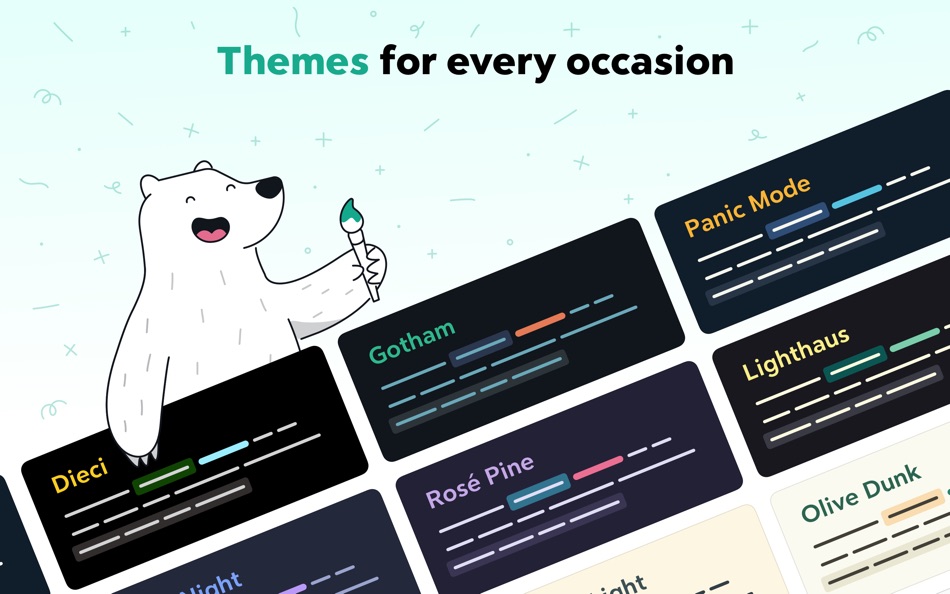
## CREATE YOUR COZY SPACE
* Pick from nearly 30 themes for the perfect writing space in both Light and Dark Mode (Bear Pro required)
* Choose an app icon that speaks to your personality (Bear Pro required)
* Set your own fonts for plain text, headings, and code
* Set line height and width, paragraph spacing, and more
## GET MORE WITH BEAR PRO
One subscription enables a variety of features on all your devices and keeps the Bear hugs coming.
- Sync notes between your iPhone, iPad, and Mac via iCloud
- Encrypt individual notes with a password that is entirely private to you
- Lock Bear with Face/Touch ID
- Export to more formats including HTML, DocX, PDF, JPG, and ePub
- Search for text inside images and PDFs in Bear notes
- Over 30 beautiful app themes & app icons
$2.99 monthly
$29.99 yearly
14-day free trial
-----
Price may vary by location. Subscriptions will be charged to your credit card through your App Store account. Your subscription will automatically renew unless canceled at least 24 hours before the end of the current period. You will not be able to cancel the subscription once activated. After purchase, manage your subscriptions in App Store Account Settings. Any unused portion of a free trial period will be forfeited when the user purchases a subscription.
-----
bear@shinyfrog.net
Twitter: BearNotesApp
Reddit: reddit.com/r/BearApp
Facebook: BearNotes
Instagram: BearNotesApp
Privacy Policy: http://www.bear.app/privacy/
Terms of Service: http://www.bear.app/terms/
Captures d'écran

Nouveautés
- Version: 2.6.6
- Mis à jour:
- - Resolved a crash triggered when toggling column visibility in full-screen mode
- Refactored and optimized pasteboard management for improved stability
- Implemented multiple enhancements to Bear’s Web Clipper for more reliable data capture
- Corrected an issue preventing consistent thumbnail generation
- Fixed a state-synchronization bug that could leave the editor in an inconsistent state
Prix
-
* Achats intégrés - Aujourd’hui: Gratuit
- Minimum: Gratuit
- Maximum: Gratuit
Suivre l'évolution des prix
Concepteur
- Shiny Frog Ltd.
- Plateformes: iOS Applications (1) macOS Applications (2)
- Listes: 1 + 3
- Points: 11 + 6,790 ¡
- Classements: 5 (1)
- Avis: 0
- Remises: 0
- Vidéos: 0
- RSS: S'abonner
Points
-

- 541 MichaelTheGeek
- +1
-
- 3,040 바람처어럼
- +1


Classements
0 ☹️
Listes
0 ☹️
- Bear: Markdown Notes
Avis
Soyez le premier à donner votre avis 🌟
Informations supplémentaires
- Version: 2.6.6
- Catégorie:
macOS Applications›Productivité - Systèmes d'exploitation:
macOS,macOS 12.4 ou version ultérieure - Taille:
29 Mb - Langues prises en charge:
Chinese,English,French,German,Italian,Japanese,Korean,Portuguese,Russian,Spanish - Classification du contenu:
4+ - Mac App Store Note:
0 - Mis à jour:
- Date de sortie:
Contacts
- Site Web:
 https://bear.app
Bear: Markdown Notes URL courte: Copié!- 🌟 Partager
- Mac App Store
Découvrez également
-
- Markdown Notes App
- macOS Applications: Productivité De: Constellation Ltd
- Gratuit
- Listes: 0 + 0 Classements: 0 Avis: 0
- Points: 2 + 3 (3.7) Version: 1.0.7 Markdown Editor Plus is the perfect app for anyone looking for a simple yet powerful tool to write and edit text in Markdown format. Designed with a clean and easy-to-use interface, ... ⥯
- Nouvel
- Instant Markdown Notes
- macOS Applications: Productivité De: Pradeep Burugu
- * Gratuit
- Listes: 0 + 0 Classements: 0 Avis: 0
- Points: 0 + 0 Version: 1.5 Instant Markdown Notes It's an app designed for taking notes throughout your day in markdown files, allowing you to capture notes instantly from anywhere on macOS. You don't even have ... ⥯
-
- Metion: Markdown Notes
- macOS Applications: Productivité De: Hangzhou Quanduan Technology Co., Ltd.
- * Gratuit
- Listes: 1 + 0 Classements: 0 Avis: 0
- Points: 5 + 46 (4.3) Version: 3.8.5 Metion is a notebook tool that focuses on the writing experience, uses Markdown as basic text syntax. ## Build Your Own Knowledge Base Metion 2.0 brings a new feature named "Knowledge ... ⥯
-
- TakeNote: AI Markdown Notes
- macOS Applications: Productivité De: Adam Drew
- Gratuit
- Listes: 0 + 0 Classements: 0 Avis: 0
- Points: 0 + 3 (5.0) Version: 1.1.2 TakeNote is a fast, elegant, and distraction-free way to capture your ideas. Built exclusively for Apple platforms with SwiftUI and SwiftData, it feels right at home on macOS and iOS. ... ⥯
-
- Markdown Pro
- macOS Applications: Productivité De: RADSense Software
- $5.99
- Listes: 1 + 0 Classements: 0 Avis: 0
- Points: 0 + 0 Version: 1.0.9 Best Markdown Syntax Editor With Markdown PRO you can write beautiful documentation, notes, essays, term papers all by using plain text to tag your formatting such as bold, italic, ... ⥯
-
- Markdown - Enjoy writing
- macOS Applications: Productivité De: xiao luo
- $7.99
- Listes: 1 + 0 Classements: 0 Avis: 0
- Points: 0 + 0 Version: 1.3.3 I'm Markdown, the Markdown editor for OS X. This is a powerful Markdown editor, very design, UI simple and user-friendly interactive experience, let us focus more on writing. Markdown ... ⥯
-
- Markdown+ Text & Code Editor
- macOS Applications: Productivité De: Zetegy LLC
- $4.99
- Listes: 0 + 0 Classements: 0 Avis: 0
- Points: 1 + 0 Version: 1.8.10 Introducing the native, real-time Markdown editor with superpowers. Markdown+ has been meticulously crafted for Vision Pro, iPhone, iPad, and Mac. With blazing-fast performance and ... ⥯
-
- Markdown Peek
- macOS Applications: Productivité De: Michael Thingmand
- Gratuit
- Listes: 0 + 0 Classements: 0 Avis: 0
- Points: 1 + 0 Version: 1.0 Description: Markdown Peek is a simple, elegant markdown viewer for macOS. Set it as your default app for .md files and enjoy instant, beautiful rendering. Features: Instant Preview ... ⥯
-
- Markdown+
- macOS Applications: Productivité De: InSili.co
- $14.99
- Listes: 0 + 0 Classements: 0 Avis: 0
- Points: 0 + 0 Version: 3.3 Edit, style, preview and export your Markdown in macOS. With style. Like a breeze. Easy-to-use Getting started is really easy. Just open the editor and start writing. Your text will be ⥯
-
- Notes Air - Simple Notes
- macOS Applications: Productivité De: Air Apps Systems
- Gratuit
- Listes: 0 + 0 Classements: 0 Avis: 0
- Points: 3 + 8 (4.4) Version: 2025.8.1 Simple and easy-to-use notepad. Generate Text Based on Your Input, and stay organized. Download the app now! Notes AIR is a simple notepad where you can create, edit and capture your ... ⥯
- Nouvel
- Notes Hub & Tasks
- macOS Applications: Productivité De: ALEKSANDR KOFMAN
- $1.99
- Listes: 0 + 0 Classements: 0 Avis: 0
- Points: 0 + 0 Version: 1.0 Notes Hub is a beautifully designed, clutter-free productivity app that combines note-taking and task management in one seamless experience. Perfect for professionals, students, and ... ⥯
-
- Markdown Book Compiler
- macOS Applications: Productivité De: Lotus Core
- $34.99
- Listes: 0 + 0 Classements: 0 Avis: 0
- Points: 0 + 0 Version: 1.1.2 Markdown Book Compiler makes it easy for self-publishers, authors, bloggers, and educators to turn plain-text .md files into fully formatted, beautifully styled eBooks without using ... ⥯
- Nouvel
- Markdown Web Writer
- macOS Applications: Productivité De: Eric Kampman
- $19.99
- Listes: 0 + 0 Classements: 0 Avis: 0
- Points: 0 + 0 Version: 1.0 Markdown Web Writer is a focused macOS application for turning Markdown into clean, dependable HTML and PDF output. It s designed as a professional, single-purpose tool that emphasizes ⥯
-
- Markdown Editor
- macOS Applications: Productivité De: Satoshi Iwaki
- Gratuit
- Listes: 0 + 0 Classements: 0 Avis: 0
- Points: 1 + 0 Version: 1.5.0 Markdown Editor is a lightweight markdown editor. MAIN FEATURES - Syntax highlighting - Display line numbers - Auto preview - Export to HTML ⥯