
| 開發人員: | Ori Roniger (18) | ||
| 價錢: | $1.99 | ||
| 排名: | 0 | ||
| 評測: | 0 寫評論 | ||
| 清單: | 0 + 0 | ||
| 點數: | 0 + 0 ¡ | ||
| Mac App Store | |||
描述

_________________________________
Key Features
• Auto-Sort on Capture
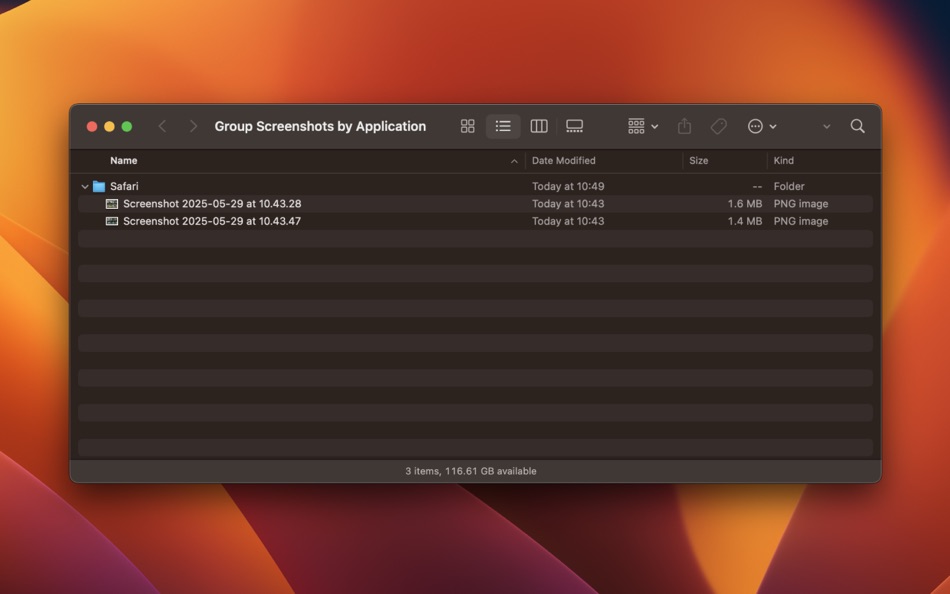
Instantly move every new screenshot (⌘⇧ 3 or ⌘⇧ 4) and recording (⌘⇧ 5) into the folder you specify - keeping your Desktop tidy without lifting a finger.
• Flexible Grouping
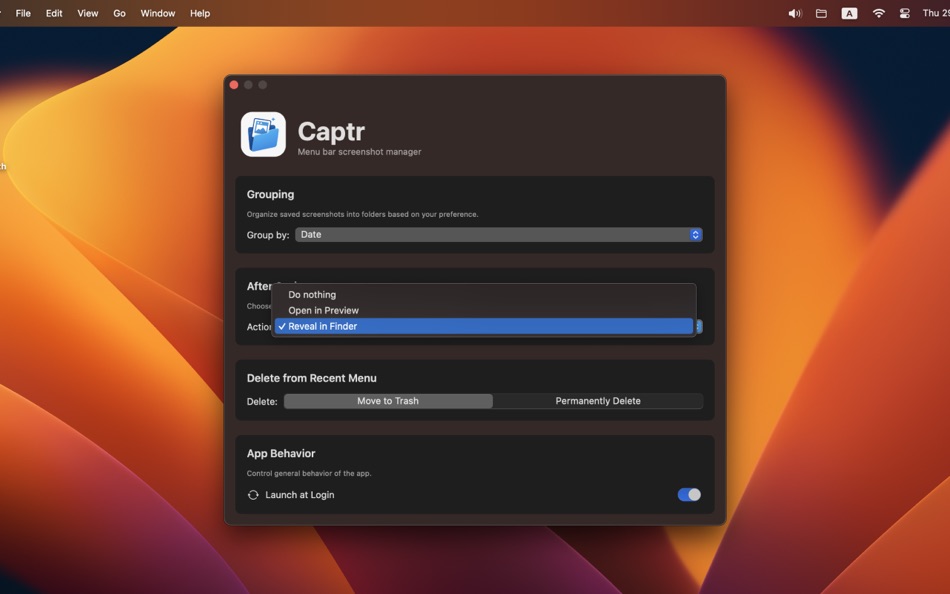
Organize your captures by application, by date (year and month), or by both—tailor Captr to your workflow.
• Auto-Recovery of Folders
Accidentally delete a destination folder? Captr will automatically recreate it (no need to reselect).
• Recent Snapshots Submenu
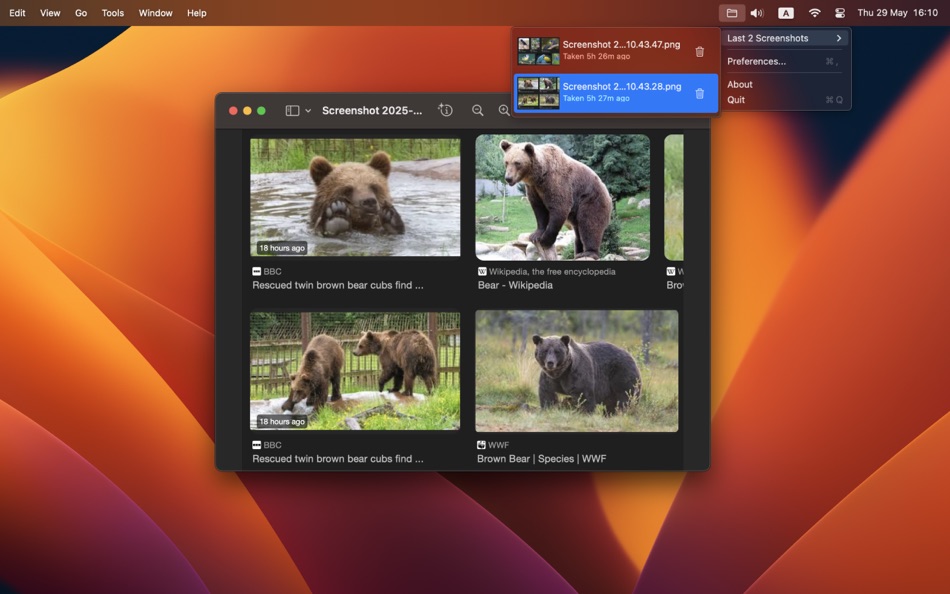
One click reveals your five latest captures (up to 20, if you prefer), each with a live thumbnail. Open any of them directly from the menu.
• Enhanced Delete Confirmation
When you delete a snapshot, you’ll see its thumbnail in a frontmost alert - so you always know exactly what you’re removing.
• Quick "Show in Finder"
Need to share, edit, or upload? Captr will open the folder and highlight your selected capture for you.
• Custom Destinations
Set separate folders for screenshots and recordings.
• Lightweight & Invisible
Runs as an accessory app (no Dock icon), only appears in your menu bar. Start at login so it’s always ready when you hit ⌘⇧ 3 or ⌘⇧ 4.
• Performance-Focused
Built with DispatchSource APIs to watch folders efficiently, even under heavy capture loads.
• Configurable Feedback
Toggle "Open in Finder after saving" or "View file after saving" to your preference.
_________________________________
Why Captr?
• Stop Losing Captures
Never miss a screenshot by accidentally saving to the wrong place.
• Boost Productivity
Spend less time organizing files and more time creating.
• Stay Focused
No more context-switching to Finder or Terminal to find that one screenshot.
_________________________________
Getting Started
1. On first launch, you’ll be prompted to choose the folder where your screenshots are currently saved (you can always remap it later via Change watched screenshots folder…).
2. Click the Captr icon in the menu bar (it may be hidden at the far right among your other icons).
3. Select your image destination by clicking Change screenshots folder…, and your video destination with Change recordings folder…. While the app is running, all new captures will be moved into those folders.
4. (Optional) Toggle Open in Finder after saving or View file after saving to your preference.
5. (Optional) Choose View Recent Screenshots… to see up to your latest 20 captures (provided they remain in those folders and haven’t been renamed).
6. Delete screenshots right from the Recent Snapshots menu, choosing whether to move them to Trash or delete permanently.
7. Capture as usual—Captr handles the rest.
_________________________________
Support & Feedback
Captr is under active development. If you have a feature request, encounter an issue, want to assist with localization, or just want to say hello, please reach out at support@comnet.co.il.
Enjoy a cleaner, more organized workflow—one capture at a time.
螢幕擷取畫面




新功能
- 版本: 1.06
- 發佈日期:
- Show all destination folder png/mov files in recents
Renaming file automatically refreshes the recents list
價錢
- 今天: $1.99
- 最小值: $1.99
- 最大值: $1.99
追蹤票價
開發人員
- Ori Roniger
- 平台: macOS 應用程式 (18)
- 清單: 0 + 0
- 點數: 11 + 0 ¡
- 排名: 0
- 評測: 0
- 折扣: 0
- 影片: 0
- RSS: 訂閱
點數
0 ☹️
排名
0 ☹️
清單
0 ☹️
評測
成為第一個評論 🌟
其他資訊
- 版本: 1.06
- 類別 :
macOS 應用程式›生產應用 - OS:
macOS,macOS 11.0 以上版本 - 大小:
1 Mb - 支援的語言 :
English - 內容分級:
4+ - Mac App Store 評分:
0 - 發佈日期:
- 發行日期:
聯絡人
- 個人網站:
 https://roniger.co.il
Captr 縮短網址: 已複製!- 🌟 分享
- Mac App Store
你可能還喜歡
-
- Notability: Smarter AI Notes
- macOS 應用程式: 生產應用 由: Ginger Labs
- 免費
- 清單: 30 + 19 排名: 5 (2) 評測: 0
- 點數: 28 + 431,812 (4.8) 版本: 15.1.4 Notes that move you forward. The award-winning note-taking app loved by millions is free to download, simple to use, and powerful enough to support your everyday goals. Whether you re ... ⥯
-
- Goodnotes: AI Notes, Docs, PDF
- macOS 應用程式: 生產應用 由: Goodnotes Limited
- * 免費
- 清單: 42 + 32 排名: 0 評測: 0
- 點數: 32 + 373,185 (4.7) 版本: 7.0.20 Goodnotes has always been the place to capture your ideas from quick notes to big plans. Now, it goes further. With powerful AI and new ways to capture information, Goodnotes helps you ⥯
-
- Structured - Daily Planner
- macOS 應用程式: 生產應用 由: unorderly GmbH
- 免費
- 清單: 4 + 2 排名: 0 評測: 0
- 點數: 5 + 149,563 (4.8) 版本: 4.3.12 Finally take control of your day. Plan with a clear visual timeline that brings your calendar, to-dos, routines, and habits together. Join over 1.5 million active planners who feel ... ⥯
-
- AI Chat Assistant – ChatNow
- macOS 應用程式: 生產應用 由: tappz
- 免費
- 清單: 0 + 0 排名: 0 評測: 0
- 點數: 5 + 122,118 (4.8) 版本: 5.4.0 ChatNow - Make AI Your Advantage Get more done with ChatNow, the #1 AI assistant designed for busy people. Write emails and reports, check facts, compare products, create images or ... ⥯
-
- Best VPN : Unlimited VPN Proxy
- macOS 應用程式: 生產應用 由: VPN LLC US
- 免費
- 清單: 4 + 1 排名: 0 評測: 0
- 點數: 14 + 121,877 (4.6) 版本: 4.042 Best VPN - Unlimited VPN Proxy: Your Privacy Companion Protect your privacy, secure your connection, and surf the internet freely with Best VPN. No sign ups. No logins. One tap to ... ⥯
-
- Calendars: Schedule Planner
- macOS 應用程式: 生產應用 由: Readdle Technologies Limited
- 免費
- 清單: 2 + 0 排名: 0 評測: 0
- 點數: 7 + 116,150 (4.7) 版本: 5.37.12 Calendars by Readdle is the all-in-one calendar, task manager, daily planner, and habit tracker seamlessly working across all your Apple devices: Mac, iPhone, iPad, and Apple Watch. ... ⥯
-
- Dashlane Password Manager
- macOS 應用程式: 生產應用 由: Dashlane
- * 免費
- 清單: 1 + 1 排名: 0 評測: 0
- 點數: 3 + 100,589 (4.8) 版本: 6.2549.0 SECURE YOUR DAILY DIGITAL LIFE - Create a strong, unique password for every account - Share passwords and data securely (instead of over text or email) - Lock down sensitive info and ... ⥯
-
- iLovePDF - PDF Editor & Scan
- macOS 應用程式: 生產應用 由: iLovePDF
- 免費
- 清單: 1 + 0 排名: 0 評測: 0
- 點數: 1 + 45,825 (4.8) 版本: 3.12.5 Read, convert, annotate and sign PDF in just a few seconds with this handy document scanner and editor. Boost your productivity with every tool you need to work on the go. PHONE ... ⥯
-
- Authenticator App
- macOS 應用程式: 生產應用 由: 2Stable
- 免費
- 清單: 0 + 0 排名: 0 評測: 0
- 點數: 0 + 42,128 (4.6) 版本: 3.39.1 Authenticator App helps you keep your online accounts safe by giving you secure two-factor authentication codes for all your accounts. Key Features of the Authenticator App: - Secure & ⥯
-
- Form for Google Forms
- macOS 應用程式: 生產應用 由: Amad Marwat
- 免費
- 清單: 0 + 0 排名: 0 評測: 0
- 點數: 0 + 36,512 (4.8) 版本: 1.8.2 Create, edit, and manage all your Google forms on your iOS, iPhone, iPod or iPad with the free FormApp. With this app you can: Create new forms: Create new forms on your iOS device. ... ⥯
-
- Shapr 3D CAD modeling
- macOS 應用程式: 生產應用 由: Shapr3D Zrt
- * 免費
- 清單: 2 + 1 排名: 0 評測: 0
- 點數: 7 + 32,320 (4.7) 版本: 5.1010 From design to manufacturing. Teams collaborate with more impact. Instinctive design meets multidevice capability and full interoperability for the ultimate 3D design workflow. All ... ⥯
-
- ScreenZen- Screen Time Control
- macOS 應用程式: 生產應用 由: ScreenZen LLC
- 免費
- 清單: 0 + 0 排名: 0 評測: 0
- 點數: 2 + 28,150 (4.8) 版本: 1.2.173 Multiple strategies to reduce your screentime 1. Delay before opening your app: A bit of time before choosing if you need to open your distracting app. You can have the wait time ... ⥯