
| Nhà phát triển: | 兰桂 吴 (58) | ||
| Giá bán: | Miễn phí | ||
| Xếp hạng: | 0 | ||
| Đánh giá: | 0 Viết đánh giá | ||
| Danh sách: | 0 + 0 | ||
| Điểm: | 1 + 0 ¡ | ||
| Mac App Store | |||
Mô tả

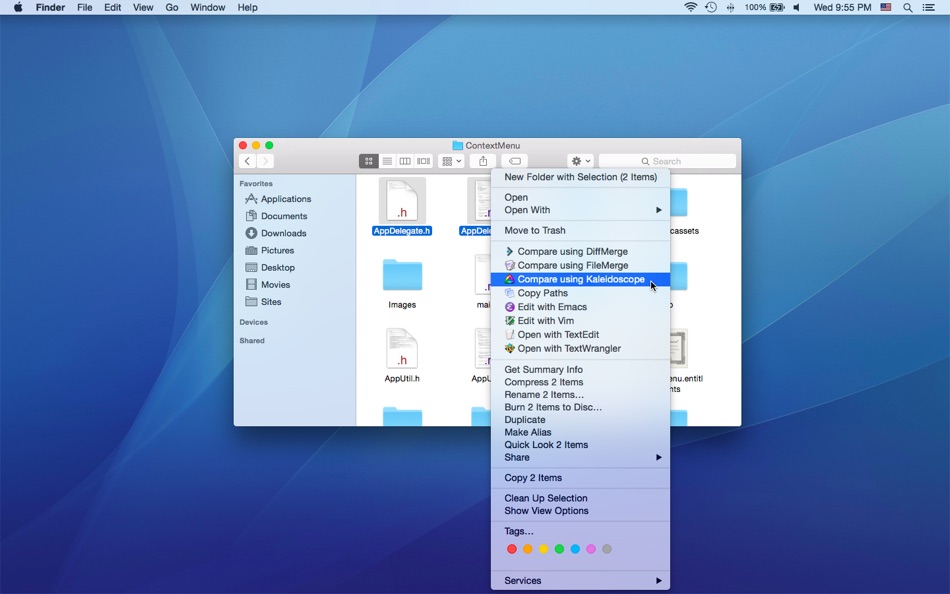
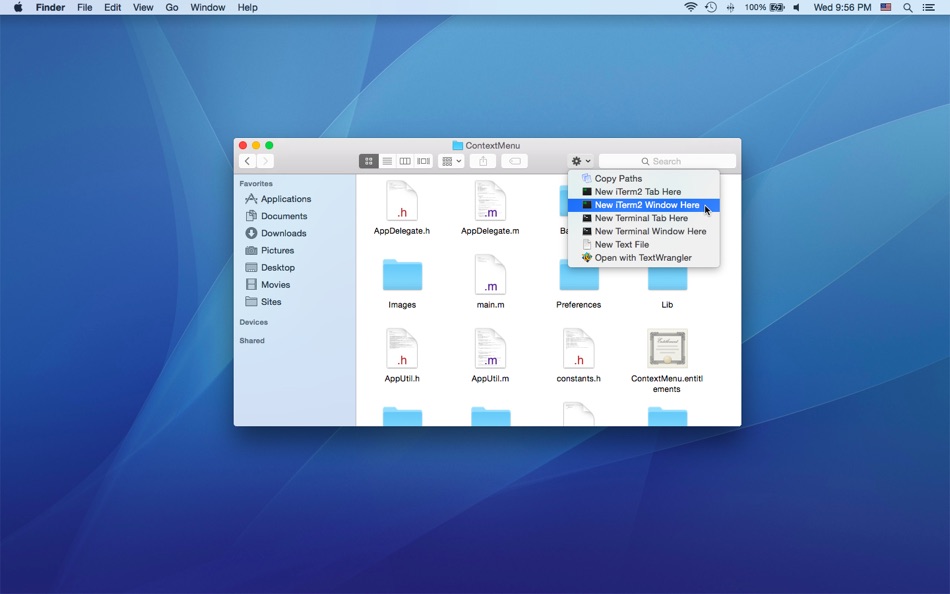
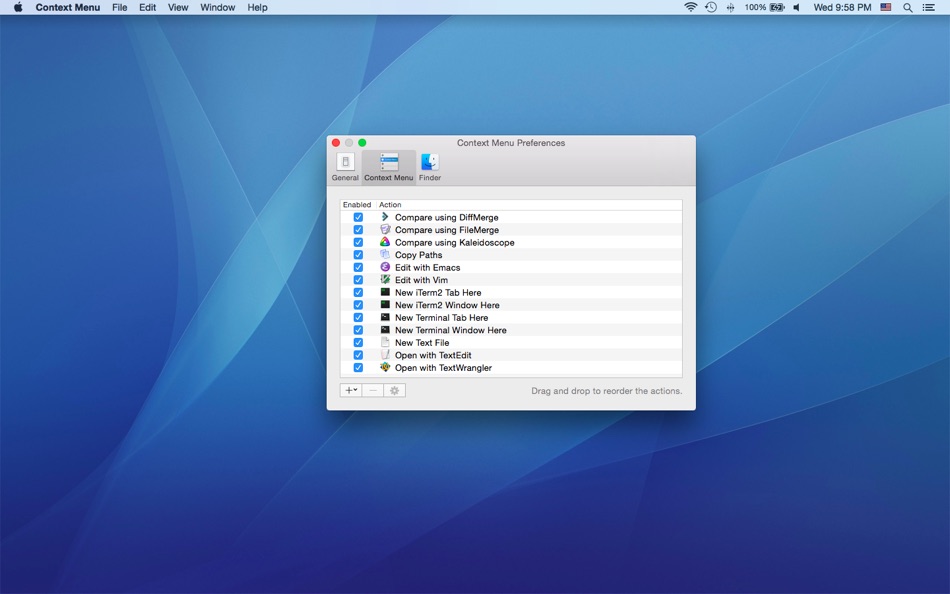
You can easily attach applications / shell scripts / services to the contextual menu of Finder with the help of Context Menu.
Note: Context Menu Lite is implemented as a Finder extension, you need to enable "Context Menu Lite Extension" in "System Preferences » Extensions" to make the context menu appear.
* Context Menu Lite supports up to 3 actions, please purchase Context Menu full version if you would like to support more actions.
* FAQ
Q: I can't find the context menu?
A: Please make sure that you've enabled "Context Menu Lite Extension" in "System Preferences » Extensions", and make sure that you've added the specific location to the Context Menu preferences.
If the problem persists, please disable "Context Menu Lite Extension" in "System Preferences » Extensions" and then enable it again. The last resort is to relaunch Finder or restart your computer.
Q: Is it possible to add the context menu to mounted volumes?
A: Yes. You need to add the volumes to the Context Menu preferences first.
Q: How to hide Context Menu from the Dock?
A: Please simply quit Context Menu, the context menu extension will continue to work.
Q: Where are the actions stored?
A: You can find all the installed actions at "~/Library/Group Containers/85P8ZUTQL8.net.langui.ContextMenuLite/Actions".
Ảnh chụp màn hình
Tính năng mới
- Phiên bản: 1.5
- Cập nhật:
- • Show the actions via a keyboard shortcut (Context Menu Preferences -> General -> Show actions)
Giá bán
- Hôm nay: Miễn phí
- Tối thiểu: Miễn phí
- Tối đa: Miễn phí
Theo dõi giá
Nhà phát triển
- 兰桂 吴
- Nền tảng: iOS Ứng dụng (6) macOS Ứng dụng (52)
- Danh sách: 7 + 6
- Điểm: 21 + 149 ¡
- Xếp hạng: 0
- Đánh giá: 0
- Giảm giá: 0
- Video: 0
- RSS: Đăng ký
Điểm
-

- 2,878 Dragon
- +1

Xếp hạng
0 ☹️
Danh sách
0 ☹️
Đánh giá
Hãy là người đầu tiên đánh giá 🌟
Thông tin bổ sung
- Phiên bản: 1.5
- Danh mục:
macOS Ứng dụng›Năng suất - HĐH:
macOS,macOS 10.10 trở lên - Kích thước:
11 Mb - Ngôn ngữ được hỗ trợ:
Chinese,English - Xếp hạng nội dung:
4+ - Mac App Store Xêp hạng:
0 - Cập nhật:
- Ngày phát hành:
Context Menu Lite URL ngắn: Đã sao chép!- 🌟 Chia sẻ
- Mac App Store
Bạn cũng có thể thích
-
- Menu AI: Ask AI in menu bar.
- macOS Ứng dụng: Năng suất Bởi: INII Co., Ltd.
- * Miễn phí
- Danh sách: 0 + 0 Xếp hạng: 0 Đánh giá: 0
- Điểm: 0 + 0 Phiên bản: 1.2.0 Menu AI - Ask AI in menu bar. Menu AI is a powerful AI chat assistant that lives in your menu bar, providing instant access to both GPT and Claude AI capabilities. With its sleek and ... ⥯
-
- Menu Bar Calendar
- macOS Ứng dụng: Năng suất Bởi: Sindre Sorhus
- Miễn phí
- Danh sách: 2 + 0 Xếp hạng: 0 Đánh giá: 0
- Điểm: 4 + 0 Phiên bản: 1.6.1 Quickly access a monthly calendar from your menu bar. You can click a date in the calendar to reveal it in the Calendar app or Google Calendar. The calendar displays dates and days in ... ⥯
-
- Menu Minder - To Do Reminders
- macOS Ứng dụng: Năng suất Bởi: Limit Point Software
- Miễn phí
- Danh sách: 0 + 0 Xếp hạng: 0 Đánh giá: 0
- Điểm: 1 + 1 (4.0) Phiên bản: 2.1.4 Never forget anything ever again. Menu Minder is an app for organizing reminders. Keep your plans in order and make sure you are reminded of the tasks and plans you have set for ... ⥯
-
- Menu Bar Timer
- macOS Ứng dụng: Năng suất Bởi: Efe Ertugrul
- $0.99
- Danh sách: 0 + 0 Xếp hạng: 0 Đánh giá: 0
- Điểm: 1 + 0 Phiên bản: 2.4.5 Menu Bar Timer adds a Stopwatch or a Timer to your menu bar so you can keep track of time whatever you've been working on without an extra app icon on your dock. You can choose ... ⥯
-
- Menu bar Launcher
- macOS Ứng dụng: Năng suất Bởi: Pawan Dixit
- $1.99
- Danh sách: 1 + 1 Xếp hạng: 0 Đánh giá: 0
- Điểm: 1 + 0 Phiên bản: 1.4 This is a simple menu bar utility to keep your frequent Files and Apps right into the menu bar so that you can quickly launch them when you want to work on them without locating then ... ⥯
-
- Menu Bar Reminder: Dojo
- macOS Ứng dụng: Năng suất Bởi: Florian Schweizer
- Miễn phí
- Danh sách: 1 + 0 Xếp hạng: 0 Đánh giá: 0
- Điểm: 2 + 0 Phiên bản: 1.1 Add a single reminder to your menu bar - always visible. You can enter any text that you'd like to have on the menu bar and it will be shown to you at all times. You can also activate ... ⥯
-
- Menu Bar Hub: work.bench
- macOS Ứng dụng: Năng suất Bởi: Dimitri Giani
- * Miễn phí
- Danh sách: 0 + 0 Xếp hạng: 0 Đánh giá: 0
- Điểm: 0 + 0 Phiên bản: 1.2 work.bench is the ultimate menu bar utility for macOS that revolutionizes your workflow. Designed exclusively for Mac with a beautiful notch-inspired interface, work.bench brings ... ⥯
-
- Menu Timers - High Precision
- macOS Ứng dụng: Năng suất Bởi: DevStorm
- Miễn phí
- Danh sách: 0 + 0 Xếp hạng: 0 Đánh giá: 0
- Điểm: 1 + 0 Phiên bản: 1.0 Time your important tasks straight from the menu bar with this utility app! With millisecond precision, any task can be precisely measured. Features always on screen. The app lives in ... ⥯
-
- Menu Muncher
- macOS Ứng dụng: Năng suất Bởi: 经纬 宛
- $1.99
- Danh sách: 0 + 0 Xếp hạng: 0 Đánh giá: 0
- Điểm: 0 + 0 Phiên bản: 1.5 Q: How should I use this software? A: After opening the software for the first time, two icons will be generated on the leftmost side of the status bar, please drag the word "吃" (hold ... ⥯
-
- Wise Menu
- macOS Ứng dụng: Năng suất Bởi: Wise Tech Labs Private Limited
- $4.99
- Danh sách: 3 + 0 Xếp hạng: 0 Đánh giá: 0
- Điểm: 13 + 0 Phiên bản: 2.2 Wise Menu is an ultra light Finder extension that adds useful actions to the context menu that appears on right clicking any item in Finder. The additional menu items that are added on ⥯
-
- New File Menu Lite
- macOS Ứng dụng: Năng suất Bởi: 兰桂 吴
- Miễn phí
- Danh sách: 1 + 0 Xếp hạng: 0 Đánh giá: 0
- Điểm: 2 + 0 Phiên bản: 1.8.1 New File Menu allows you to create new files quickly via the Finder context menu. New File Menu is simply the coolest way to create a new file on the macOS platform, you can right ... ⥯
-
- Black Menu for Wikipedia
- macOS Ứng dụng: Năng suất Bởi: Carlos Jeurissen
- Miễn phí
- Danh sách: 0 + 0 Xếp hạng: 0 Đánh giá: 0
- Điểm: 1 + 2 (5.0) Phiên bản: 6.7.1 Black Menu for Wikipedia lets you access the best of the Wikipedia Universe, in a simple, easy, and convenient way. This extension has a comprehensive menu of Wikimedia Foundation ... ⥯
-
- Calcularium Context Calculator
- macOS Ứng dụng: Năng suất Bởi: InVooDoo LLC
- Miễn phí
- Danh sách: 0 + 0 Xếp hạng: 0 Đánh giá: 0
- Điểm: 2 + 0 Phiên bản: 1.0.6 If you ever used Spotlight to do your math you probably have noticed that as soon as you switched to the other app, the numbers you've entered before were gone. Calcularium Context ... ⥯
-
- Cool Menu
- macOS Ứng dụng: Năng suất Bởi: SolutionShare Technologies Private Limited
- $3.99
- Danh sách: 1 + 0 Xếp hạng: 0 Đánh giá: 0
- Điểm: 3 + 0 Phiên bản: 1.56 Cool Menu is an assortment of 10 super useful features that are not available on macOS. Instead of multiple menubar apps for each feature wasting your menubar s precious real estate, ... ⥯