
| 開發人員: | Nishchay Karle (1) | ||
| 價錢: | $0.99 | ||
| 排名: | 0 | ||
| 評測: | 0 寫評論 | ||
| 清單: | 0 + 0 | ||
| 點數: | 0 + 0 ¡ | ||
| Mac App Store | |||
描述

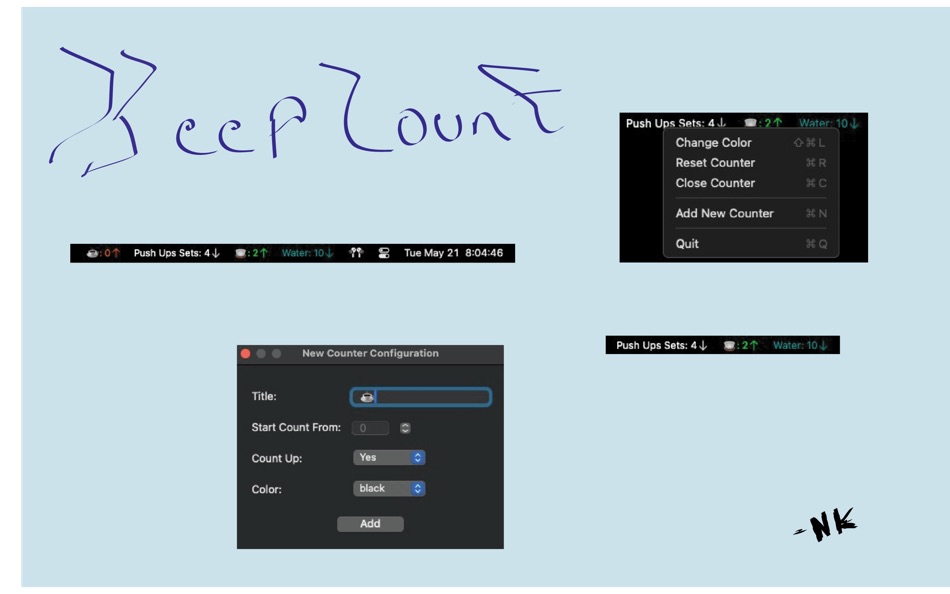
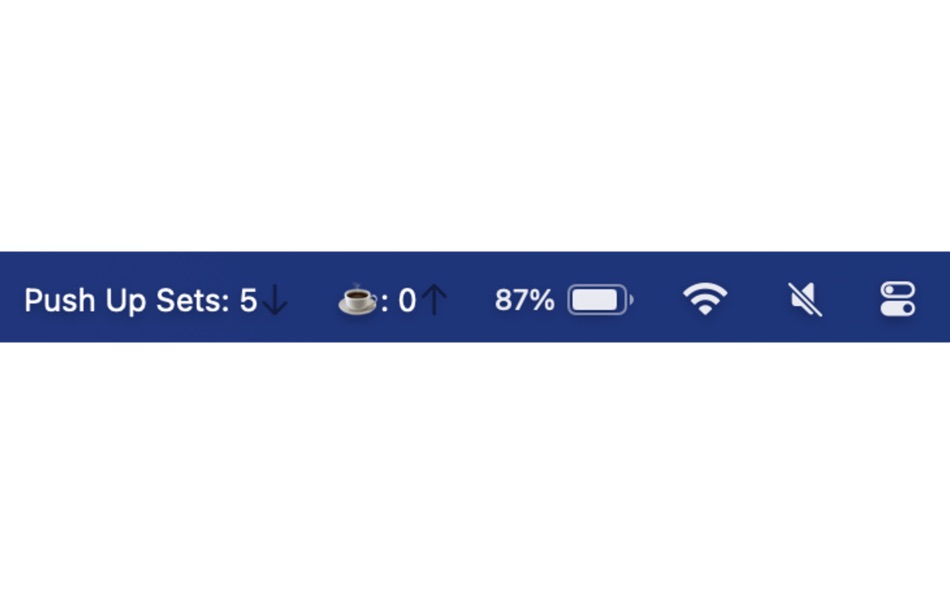
Effortlessly track and manage multiple counters right from your Mac's menu bar with KeepCountLite! Whether you're counting coffee cups, tracking daily tasks, or anything else, Keep Count is the perfect tool to make your counting simple, intuitive, colorful and efficient.
Key Features:
Easy Setup: Start with a "New Counter Configuration" window at launch, allowing you to set up your initial counter quickly.
Multiple Counters: Manage several counters simultaneously, each with its own dedicated status bar icon and settings.
Flexible Counting: Choose to count up or down based on your needs, with options to set the starting point and adjust on the fly.
Interactive Configuration: Use a simple configuration window to update counter titles, initial values, and counting directions.
Immediate Feedback: See real-time updates in your menu bar as you adjust or reset your counters.
Minimalist Design: A clean, intuitive interface ensures you can focus on your tasks without unnecessary distractions.
Close Trackers Individually: Effortlessly close individual counters without affecting others, keeping your workspace organized and tailored.
Whether for productivity, tracking habits, or just for fun, KeepCount adapts to your counting needs with elegance and simplicity. Try KeepCount today and experience the joy of counting made effortless!
螢幕擷取畫面



新功能
- 版本: 1.6
- 發佈日期:
- Menu option to count opposite of the default counter behavior to undo accidental clicks
價錢
- 今天: $0.99
- 最小值: $0.99
- 最大值: $0.99
追蹤票價
開發人員
- Nishchay Karle
- 平台: macOS 應用程式 (1)
- 清單: 0 + 0
- 點數: 0 + 0 ¡
- 排名: 0
- 評測: 0
- 折扣: 0
- 影片: 0
- RSS: 訂閱
點數
0 ☹️
排名
0 ☹️
清單
0 ☹️
評測
成為第一個評論 🌟
其他資訊
- 版本: 1.6
- 類別 :
macOS 應用程式›生產應用 - OS:
macOS,macOS 11.0 以上版本 - 大小:
906 Kb - 支援的語言 :
English - 內容分級:
4+ - Mac App Store 評分:
0 - 發佈日期:
- 發行日期:
Keep Count Lite 縮短網址: 已複製!- 🌟 分享
- Mac App Store
你可能還喜歡
-
- Keep Aware Workspace
- macOS 應用程式: 生產應用 由: Keep Aware, Inc.
- 免費
- 清單: 0 + 0 排名: 0 評測: 0
- 點數: 2 + 0 版本: 2.2.10 Keep Aware is an enterprise browser security platform designed to secure the modern workplace without disrupting productivity. By integrating directly into existing browsers, it ... ⥯
-
- Keep It
- macOS 應用程式: 生產應用 由: Steve Harris
- * 免費
- 清單: 1 + 0 排名: 0 評測: 0
- 點數: 8 + 0 版本: 2.7.7 Keep It is a powerful notebook and document organizer for Mac, and is also available as a separate app for iPhone and iPad. Keep It can create and edit notes, rich text, plain text and ⥯
-
- Keep Everything
- macOS 應用程式: 生產應用 由: groosoft
- 免費
- 清單: 2 + 0 排名: 0 評測: 0
- 點數: 2 + 0 版本: 2.8 Keep Everything saves web pages to Dropbox so you can read them later, anytime, anywhere. It can save all or just a portion of web page as well as data from other applications, such as ⥯
-
- Keep Writing
- macOS 應用程式: 生產應用 由: Daniel Liebke
- $2.99
- 清單: 0 + 1 排名: 0 評測: 0
- 點數: 0 + 1 (5.0) 版本: 1.05 When you re writing the first draft of any piece of writing, you don t want to muck about with edits. That s for a future draft. On a first draft, you just need to get the words down. ... ⥯
- 全新
- Count Down and Up
- macOS 應用程式: 生產應用 由: Danny BOWEN
- $0.99
- 清單: 0 + 0 排名: 0 評測: 0
- 點數: 0 + 0 版本: 1.0 Core Functionality SwiftData for local data persistence Structured for future iCloud sync Light/Dark mode support with custom color schemes Hierarchical time calculation (years, ... ⥯
-
- Rapid Word Count
- macOS 應用程式: 生產應用 由: Luigi Mazzeo
- 免費
- 清單: 0 + 0 排名: 0 評測: 0
- 點數: 0 + 2 (3.0) 版本: 1.0.2 Meet the fastest way to count words and characters: Rapid Word Count - an ultra-fast, light-weight way to count words and characters in text in a flash. Rapid Word Count's sleek and ... ⥯
-
- Category Tabs for Google Keep
- macOS 應用程式: 生產應用 由: Carlos Jeurissen
- $0.99
- 清單: 1 + 0 排名: 0 評測: 0
- 點數: 1 + 3 (1.0) 版本: 20.11.1 Tired of wasting time looking look through and re-sorting all of your notes on Google Keep? With Category Tabs for Google Keep™, you can now sort your new and existing notes by color. ... ⥯
-
- Mindkit-keep things organized
- macOS 應用程式: 生產應用 由: 增存 岳
- * 免費
- 清單: 3 + 0 排名: 5 (1) 評測: 0
- 點數: 4 + 38 (4.9) 版本: 4.8.2 MindKit is a lightweight, modular todo and note application. When we're working, studying, or enjoying our daily life, we always focus on many things: - What will I do / learn today? - ⥯
-
- Counter Count-Track any number
- macOS 應用程式: 生產應用 由: 永文 胡
- $7.99
- 清單: 0 + 0 排名: 0 評測: 0
- 點數: 0 + 0 版本: 1.2 Counter counting APP is a very convenient digital counting and statistics application, you can use this counter for use cases such as increasing counting, decreasing counting, ... ⥯
-
- Note App For Google Keep
- macOS 應用程式: 生產應用 由: Farhana Farooq
- * 免費
- 清單: 0 + 0 排名: 0 評測: 0
- 點數: 1 + 0 版本: 1.0.4 Introducing the ultimate Notes app designed to make note-taking, organizing, and creativity easier than ever! With our powerful and intuitive features, you can capture your ideas, ... ⥯
-
- Mindown - Take Notes, Write Todos, Create Lists, and Keep it All Organized for Mac OS X
- macOS 應用程式: 生產應用 由: Antonio Carvalho
- 免費
- 清單: 0 + 0 排名: 0 評測: 0
- 點數: 0 + 0 版本: 1.2.5 Mindown is the new and best way to write and organize your notes, lists, todos, ideas and more. And to keep them in sync on all your Mac and iOS devices! Your mind is filled with ... ⥯
-
- Actions: To Do List Organizer
- macOS 應用程式: 生產應用 由: Bonobo
- 免費
- 清單: 1 + 0 排名: 0 評測: 0
- 點數: 4 + 9,610 (4.6) 版本: 3.9.5 Keep on top of everything in your head, whether it s movies to watch or the details of your next big project. Designed for busy people who live by making lists to stay on track at work ⥯
-
- Reminders: To Do List & Widget
- macOS 應用程式: 生產應用 由: ZipoApps
- 免費
- 清單: 1 + 0 排名: 0 評測: 0
- 點數: 8 + 92 (4.6) 版本: 4.1.1 Keep using the Reminders and Calendar apps that you know and love - now with seamless integration. Effortlessly view your reminders directly within the Calendar app, enhancing your ... ⥯
-
- Day Progress
- macOS 應用程式: 生產應用 由: Sindre Sorhus
- $4.00
- 清單: 2 + 1 排名: 0 評測: 0
- 點數: 4 + 0 版本: 2.0.3 Keep track of the time remaining in your day, right in the menu bar. Use this as a visual cue to stay motivated and manage time more efficiently. You can customize your day's start and ⥯