
| Ontwikkelaar: | Pranoy Chowdhury (17) | ||
| Prijs: | * Gratis | ||
| Beoordelingen: | 0 | ||
| Recensies: | 0 Schrijf een review | ||
| Lijsten: | 0 + 1 | ||
| Punten: | 4 + 0 ¡ | ||
| Mac App Store | |||
Beschrijving

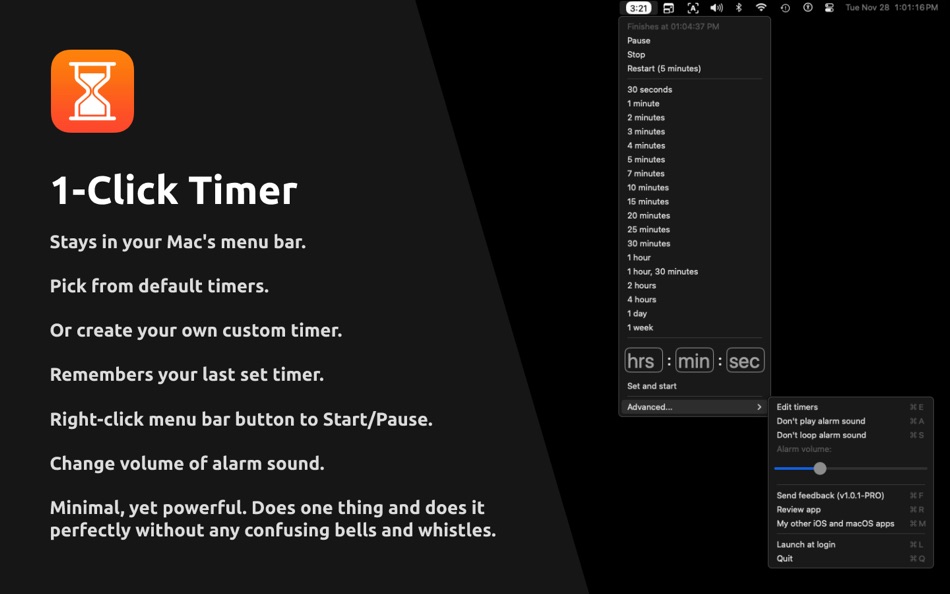
It stays in your Mac's menu bar and shows you the remaining time there. No extra clutter.
You can pick from a variety of default timers. Or you can create your own custom timer. It remembers your custom timers and you can edit them.
It remembers your last set timer and you can right-click the menu bar button to Start/Pause.
Upon completion, it plays an alarm sound. You can change its volume, mute it, and loop it.
You can enter a Shortcuts URL or a web URL to launch when timer starts OR finishes.
You can make the timer auto restart upon finish.
I've been using this personally to remember to stand up and help my lower back recover. Otherwise, it gets sore from sitting all day and affects my workouts. I set a 25 minute timer and start working. After 25 min, I take a short break to stand up, walk around, drink water. Then I right-click the timer to restart for another 25 minutes. I keep doing this until my work gets done. I have the "Loop alarm sound" switched off and have reduced the volume to be subtle. Hope this helps others.
Developed by a solo independent developer.
Free version allows timers up to 5 minutes. A small one-time only in-app purchase lets you set timers over 5 minutes and set custom timers. It also helps me pay for development costs.
There are NO subscriptions, ads, trackers, analytics or other nonsense in my app. This allows me to provide the absolute best user-experience to my users. If you find my app useful, please leave me a positive rating on the App Store as that helps me get the word out to others. Thank you for your support!
If you have any feedback or feature requests, please email me at:
pran@pranapps.com
Screenshots
Wat is er nieuw?
- Versie: 20
- Bijgewerkt:
- - Made monospace font the default and added a new setting "Use monospace font" to disable this. Monospace font prevents the timer from constantly changing size.
- Fixed a bug where the Buy button for in app purchase wasn't showing. If this issue still exists, please email me at pran@pranapps.com
Small indie developers like me benefit from your support. There are NO subscriptions, ads, trackers, analytics or other nonsense in my app. This allows me to provide the best user-experience to my users. If you are finding my app useful, please support me by purchasing the one-time only in-app purchase. You can also leave me a positive rating on the app store as that helps get the word out to others.
Send feedback or feature requests at:
pran@pranapps.com
Prijs
-
* In-app aankopen - Vandaag: Gratis
- Minimum: Gratis
- Maximaal: Gratis
Prijzen volgen
Ontwikkelaar
- Pranoy Chowdhury
- Platforms: iOS Apps (8) iOS Games (3) macOS Apps (6)
- Lijsten: 7 + 6
- Punten: 17 + 5,008 ¡
- Beoordelingen: 0
- Recensies: 0
- Kortingen: 0
- Videos: 0
- RSS: Abonneren


Beoordelingen
0 ☹️
Lijsten
0 ☹️
Recensies
Schrijf als eerste een review 🌟
Aanvullende informatie
- Versie: 20
- Categorie:
macOS Apps›Productiviteit - Besturingssystemen:
macOS,macOS 10.13 en hoger - Grootte:
3 Mb - Ondersteunde talen:
English - Beoordeling van content:
4+ - Mac App Store Beoordeling:
0 - Bijgewerkt:
- Releasedatum:
Contacten
 https://docs.google.com/document/d/e/2PACX-1vT2Y-3Sp4mRKCAp-EZ9H2fRKrjVn6VP15wf6bD2pcvAzLwdGlsDTisQAzKpLS3Rh4n-4VNsoThECNXC/pubMenuTimer menu bar tiny timer Korte URL: Gekopieerd!
- 🌟 Delen
- Mac App Store
Mogelijk vindt u dit ook interessant
-
- Pull - Menu Timer
- macOS Apps: Productiviteit Door: Duncan Gillespie
- $0.99
- Lijsten: 0 + 0 Beoordelingen: 0 Recensies: 0
- Punten: 0 + 0 Versie: 1.2 Press, drag, release. Pull is an easy to use timer that sits in your menu's status bar. To start the timer, just press on the icon, drag down to the time you want, and release. The ... ⥯
-
- Menu Bar Timer
- macOS Apps: Productiviteit Door: Efe Ertugrul
- $0.99
- Lijsten: 0 + 0 Beoordelingen: 0 Recensies: 0
- Punten: 1 + 0 Versie: 2.4.5 Menu Bar Timer adds a Stopwatch or a Timer to your menu bar so you can keep track of time whatever you've been working on without an extra app icon on your dock. You can choose ... ⥯
-
- Tiny PDF Editor - PDF Signer
- macOS Apps: Productiviteit Door: 蒙蒙 贺
- Gratis
- Lijsten: 0 + 0 Beoordelingen: 0 Recensies: 0
- Punten: 0 + 0 Versie: 1.3.7 Tiny PDF Editor - Great for filling out scanned versions of pdf forms and signing pdf agreements and contracts. What users say? "It s the best way to insert an image of a signature, ... ⥯
-
- Menu AI: Ask AI in menu bar.
- macOS Apps: Productiviteit Door: INII Co., Ltd.
- * Gratis
- Lijsten: 0 + 0 Beoordelingen: 0 Recensies: 0
- Punten: 0 + 0 Versie: 1.2.0 Menu AI - Ask AI in menu bar. Menu AI is a powerful AI chat assistant that lives in your menu bar, providing instant access to both GPT and Claude AI capabilities. With its sleek and ... ⥯
-
- Menu Bar Calendar
- macOS Apps: Productiviteit Door: Sindre Sorhus
- Gratis
- Lijsten: 2 + 0 Beoordelingen: 0 Recensies: 0
- Punten: 4 + 0 Versie: 1.6.2 Quickly access a monthly calendar from your menu bar. You can click a date in the calendar to reveal it in the Calendar app or Google Calendar. The calendar displays dates and days in ... ⥯
-
- Menu Minder - To Do Reminders
- macOS Apps: Productiviteit Door: Limit Point Software
- Gratis
- Lijsten: 0 + 0 Beoordelingen: 0 Recensies: 0
- Punten: 1 + 1 (4.0) Versie: 2.1.4 Never forget anything ever again. Menu Minder is an app for organizing reminders. Keep your plans in order and make sure you are reminded of the tasks and plans you have set for ... ⥯
-
- Timer Pomodoro
- macOS Apps: Productiviteit Door: Olha Hardash
- $3.99
- Lijsten: 0 + 0 Beoordelingen: 0 Recensies: 0
- Punten: 0 + 0 Versie: 1.0 Discover the art of time management with Pomodoro Timer! Our app will help you work efficiently, rest on time, and achieve your goals without stress. Key features: Flexible timer ... ⥯
-
- Timer: Simple Menu Bar Timer
- macOS Apps: Productiviteit Door: Nickolans Griffith
- $0.99
- Lijsten: 1 + 0 Beoordelingen: 0 Recensies: 0
- Punten: 2 + 0 Versie: 2.0.0 Timer application designed with a minimalist menu bar interface, ensuring a focused and clutter-free time-tracking experience. Terms of Use: ... ⥯
-
- Menu QuickNote
- macOS Apps: Productiviteit Door: Oyvind Snekkestad
- * Gratis
- Lijsten: 0 + 0 Beoordelingen: 0 Recensies: 0
- Punten: 0 + 0 Versie: 1.1 Menu QuickNote - Quick Notes for Your Mac Menu Bar Transform your note-taking experience with Menu QuickNote, the elegant and lightweight app that puts beautiful, colorful notes right ... ⥯
-
- Timer Boom
- macOS Apps: Productiviteit Door: Marian Raafat
- $1.99
- Lijsten: 0 + 0 Beoordelingen: 0 Recensies: 0
- Punten: 0 + 0 Versie: 1.0.1 Timer Boom is a countdown timer can do many tasks Do you want to Sleep while listening to your iTunes music then shutdown automatically after a certain time sleep your mac ... ⥯
-
- Timer RH
- macOS Apps: Productiviteit Door: Pavlo Liashenko
- * Gratis
- Lijsten: 0 + 0 Beoordelingen: 0 Recensies: 0
- Punten: 1 + 0 Versie: 3.3 Capabilities: + Multiple timers + Repeating & Interval timers + Stopwatch + Text and color labels + One-touch timers adding + Status bar and Dock icon widgets + Scenarios (combining ... ⥯
-
- InstaCal - Menu Bar Calendar
- macOS Apps: Productiviteit Door: Higher Bar, LLC
- $4.99
- Lijsten: 1 + 2 Beoordelingen: 0 Recensies: 0
- Punten: 1 + 0 Versie: 1.9.8 InstaCal is the missing menu bar calendar macOS deserves. InstaCal is an affordable, yet powerful calendar app that puts all your events right at your fingertips, always available in ... ⥯
-
- Menu bar Launcher
- macOS Apps: Productiviteit Door: Pawan Dixit
- $1.99
- Lijsten: 1 + 1 Beoordelingen: 0 Recensies: 0
- Punten: 1 + 0 Versie: 1.4 This is a simple menu bar utility to keep your frequent Files and Apps right into the menu bar so that you can quickly launch them when you want to work on them without locating then ... ⥯
-
- Menu Bar Reminder: Dojo
- macOS Apps: Productiviteit Door: Florian Schweizer
- Gratis
- Lijsten: 1 + 0 Beoordelingen: 0 Recensies: 0
- Punten: 2 + 0 Versie: 1.1 Add a single reminder to your menu bar - always visible. You can enter any text that you'd like to have on the menu bar and it will be shown to you at all times. You can also activate ... ⥯