
| Nhà phát triển: | Hangzhou Quanduan Technology Co., Ltd. (10) | ||
| Giá bán: | * Miễn phí | ||
| Xếp hạng: | 0 | ||
| Đánh giá: | 0 Viết đánh giá | ||
| Danh sách: | 1 + 0 | ||
| Điểm: | 5 + 44 (4.4) ¡ | ||
| Mac App Store | |||
Mô tả

## Build Your Own Knowledge Base
Metion 2.0 brings a new feature named "Knowledge Base", the plain text syntax, then becomes mindmap trees, or connected as a network...
## The Writing Experience is So Important
Our goal is to create a great writing experience, specially for iPadOS, although it's not easy.
Metion provides a relatively complete keyboard shortcuts support. After a keyboard connected, both iPad and iPhone can archive a huge improvement in writing experience.
We also have redesigned the "Zen Mode" on iPad, a more focusing writing mode. It is very very beautiful, choosing a suitable background image, selecting the white noise you like in Zen Mode, and the irrelevant UI elements are hidden. Writing is a pleasure, writing is talking to the world, writing is your Zen.
## Data Freedom, Open Filesystem, Git Built-in
Metion based on the open filesystem, no need to create another new format for storing data. An article is a plain text file, and the images in the article are also under a certain folder.
Data freedom and open filesystems allow us to synchronize data across devices using iCloud or Git. If you have a higher requirement for data security, you can also make a backup very quickly by copying the entire folder (working directory).
One more thing, Metion has a built-in support named "history version" that provides a little more reliability for your documents.
**Also, if you know how to use Git, you can try Git to sync. Yes! We have the powerful Git as a built-in feature! **
## Optimized for iPad Pro, Also for iPhone
We tried the best to make Metion optimized for iPad Pro, when writing on iPad Pro by Metion, the iPad is a really more productive device.
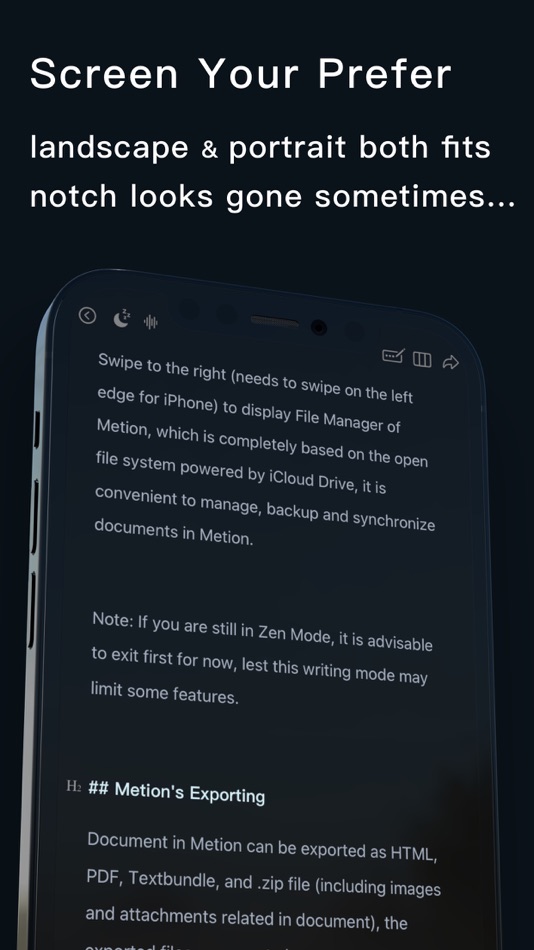
Metion is also optimized for the iPhone too. In recent years, most of the new iPhones have notch at the top of screen. Metion does not simply avoid the safe area, but makes a lot of technical efforts to apply every pixel on the screen as far as possible. If using the visual theme of "Dark", the notch sometimes look like disappeared, like the next generation of full-screen phone comes.
## The Exporting of Metion
If using Metion to export as PDF, we suggest the theme of PDF can be set as "Printer" in Settings Panel. If there is a real printer connected in current local network, just print directly, it will be pretty when words on the real paper.
Document in Metion can be exported as image, which is optimized for mobile device (iPhone). We can set text and QR-Code signature at the end of exported image. Send it to friends through some social Apps. The beautiful layout of text can highlight the value of your words.
Metion can analyze the structure of current article automatically, then export it as "Mindmap" with one tap only.
- - - - - - - - - -
Privacy Policy: http://markeditor.com/privacy-policy.html
Terms of Use: http://markeditor.com/page/terms.md
Ảnh chụp màn hình



Tính năng mới
- Phiên bản: 3.8.0
- Cập nhật:
- - Adjust: Attempt to detect capacity exceedances in CloudKit/iCloud.
- Fixed: Incorrect color matching for information text in the search bar, which may cause unclear display.
- Other minor corrections.
Giá bán
-
* Trong ứng dụng mua hàng - Hôm nay: Miễn phí
- Tối thiểu: Miễn phí
- Tối đa: Miễn phí
Theo dõi giá
Nhà phát triển
- Hangzhou Quanduan Technology Co., Ltd.
- Nền tảng: iOS Ứng dụng (3) macOS Ứng dụng (7)
- Danh sách: 3 + 0
- Điểm: 17 + 79 ¡
- Xếp hạng: 0
- Đánh giá: 0
- Giảm giá: 0
- Video: 0
- RSS: Đăng ký
Điểm
-

- 104 윤대남
- +1
-
- 1,508 sam
- +1
-
- 13 Hikmet Utul
- +1
-
- 448 Bizzogalz
- +1
-
- 98 Brian
- +1


Xếp hạng
0 ☹️
Danh sách

Đánh giá
Hãy là người đầu tiên đánh giá 🌟
Thông tin bổ sung
- Phiên bản: 3.8.0
- Danh mục:
macOS Ứng dụng›Năng suất - HĐH:
iPad,iPhone,macOS,macOS 13.0 trở lên - Kích thước:
94 Mb - Ngôn ngữ được hỗ trợ:
Chinese,Croatian,Czech,Danish,Dutch,English,Finnish,French,German,Greek,Hungarian,Indonesian,Italian,Japanese,Korean,Malay,Polish,Portuguese,Romanian,Russian,Slovak,Spanish,Swedish,Thai,Turkish,Ukrainian,Vietnamese - Xếp hạng nội dung:
4+ - Mac App Store Xêp hạng:
4.4(44) - Cập nhật:
- Ngày phát hành:
Metion: Markdown Notes URL ngắn: Đã sao chép!- 🌟 Chia sẻ
- Mac App Store
Bạn cũng có thể thích
-
- Markdown Notes App
- macOS Ứng dụng: Năng suất Bởi: Constellation Ltd
- Miễn phí
- Danh sách: 0 + 0 Xếp hạng: 0 Đánh giá: 0
- Điểm: 2 + 0 Phiên bản: 1.0.7 Markdown Editor Plus is the perfect app for anyone looking for a simple yet powerful tool to write and edit text in Markdown format. Designed with a clean and easy-to-use interface, ... ⥯
-
- Bear: Markdown Notes
- macOS Ứng dụng: Năng suất Bởi: Shiny Frog Ltd.
- * Miễn phí
- Danh sách: 0 + 2 Xếp hạng: 0 Đánh giá: 0
- Điểm: 2 + 0 Phiên bản: 2.6.6 Bear is a beautiful, powerfully simple Markdown app to capture, write, and organize your life. Take notes, plan your day, journal thoughts, organize tables, create lists and tasks, ... ⥯
-
- TakeNote: AI Markdown Notes
- macOS Ứng dụng: Năng suất Bởi: Adam Drew
- Miễn phí
- Danh sách: 0 + 0 Xếp hạng: 0 Đánh giá: 0
- Điểm: 0 + 3 (5.0) Phiên bản: 1.1.2 TakeNote is a fast, elegant, and distraction-free way to capture your ideas. Built exclusively for Apple platforms with SwiftUI and SwiftData, it feels right at home on macOS and iOS. ... ⥯
-
- Markdown Pro
- macOS Ứng dụng: Năng suất Bởi: RADSense Software
- $5.99
- Danh sách: 1 + 0 Xếp hạng: 0 Đánh giá: 0
- Điểm: 0 + 0 Phiên bản: 1.0.9 Best Markdown Syntax Editor With Markdown PRO you can write beautiful documentation, notes, essays, term papers all by using plain text to tag your formatting such as bold, italic, ... ⥯
-
- Markdown - Enjoy writing
- macOS Ứng dụng: Năng suất Bởi: xiao luo
- $7.99
- Danh sách: 1 + 0 Xếp hạng: 0 Đánh giá: 0
- Điểm: 0 + 0 Phiên bản: 1.3.3 I'm Markdown, the Markdown editor for OS X. This is a powerful Markdown editor, very design, UI simple and user-friendly interactive experience, let us focus more on writing. Markdown ... ⥯
-
- Markdown+ Text & Code Editor
- macOS Ứng dụng: Năng suất Bởi: Zetegy LLC
- $4.99
- Danh sách: 0 + 0 Xếp hạng: 0 Đánh giá: 0
- Điểm: 1 + 0 Phiên bản: 1.7.5 Introducing the native, real-time Markdown editor with superpowers. Markdown+ has been meticulously crafted for Vision Pro, iPhone, iPad, and Mac. With blazing-fast performance and ... ⥯
- mới
- Markdown Peek
- macOS Ứng dụng: Năng suất Bởi: Michael Thingmand
- Miễn phí
- Danh sách: 0 + 0 Xếp hạng: 0 Đánh giá: 0
- Điểm: 1 + 0 Phiên bản: 1.0 Description: Markdown Peek is a simple, elegant markdown viewer for macOS. Set it as your default app for .md files and enjoy instant, beautiful rendering. Features: Instant Preview ... ⥯
-
- Markdown+
- macOS Ứng dụng: Năng suất Bởi: InSili.co
- $14.99
- Danh sách: 0 + 0 Xếp hạng: 0 Đánh giá: 0
- Điểm: 0 + 0 Phiên bản: 3.3 Edit, style, preview and export your Markdown in macOS. With style. Like a breeze. Easy-to-use Getting started is really easy. Just open the editor and start writing. Your text will be ⥯
-
- Notes Air - Simple Notes
- macOS Ứng dụng: Năng suất Bởi: Air Apps Systems
- Miễn phí
- Danh sách: 0 + 0 Xếp hạng: 0 Đánh giá: 0
- Điểm: 3 + 8 (4.4) Phiên bản: 2025.8.1 Simple and easy-to-use notepad. Generate Text Based on Your Input, and stay organized. Download the app now! Notes AIR is a simple notepad where you can create, edit and capture your ... ⥯
-
- Markdown Book Compiler
- macOS Ứng dụng: Năng suất Bởi: Lotus Core
- $34.99
- Danh sách: 0 + 0 Xếp hạng: 0 Đánh giá: 0
- Điểm: 0 + 0 Phiên bản: 1.1.2 Markdown Book Compiler makes it easy for self-publishers, authors, bloggers, and educators to turn plain-text .md files into fully formatted, beautifully styled eBooks without using ... ⥯
-
- Markdown Editor
- macOS Ứng dụng: Năng suất Bởi: Satoshi Iwaki
- Miễn phí
- Danh sách: 0 + 0 Xếp hạng: 0 Đánh giá: 0
- Điểm: 1 + 0 Phiên bản: 1.5.0 Markdown Editor is a lightweight markdown editor. MAIN FEATURES - Syntax highlighting - Display line numbers - Auto preview - Export to HTML ⥯
-
- Notes Archive 1.0
- macOS Ứng dụng: Năng suất Bởi: Audio Dropboxes
- $7.99
- Danh sách: 0 + 0 Xếp hạng: 0 Đánh giá: 0
- Điểm: 0 + 0 Phiên bản: 1.0 Notes Archive is your personal knowledge management system for handwritten documents. Scan, search, and organize notes like never before all securely stored in your private iCloud. We ... ⥯
-
- Markdown Viewer Offline
- macOS Ứng dụng: Năng suất Bởi: Hopebest Inc Limited
- Miễn phí
- Danh sách: 0 + 0 Xếp hạng: 0 Đánh giá: 0
- Điểm: 1 + 0 Phiên bản: 1.0 In today s fast-paced digital landscape, clear and structured documentation is essential. Whether you are a developer writing technical guides, a student organizing lecture notes, or a ⥯
-
- Notes.ai
- macOS Ứng dụng: Năng suất Bởi: Meisheng Zhou
- * Miễn phí
- Danh sách: 2 + 1 Xếp hạng: 0 Đánh giá: 0
- Điểm: 8 + 0 Phiên bản: 3.0.2 Quickly and easily transcribe audio files into organized transcripts using local AI models. Whether you're recording a meeting, lecture, or other important audio, Notes.ai quickly and ... ⥯