
| ผู้พัฒนา: | MultiMarkdown Software, LLC (2) | ||
| ราคา: | ฟรี | ||
| การจัดอันดับ: | 0 | ||
| ความเห็น: | 0 เขียนความเห็น | ||
| รายการ: | 0 + 0 | ||
| แต้มแล: | 0 + 0 ¡ | ||
| Mac App Store | |||
คำอธิบาย

MultiMarkdown Composer was the first text editor specifically designed for writing in MultiMarkdown (or regular Markdown), and now there is a completely new version with improved performance and features.
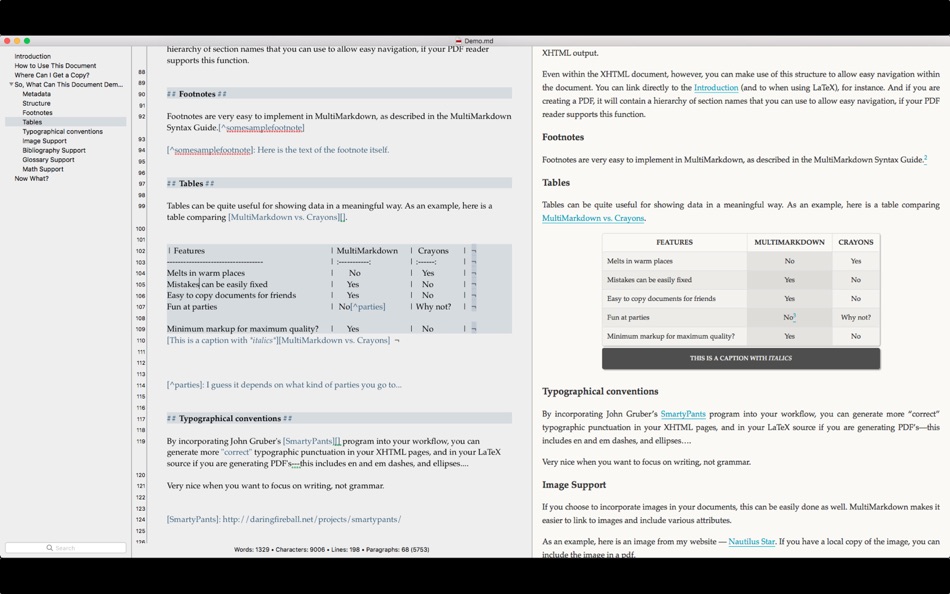
By using an editor built around Markdown/MultiMarkdown, you can focus on the *writing*, rather than worrying about formatting and styles. Composer's intelligent tools provide automatic support while you write -- organize your document with the Table of Contents, quickly insert links, images, etc. with the References sidebar, and quickly review CriticMarkup edits.
Composer 4 represents a complete rewrite. The syntax highlighting engine is faster and more accurate. The preview is faster and includes multiple other improvements. The MultiMarkdown engine has been upgraded to MMD v 6 in order to include the latest features, faster performance, and increased accuracy. The theme configuration files use a new JSON format that is easier to use. The assistants (TOC, References, CriticMarkup, and Info) have been rebuilt as sidebars in the document window in order to increase flexibility.
In short, virtually every piece of Composer has been rewritten to make it better!
## Learn More
If you are unfamiliar with Markdown or MultiMarkdown, please visit http://fletcherpenney.net/multimarkdown/ before purchasing this application. We want you to be sure that you will be happy with your purchase!
You can also visit http://multimarkdown.com/ to learn more about MultiMarkdown Composer, see screenshots, and even video previews and demonstrations. The support site offers you a chance to have your questions answered.
## Free Features
* Read and write files
* Intelligent editing support -- "smart pairs", automatic formatting of Markdown block structures (lists, blockquotes, tables), easily create links and images, and much more
* Live HTML preview
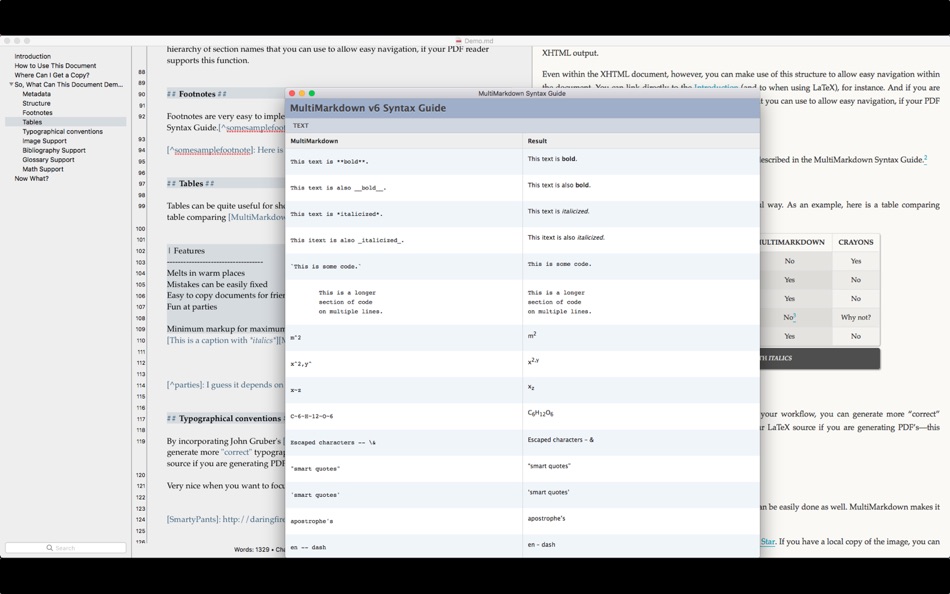
* Supports MultiMarkdown v6 (including regular Markdown compatibility mode)
* Built-in support for MathJax and syntax highlighting javascript libraries
* CriticMarkup support, including live change tracking and including your edits in the preview
* Automatically cleans up Markdown formatting to quickly fix problems when copying text from other sources
* Typewriter Mode to keep the cursor in the center of the screen
* Auto Zoom to make the most use of the window, regardless of what size you make it
* Sync MultiMarkdown metadata tags with macOS file tags automatically
* File comparison -- compare two files and convert the differences into CriticMarkup to easily handle file revisions shared from other users
## Standard Upgrade
* Open multiple documents at once
* Custom themes for syntax highlighting
* Custom CSS for preview/documents
* Print source text
* Print HTML preview (including print to PDF)
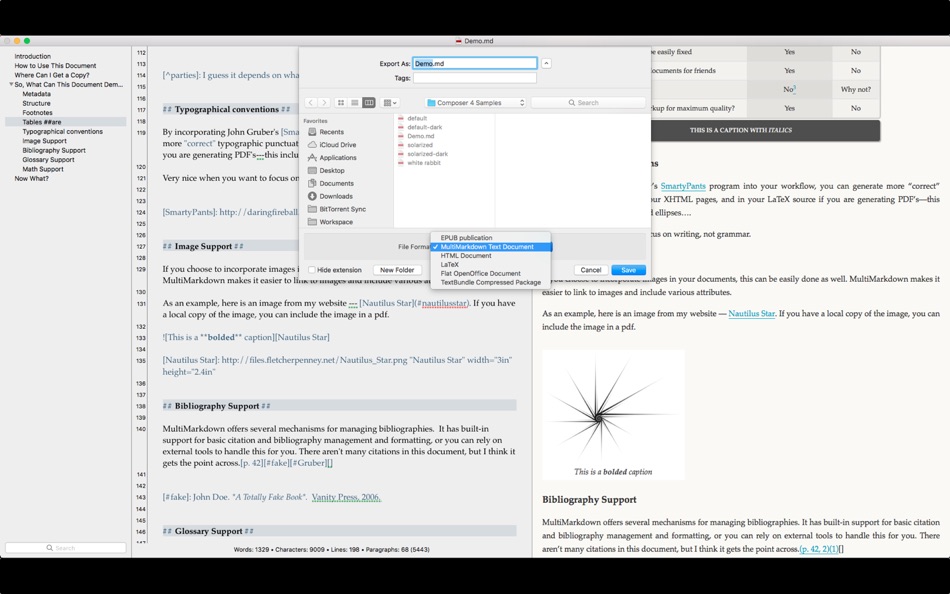
* Export to HTML, EPUB 3, OpenDocument, LaTeX, and TextPack
* Sidebar assistants -- Table of Contents, References list, CriticMarkup changes
* Drag and drop in the Table of Contents sidebar to quickly rearrange your document
## Pro Upgrade
* Automatic text expansion -- expand shortcuts for commonly used text blocks
* Custom keyboard commands and macros -- customize Composer to suit your needs!
* Share extras files (themes, CSS, expansions) between multiple machines so you have a consistent environment on each
* History undo mode -- increased flexibility in undo/redo of changes while working on a document
* Control over undo coalescing -- you control whether undo works by the character, sentence, or paragraph
* Control depth of the table of contents sidebar for easier navigation
* More features planned for the future -- stay tuned for updates
## Need More Help?
If you have questions, suggestions, feature requests, or bug reports then please contact us at help@multimarkdown.com or http://support.multimarkdown.com/ so that we may respond to your questions and assist with any issues.
And, as always, thank you for your support over the years!
ภาพหน้าจอ


มีอะไรใหม่
- เวอร์ชัน: 4.5.12
- อัปเดต:
- Fix issue validating App Store receipt when launching application
ราคา
- วันนี้: ฟรี
- ต่ำสุด: ฟรี
- มากที่สุด: ฟรี
ติดตามราคา
ผู้พัฒนา
- MultiMarkdown Software, LLC
- แพลตฟอร์ม: macOS แอป (2)
- รายการ: 0 + 0
- แต้มแล: 0 + 0 ¡
- การจัดอันดับ: 0
- ความเห็น: 0
- ลดราคา: 0
- วิดีโอ: 0
- RSS: ติดตาม
แต้มแล
0 ☹️
การจัดอันดับ
0 ☹️
รายการ
0 ☹️
ความเห็น
แสดงรีวิวเป็นคนแรกเลย 🌟
ข้อมูลเพิ่มเติม
- เวอร์ชัน: 4.5.12
- หมวดหมู่:
macOS แอป›ประสิทธิภาพการผลิต - ระบบปฏิบัติการ:
macOS,macOS 10.11 และสูงกว่า - ขนาด:
5 Mb - ภาษาที่สนับสนุน:
English - การจัดประเภทเนื้อหา:
4+ - Mac App Store คะแนนโดย:
0 - อัปเดต:
- วันที่วางจำหน่าย:
รายชื่อติดต่อ
- เว็บไซท์:
 http://multimarkdown.com/
MultiMarkdown Composer 4 URL แบบสั้น: คัดลอกแล้ว!- 🌟 แชร์
- Mac App Store
คุณอาจชอบ
-
- Markdown Notes App
- macOS แอป: ประสิทธิภาพการผลิต โดย: Constellation Ltd
- ฟรี
- รายการ: 0 + 0 การจัดอันดับ: 0 ความเห็น: 0
- แต้มแล: 2 + 0 เวอร์ชัน: 1.0.7 Markdown Editor Plus is the perfect app for anyone looking for a simple yet powerful tool to write and edit text in Markdown format. Designed with a clean and easy-to-use interface, ... ⥯
-
- Markdown - Enjoy writing
- macOS แอป: ประสิทธิภาพการผลิต โดย: xiao luo
- $7.99
- รายการ: 1 + 0 การจัดอันดับ: 0 ความเห็น: 0
- แต้มแล: 0 + 0 เวอร์ชัน: 1.3.3 I'm Markdown, the Markdown editor for OS X. This is a powerful Markdown editor, very design, UI simple and user-friendly interactive experience, let us focus more on writing. Markdown ... ⥯
-
- Markdown Pro
- macOS แอป: ประสิทธิภาพการผลิต โดย: RADSense Software
- $5.99
- รายการ: 1 + 0 การจัดอันดับ: 0 ความเห็น: 0
- แต้มแล: 0 + 0 เวอร์ชัน: 1.0.9 Best Markdown Syntax Editor With Markdown PRO you can write beautiful documentation, notes, essays, term papers all by using plain text to tag your formatting such as bold, italic, ... ⥯
-
- Markdown+ Text & Code Editor
- macOS แอป: ประสิทธิภาพการผลิต โดย: Zetegy LLC
- $4.99
- รายการ: 0 + 0 การจัดอันดับ: 0 ความเห็น: 0
- แต้มแล: 1 + 0 เวอร์ชัน: 1.7.4 Introducing the native, real-time Markdown editor with superpowers. Markdown+ has been meticulously crafted for Vision Pro, iPhone, iPad, and Mac. With blazing-fast performance and ... ⥯
- ใหม่
- Markdown Peek
- macOS แอป: ประสิทธิภาพการผลิต โดย: Michael Thingmand
- ฟรี
- รายการ: 0 + 0 การจัดอันดับ: 0 ความเห็น: 0
- แต้มแล: 1 + 0 เวอร์ชัน: 1.0 Description: Markdown Peek is a simple, elegant markdown viewer for macOS. Set it as your default app for .md files and enjoy instant, beautiful rendering. Features: Instant Preview ... ⥯
-
- Markdown Editor
- macOS แอป: ประสิทธิภาพการผลิต โดย: Satoshi Iwaki
- ฟรี
- รายการ: 0 + 0 การจัดอันดับ: 0 ความเห็น: 0
- แต้มแล: 1 + 0 เวอร์ชัน: 1.5.0 Markdown Editor is a lightweight markdown editor. MAIN FEATURES - Syntax highlighting - Display line numbers - Auto preview - Export to HTML ⥯
-
- Markdown Viewer Offline
- macOS แอป: ประสิทธิภาพการผลิต โดย: Hopebest Inc Limited
- ฟรี
- รายการ: 0 + 0 การจัดอันดับ: 0 ความเห็น: 0
- แต้มแล: 1 + 0 เวอร์ชัน: 1.0 In today s fast-paced digital landscape, clear and structured documentation is essential. Whether you are a developer writing technical guides, a student organizing lecture notes, or a ⥯
-
- Markdown Clip
- macOS แอป: ประสิทธิภาพการผลิต โดย: Tomoaki Yagishita
- * ฟรี
- รายการ: 0 + 0 การจัดอันดับ: 0 ความเห็น: 0
- แต้มแล: 2 + 0 เวอร์ชัน: 6.1.3 simple MarkdownEditor - new-style Markdown WYSIWYG editor Simple markdown editor without preview mode. apply markdown decoration on the spot. - TODO management (simple TODO and Dated ... ⥯
-
- Multi Mail for Gmail
- macOS แอป: ประสิทธิภาพการผลิต โดย: Wise Tech Labs Private Limited
- * ฟรี
- รายการ: 0 + 0 การจัดอันดับ: 0 ความเห็น: 0
- แต้มแล: 2 + 0 เวอร์ชัน: 1.8 "Introducing Multi Mail for Gmail the ultimate macOS app to streamline your email management experience. Say goodbye to juggling between multiple browser windows, and hello to ... ⥯
- -100%
- Multi-List Timer
- macOS แอป: ประสิทธิภาพการผลิต โดย: Roman Sevastyanov
- ▼ ฟรี
$0.29-100% - รายการ: 1 + 1 การจัดอันดับ: 0 ความเห็น: 0
- แต้มแล: 18 + 12 (4.6) เวอร์ชัน: 2.4 Create multiple timer lists for study, work, and workouts. * No Hidden Costs: No ads or subscriptions. * Private: No sign-ups or data collection. * Works Offline: No internet ... ⥯
-
- Multi-Camera Monitor
- macOS แอป: ประสิทธิภาพการผลิต โดย: EasyStyle G.K.
- ฟรี
- รายการ: 0 + 0 การจัดอันดับ: 0 ความเห็น: 0
- แต้มแล: 1 + 0 เวอร์ชัน: 1.0.8 This is a mac app that can monitor multiple cameras at once. You can view images that is not only physical cameras but also virtual cameras such as OBS Virtual Camera and Video capture ⥯
-
- One Markdown
- macOS แอป: ประสิทธิภาพการผลิต โดย: 禄海 区
- * ฟรี
- รายการ: 0 + 0 การจัดอันดับ: 0 ความเห็น: 0
- แต้มแล: 1 + 100 (4.6) เวอร์ชัน: 1.6.5 One Markdown is a simple and fast editor that supports plain text, Markdown and Textbundle. It has the following features: * Base on CommonMark syntax and GitHub Flavored Markdown ... ⥯
-
- Simark - Markdown Notebook
- macOS แอป: ประสิทธิภาพการผลิต โดย: 冠为 周
- * ฟรี
- รายการ: 0 + 1 การจัดอันดับ: 0 ความเห็น: 0
- แต้มแล: 12 + 0 เวอร์ชัน: 1.4.7 > Simark is the ultimate note-taking app for anyone who loves the simplicity and efficiency of Markdown. Designed for professionals, students, and writers, Simark offers a clean and ... ⥯
-
- Marked 2 - Markdown Preview
- macOS แอป: ประสิทธิภาพการผลิต โดย: Brett Terpstra
- * $13.99
- รายการ: 1 + 5 การจัดอันดับ: 0 ความเห็น: 0
- แต้มแล: 3 + 0 เวอร์ชัน: 2.6.46 Marked 2 is a previewer (*not an editor*) for Markdown, MultiMarkdown and other text markup languages. It updates live every time you save your document in your favorite text editor, ... ⥯